
- Print Business Cards in Sugar Land – Same Day Service
- Copying Services
- Document Printing, Finishing & Lamination in Sugar Land
- Flyers
- Print Banner in Sugar Land | Same-Day Banner Printing Near Me
- Graphic Design
- Photo Printing
- Postcard Printing
- Document Printing
- EDDM Full Service Postcards
- FotoZoomer Large Format Printing


Shipping Label Printing Service: A Small Business Guide
Businessmailboutique
11645 S. Hwy 6
Sugar land, Texas 77498 United States (US)
Email: info@businessmailboutique.com
You’ve got an order packed, the customer is waiting on tracking, and your printer suddenly decides it won’t cooperate. The label prints too small, the barcode comes out fuzzy, or you’re out of adhesive sheets and end up trimming paper at the kitchen counter. For a small business, that’s not a minor nuisance. It slows fulfillment, adds avoidable mistakes, and turns a simple shipment into a chore.
That’s why a shipping label printing service matters more than most owners expect. Label printing isn’t a side issue in modern shipping. It sits right in the middle of whether orders leave on time and arrive without trouble. The category itself reflects that staying power. The global shipping label market was valued at USD 2.30 billion in 2025 and is projected to reach USD 3.62 billion by 2036, with a 4.2% CAGR according to Future Market Insights’ shipping labels market outlook. That kind of steady projected growth tells you businesses aren’t moving away from labels. They’re relying on them even more.
Table of Contents
- The Hidden Hassle of Home Shipping
- What Is a Shipping Label Printing Service
- Understanding Carrier and Format Requirements
- How to Prepare and Print Your Labels Flawlessly
- How to Choose the Right Label Printing Service
- Beyond the Print Job Common Shipping Pitfalls to Avoid
- Shipping Label Questions Answered
The Hidden Hassle of Home Shipping
Home shipping sounds efficient until you’re doing it under pressure.
A lot of small business owners start with the same setup. A desktop printer, regular paper, tape, and a promise to themselves that they’ll “upgrade later.” That works for a while. Then actual problems start stacking up. The printer scales the label incorrectly. The barcode lands too close to the edge. Ink streaks across the address. One order turns into three reprints.
The frustrating part is that each problem seems small by itself. Together, they eat time. If you ship a few orders a week, maybe that’s manageable. If you ship daily, it becomes part of your overhead.
The hidden costs aren’t just supplies
Most owners think first about ink, toner, or labels. The bigger cost is interruption.
You stop packing to fix a driver issue. You remeasure a box because the first label was wrong. You head to a carrier counter because the one you printed at home doesn’t look trustworthy enough to risk on an expensive order. None of that shows up neatly on a receipt, but it still costs money.
Good shipping operations usually don’t fall apart because the process is complicated. They fall apart because too many tiny problems happen at the worst moment.
There’s also the no-printer problem, which is more common than people admit. Maybe you run your business from your phone. Maybe your office printer is shared and unreliable. Maybe you only ship often enough to need labels, but not often enough to justify dedicated equipment. In those cases, a local shipping label printing service isn’t a luxury. It’s a practical workaround.
What usually works better
A professional counter service removes the weak points in the process. You bring the file, email it, or show a QR code. The label gets printed in the right format, on the right stock, with someone checking whether it looks scannable before it goes on the box.
That’s a different experience from DIY. It’s the difference between “I hope this prints correctly” and “this is ready to ship.”
For small businesses, that reliability matters more than people think. Customers don’t care whether you saved a few minutes printing at home. They care whether the package moves cleanly through the carrier network.
What Is a Shipping Label Printing Service
A shipping label printing service takes the file on your phone, the PDF in your inbox, or the QR code from a carrier app and turns it into a shipment that is ready to go.
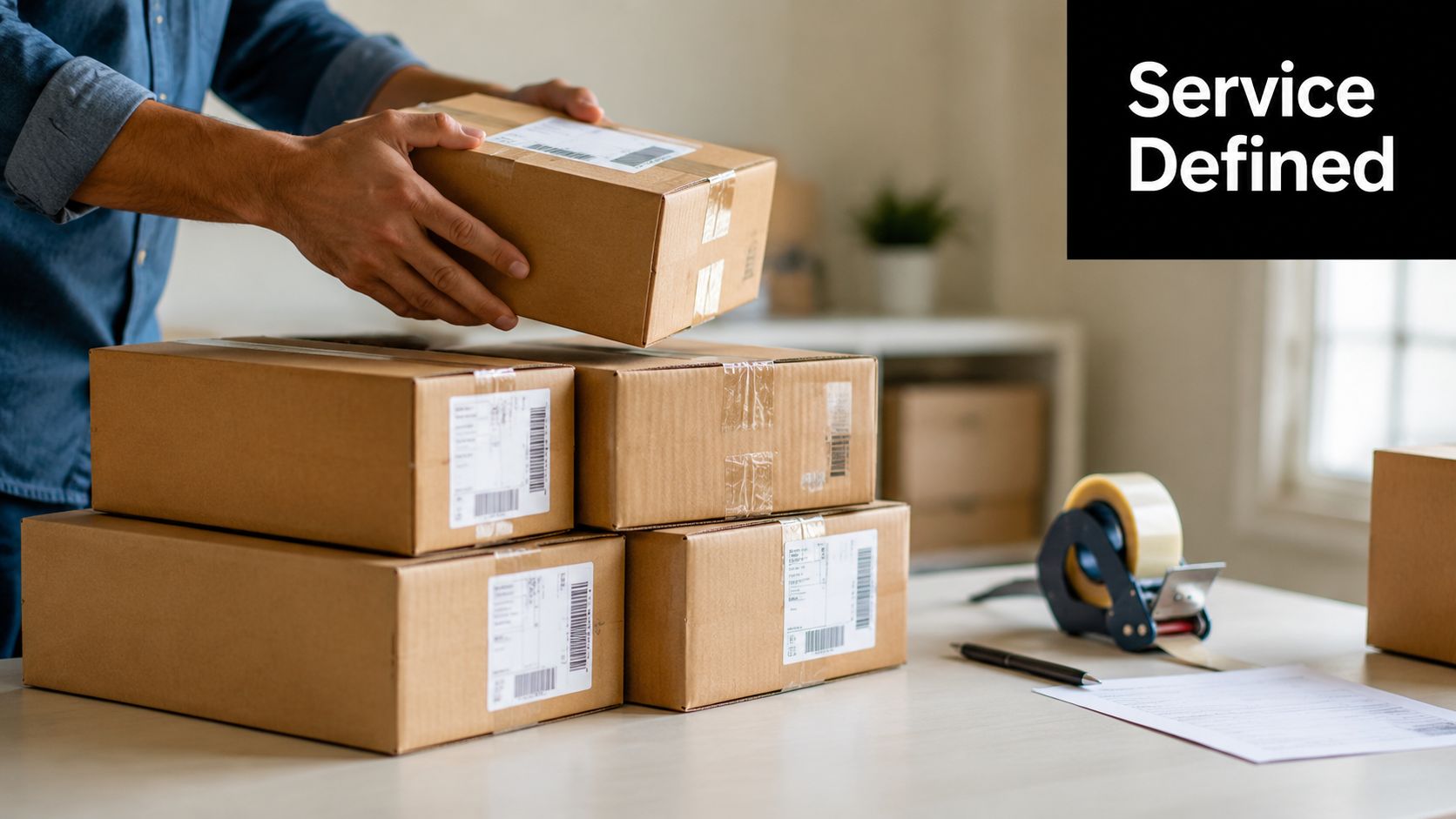
For a small business owner, that matters most on the days you do not have a working printer, do not keep label stock on hand, or do not want to gamble on whether a home print will scan at the counter. The job is not just printing ink on paper. The job is producing a label the carrier can read, attaching it correctly, and catching small problems before the box enters the system.
More than printer access
A good counter service checks the parts that usually cause trouble after you hit “buy label.”
That usually includes:
- Correct label size: The file prints at the dimensions the carrier expects.
- Clear barcode output: Nothing is clipped, blurred, stretched, or reduced.
- Appropriate material: The label or paper holds up through handling, tape, and transport.
- File review: If the label looks off, staff can flag it before it goes on the package.
- Pack-and-ship support: If the box, tape, or placement is wrong, it can be fixed on the spot.
That last part gets skipped in a lot of online advice. In real shipping work, printing the label is only one step. If the label is taped over a barcode, placed across a box seam, stuck to a damaged carton, or paired with the wrong packaging, the shipment can still be delayed.
The main service types
Small businesses usually end up choosing among three options.
Online shipping platforms work well if you already have equipment and only need software to buy postage or compare rates. They save time at your desk, but print quality and label placement are still your problem.
Carrier locations can be useful if you are already committed to one network. Some offer QR-based printing and direct drop-off. If you need to compare services first, a Sugar Land guide to UPS shipping options can help clarify where that route makes sense.
Local full-service shipping centers solve the broader problem. Staff can print the label, check whether the package matches the service level, help with supplies, and often handle the handoff in the same visit. Business Mail Boutique LLC is one example of that model in Sugar Land, offering shipping and printing services in one place.
That setup is especially useful for sellers with mixed shipping needs. A retail order, a return, and an FBA carton do not always follow the same rules. If you send inventory to Amazon, review the FNSKU and box label rules before the label ever gets printed.
Practical rule: If you only need postage software, use software. If you need the label printed correctly, the box checked, and the shipment out the door without extra errands, a local service usually saves more time than it costs.
That is the value. It removes the no-printer problem, reduces avoidable mistakes, and gets the package from file to carrier with fewer chances for something small to turn into a delay.
Understanding Carrier and Format Requirements
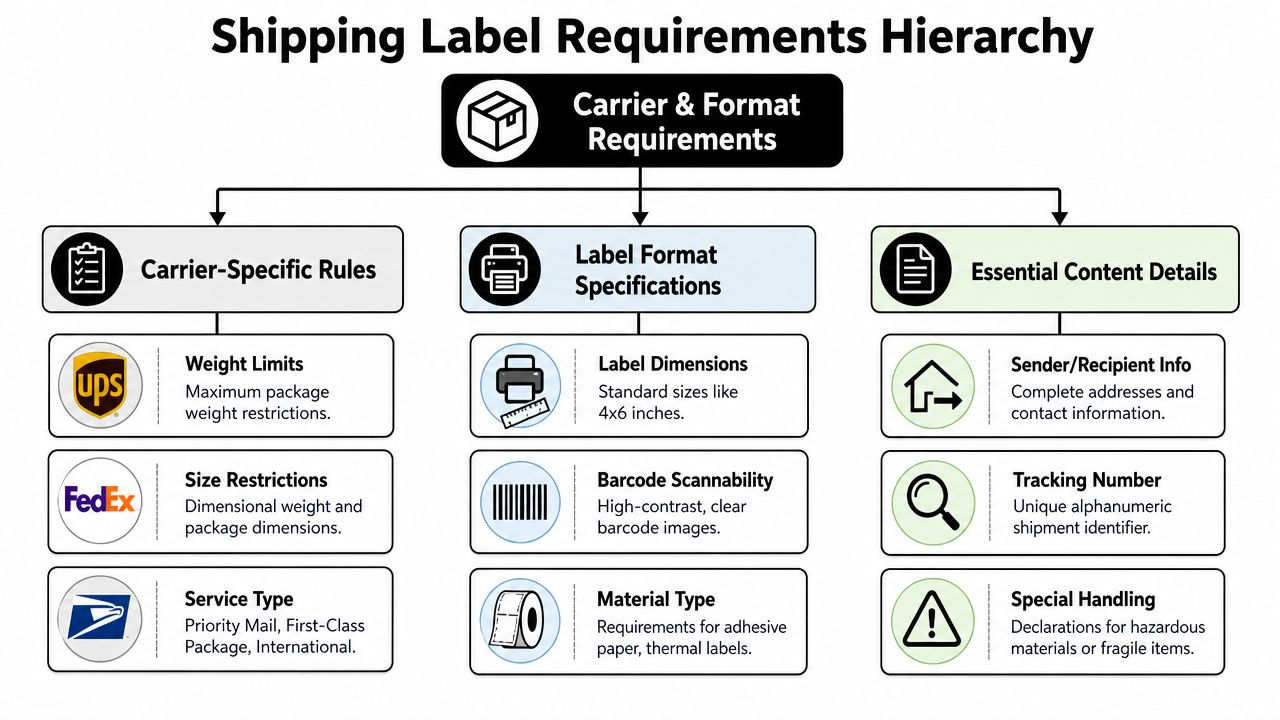
Shipping labels look simple until you print one incorrectly. Then you find out quickly that carriers are particular about size, format, and readability.
Why 4×6 keeps showing up
Most shipping systems default to 4×6-inch labels because carrier APIs commonly generate labels in that size, and a letter layout can typically place two 4×6 labels on an 8.5×11 sheet according to ShipEngine’s guide to label formats. In practice, that standard gives you flexibility. You can print on a thermal label printer or use a regular office printer without changing the core label content.
That’s why 4×6 keeps showing up across platforms. It’s not arbitrary. It’s the size that works cleanly with shipping systems, scanners, and common workflows.
For most small businesses, this creates a simple rule of thumb:
| Setup | What usually works |
|---|---|
| Thermal printer | Native 4×6 label output |
| Office printer | PDF on letter paper with two 4×6 labels per sheet |
| Counter service | Staff chooses the right print method for the file |
Formats that work and formats that cause problems
The most common file types you’ll see are PDF, PNG, and ZPL.
- PDF is generally the easiest to handle. It prints well from standard computers and works for counter printing.
- PNG can work fine, but scaling mistakes happen more often if the print settings aren’t checked carefully.
- ZPL is built for Zebra-class thermal printers. It’s efficient in the right environment, but it isn’t the format you want for letter-sheet printing.
That last point trips people up. A customer receives a ZPL file from a platform, opens it like a regular document, and expects a normal printer to handle it. That usually leads nowhere useful. If you’re working with a local provider, ask whether your label file is already in a printer-ready format or whether it needs to be converted.
A label that exists on screen isn’t necessarily ready to print. “Download complete” and “carrier-compliant output” are not the same thing.
If you need a better sense of how carrier requirements affect real drop-off choices, this local guide to UPS shipping options in Sugar Land is a useful reference point when matching labels to service types and handoff plans.
When special labeling rules apply
Standard parcel labels are only part of the picture. If you sell through Amazon FBA or move inventory into fulfillment centers, you also need to watch carton and product labeling rules. This overview of FNSKU and box label rules is worth reviewing because marketplace shipments introduce a second layer of requirements beyond the carrier label itself.
The practical takeaway is simple. Don’t assume one printed label solves everything. Some shipments require both a carrier label and platform-specific markings, and mixing those up can cause receiving issues even if the package itself ships fine.
How to Prepare and Print Your Labels Flawlessly
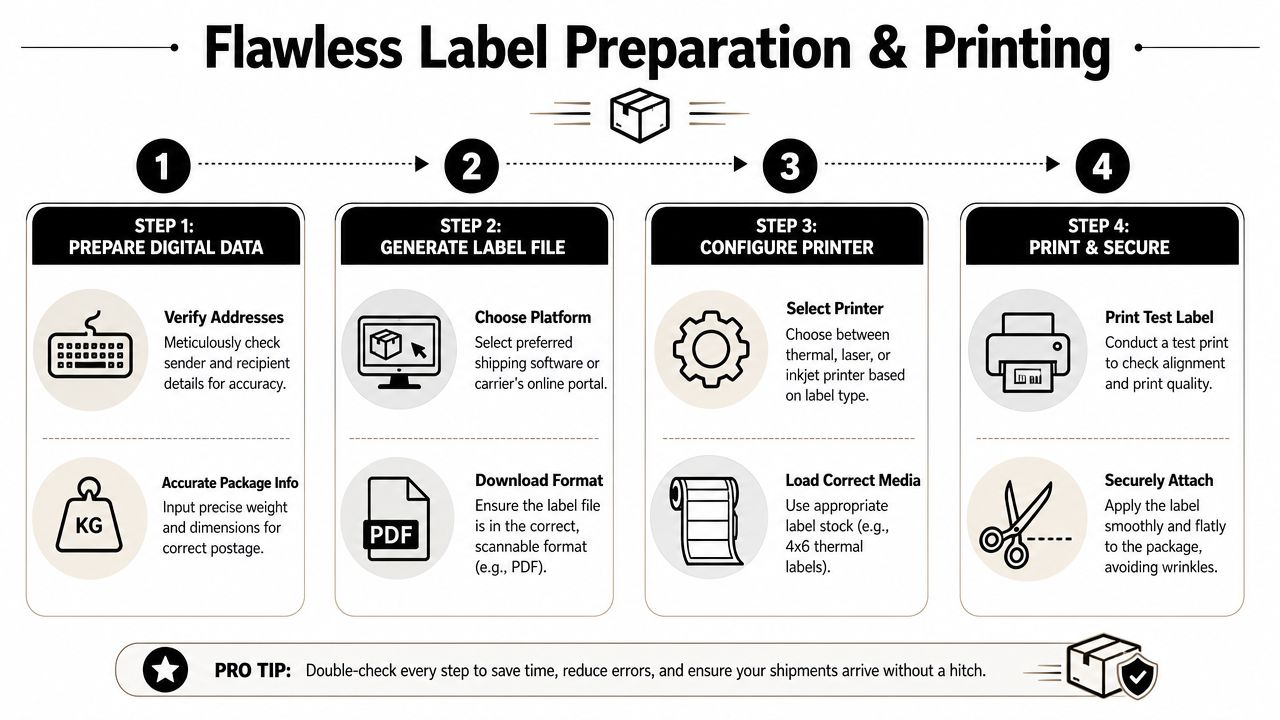
The cleanest shipping workflow starts before you hit print. Most label problems aren’t caused by the printer alone. They begin with bad address data, wrong dimensions, or a file that isn’t suited to the output method.
Start with the file, not the printer
Before you print anything, check the shipment details carefully.
- Verify the address. Small mistakes matter. A wrong suite number can cause almost as much trouble as a wrong street.
- Confirm weight and dimensions. If the package info is off, the label may still print, but the shipment can run into trouble later.
- Use the right output file. If your platform offers multiple formats, choose the one that matches your print setup.
- Keep the artwork clean. For production-quality label output, common prepress standards include 300 DPI, CMYK color, and 0.125-inch bleed according to Consolidated Label’s design requirements. In practical terms, higher resolution helps barcodes and small text print with cleaner edges, and bleed helps avoid thin white edges after trimming.
For ordinary carrier labels, you usually won’t be designing from scratch, but the principle still matters. Low-resolution output and sloppy scaling create scan problems fast.
Here’s a quick prep checklist:
- Open the final file before leaving for the store: Make sure it’s the correct shipment, not last week’s label.
- Check orientation: Rotated labels can print awkwardly on the wrong media.
- Avoid screenshots when possible: Original files usually print more reliably than cropped phone images.
- Bring backup access: If the file is in email, cloud storage, and on your phone, you’re less likely to get stuck at the counter.
A quick walkthrough can help if you want to see a general label workflow in action:
Printing options that make sense
Different print methods fit different shipping habits.
A thermal printer is the cleanest option for businesses shipping regularly. It’s fast, built around 4×6 labels, and avoids the ink-and-alignment problems that home users complain about.
An inkjet or laser printer can still work well for lighter shipping volume. The trade-off is more manual handling. You may print on plain paper, trim it, tape it down, and hope nothing shifts or smears.
A local shipping label printing service makes more sense when your shipping volume is inconsistent, you don’t want equipment upkeep, or you need labels printed from a QR code, email, or phone file. You avoid buying supplies for a process you don’t use enough to justify maintaining.
What a local print workflow looks like
At a good counter, the process is straightforward.
- You send the label file by email, bring it on a device, or present a carrier-issued QR code.
- The staff checks the format and prints it on suitable stock.
- You attach it properly or have the package checked before handoff.
- You finish the trip in one stop instead of bouncing between your printer, your supply drawer, and a carrier location.
If you only print labels occasionally, owning the equipment often creates more friction than it removes.
That’s especially true for owners who run lean operations. If your time is better spent packing orders, answering customers, or managing inventory, label printing should be the easy part, not the thing that derails your day.
How to Choose the Right Label Printing Service
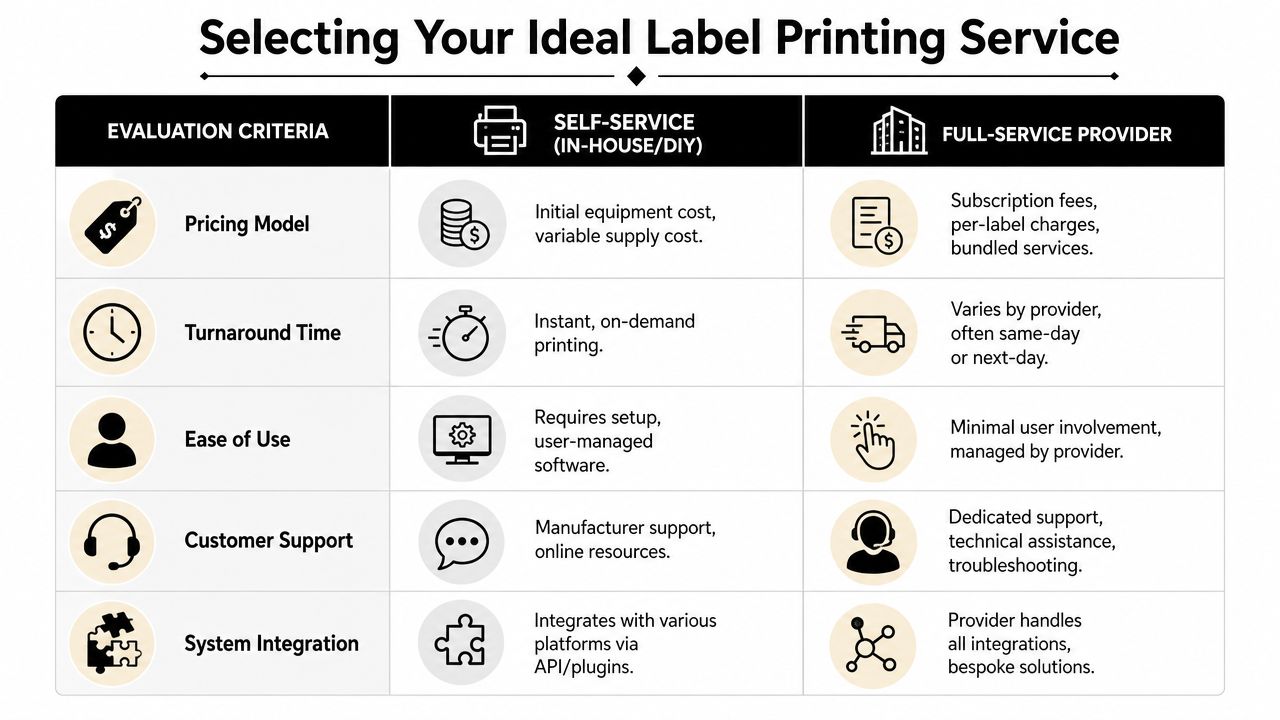
Not every shipping label printing service solves the same problem. Some are built for speed at home. Some are built for carrier-specific convenience. Some are built for people who need the whole errand handled in one place.
Compare the real trade-offs
The easiest way to choose is to stop thinking only about print cost and start thinking about total effort.
| Option | Best fit | Main limitation |
|---|---|---|
| Online software | Businesses with an existing printer setup | You still manage print quality and materials |
| Carrier-direct printing | Simple shipments inside one carrier network | Convenience varies by carrier and location |
| Local full-service center | Owners who want printing, packing, and handoff handled together | Usually requires an in-person stop |
For customers without a printer, USPS Label Broker is one practical carrier-direct route. USPS lets customers generate a QR code online and have the label printed at a participating Post Office, as described on USPS Label Broker. That’s useful, especially for occasional shipments.
But there’s a trade-off. Carrier-direct options can be uneven. One carrier may support QR workflows cleanly in your area while another may not. A local provider can be more flexible when you’re bringing different file types, handling returns, or needing packaging help at the same time.
If you’re comparing broader fulfillment and carrier choices, this roundup of shipping services for small businesses helps frame what matters when labels are only one part of your shipping workflow.
What to ask before you hand over a package
A good service should answer practical questions without making you guess.
Ask things like:
- Can you print from my phone or email?
- Do you handle QR-code label workflows?
- If my package isn’t packed well, can I fix that here?
- Can I drop off with more than one carrier option available?
- If this is a return, can you help confirm the label is usable?
Those questions reveal whether you’re dealing with a real service counter or just a place that happens to have a printer.
For small businesses, convenience usually wins when it reduces rework. If one stop handles label printing, supplies, package prep, and handoff, you save time in a way that software alone can’t always deliver.
Beyond the Print Job Common Shipping Pitfalls to Avoid
A perfect label can still fail once it meets a real package.
That’s the part many guides skip. They focus on creating the label, then act like the shipment is finished. It isn’t. A lot of shipping problems happen after printing. Issues like poor placement, moisture exposure, or missing paperwork can derail an otherwise fine shipment, as noted in Parcel Monkey’s guidance on labels and shipment prep.
Bad placement ruins good labels
The label needs a flat, visible surface. Don’t wrap it over a corner. Don’t place tape across the barcode in a way that adds glare or wrinkles. Don’t stick it onto a dusty, uneven box and assume it’ll stay put.
These are the mistakes that show up at sorting points, not at your desk.
A few practical habits prevent most of them:
- Use the largest flat side of the box: Give the barcode the best chance to scan quickly.
- Press out bubbles and wrinkles: Uneven labels are harder to read and easier to peel.
- Keep old labels covered or removed: Multiple visible barcodes create confusion.
- Protect the package from weather: If the carton may get wet, the label needs to stay readable.
A readable label on the wrong spot is still a bad label.
For e-commerce sellers shipping branded products, packaging integrity matters too. If you’re thinking more broadly about package presentation and protection in online retail, Crayex Brand Protect™ e-commerce solutions offer a useful look at how packaging choices can support cleaner delivery outcomes.
International shipments need more than a label
International shipping adds another layer. The label alone may not be enough. Customs paperwork, content declarations, and correct attachment all matter. If those pieces are missing, the package can stall even when the carrier label printed perfectly.
Returns have their own pitfalls too. A return label may be valid, but the box might be damaged, old markings may still be visible, or the customer may attach the label poorly. If you deal with customer returns regularly, this guide to return label printing for SMBs is worth reviewing because return logistics fail for practical reasons, not just printing reasons.
That’s why local expertise matters. A good counter doesn’t stop at “here’s your label.” They look at whether the package is ready to move.
Shipping Label Questions Answered
What if I don’t have a printer?
Use a local shipping label printing service or a carrier-supported QR workflow. If you already have a prepaid label or QR code, a counter service is usually the fastest path because you can handle printing, package check, and drop-off in one trip.
Can I print a shipping label on regular paper?
Yes, in many cases you can. The bigger question is whether it’s attached well and remains fully readable. Plain paper can work for occasional shipping, but it’s more vulnerable to bad taping, wrinkles, and moisture. If the shipment matters, having it printed on the proper stock at a local service is usually safer.
What if my QR code won’t scan?
Don’t keep retrying blindly. Open the original email or app and confirm you’re using the current code. Bright screen glare, cracked screens, and weak mobile signal can also cause issues. A local counter may still be able to help if you can access the associated label email or order information.
Is printing the label the hard part?
Usually no. The bigger trouble starts when the wrong file format gets used, the label is attached poorly, or the package still needs customs documents or stronger packaging. Printing is only one step in a shipment that has to survive handling all the way to delivery.
When does a local service make the most sense?
When you don’t ship enough to justify your own setup, when you need help with packing, when you’re dealing with returns, or when you want one stop for print and handoff. That’s where local service saves more time than DIY.
If you’re in Sugar Land and want a simple way to print labels, prep packages, and get shipments out without wasting part of your day on printer problems, visit Business Mail Boutique LLC. It’s a practical option when you need shipping, printing, and package support handled in one place.

Related posts

Custom Memorial Glasses Engraved in Three Hours in Sugar Land
When a customer needed eight personalized glasses for a memorial, Business Mail Boutique completed the engraving or...

Custom Martini Glass Engraving in Sugar Land, TX
Custom Logo Engraving on Martini Glasses in Sugar Land, Texas.
Business Mail Boutique recently completed a beautiful custom engravin...

Custom Engraved Wine Glasses for a Golf Club Event in Sugar Land, TX
Custom Engraved Wine Glasses for a Golf Club Event in Sugar Land.
Custom wine glass engraving in Sugar Land, TX at Business Mail Bouti...