
- Print Business Cards in Sugar Land – Same Day Service
- Copying Services
- Document Printing, Finishing & Lamination in Sugar Land
- Flyers
- Print Banner in Sugar Land | Same-Day Banner Printing Near Me
- Graphic Design
- Photo Printing
- Postcard Printing
- Document Printing
- EDDM Full Service Postcards
- FotoZoomer Large Format Printing


Best Online Business Printing Services.
Find the best online business printing services with our step-by-step guide. Compare quality, turnaround, pricing, file prep, and support before you order.
Businessmailboutique
11645 S. Hwy 6
Sugar land, Texas 77498 United States (US)
Email: info@businessmailboutique.com
Route
You’ve got a trade show next week, a client presentation on Friday, or a stack of outdated business cards you should’ve replaced last month. The online printer’s price looks attractive, the product page promises fast production, and the upload button makes ordering feel finished before you’ve checked the file properly. That’s exactly how a cheap print order turns into a costly business problem.
The best online business printing services aren’t the ones with the lowest unit price. They’re the ones that manage the entire workflow, from file preparation and proofing to production, shipping, and reprints. Online ordering has become a substantial part of a growing industry. One market estimate valued online printing services at USD 20.69 billion in 2024 and projected USD 34.69 billion by 2032, while another estimated the sector at USD 25.3 billion in 2023 and forecast USD 46.9 billion by 2032 (Business Wire market forecast). Convenience is now expected, but workflow quality still separates dependable printers from frustrating ones.
What You Risk When You Pick the Wrong Online Printer
A small-business owner orders 500 brochures from the cheapest online printer. The deadline is Tuesday, so the order goes in early enough to allow production and delivery. On Monday afternoon, the boxes arrive. The images are slightly off-register, the company logo has a yellow cast, and the brochures look nothing like the approved design on the monitor.
The obvious problem is defective print. The problem is everything attached to it: a missed trade show, a rushed replacement order, awkward explanations to prospects, and hours spent arguing with customer support instead of serving customers. A reprint can cost more than the original order, particularly after expedited production and shipping enter the equation. Even when the printer eventually fixes the job, your deadline may already be gone.
Practical rule: A printer that catches a bleed problem before production is more valuable than a printer that advertises a slightly lower starting price.
The smooth version of that order looks different. The vendor’s preflight system flags artwork that runs too close to the trim line. A support agent explains the issue, a proof is reviewed, and the corrected file enters production without drama. If the finished pieces still fail inspection, the vendor has a documented reprint process and a tracking trail.
The loss isn’t confined to the invoice
A bad print job can damage four areas at once:
- Time: You lose hours checking files, contacting support, arranging replacements, and updating colleagues or clients.
- Credibility: Crooked trimming, weak color, or blurry images make the business look careless, even when the design itself was strong.
- Campaign timing: Event materials, direct mail, menus, and promotional brochures lose value when they arrive after the relevant moment.
- Inventory flexibility: Over-ordering outdated materials leaves money sitting on a shelf, while under-ordering can force an expensive emergency run.
The broader commercial printing market remains enormous despite the shift toward digital ordering. IBISWorld reported worldwide commercial printing at USD 319.4 billion in 2025, while other industry estimates place the broader printing market at USD 343.63 billion in 2025 and commercial printing at USD 594.24 billion in 2026 (IBISWorld commercial printing overview). Online providers are digitizing part of a mature print economy, not creating an entirely new category.
Judge the workflow, not the checkout screen
Use seven tests before trusting a vendor with a deadline:
- Print quality, including stock, color, trim, and finishing.
- Turnaround, separating production time from transit time.
- File preparation and proofing, including human review for important jobs.
- Pricing transparency, including setup, finishing, and rush charges.
- Shipping and returns, especially damage claims and reprint terms.
- Useful integrations, not a long list of decorative plug-ins.
- Customer support, measured before you place the order, not after something goes wrong.
That framework turns printer selection into an operational decision. Price still matters, but it belongs near the end of the evaluation, after you know what you’re buying.
The Seven Criteria That Actually Matter
Online printers make comparison easy by putting products, quantities, and prices on one screen. That convenience can hide the differences that determine whether the final job is usable.
Test each provider before committing
1. Print quality starts with the physical result, not the product photograph. Request a sample pack when one is available, then inspect paper stiffness, coating, color consistency, edge quality, and finishing. For business cards, compare small text and fine lines. For event signage, inspect large areas of solid color and the mounting or hemming options.
2. Turnaround needs two separate answers: How long does production take, and how long does shipping take? Ask whether the stated window begins after payment, file approval, or proof approval. A vendor that responds clearly is safer than one that hides the production cutoff in a buried help page.
3. File preparation and proofing reveal whether the company expects you to catch every technical problem yourself. Upload a test file or ask a pre-sales question about bleed, CMYK conversion, and font handling. You can also use a practical design reference such as this wedding card design and wording guide when preparing invitation-style or personal-brand print materials that need careful typography and layout.
4. Pricing transparency means checking the cart, not trusting the product-page headline. Look for paper upgrades, special finishing, die-cut charges, proof fees, taxes, and shipping.
5. Shipping and returns deserve a small test order. Check whether tracking updates at production, dispatch, or carrier acceptance, and read the policy for damaged custom goods.
6. Integrations should remove a manual handoff. Canva, Adobe Express, and Figma connections can reduce export steps, while CRM and marketing-platform integrations may help teams that send direct mail regularly.
7. Support responsiveness is easy to test. Send a specific pre-sales question and time the reply. If support takes too long before payment, expect a worse experience when a deadline is at risk.
Match the criterion to the job
| Criterion | Business Cards | Event Signage | Direct Mail | Brochures |
|---|---|---|---|---|
| Print quality | High | Very high | High | High |
| Turnaround | Medium | Critical | Medium | High |
| File prep and proofing | High | Very high | High | Very high |
| Pricing transparency | High | High | Very high | High |
| Shipping and returns | Medium | Critical | High | High |
| Integrations | Medium | Low | Very high | Medium |
| Customer support | High | Critical | High | High |
This matrix keeps you from using one universal definition of value. A direct-mail campaign may benefit most from workflow integrations and predictable fulfillment. A trade-show banner needs dependable production, shipping visibility, and a support person who can act before the event.
Preparing Files and Proofing Like a Pro
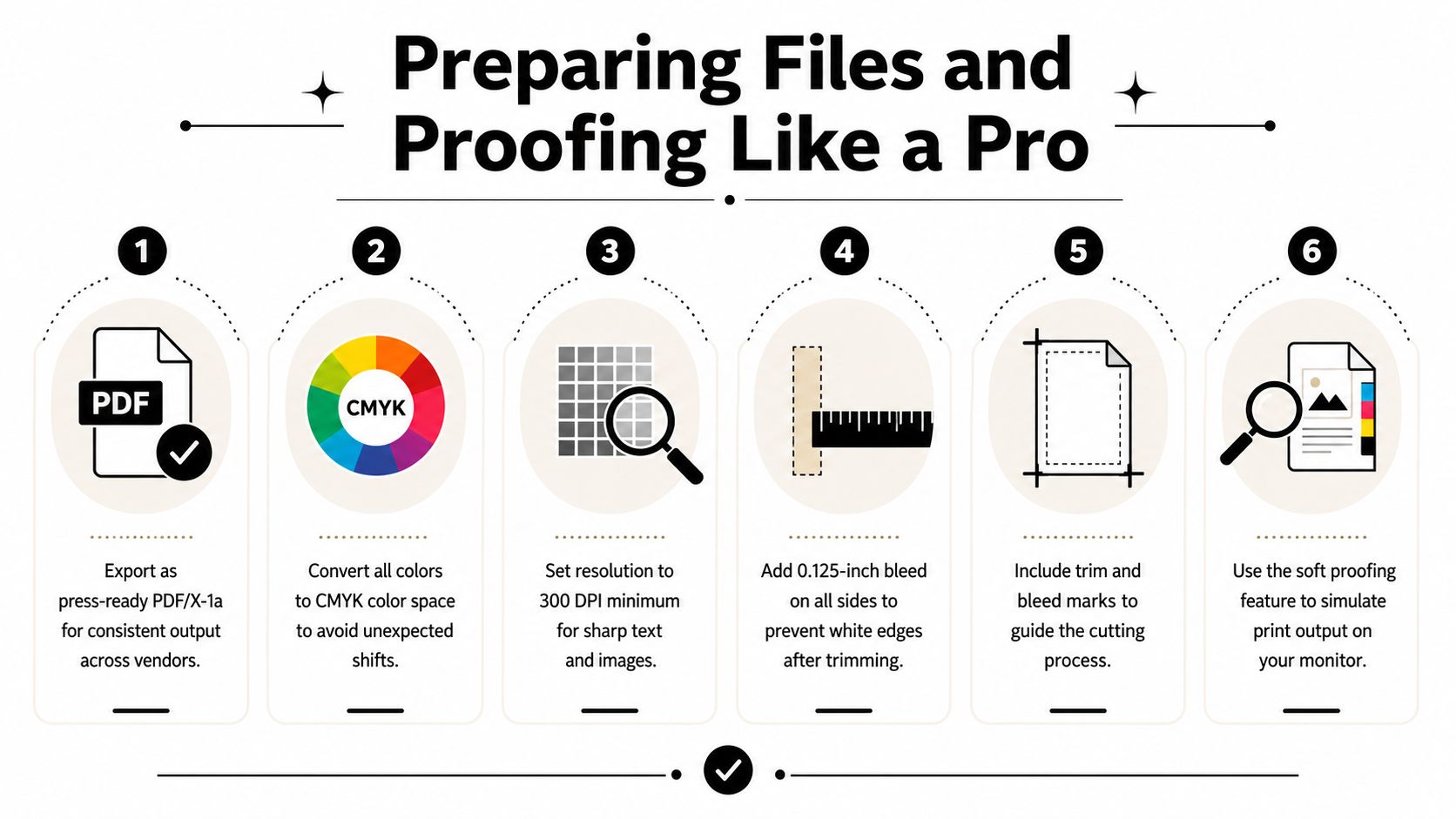
File preparation is the highest control point in the entire print workflow. Established print-prep guidance converges on PDF submission, CMYK color, 300 DPI for raster elements, and 1/8-inch bleed as the baseline for reducing trim, color, and output problems (Carleton University print-file best practices).
Build the file around the press
Export a press-ready PDF, ideally PDF/X-1a when the vendor supports it. Keep raster images at 300 DPI or better, convert brand-sensitive artwork to CMYK, add 0.125-inch bleed on every side, and keep important text and logos inside a 0.25-inch safe margin. Embed or outline fonts so the printer doesn’t substitute a typeface during production.
RGB can work for some large-format signage viewed from a distance, particularly when the vendor’s workflow handles conversion. Don’t rely on that for a color-critical logo, premium stationery, invitations, or any job where the brand color has to match an established standard.
Use a preflight tool before uploading:
- Adobe Acrobat Preflight can identify color-space, font, image-resolution, and PDF-standard issues.
- Enfocus PitStop provides deeper inspection and correction controls for production workflows.
- Adobe PDF Checker offers a free way to review common file problems.
- Vendor-side automated checks can catch dimensions, missing bleed, and some low-resolution assets, but they won’t replace your judgment.
Flatten transparencies when the vendor requests it, convert spot colors where appropriate, verify trim dimensions, and include crop marks only when the printer’s specifications call for them. Name the file with the job, quantity, and paper stock, such as spring-menu-250-100lb-matte.pdf. That small habit prevents the wrong version from reaching production.
Understand the proof you’re approving
A screen proof shows layout, but it isn’t a reliable prediction of printed color. A soft-proof PDF lets you inspect trim, text, and alignment in a more controlled file. A hard proof gives you a physical reference and is the right choice when color, paper, or finishing carries business risk.
Ask the vendor three direct questions: Is the proof included? Does production begin automatically after approval? What happens if the printed piece differs from the approved proof? For mugs and other curved or coated products, review artwork guidance before uploading. This resource on perfect custom mug prints is useful because placement, scale, and image quality matter differently on a product surface than they do on a flat sheet.
For a visual walkthrough of file preparation and proofing, use the embedded guide below.
Decoding Pricing, Fees, and Hidden Costs
The price beside a product is only the beginning. The useful number is landed cost, which combines the printed item, setup, finishing, proofing, shipping, and any rush charge required to meet the deadline.
A low base price can lose its advantage after you add a paper upgrade, a special cut, a digital proof fee, or expedited delivery. Some “free proof” offers may provide only an automated preview, not the soft-proof review or physical sample you need.
Calculate the complete order
Use this formula before comparing vendors:
Landed cost = base print price + setup fees + finishing fees + proof fees + shipping + rush charges
Then compare that total with a shorter run ordered again later. Bulk ordering can lower the per-piece cost, but it can also leave you with obsolete business cards, outdated event details, or excess campaign material. On-demand purchasing is often more sensible when your message changes frequently, even if the unit price is higher.
| Fee Type | Typical Range | Watch For |
|---|---|---|
| Setup | Varies by product | Fees added after file upload or customization |
| Proofing | Included or extra | Automated preview presented as a full proof |
| Finishing | Varies by option | Foil, coating, folding, die-cutting, and rounded corners |
| Paper upgrade | Varies by stock | Premium pricing without a clear stock description |
| Shipping | Varies by destination and weight | Economy delivery that misses the production deadline |
| Rush service | Varies by urgency | A major price jump after the cutoff time |
The exact figures change by product and vendor, so don’t compare a headline quantity price with another printer’s final checkout total. For more context on the economics of color jobs, review this cost to print in color breakdown.
Industry benchmarking points to a practical operational lesson. A 2025 survey found that higher-performing printing firms spend a smaller share of revenue on administrative costs, and the survey’s average response rate was 59.6% (2025 printing industry benchmarking survey). For buyers, standardized intake, proofing, and job routing are useful signs that a printer has fewer avoidable handoffs.
Shipping, Returns, and Tracking
A printer can produce an excellent brochure and still fail the job by delivering it too late. Treat the shipping policy like part of the product specification, not a footer you skim after entering payment details.
Production and transit are separate clocks. A stated production window doesn’t automatically include carrier travel, weekends, file approval, or the time between label creation and the carrier’s first scan. Ask the vendor to confirm the final ship date, the expected delivery date, the carrier service, and the cutoff for changes.
Protect deadline-sensitive orders
Before placing an event or client-direct order, verify these details:
- Production start: Find out whether the clock begins at checkout or after proof approval.
- Carrier handoff: Confirm when tracking becomes active and whether the first scan may occur after the label is created.
- Delivery address: Check the destination carefully, especially for hotels, convention centers, and client offices.
- Signature service: Request a signature when unattended delivery could put the job at risk.
- Packaging: Ask how banners, rigid signs, folded pieces, or delicate finishing are protected.
- Damage process: Confirm the required photos, claim period, replacement terms, and refund rules.
Record the order confirmation, approved proof, promised ship date, and tracking number in one place. If the job is going to a trade show, send it early enough to allow a correction rather than routing it directly to the venue at the last possible moment. When comparing carrier options, this guide to UPS, FedEx, and USPS rates can help you evaluate the shipping component instead of accepting the default service blindly.
Handle damage claims methodically
Open custom print shipments carefully. Photograph the unopened package, then record the unboxing before removing the materials. Capture crushed corners, moisture, scuffs, color issues, trimming errors, and any damage to the outer carton. Keep the packaging until the vendor confirms that the claim is complete.
Returns for custom print usually depend on a manufacturing defect, not a change of mind or a mistake in customer-supplied artwork. Read the reprint and refund language before paying, and ask for written confirmation when the job is deadline-sensitive. A vendor’s willingness to explain the policy clearly before the order is a better signal than a vague satisfaction statement.
Choose integrations that remove work
Online printers often advertise many integrations. Most small businesses need only the connections that eliminate a manual transfer:
- Design tools: Canva, Adobe Express, and Figma can reduce repeated downloads, uploads, and font mismatches.
- CRM and marketing platforms: HubSpot, Mailchimp, and Constant Contact connections can support recurring postcard or mailer fulfillment.
- APIs: API access makes sense when you have a developer or already use a print automation platform such as Lob or Printful.
- Low-value extras: Social sharing buttons, AI design assistants, and marketplace plug-ins rarely justify another dashboard unless they remove a real production step.
The test is simple. Can the integration move approved artwork, customer data, or fulfillment instructions without someone copying information between systems? If not, it’s probably a feature you’ll admire once and ignore afterward.
When a Local Print Shop Beats Online
Online printers are a strong choice for standardized products, repeat orders, and larger quantities that can move through a predictable web-to-print workflow. They lose their advantage when the job is urgent, highly customized, color-critical, or too small to justify shipping and setup.
Four jobs belong on the local side
Same-day work is the clearest example. A banner tears before an event, a restaurant changes its menu, or a sales team runs out of cards before a meeting. An online printer can’t put a replacement in your hands immediately if production and carrier transit are still ahead of you.
Color-critical work also benefits from physical review. Wedding invitations, premium brand collateral, and carefully matched stationery may require a printer to compare a physical proof, stock, and finish instead of relying on a monitor.
Complex finishing demands judgment. Embossing, foil, die-cutting, unusual folding, and layered finishing can require on-press adjustment that an automated product page can’t evaluate for you.
Very short runs often favor a nearby provider. When setup charges and shipping consume the savings from online pricing, a local shop can be more practical, especially when you need only a few finished pieces and can collect them yourself.
| Job Type | Best Fit |
|---|---|
| Standardized bulk brochures | Online printer |
| Routine business card reorder | Online printer or local shop |
| Same-day event banner | Local print shop |
| Color-sensitive invitation | Local print shop |
| Complex foil or die-cut project | Local print shop |
| Very short urgent run | Local print shop |
| Recurring direct-mail fulfillment | Online printer with useful integrations |
| Last-minute local menu update | Local print shop |
Business Mail Boutique LLC in Sugar Land offers same-day business cards, flyers, banners, posters, yard signs, decals, and photo prints through its on-site print shop, alongside packing and shipping services. That combination matters when a deadline involves both production and delivery. The guide to choosing a local print shop in Sugar Land provides a useful local evaluation framework.
Decision rule: Standardize and scale online. Go local when urgency, physical inspection, or finishing skill matters more than a low advertised price.
The local-versus-online decision also applies to branded apparel, where garment selection, placement, and hands-on quality checks can change the result. This T-Shirt Envy comparison of local and online custom apparel services is a useful reference before treating every personalized product as an interchangeable online order.
Your Quick Decision Checklist
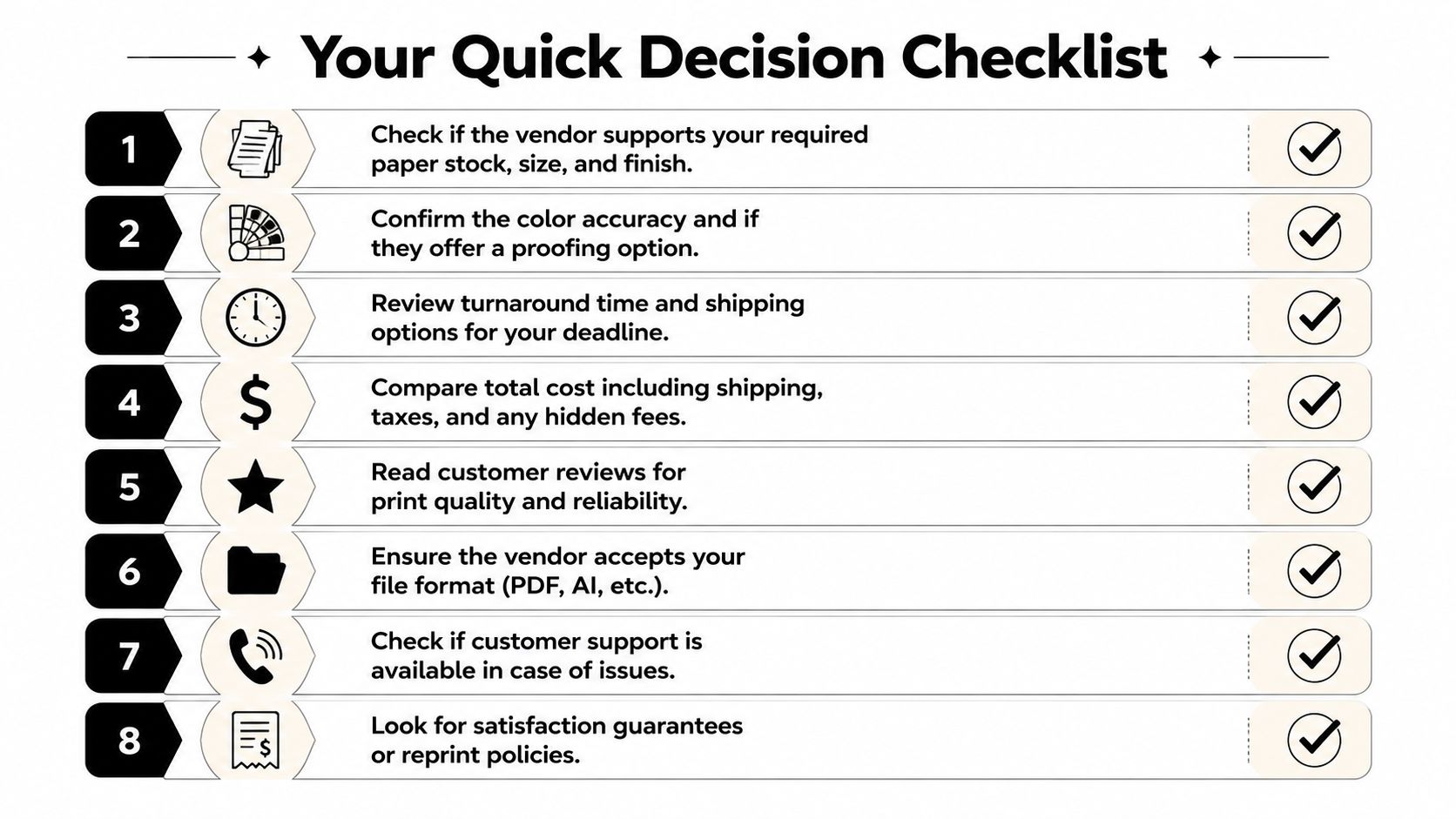
Before you place an order, answer these eight questions in writing:
- Stock and finish: Does the vendor support the required paper, size, coating, folding, cut, or mounting?
- Deadline: Does the delivery estimate include both production and shipping?
- File acceptance: Are PDF/X files supported, and are the bleed, color, and resolution specifications clear?
- Proofing: Is a soft proof or hard proof available, and is it included or charged separately?
- Full price: Can you see setup fees, finishing, rush charges, taxes, and shipping before payment?
- Damage policy: Does the vendor document its reprint, refund, and claim process?
- Useful integrations: Will the connection to your CRM, design tool, or marketing platform remove a manual step?
- Human support: Can you reach a knowledgeable person by phone or chat during business hours?
If two or more answers are weak, pause. Request a sample pack, ask for a written clarification, or send the job to a local printer. The cheapest quote isn’t a bargain if the file fails, the delivery misses the event, or the replacement arrives after the opportunity has passed.
Use online services for repeatable, scalable work with clear specifications. Use a local shop for same-day production, hands-on proofing, complicated finishing, and short runs where shipping erases the savings. That match between job type and provider type is the decision most comparison pages miss.
Business Mail Boutique LLC handles business cards, flyers, banners, posters, yard signs, decals, photo prints, packing, and shipping from its Sugar Land storefront, including same-day options for selected print jobs. Visit Business Mail Boutique LLC to request a quote or discuss a deadline-sensitive project with a local print and shipping team.

Related posts

Custom Memorial Glasses Engraved in Three Hours in Sugar Land
When a customer needed eight personalized glasses for a memorial, Business Mail Boutique completed the engraving or...

Custom Martini Glass Engraving in Sugar Land, TX
Custom Logo Engraving on Martini Glasses in Sugar Land, Texas.
Business Mail Boutique recently completed a beautiful custom engravin...

Custom Engraved Wine Glasses for a Golf Club Event in Sugar Land, TX
Custom Engraved Wine Glasses for a Golf Club Event in Sugar Land.
Custom wine glass engraving in Sugar Land, TX at Business Mail Bouti...