
- Print Business Cards in Sugar Land – Same Day Service
- Copying Services
- Document Printing, Finishing & Lamination in Sugar Land
- Flyers
- Print Banner in Sugar Land | Same-Day Banner Printing Near Me
- Graphic Design
- Photo Printing
- Postcard Printing
- Document Printing
- EDDM Full Service Postcards
- FotoZoomer Large Format Printing


Commercial Printing Service: Your 2026 Guide to Perfect
Businessmailboutique
11645 S. Hwy 6
Sugar land, Texas 77498 United States (US)
Email: info@businessmailboutique.com
You’ve got a flyer to hand out, business cards for a networking event, and maybe a banner for the front of your store. You open the office printer, load heavier paper, hit print, and hope for the best. Then the colors come out muddy, the paper curls, the edges look rough, and the final stack doesn’t feel like something you want to put in a customer’s hand.
That’s a common moment for small business owners. You’re not trying to run a print plant. You just need materials that look polished, match your brand, and arrive on time without turning into a trial-and-error project.
A commercial printing service solves that problem. It gives you access to better equipment, better file handling, better finishing, and usually much less waste. That matters because print is still a major part of how businesses show up in the physical world. The global commercial printing market is valued at USD 531.51 billion in 2025 and is projected to reach USD 886.61 billion by 2035, according to commercial printing market sizing data. Businesses still rely on print for advertising, packaging, and day-to-day communication because physical materials still do jobs that screens can’t.
Table of Contents
- Going Beyond Your Office Printer
- What Is a Commercial Printing Service?
- Common Printing Methods and Products
- Decoding Print Pricing and Turnaround Times
- Your Pre-Press Checklist for Perfect Prints
- The Local Advantage for Your Sugar Land Business
Going Beyond Your Office Printer
A lot of owners start the same way. They print a few menus in-house. Then they try postcards. Then a trifold brochure. At some point, the gap becomes obvious.
Your office printer is built for convenience. A commercial print setup is built for repeatable results.
If you’ve ever printed your logo and wondered why the blue looks purple, or why the black text looks a little gray, you’ve already hit that limit. The same thing happens with flyers that feel too thin, posters that streak, or cards that don’t cut cleanly. Customers may not know why a piece feels amateur, but they can tell when it does.
Why office printing hits a wall
The first issue is consistency. One copy looks decent, the next is lighter, and the third jams. The second issue is material choice. Most office printers don’t handle the paper stocks, finishes, or sizes that businesses want for customer-facing pieces. The third issue is finishing. A sheet fresh off a desktop printer is not the same as a trimmed, folded, scored, mounted, or laminated product.
A printed piece doesn’t just carry information. It carries a first impression.
That’s where a local shop becomes useful. You can stop treating every project like a home experiment and start treating it like part of your brand. If you’re trying to figure out what kind of local provider to work with, this guide to finding a print shop in your area gives a practical starting point.
What a print shop actually does
A good commercial printing service doesn’t just print files. It helps you choose the right format for the job.
If you need event flyers by tomorrow, the answer may be a fast digital run on a stock that feels solid but doesn’t overspend your budget. If you need presentation folders for client meetings, the answer may be a heavier stock with clean scoring so the folds don’t crack. If you need banners, yard signs, or posters, you need equipment made for larger formats and materials that hold up better than office paper ever could.
For a small business, that’s the upgrade. You’re not buying “fancier printing.” You’re buying fewer mistakes, less wasted time, and materials you can hand out with confidence.
What Is a Commercial Printing Service?
Consider the difference between cooking dinner at home and running a restaurant kitchen. Your home kitchen can make a meal. A restaurant kitchen is designed for volume, timing, consistency, and presentation.
Printing works the same way.
A commercial printing service is a professional workflow for turning digital designs into finished printed products at a quality level that most office setups can’t match. It isn’t just a bigger printer in the back room. It’s a chain of steps that includes checking files before production, printing on professional equipment, and finishing the job so it’s ready to hand out, mail, display, or install.
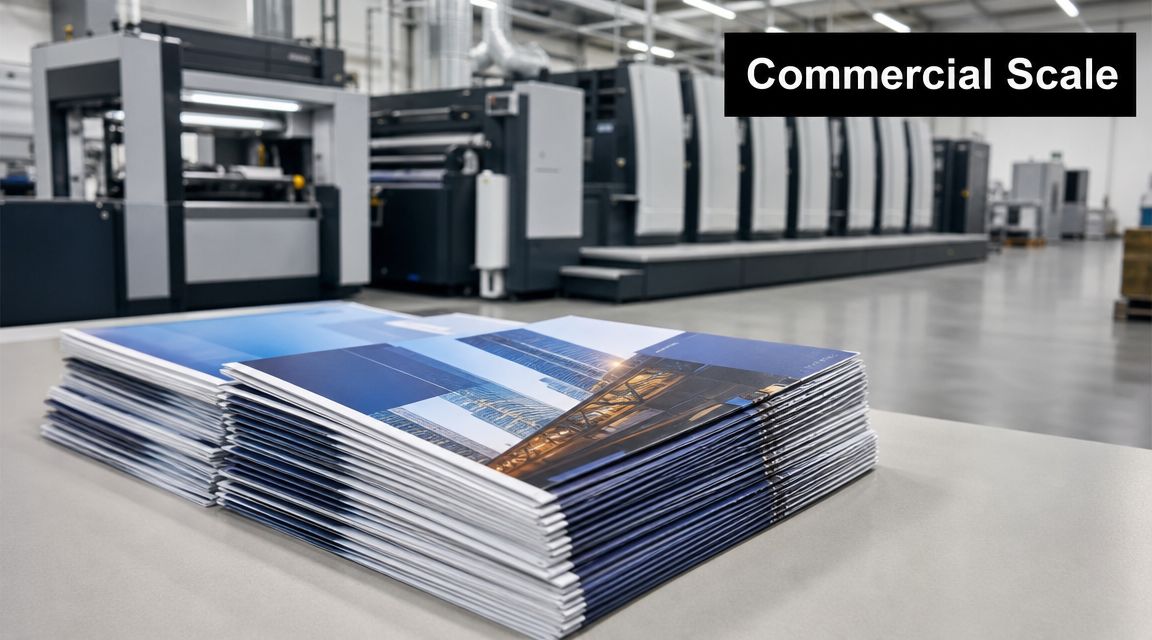
The industry itself is very real and very structured. The U.S. printing services industry under NAICS 32312 had a market size of $2.4 billion in 2026, according to IBISWorld’s printing services industry profile. That category covers the backbone work behind products like business cards, flyers, and banners.
Why office printing hits a wall
In a small office, you usually do everything yourself. You design the piece, export the file, print a test, trim it by hand, and hope the final version matches what you saw on screen. That process can work for internal notes or rough drafts.
It starts breaking down when the printed piece represents your business.
Commercial printers work with file setup, color handling, paper selection, trim accuracy, folding, binding, and finishing every day. That experience matters because print problems often start before ink ever hits paper. A file with the wrong size, missing bleed, or low-resolution images can lead to disappointing results even on good equipment.
What a print shop actually does
Most commercial jobs move through three stages:
- Prepress: The file gets reviewed for setup issues such as size, resolution, color mode, and layout problems.
- Printing: The job runs on equipment chosen for the quantity, material, and finish needed.
- Postpress: The piece gets trimmed, folded, bound, mounted, laminated, or otherwise finished.
Practical rule: If the job has to look the same from the first piece to the last, it belongs in a commercial workflow.
That’s also why a print shop can offer things your office can’t. Think thick business card stock, clean brochure folds, large banners, mounted signs, or blueprint-sized documents. The service is not just output. It’s control.
Common Printing Methods and Products
Most small businesses don’t need to memorize every print technology. You just need to know which method fits your project.
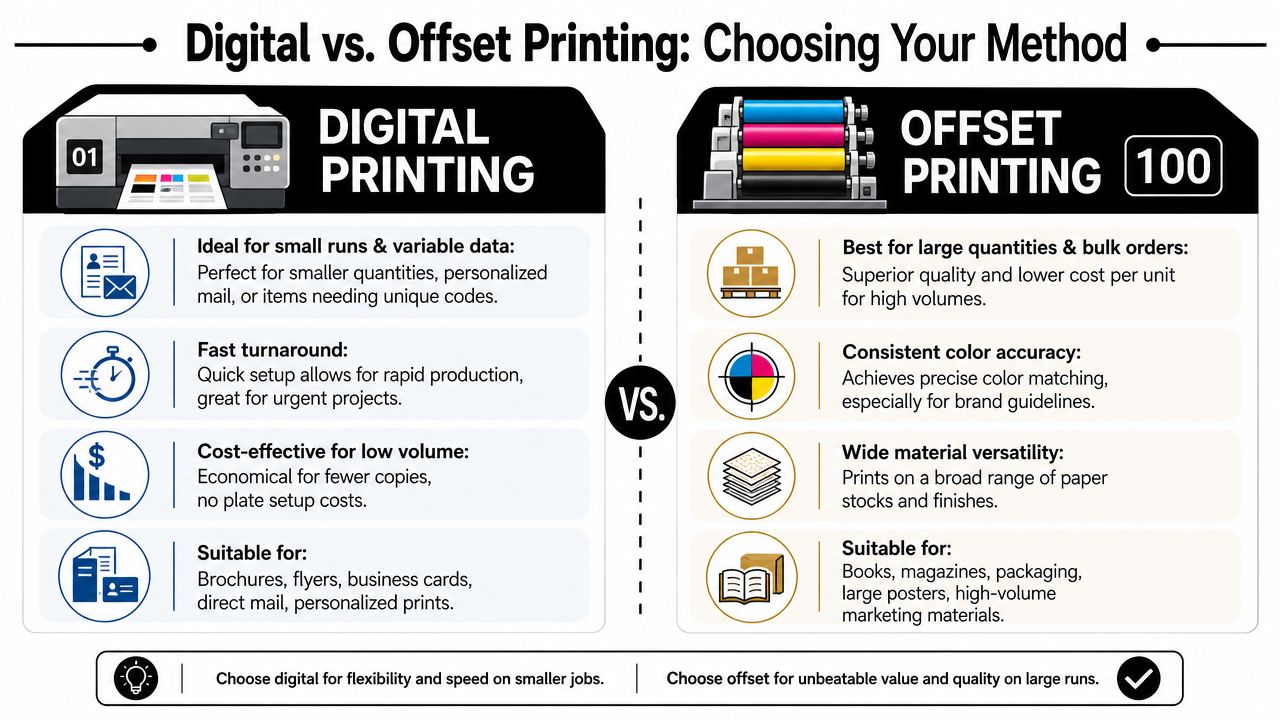
The main choice usually comes down to digital printing or offset printing. That decision affects speed, setup, flexibility, and how the cost behaves as your quantity changes. Industry commentary from Allied Printing Group notes that digital printing is projected to reach about $160 billion by 2028, which reflects growing demand for shorter runs, faster turnaround, and more personalized work.
Digital and offset in plain English
Digital printing is the practical choice when you need a smaller run, a quicker turnaround, or versioned pieces. If you’re printing a limited batch of flyers for a weekend event or personalized mailers with different names, digital is often the cleanest path.
Offset printing takes more setup, but it becomes attractive when you need larger quantities and tight consistency across the whole run. That’s why it’s often used for books, catalogs, and higher-volume marketing materials. If you’re comparing options for longer-run book projects, this overview of book offset printing services is a useful example of where offset fits.
Digital vs. Offset Printing at a Glance
| Factor | Digital Printing | Offset Printing |
|---|---|---|
| Setup | Faster to start | More setup involved |
| Best fit | Short runs, variable content, urgent jobs | Larger runs, repeat consistency |
| Personalization | Easy to customize piece by piece | Less flexible for versioned content |
| Turnaround | Usually faster | Usually slower at the front end |
| Cost pattern | Often better for lower quantities | Often better when volume is high |
| Typical jobs | Flyers, business cards, direct mail, short brochures | Books, magazines, larger bulk runs |
What local businesses usually print
The method matters, but so does the product. Here are some of the pieces small businesses order most often:
- Business cards: Still the quickest way to leave contact information in person.
- Flyers: Useful for promotions, openings, local events, and leave-behind handouts.
- Brochures: Better when you need more room for services, pricing, menus, or process explanations.
- Posters and banners: Good for storefront visibility, trade shows, school events, and temporary promotions.
- Yard signs: Common for real estate, contractors, political campaigns, and directional event signage.
- Blueprints and wide-format plans: Essential for construction, engineering, and property-related work.
If your project moves into signs, banners, or oversized visuals, it helps to work with a shop that also handles wide-format printing services, because those jobs involve different materials and finishing than standard paper pieces.
If you’re unsure which method to choose, start with the business question, not the machine. Do you need speed, quantity, personalization, or a specific finished look?
That one question usually points you in the right direction.
Decoding Print Pricing and Turnaround Times
Most customers ask two things first. How much will it cost, and when can I get it?
Fair questions. Printing prices can feel mysterious if you’ve only looked at the final quote. But the quote is really just the result of a few project decisions.
What a printer needs before quoting
A print shop can’t price a job accurately from “I need brochures” alone. It needs the specs.
According to Brumley Printing’s commercial printing specifications guide, the most important quoting details are flat size, finished size, page or panel count, quantity, and ink mode. That’s why a trifold brochure can’t be described as just one sheet. It’s a two-page piece with six panels, and that changes how the job is imposed, folded, and finished.
Here’s the simple version of what to send:
- Flat size: The untrimmed size before finishing.
- Finished size: The final size after trimming or folding.
- Page or panel count: Especially important for brochures, booklets, and folded pieces.
- Quantity: Needed because setup and run length affect the job differently.
- Ink mode: Black only, CMYK, spot color, or a mix.
The choices that change your price
Paper is one of the biggest factors. A lightweight handout stock costs differently than a heavy cover stock for business cards or presentation pieces. Finish matters too. Gloss, matte, uncoated, laminated, scored, folded, bound, or mounted all affect labor and materials.
Color also changes the equation. A simple black-only job is different from a full-color piece, and a project with special brand color requirements needs closer handling than a general promo flyer.
Turnaround usually follows complexity. A straightforward digital flyer job can move quickly. A piece that needs special stock, multiple folds, lamination, or careful finishing takes longer because there are more production steps and more chances for something to go wrong if rushed.
The fastest way to save money on print is to be precise before production starts.
If your timeline is tight, talk to the printer first instead of designing in isolation. For urgent jobs, this guide to rush printing and same-day success explains how to think about speed without creating avoidable delays.
A clean file, clear specs, and realistic finishing choices will usually do more for your budget than haggling over the last line item.
Your Pre-Press Checklist for Perfect Prints
Most printing problems are preventable. They show up because the file was built for screen use, not print use.
That’s why pre-press matters. It’s the checkpoint between your design and the final press run. If you do this part right, everything downstream gets easier.
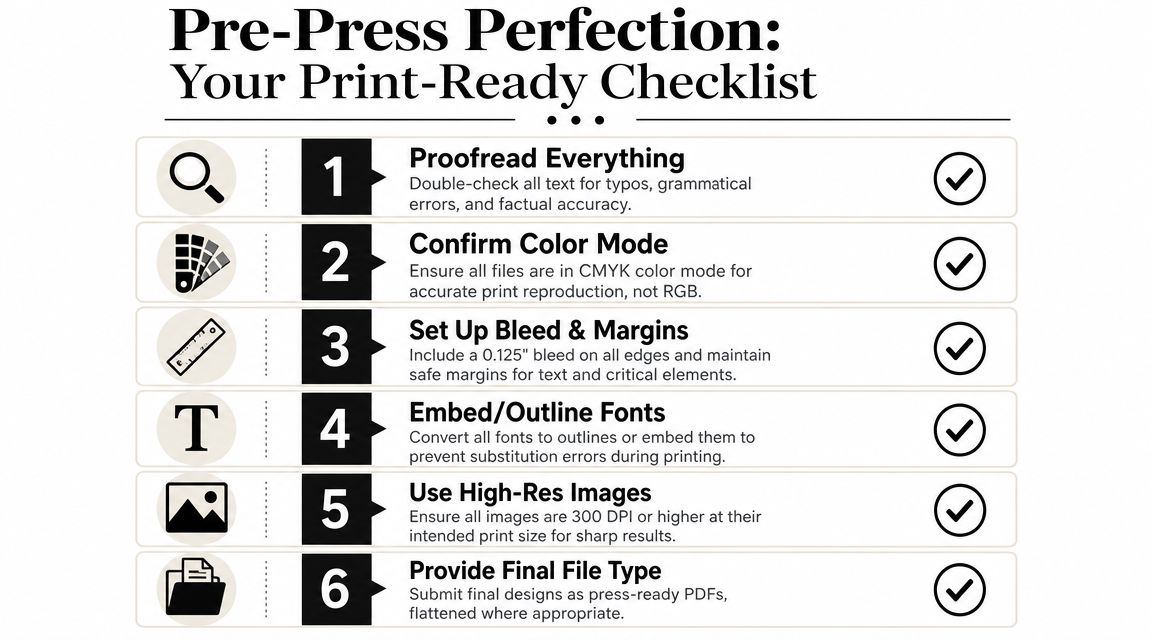
A quick visual checklist helps before you export anything:
The file checks that prevent reprints
For professional print results, graphics should generally be 150 to 300 DPI at final size, with 300 DPI preferred for photos, according to Duncan-Parnell’s printing specifications overview. That same guidance also points to bleed, safe area, and PDF/X compliance as part of predictable professional workflows, along with proofing standards such as ISO 12647-7.
Use this as your short checklist:
- Proofread every line: Typos don’t get cheaper after printing.
- Check image resolution: If the image looks fine on screen, that doesn’t mean it will print sharply.
- Use CMYK-aware artwork: Screen color and print color don’t behave the same way.
- Add bleed: This gives the printer room to trim without leaving white edges.
- Protect the safe area: Keep text and logos away from the trim edge.
- Outline or embed fonts: That avoids font substitution when the file opens on another system.
If you want a broader design-side walkthrough before production, this practical guide to print design gives helpful context from the design perspective.
Here’s a useful video overview to reinforce the basics before you send your files:
How to send files your printer can use right away
The best file is usually a press-ready PDF, not an editable working file with missing links, loose fonts, and uncertain crop settings. Editable files can be useful if you’re asking for design help, but for production, a clean final PDF reduces surprises.
Send one folder with the final PDF, clear specs, and one note that lists the quantity, stock preference, finish, and due date.
That small bit of organization saves back-and-forth and helps the shop tell you quickly whether anything needs to be fixed before printing starts.
If you’re ever unsure, ask for a proof. It’s much easier to catch a shifted panel, wrong fold, or color concern before the full run is produced.
The Local Advantage for Your Sugar Land Business
A Sugar Land business owner often finds out the value of local print service on a deadline day. The signs for Saturday’s event need to look right, the flyers need to be folded correctly, and the shipment has to leave before pickup closes. In that situation, speed matters, but so does having a real person who can spot a problem before it turns into wasted money.
Online ordering can work fine for simple reorders. Local service becomes more useful when the job needs a decision, not just a click. You can hold two paper stocks side by side, compare color on an actual sample, ask whether a banner should use grommets or a stand, and get an answer from someone who works with those choices every day.
Why local service changes the experience
A local commercial printing service helps small businesses make better decisions faster. That matters because print buying is full of small choices that affect cost and results. Paper weight changes the feel. Size changes postage, display impact, and finishing options. Turnaround changes what production method makes sense.
A nearby shop also makes problem-solving more concrete. You can bring in last year’s postcard and say, “I want this updated, but not this glossy,” or show a menu and ask how to make it hold up better. That kind of back-and-forth is hard to replace with an order form.
For Sugar Land businesses, local access also helps with the practical side of daily operations. One week you may need same-day business cards for a new employee. The next week you may need yard signs for a property, posters for a school event, or a banner for a pop-up sale. If printing, packing, and shipping all happen through different vendors, the job starts to feel like running three errands instead of finishing one project.
When one-stop service makes life easier
A one-stop storefront works like a well-organized front office for your marketing and operations. You handle the print piece, then the next task, without starting over somewhere else. That saves time, but it also reduces mistakes because fewer handoffs usually mean fewer chances for details to get lost.
Business Mail Boutique LLC offers print services such as business cards, flyers, banners, posters, yard signs, decals, photo prints, and wide-format engineering blueprints, along with packing, shipping, mailbox, notary, and related office services. For a small business owner, that setup is useful because the job does not stop at “printed.” Many projects also need to be packed, shipped, distributed, or picked up on a tight schedule.
A significant advantage is better judgment at the counter. A good local partner can tell you when a short run should stay digital, when a heavier stock is worth the extra cost, or when your file needs a quick fix before production. That guidance helps you spend money where it changes the outcome, not where it only adds cost.
Local print works best when you treat the shop like a production partner, not just a place to place an order.
That approach usually leads to smarter reorders, fewer preventable errors, and print materials that fit the job they need to do.
If you need print materials that look professional and fit real-world business deadlines, Business Mail Boutique LLC is a practical local option for Sugar Land businesses and residents. You can use one storefront for business cards, flyers, banners, posters, yard signs, blueprints, packing, shipping, mailbox services, and other day-to-day business support.
