
- Print Business Cards in Sugar Land – Same Day Service
- Copying Services
- Document Printing, Finishing & Lamination in Sugar Land
- Flyers
- Print Banner in Sugar Land | Same-Day Banner Printing Near Me
- Graphic Design
- Photo Printing
- Postcard Printing
- Document Printing
- EDDM Full Service Postcards
- FotoZoomer Large Format Printing


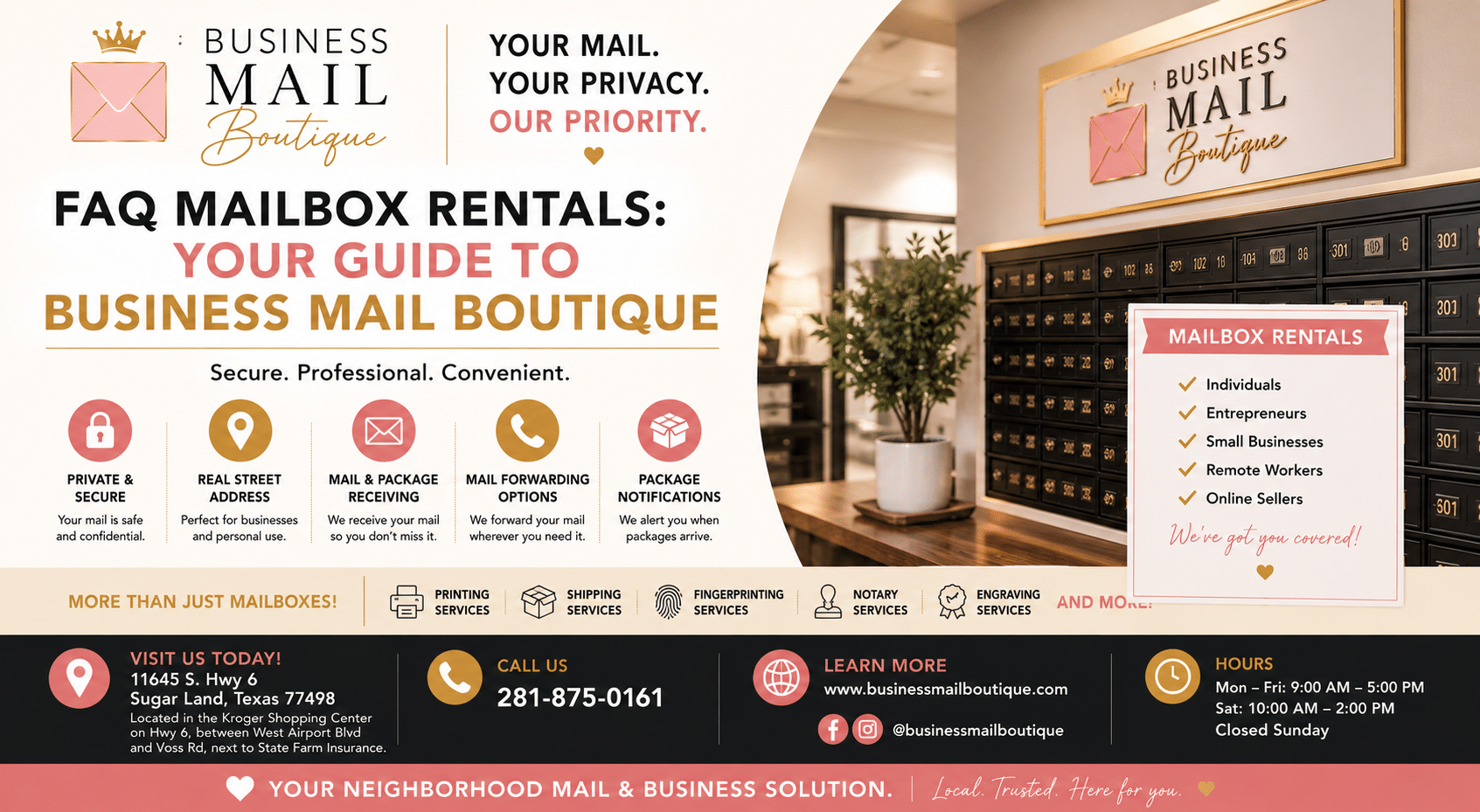
FAQ Mailbox Rentals: Your Guide to Business Mail Boutique
11645 S. Hwy 6, Sugar land, Texas 77498, United States (US) - Phone: 281-875-0161 Email: info@businessmailboutique.com
Route
You’re probably here because your current mail setup has started to feel clumsy.
Maybe you run a business from home and don’t want your house address printed on invoices, Google profiles, or vendor paperwork. Maybe packages keep landing on your porch while you’re out, and you’re tired of hoping they’re still there when you get back. Or maybe you travel, work remotely, and need a reliable way to see what arrived without driving across town.
That’s exactly why so many people look up FAQ mailbox rentals. They want straight answers before they commit. They want to know what kind of address they’ll get, how package receiving works, what paperwork is required, what they can manage online, and what happens if they need to cancel later.
Table of Contents
- Your Professional Address Solution in Sugar Land
- Choosing Your Mailbox Type Physical vs Digital
- Benefits of a Real Street Address
- Understanding Pricing Plans and Fees
- How We Handle Your Mail and Parcels
- Receiving Packages from UPS FedEx and USPS
- The Signup Process and ID Requirements
- Mailbox Access Pickup and Account Management
- Using Our Digital Mailbox and Scanning Services
- Privacy Security Cancellation and Renewal
Your Professional Address Solution in Sugar Land
A common situation looks like this. A home-based consultant starts getting more client checks, sample kits, and tax mail than expected. At first, using a home address seems fine. Then a package goes missing, a client notices the residential address, and the whole setup starts feeling less polished than the business itself.
That’s where a private mailbox starts making sense. You get a professional mailing address, a secure place for letters and parcels, and a cleaner separation between work life and home life. For many people, that’s a considerable upgrade. It’s not just mail storage. It’s peace of mind.
The demand for these services isn’t small or temporary. The global mailbox rental services market was projected at approximately USD 0.87 billion in 2026 and is expected to reach about USD 1.3 billion by 2035, with roughly 4% CAGR, according to mailbox rental market projections from Business Research Insights. That projection reflects how remote work, e-commerce, and small business formation have changed what people need from an address.
Practical rule: If your mail matters to your income, reputation, or privacy, it shouldn’t depend on a front porch or apartment mailbox.
Some customers want a better business presence. Others just want to stop chasing deliveries. Both are valid reasons to rent a mailbox.
Choosing Your Mailbox Type Physical vs Digital
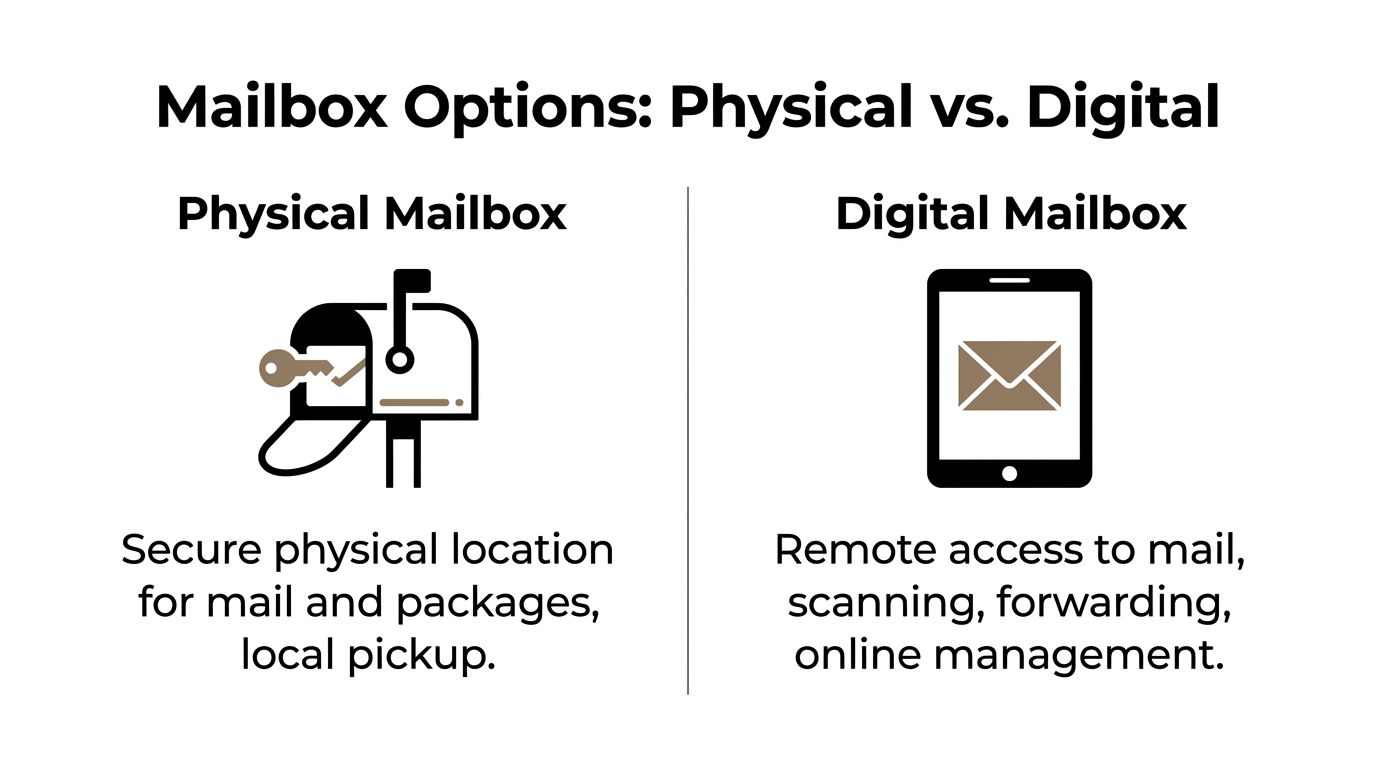
Not every renter needs the same setup. Some want a locked box they can visit. Others want to manage incoming mail from a phone or laptop. The best choice usually comes down to one question. Do you want to pick up your mail, or control it remotely?
Who usually chooses a physical mailbox
A physical or private mailbox is a good fit for people who live or work nearby and want a dependable place for daily mail and package pickup.
You might prefer this option if:
- You run a local service business: Think contractors, real estate agents, insurance brokers, or consultants who need a business mailing address.
- You receive frequent packages: A staffed receiving location is often easier than waiting at home.
- You want simple access: Pick up mail in person without logging into an app or requesting scans.
Physical mailbox users often care most about security, convenience, and presentation. If that sounds like you, comparing a PMB with a postal box helps. This guide on private mailbox vs PO Box differences is useful when you’re deciding between the two.
Who usually chooses a digital mailbox
A digital mailbox works best when you aren’t always in town or don’t want your mail tied to your physical location.
This setup often fits:
- Remote workers and travelers: You can monitor incoming mail without stopping by in person.
- Online sellers: Shipping notices, returns, vendor mail, and account documents can be managed from one dashboard.
- People who want mail actions on demand: Instead of waiting to sort a stack later, you review items and choose what to open, forward, or shred.
A good test is this. If you’ve ever thought, “I need to know what came in today, but I can’t get there,” a digital mailbox probably fits your routine better.
Some people even combine both expectations. They want a real place for receiving, plus digital tools for visibility and control.
Benefits of a Real Street Address
A real street address changes how your mail looks to customers, vendors, and agencies. It feels established in a way a home address or basic postal box often doesn’t.
Why a street address matters
For business use, a street address is often the more practical option because it looks professional on:
- Business cards and invoices
- Website contact pages
- Vendor applications
- Client-facing documents
- Many business registrations and filings
Under U.S. federal regulations, Commercial Mail Receiving Agency addresses are accepted for many commercial filings and registrations, but they are treated differently from a residential address. That distinction is outlined in this overview of CMRA address rules.
What it cannot be used for
Many people often get tripped up on this point: a mailbox rental address can be excellent for business mail, package receiving, and professional correspondence, but it generally cannot be used as a legal residence address for things like a driver’s license or voter registration.
That’s not a flaw in the service. It’s the rule that keeps private mailbox services compliant and clearly defined.
Use your mailbox address for business identity and mail handling. Use your home address where the law requires a residence.
If you keep that distinction clear from the start, you’ll avoid almost all of the confusion that frustrates new renters.
Understanding Pricing Plans and Fees
Pricing questions are usually less about the monthly charge and more about avoiding surprises. People want to know what they’re paying for, whether a larger mailbox matters, and what happens if they start receiving more packages than expected.
A simple way to compare plans
Here’s a clean way to think about plan structure. The exact names and fees vary by location, but the comparison model below helps you ask the right questions before you sign.
| Plan Name | Ideal For | Mail Items per Month | Price (per month) |
|---|---|---|---|
| Personal | Individuals and light household use | Varies by provider | Varies by provider |
| Business | Freelancers and small businesses | Varies by provider | Varies by provider |
| Corporate | Teams with higher mail volume | Varies by provider | Varies by provider |
If you’ve ever compared service pricing in another category, the pattern is similar. A useful example is MG Self Storage’s complete price guide, which shows how size, access needs, and service extras affect value more than the label on the plan.
Other fees people often ask about
When reviewing mailbox pricing, ask about these items directly:
- Setup charges: Some providers charge an initial onboarding fee.
- Key or access deposits: Physical mailbox users may need to leave a refundable deposit.
- Forwarding costs: If mail is shipped elsewhere, postage and handling may apply.
- Oversized package handling: Large or unusual deliveries may carry an added fee.
- Scan or special handling requests: Digital actions can be bundled or billed separately depending on the plan.
The smartest way to compare plans isn’t to ask, “What’s the cheapest?” Ask, “What’s included, and what triggers extra charges?”
How We Handle Your Mail and Parcels
People rarely worry about the mailbox itself. They worry about what happens after something arrives. That’s the trust question.
What happens when a letter arrives
When standard mail comes in, the first job is accurate intake. Staff check the recipient name, match it to the active mailbox record, and route it to the correct mailbox or account. That sounds simple, but a professional process holds paramount importance.
A good receiving workflow reduces the two problems customers hate most:
- mail placed under the wrong name
- important documents sitting in the wrong area without being logged
That’s why established mailbox stores rely on sorting routines instead of informal pile systems.
How mail stays organized
Once sorted, mail is kept in a secure area until pickup or the next requested action. Depending on the service type, customers may receive a notice, see the item in a digital dashboard, or collect it during their normal pickup routine.
Your mailbox service should feel boring in the best possible way. Mail arrives, gets matched correctly, stays secure, and waits for you.
If you receive sensitive items like checks, contracts, tax notices, legal envelopes, or replacement cards, consistency matters more than flashy features. The best handling process is the one that prevents mistakes before they happen.
Receiving Packages from UPS FedEx and USPS
Letters are only half the story. Many renters choose a mailbox mainly because they need a staffed address that can receive parcels from major carriers.
What package receiving usually looks like
A full-service mailbox location typically accepts deliveries from UPS, FedEx, and USPS, and many also receive shipments from major online marketplaces. That means you don’t have to plan your day around a delivery window or worry about a driver leaving a box in plain sight.
The normal package flow looks like this:
- Carrier delivery: A driver drops the package at the receiving counter or designated intake area.
- Recipient check-in: Staff identify the mailbox holder or account attached to the delivery.
- Secure holding: The parcel is placed in a protected storage area until pickup or further instructions.
- Customer notice: Depending on the service, you may receive an email, text, or app alert.
If package receiving is a top priority, it also helps to understand how authorized shipping counters work. This overview of a UPS Authorized Shipping Outlet gives helpful context for the kind of carrier support some locations provide.
Questions to ask before you sign up
Package policies differ more than people expect, so ask these before opening an account:
- How long are packages held? This matters if you travel or pick up infrequently.
- Are there limits on size or weight? Large boxes may need special handling.
- Do all carriers deliver there? Most do, but it’s worth confirming.
- How are you notified? Email, text, and portal alerts each suit different customers.
- What happens if a package arrives for a former recipient? Clear labeling and account management reduce mix-ups.
A good mailbox service should make package receiving easier, not turn it into another thing you have to track manually.
The Signup Process and ID Requirements
This is the part that surprises first-time renters. Opening a private mailbox isn’t the same as buying a gym membership or setting up a streaming account. Because a mailbox provider receives mail on your behalf, identity verification is a real requirement.
Why Form 1583 matters
For CMRA compliance, customers must complete USPS Form 1583, and that form must be notarized and kept on file with copies of government IDs for at least five years, as described in this explanation of USPS Publication 59 and Form 1583 requirements.
That requirement exists to create a legal chain of custodianship for received mail. In plain terms, it documents who authorized the mailbox provider to accept mail in that person’s name.
If you want a deeper look at the document itself, this page on the USPS Form 1583 process helps explain what customers are signing and why.
This paperwork is not optional. If a provider is receiving your mail legally, they need your verified authorization on file.
What to bring for identification
The exact acceptable documents should always be confirmed before your appointment, but expect to provide identification that proves both who you are and where you physically live.
Customers often get delayed for one of three reasons:
- Name mismatch: The ID and application don’t match exactly.
- Expired documents: Even valid-looking IDs can’t be used if they’re out of date.
- Missing notarization: Remote applicants often forget this step until the end.
If you’re signing up for a business mailbox, bring any business information requested during onboarding as well. That keeps account naming accurate from day one.
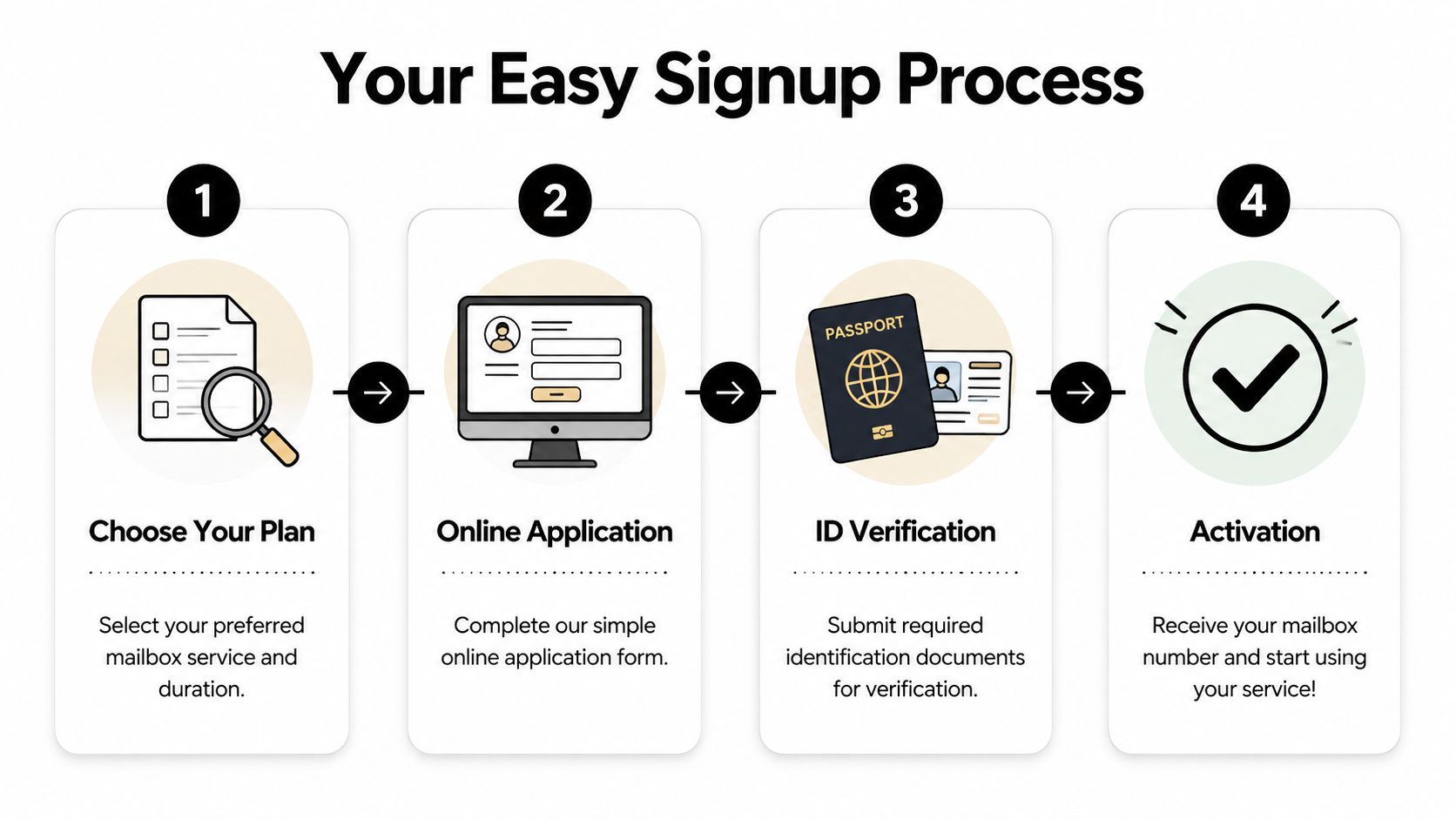
Typical signup flow
The process usually feels straightforward once you know the order:
- Choose your mailbox plan based on how you’ll use it.
- Complete the application with your contact details and recipient name.
- Submit identification and finish the notarization step for Form 1583.
- Receive activation details once the account is approved.
The biggest mistake people make is trying to rush step three. Bring the right documents, make sure your information matches, and the rest moves much more smoothly.
Mailbox Access Pickup and Account Management
Once your account is active, the next practical question is simple. How do you use it week to week?
Everyday access questions
Most mailbox renters settle into one of two habits. They either stop by on a regular schedule, or they wait until a notification tells them something important has arrived. Both work, as long as you know the pickup rules for your location.
Common things to confirm early include:
- Pickup hours: Know when staff are available if your items are kept behind the counter.
- After-hours access: Some services offer extended or self-service access, while others don’t.
- Authorized pickup: If a spouse, assistant, or team member may collect mail, ask how to add them correctly.
- Photo ID at pickup: Many stores require it for parcel release or account-sensitive items.
These details seem minor until the day someone else needs to collect an urgent package for you.
Managing changes on your account
Mailbox accounts aren’t static. Travel, staffing changes, and business growth all affect how you use the service.
You may want to request:
- A temporary mail hold while you’re away
- Forwarding to another address during travel or relocation
- An additional recipient name for a business partner or department
- Removal of an old authorized user after a role change
The easiest mailbox accounts to manage are the ones that stay current. If a name, phone number, or forwarding need changes, update it before mail starts piling up.
Good account management isn’t complicated. It’s mostly about keeping permissions, names, and instructions accurate so your mail keeps moving the way you expect.
Using Our Digital Mailbox and Scanning Services
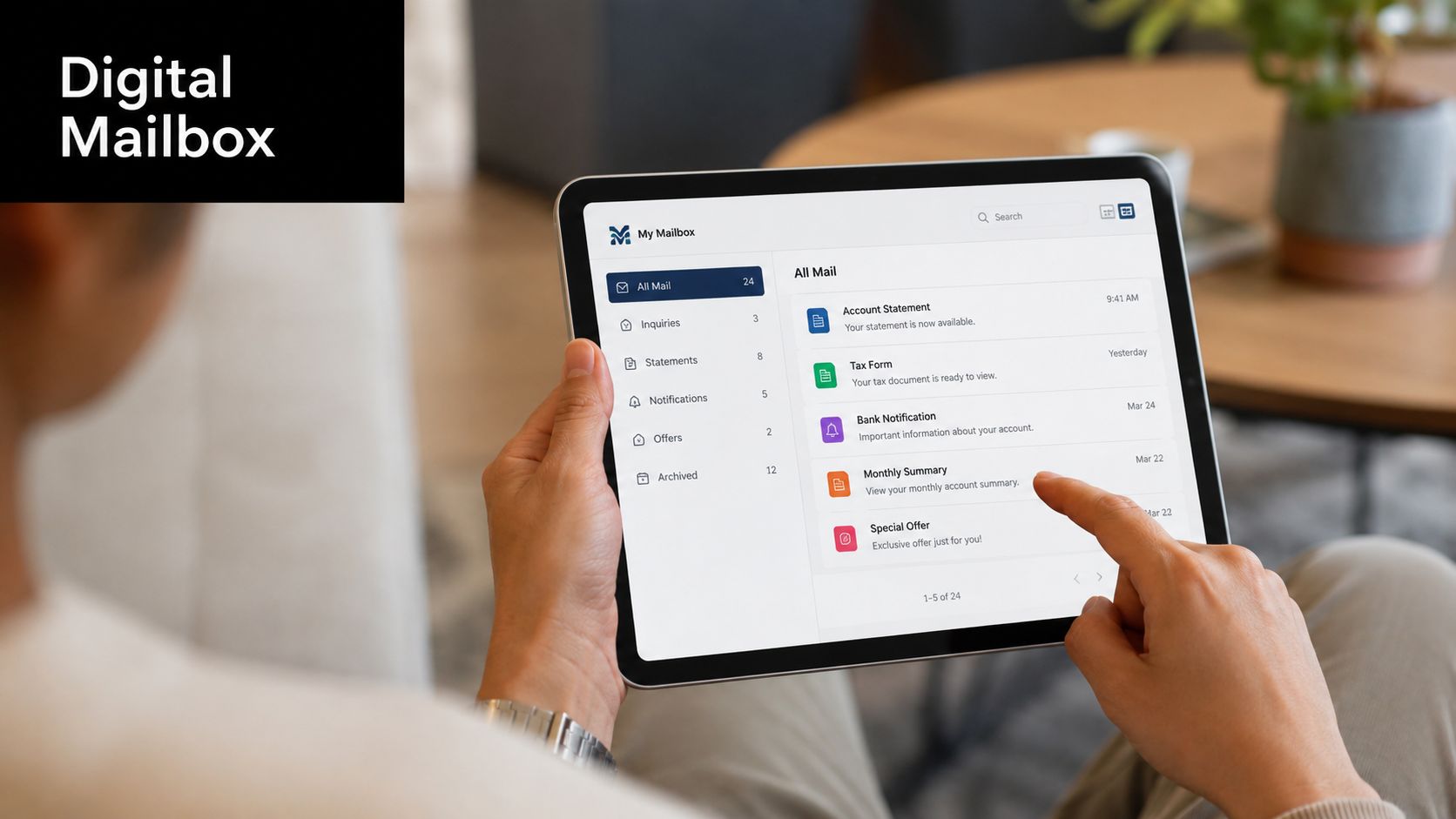
Digital mailbox service is what turns a mailing address into a remote workflow tool. Instead of wondering what’s waiting in your box, you log in and see what arrived.
How digital mail works in practice
Here’s the basic experience. A piece of mail arrives. The outside gets logged into your account, and you receive a notification. From there, you decide what happens next.
For someone who travels, that means checking an envelope before deciding whether it needs immediate attention. For a business owner, it means separating junk mail from invoices, vendor notices, or customer payments without waiting for the next in-person visit.
Typical digital mailbox actions include:
- View envelope scans: See what arrived before choosing your next step.
- Request open and scan: Have the contents scanned for online review.
- Forward selected items: Send physical mail where you need it.
- Shred unwanted mail: Clear out paper you don’t want to store.
That kind of control is why virtual features have become such a strong demand driver in mailbox services, especially among remote workers and online sellers, as noted earlier in the market outlook.
A quick visual walk-through can help if this is your first time using a virtual mailbox:
Common actions inside a digital mailbox
The most useful digital mailbox accounts aren’t the ones with the most buttons. They’re the ones that help you make quick decisions.
A practical routine looks like this:
- Check notifications daily: You’ll spot time-sensitive mail faster.
- Open and scan only what matters: That keeps processing focused and costs predictable.
- Forward in batches when possible: It’s easier than mailing one item at a time.
- Shred low-value paper promptly: That reduces clutter and protects privacy.
If you’re the kind of person who already manages banking, scheduling, and documents online, a digital mailbox usually feels natural within a day or two.
Privacy Security Cancellation and Renewal
Trust matters more in mailbox service than in almost any other everyday business service. People are handing over checks, legal notices, tax documents, IDs, contracts, and personal correspondence. That means privacy can’t be treated casually.
How privacy is protected
A strong mailbox operation protects both the physical mail and the account data around it. Physical items should be accessible only to authorized staff and approved account holders. Digital records should be tied to verified users and managed carefully.
If you like seeing how service businesses explain responsible information practices, this page can help you understand our data handling through a privacy-policy example in a related business setting.
The main question to ask isn’t “Do you take privacy seriously?” Every business will say yes. Ask what controls exist around access, identity verification, and release of mail.
How renewals and cancellations usually work
Renewals should be simple. You want advance notice, clear payment options, and enough time to decide whether you’re continuing, changing plans, or closing the box.
Before opening any mailbox account, ask:
- How renewal reminders are sent
- Whether service renews automatically or manually
- What notice is required for cancellation
- How remaining mail is handled after closure
- Whether forwarding can be set up during the closeout period
A clean cancellation policy is a sign of a well-run service. If a provider is vague about ending service, customers usually feel that confusion later when they’re trying to move mail, update records, or recover final items.
If you want a secure mailbox with a real street address, package receiving, digital mail options, and practical help from a local team, Business Mail Boutique LLC is a smart place to start. Reach out to confirm current mailbox availability, signup requirements, and the best plan for how you receive mail today

Related posts

Custom Memorial Glasses Engraved in Three Hours in Sugar Land
When a customer needed eight personalized glasses for a memorial, Business Mail Boutique completed the engraving or...

Custom Martini Glass Engraving in Sugar Land, TX
Custom Logo Engraving on Martini Glasses in Sugar Land, Texas.
Business Mail Boutique recently completed a beautiful custom engravin...

Custom Engraved Wine Glasses for a Golf Club Event in Sugar Land, TX
Custom Engraved Wine Glasses for a Golf Club Event in Sugar Land.
Custom wine glass engraving in Sugar Land, TX at Business Mail Bouti...