
- Print Business Cards in Sugar Land – Same Day Service
- Copying Services
- Document Printing, Finishing & Lamination in Sugar Land
- Flyers
- Print Banner in Sugar Land | Same-Day Banner Printing Near Me
- Graphic Design
- Photo Printing
- Postcard Printing
- Document Printing
- EDDM Full Service Postcards
- FotoZoomer Large Format Printing


Cost to Print in Color: A Small Business Guide
Businessmailboutique
11645 S. Hwy 6
Sugar land, Texas 77498 United States (US)
Email: info@businessmailboutique.com
Route
You approve a flyer proof, ask for a simple color print quote, and the number comes back higher than expected. That happens all the time. The part that surprises most small business owners isn’t that color costs more than black and white. It’s that a page with a tiny logo often gets billed like a page covered edge to edge in photos.
That gap between what feels fair and how many printers bill is where budgets get wasted. If you understand how shops price color, especially the difference between flat-rate color billing and actual-usage billing, you can ask better questions, compare quotes properly, and avoid paying premium rates for light-color jobs.
Why Is Color Printing So Expensive Anyway
A bakery owner orders menus. The front has food photos, the back is mostly text with a small brand mark. The quote still treats both sides as color. From the customer’s side, that feels wrong. From the machine’s side, it depends entirely on how the device or contract is set up.
That’s the part most online guides skip. They talk about ink, toner, and paper, which matter. But they don’t explain that many shops and office fleets bill color as a simple yes-or-no decision. If any color appears on the page, the page enters the color bucket.
A small logo can turn a black-and-white job into a color-priced job if the printer uses flat-rate billing.
That billing logic is why the cost to print in color feels inconsistent. Two jobs can look very different and still price out the same on a per-page basis. One page might have a tiny blue header. Another might be a full-bleed marketing sheet. If the billing model is flat, both get charged as color.
There are real production costs behind that. Color printing uses more consumables, more calibration, and often more quality control than monochrome work. Heavy graphics can also push a page much higher than a light business document, especially on desktop equipment.
For a small business, the practical lesson is simple:
- Don’t assume light color means a light charge. Many systems don’t work that way.
- Don’t compare quotes blindly. One printer may charge a flat color rate, while another may price based on toner coverage or production method.
- Don’t focus only on the artwork. The billing model often matters more than whether your logo is small.
Once you know that, color pricing stops looking random. It starts looking negotiable.
The Core Components of Color Printing Costs
Color printing gets expensive because you’re not buying “color” as one thing. You’re paying for a process that stacks multiple materials and machine actions onto a single sheet.
CMYK is four supplies, not one
Commercial and office printers build color with CMYK, which stands for cyan, magenta, yellow, and black. This process is akin to mixing four paint streams rather than using a single black marker. Every extra channel adds cost.
According to this explanation of mono versus color print charge calculations, a black-and-white page may cost 2 cents, while a full-color page can cost approximately 17 cents because it uses black plus three color channels. That same source explains the underlying logic: black is one supply stream, but color combines all four.
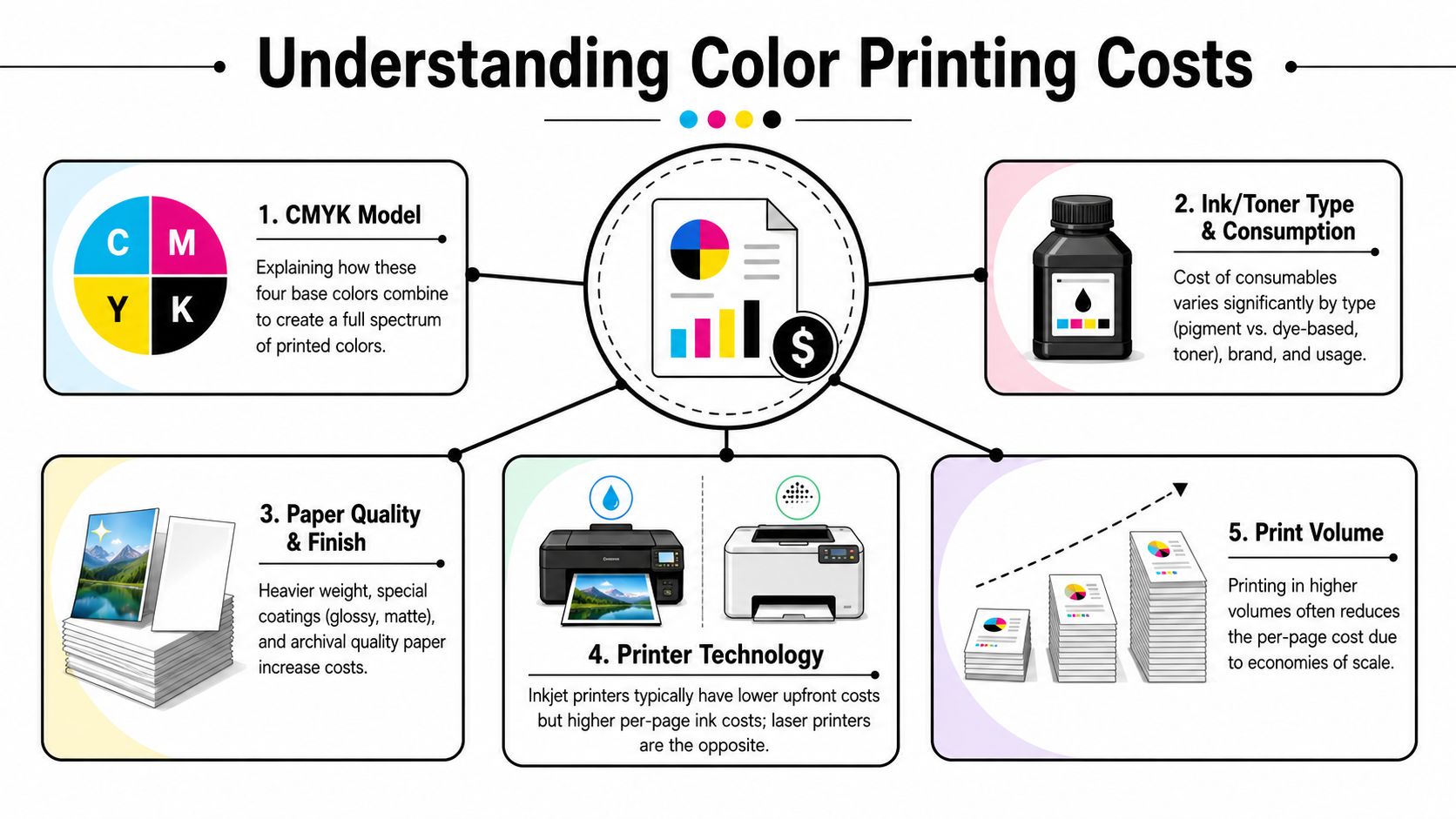
That four-channel structure affects more than the toner line on a job sheet. It affects calibration, consistency, and waste. If a color run starts drifting, the operator often has to correct it before the job continues. Black text is simpler. A branded mailer with photos isn’t.
Desktop printing and commercial copying are priced differently
Desktop equipment and production equipment don’t behave the same way. A small office printer might be convenient for proofs or short internal runs, but convenience doesn’t always mean low cost.
If you’re comparing in-house output with outsourced production, it helps to know what affects the gap:
- Laser versus inkjet: The consumable pattern differs, and so does the per-page cost structure.
- Coverage level: Light color and heavy graphics may be billed the same on some devices, or differently on others.
- Paper path and finish compatibility: Premium stock can require a slower process or a different machine.
- Run size: Small runs often carry the highest per-page pain.
If you work in other decorated products too, the pricing logic will sound familiar. For example, businesses comparing print methods on apparel and accessories often need to understand screen printing hat costs because setup, volume, and material choice all shift unit economics in similar ways.
For businesses ordering marketing pieces, it’s also worth comparing service formats, not just price labels. A local option for color and black white copy services can make it easier to choose the right production method for short runs, event handouts, and everyday business documents.
Key Factors That Determine Your Final Price
The final quote isn’t one decision. It’s a stack of decisions. I usually compare it to ordering a work truck. The base model gets the job done, but every upgrade changes the total.
The six choices that move a quote up or down
Here are the six variables that usually change the number fastest.
- Volume
Quantity has a huge effect on unit cost. A short run spreads setup and handling across fewer sheets. A larger run spreads that same work across more pieces.
- Paper type and weight
Paper isn’t just paper. Standard sheets cost less than premium coated stocks, and specialty materials can push the quote higher.
- Finishing
Cutting, folding, laminating, binding, scoring, and trimming all add labor or machine time. A flat flyer is one thing. A folded brochure or laminated menu is another.
- File preparation
A clean print-ready file saves prepress time. A file that needs correction, resizing, or layout repair adds cost even before the first sheet prints.
- Printer type
For in-house desktop output, this breakdown of average page costs notes that desktop laser color pages average 12 to 15 cents, while inkjet color pages are around 20 cents. The same source notes that standard high-quality stock adds about 1 cent per sheet. That matters when you’re deciding whether to run jobs internally or send them to a shop.
- Turnaround time
Rush work usually narrows your choices. The shop may need to interrupt another run, assign labor differently, or use a faster but less economical workflow.
What usually saves money and what usually does not
Small businesses often chase the wrong lever. They shrink a logo, swap one accent color, or remove a colored footer. That only helps if the billing model recognizes lighter coverage.
These choices usually help more:
- Combine demand into larger runs. Ordering once for a campaign often beats placing several small emergency orders.
- Match the stock to the job. A takeaway menu, trade show handout, and premium leave-behind don’t need the same paper.
- Skip extras that don’t change response. Lamination and special finishes are useful when the piece needs durability or a premium feel, not by default.
- Approve the file carefully. Reprints caused by preventable file issues are one of the quietest ways to waste a print budget.
Practical rule: If the piece is mostly text and only carries a logo or header color, ask how the device bills low-coverage pages before you approve the run.
What usually doesn’t help enough under flat billing is trimming small color accents. If the machine charges color the moment it sees any color at all, a tiny mark in the corner still triggers the color rate.
Color Printing Costs in Practice Example Scenarios
Generic advice gets clearer when you put jobs side by side. Below are three common scenarios that show why the same phrase, cost to print in color, can mean very different things depending on how you print and how much you order.
Three common jobs and how they price out
Scenario one: short-run in-house flyers
You need a few dozen promotional sheets for a weekend event. Convenience wins, but desktop color can be costly per page, especially if you use inkjet or premium stock.
Scenario two: local batch of business handouts
You need enough flyers for a campaign drop, counter display, or community event. This is often where commercial copy pricing starts to look better than office printing.
Scenario three: volume order for a major distribution
You already know the design won’t change. This allows economies of scale to make commercial color surprisingly efficient.
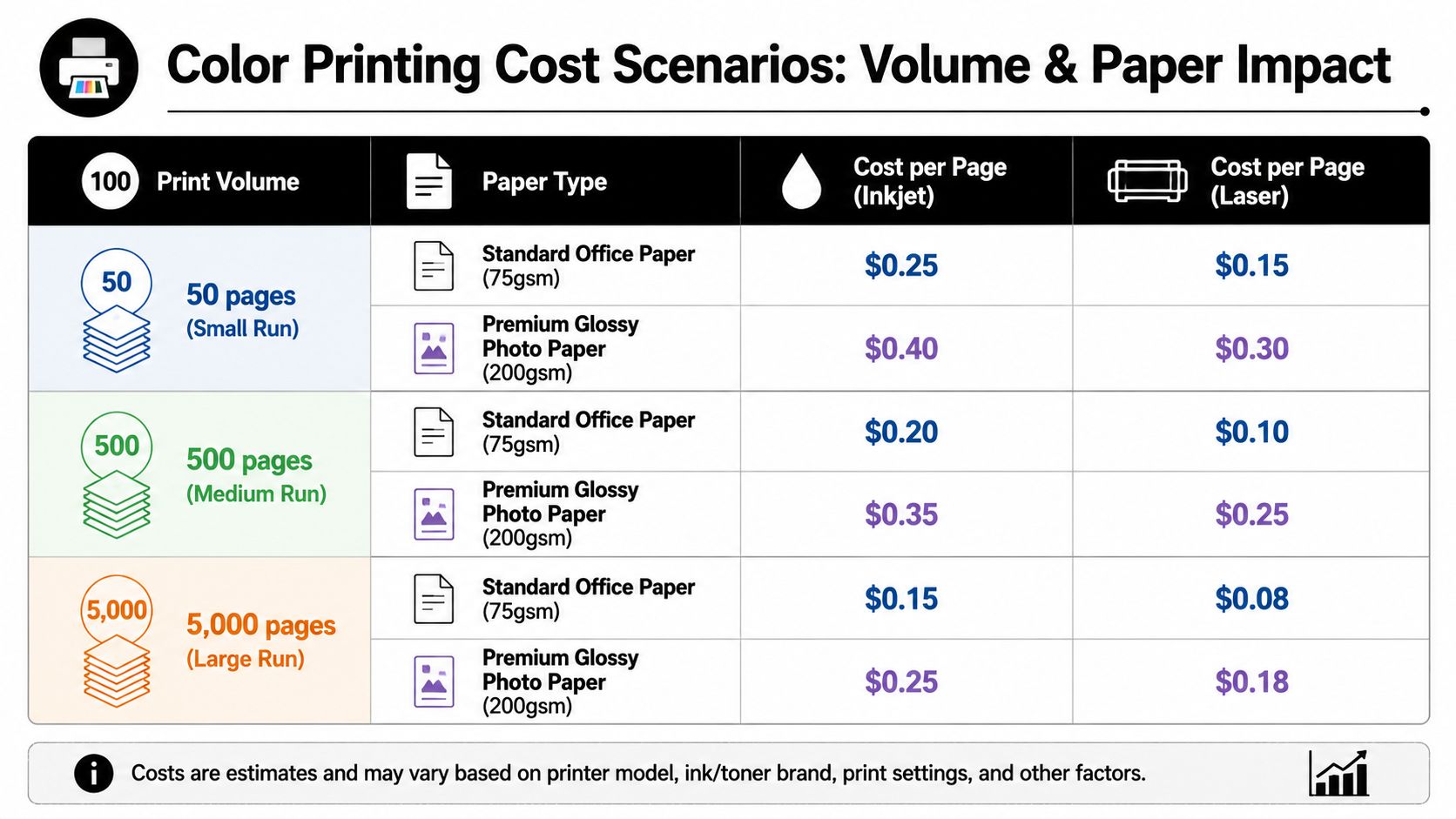
A useful benchmark comes from commercial color copy pricing examples. That source notes a job priced at about 42 cents per sheet at 250 copies can drop to roughly 8 cents per page at 1,000 or more copies. It also notes that commercial color copy services can range from $0.08 to $1.00 per page, depending on stock, quantity, and finishing.
Example color printing costs by volume
| Print Quantity | Example Cost Per Page | Example Total Cost |
|---|---|---|
| 250 copies | 42 cents | $105.00 |
| 1,000 copies | 8 cents | $80.00 |
| 25,000 copies on 20/50# Bond, single original | 5 cents | $1,250.00 |
That table shows the pricing curve clearly. A larger order can cost more in total dollars while costing less per piece. That’s why a shop may tell you to print more than you first planned. It isn’t always upselling. Sometimes it’s the only way to move the unit price into a sensible range.
If you’re reordering the same flyer every few weeks, you’re often paying the small-run penalty over and over.
Another practical point: not all “larger” jobs belong on premium paper. A coupon drop, neighborhood handout, or in-store promo often works fine on simpler stock. Save heavier coated sheets for pieces people are meant to keep.
Smart Strategies to Reduce Your Color Printing Costs
Most businesses try to save money by changing the artwork. That’s useful sometimes, but it’s not the first place I’d look. The biggest savings usually come from changing the pricing structure, the run strategy, or the production method.
Questions to ask before you approve the job
Start with direct questions. Good shops can answer them quickly.
- Is this flat-rate color or usage-based color?
This is the most important question for logo-heavy documents.
- If a page has only a small logo, is it still billed as full color?
Many systems say yes.
- Would this job price better as a larger run?
If the design is stable, batching is often cheaper.
- Can I split the job by purpose?
Internal copies may not need the same stock or finish as customer-facing pieces.
A key billing reality comes from Oklahoma State University’s color print FAQ, which states: “Any document printed on the color printer will incur a charge of $.10/page regardless of the amount of color on the page,” and also notes that pages with even a very small amount of color are billed as color. That’s the issue many small businesses miss.
Tactics that work better than trimming the logo
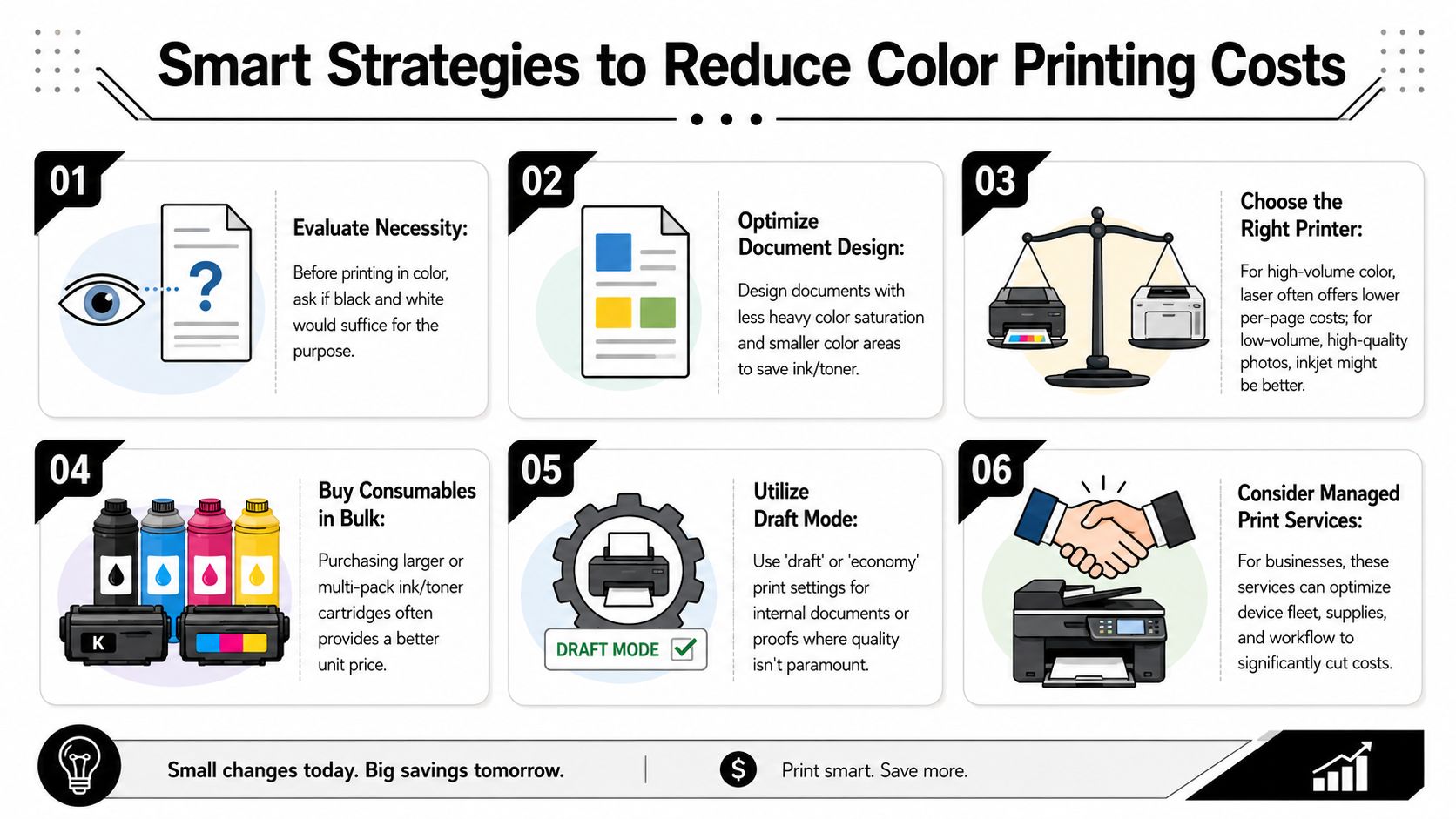
One helpful way to think about print savings is to compare them with other branded materials. Companies reviewing strategies to cut company swag expenses run into the same truth: the biggest wins usually come from smarter specifications and smarter ordering, not cosmetic tweaks that don’t change the production model.
Here are the tactics I’d push first:
- Ask for a low-coverage option. Some devices and contracts can bill light-color pages more fairly than flat-rate systems.
- Separate internal from external use. Proofs, drafts, and staff copies don’t always need full-color production.
- Batch repeat jobs. If you know you’ll reorder, price the larger quantity now.
- Choose paper by function. A yard sale flyer, takeout insert, and premium presentation sheet should not all use the same stock.
- Use a local low-cost channel for simple flyer runs. If you’re comparing options, looking at where to print flyers for cheap can help frame the trade-off between speed, quality, and minimums.
This short video gives a useful visual overview of print-cost thinking before you order:
What doesn’t usually work under flat-rate billing is obsessing over whether the logo should be a little smaller or the header should use a lighter tint. If any color triggers the same charge, you haven’t changed the price at all.
Get a Clear Color Printing Quote in Sugar Land
A good quote should answer practical questions, not just show a total. If you’re pricing flyers, menus, postcards, presentation sheets, or event handouts, the useful part isn’t only the number. It’s knowing what assumptions sit behind that number.
Bring the right information the first time
When you ask for a quote, bring these details:
- Exact quantity needed
- Final size
- Single-sided or double-sided
- Paper preference, if any
- Whether the job is mostly text, logo-only color, or image-heavy
- Any finishing needed, such as folding, cutting, laminating, or binding
- Your deadline
That information helps the shop quote the right production path the first time. It also makes it easier to compare one vendor with another because you’re pricing the same job, not two different assumptions.
What a useful quote should tell you
A strong quote should make these points clear:
- Whether pricing assumes full color billing or a lighter-coverage approach
- What paper is included
- Whether finishing is included
- How quantity changes the unit price
- Whether there is a better break point for ordering more
If you’re choosing between local providers, this guide on choosing a local print shop in Sugar Land is a practical reminder that transparency matters as much as the headline price. The cheapest-looking quote isn’t always the cheapest job once paper, finishing, reruns, and turnaround are counted properly.
When a shop explains the billing model, the stock, and the break points clearly, you can make a smart decision fast. That’s what most small businesses need. Not mystery pricing. Just a straight answer on what the color is costing and why.
If you need a straightforward quote for flyers, business cards, posters, banners, signs, or everyday document printing, Business Mail Boutique LLC in Sugar Land can help you compare options clearly and choose the most sensible setup for your budget, timeline, and print goals.

Related posts

Custom Memorial Glasses Engraved in Three Hours in Sugar Land
When a customer needed eight personalized glasses for a memorial, Business Mail Boutique completed the engraving or...

Custom Martini Glass Engraving in Sugar Land, TX
Custom Logo Engraving on Martini Glasses in Sugar Land, Texas.
Business Mail Boutique recently completed a beautiful custom engravin...

Custom Engraved Wine Glasses for a Golf Club Event in Sugar Land, TX
Custom Engraved Wine Glasses for a Golf Club Event in Sugar Land.
Custom wine glass engraving in Sugar Land, TX at Business Mail Bouti...