
- Print Business Cards in Sugar Land – Same Day Service
- Copying Services
- Document Printing, Finishing & Lamination in Sugar Land
- Flyers
- Print Banner in Sugar Land | Same-Day Banner Printing Near Me
- Graphic Design
- Photo Printing
- Postcard Printing
- Document Printing
- EDDM Full Service Postcards
- FotoZoomer Large Format Printing


Cheap Printing Services: Save Money
Businessmailboutique
11645 S. Hwy 6
Sugar land, Texas 77498 United States (US)
Email: info@businessmailboutique.com
Route
Find cheap printing services without sacrificing quality. Our 2026 guide offers step-by-step tips on saving money on business cards, flyers, and banners.
You’ve got the artwork ready. The logo looks sharp on screen, the event date is locked in, and you just need business cards, flyers, postcards, or a banner printed without blowing the budget. Then the quotes come back, and they’re all over the place. One looks suspiciously cheap. Another feels overpriced. A third adds shipping, rush fees, and file setup charges right before checkout.
That’s where many people get stuck.
Cheap printing services can save considerable money, but only if you know what you’re truly buying. In printing, the lowest sticker price often hides the true cost in paper quality, delays, reprints, color choices, or bad file prep. The good news is that printing is a huge, competitive industry, and that scale creates room for smart buyers to get strong value. The global commercial printing market reached USD 480.4 billion in 2023 and is projected to reach USD 586.2 billion by 2032, according to commercial printing market data from Market.us.
That matters for one simple reason. In a market this large, there are plenty of ways to save without settling for junk.
Table of Contents
- Your Guide to Affordable High-Quality Printing
- Decoding Your Print Quote What Really Drives the Price
- Smart Tactics to Lower Your Printing Bill Today
- The Pre-Flight Checklist Preparing Your Files for Flawless Printing
- The Price of Speed Local Same-Day vs Online Economy
- Advanced Strategies for Businesses and Bulk Orders
Your Guide to Affordable High-Quality Printing
Cheap printing doesn’t mean grabbing the rock-bottom option and hoping for the best. It means understanding where quality matters, where flexibility matters, and where you can trim cost without hurting the final piece.
A lot of buyers focus on unit price only. That’s a mistake. A postcard that arrives late, curls in the mail, smudges easily, or feels flimsy in a customer’s hand wasn’t cheap. It just looked cheap at checkout.
The better approach is to match the print method and the specs to the job. If you’re printing a simple handout for an internal meeting, you can keep it lean. If you’re printing leave-behinds for a sales team, a real estate postcard, or a menu that gets handled often, the paper and finish matter because the piece has to hold up and represent your brand well.
Practical rule: Cheap printing services deliver value when you cut waste, not when you cut the parts people notice.
That mindset also helps you compare online vendors with local shops more clearly. Online printers often win on standard products with longer lead times. Local shops often win when you need guidance, speed, paper samples, finishing help, or a fast correction before a deadline. For many small businesses, the smartest move isn’t choosing one forever. It’s using each option for the jobs it handles best.
There’s no single cheapest printer for every project. There’s only the right setup for this project, this deadline, and this budget.
Decoding Your Print Quote What Really Drives the Price
Most print quotes are built around a handful of variables. Once you know those levers, you can lower cost with intention instead of guessing.
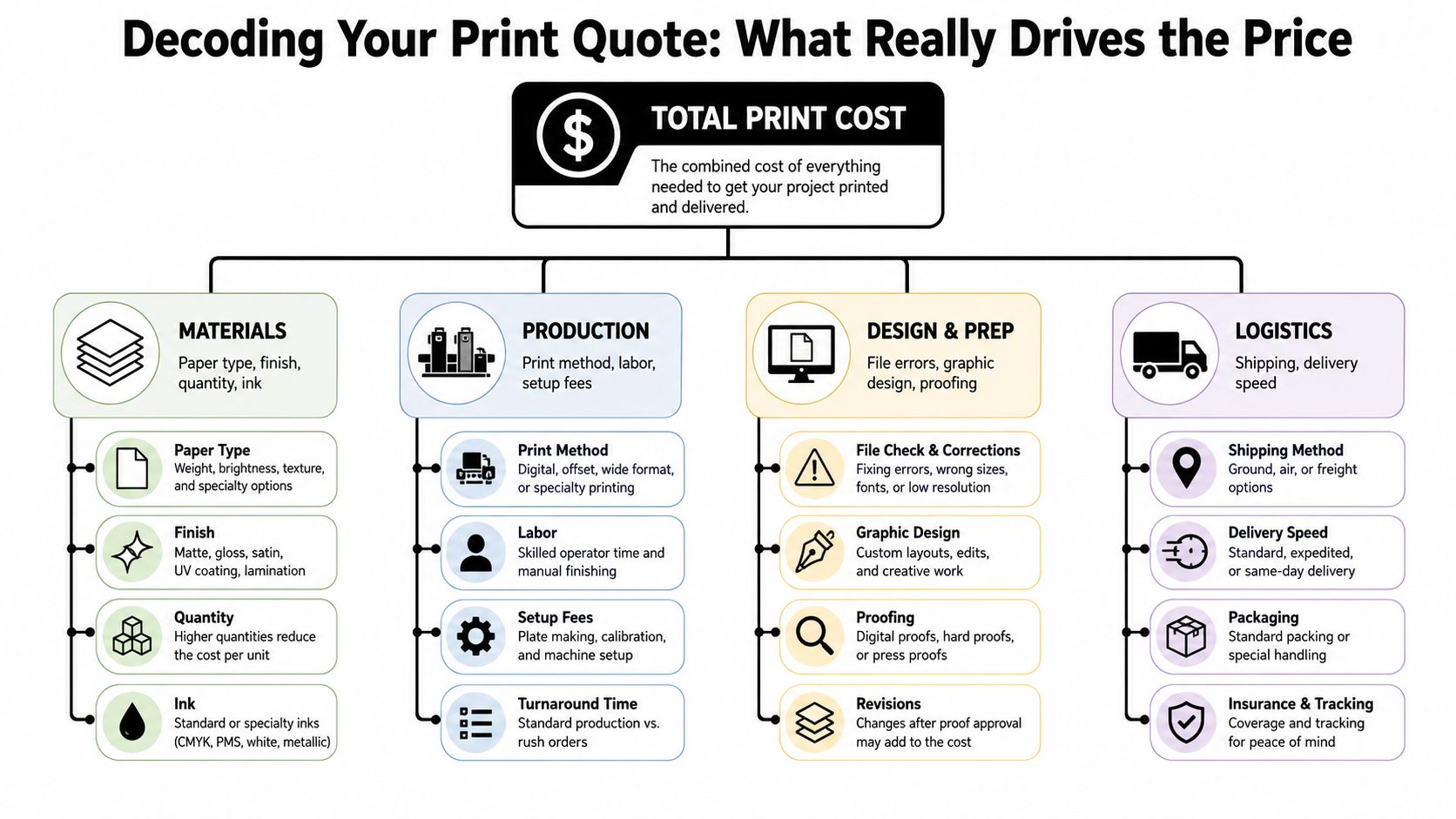
The line items that matter most
Quantity changes everything. Printers spread setup time, press time, and handling across the whole run. That’s why a larger order often drops the per-piece cost, even if the total invoice rises.
Paper stock is one of the biggest price drivers. Thicker stock usually costs more, but it also changes how the piece feels, folds, mails, and lasts. A matte stock, gloss stock, coated cover, uncoated text sheet, or heavier card stock each sends a different signal.
Trim size matters because presses and paper sheets are built around standard production sizes. If your flyer, postcard, or booklet fits efficiently on the parent sheet, waste stays lower. Custom sizing often creates extra spoilage, more cutting, or special handling.
Color can easily inflate the bill. If a project doesn’t need full color, don’t force it. For jobs with mostly text or internal use, black and white may be the smarter choice. If only one side needs visual impact, keep the back simple.
You also pay for finishing. Folding, scoring, binding, laminating, padding, perforating, drilling, and coating all add labor and time. None of these are bad. They just need to earn their place.
For business owners who like to think in margins, Next Point Digital’s product pricing tips offer a useful framework for evaluating whether your print choices support the result you need, instead of just chasing the lowest input cost.
Where cheap gets expensive
The biggest trap in cheap printing services is assuming all paper is basically the same. It isn’t. The hidden cost often shows up after delivery, not before. As explained in 48HourPrint’s discussion of cheap printing trade-offs, low-cost providers often use thinner paper stocks such as 12PT instead of 16PT, which can reduce durability and hurt professional perception.
That difference matters on postcards, rack cards, invitations, and business cards. If the piece bends too easily, scuffs quickly, or feels weak in hand, you may end up reordering sooner or replacing materials for important events.
A few quote details deserve extra attention:
- Proofing and file review: Some printers include this. Others charge when your file needs cleanup.
- Shipping: An online quote can look low until freight is added.
- Turnaround: Rush production almost always costs more.
- Bleed or trim issues: If your design isn’t built correctly, the printer may need to fix it.
- Color expectations: Screen colors and printed colors aren’t identical. If the job is brand-sensitive, ask questions early.
If you want a clearer sense of why color choices affect the bill so much, this guide on what it costs to print in color helps explain the practical difference between black-and-white jobs and full-color output.
A good print quote tells you what you’re paying for. A bad one makes you find out after the order is placed.
Smart Tactics to Lower Your Printing Bill Today
The fastest savings usually come from better decisions before the order is submitted. Not heroic negotiation. Not coupon hunting. Better specs.
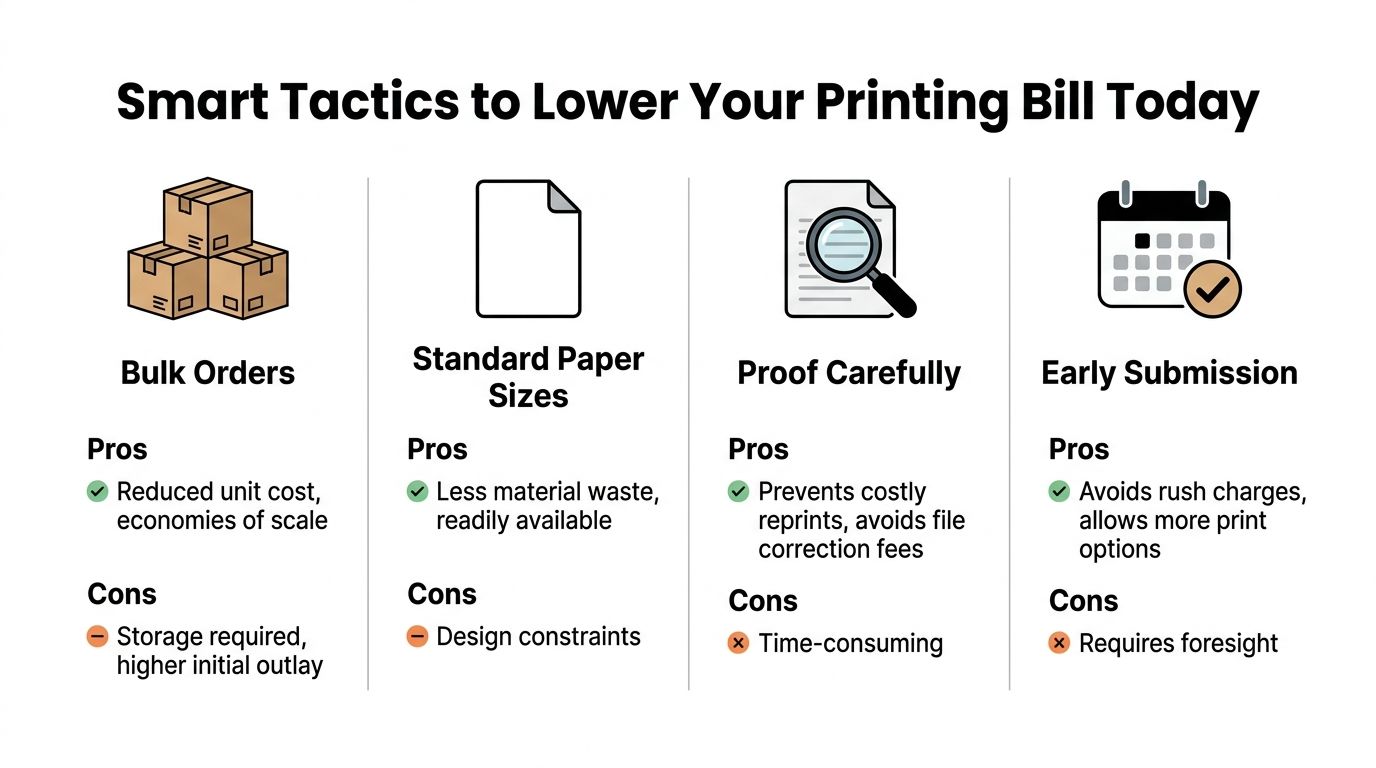
Choose the specs that save money
Start with standard sizes. A standard flyer, postcard, or business card is easier to gang up on press sheets and easier to trim efficiently. Custom dimensions may look distinctive, but they often cost more because they disrupt normal production flow.
Be selective about paper weight. Use heavier stock when the piece is meant to impress or survive handling. Use lighter stock when the piece is temporary, informational, or inserted into a package. Don’t overspec paper just because it sounds premium.
Also think about digital versus offset in practical terms. Digital printing is usually a good fit for shorter runs, versioned pieces, and jobs that need a quick turnaround. Offset becomes attractive when the job is large enough and stable enough to justify the setup. A good shop will steer you toward the economical method for the quantity you need.
Then there’s batching. If you know you’ll need postcards, handouts, and menus across the month, plan them together where possible. Grouping similar jobs can reduce setup friction and give the printer room to produce more efficiently.
Cost-Saving Choices at a Glance
| Factor | Lower Cost Option | Higher Cost Option | Pro Tip |
|---|---|---|---|
| Size | Standard finished sizes | Custom trim sizes | Design to common dimensions before artwork is finalized |
| Color | Black and white where appropriate | Full color on every page | Reserve color for pages or sides that need visual impact |
| Layout | Double-sided when practical | Single-sided by default | Put secondary details on the back instead of adding more sheets |
| Timing | Early submission | Rush turnaround | Give the printer options instead of forcing premium timing |
| Quantity planning | Batched recurring orders | Multiple one-off orders | Forecast near-term needs and combine what makes sense |
| File prep | Print-ready PDF | Editable file with issues | Clean files avoid correction fees and delays |
Some mistakes cost more than people realize. According to Braden Online’s managed print guidance, printing unnecessarily in color can cost 3 to 5 times more per page, single-sided printing can increase material and storage costs by 20 to 30%, and incomplete print specs can lead to 15 to 25% higher costs from miscommunication.
That’s why strong job instructions matter. Give the printer the quantity, final size, flat size if folded, paper preference, number of sides, finishing details, and delivery date. If mailing is involved, include that up front instead of treating it as an afterthought.
A few habits save money immediately:
- Proof on paper: Zoomed-in screen review misses things. Print one copy at actual size.
- Cut color where it doesn’t help: Internal forms, instruction sheets, and backup copies rarely need full color.
- Use both sides wisely: Not every project should be duplexed, but many should.
- Submit earlier than you think you need to: Time gives the printer better production choices.
The Pre-Flight Checklist Preparing Your Files for Flawless Printing
A surprising number of print overruns start with a file that looked fine on a laptop. Then the fonts shift, the images soften, the colors drift, or the artwork trims too close to the edge.
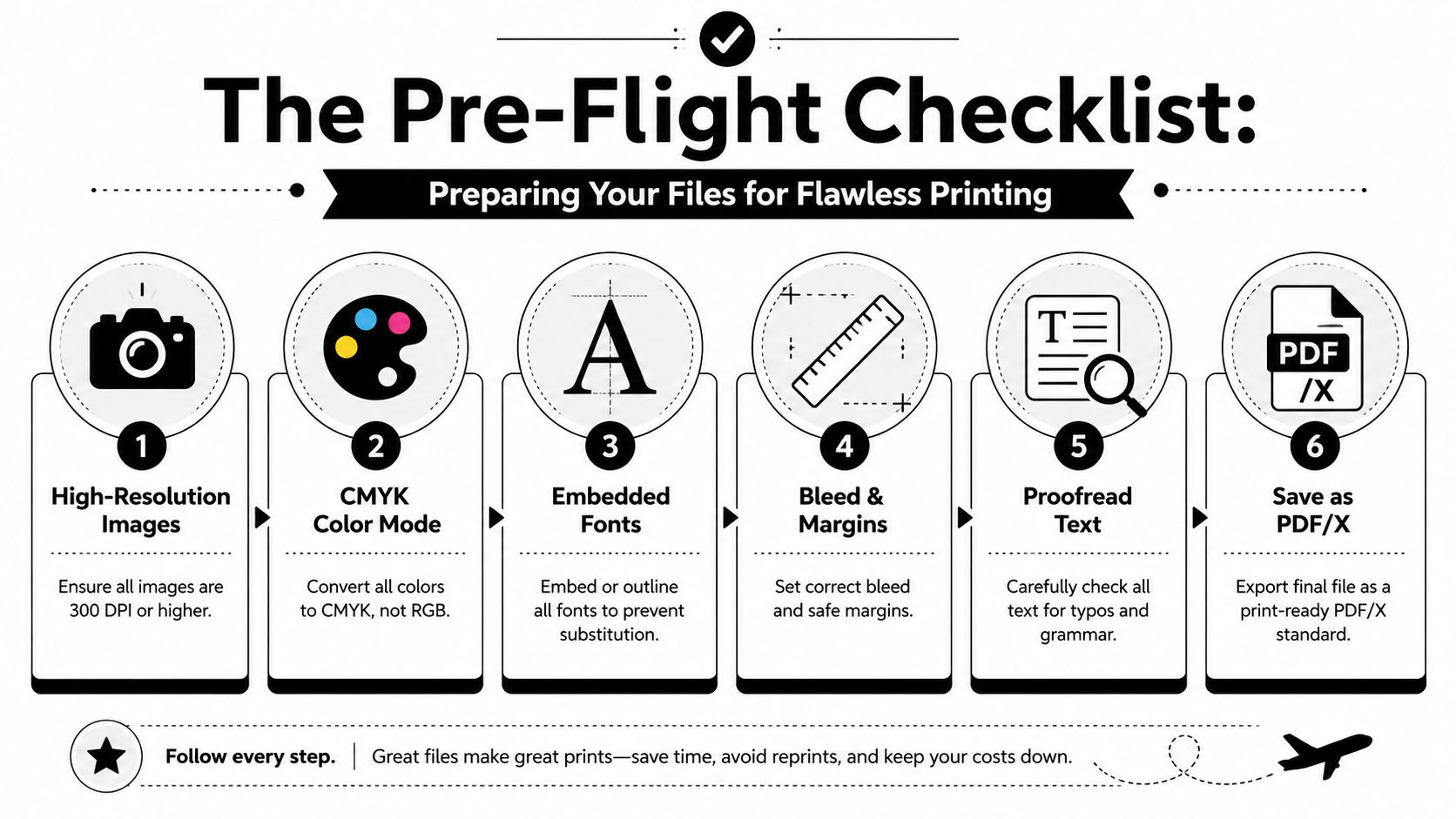
What to check before you upload
Keep your images high resolution. For most print work, that means using files built for print, not screenshots pulled from a website or social platform. If an image looks slightly soft on screen, it usually looks worse on paper.
Build the file in CMYK color mode, not RGB. Screens display light. Printing uses ink. That’s why bright blues, greens, and neon-style colors often print differently than expected when the file wasn’t prepared correctly.
Use proper bleed and safety margins. Bleed gives the printer extra image area beyond the trim so you don’t end up with thin white edges. Safety margin keeps text and logos away from the cut line so they don’t get clipped.
Fonts create problems more often than anticipated. Embed them in the PDF or convert them to outlines when appropriate. If you work across design apps or shared templates, this guide on optimizing font file formats is a useful reference for avoiding font-related surprises.
Export the final artwork as a high-quality print PDF, ideally using a print-ready preset your designer or printer recommends.
Small file mistakes that turn into real charges
The expensive part isn’t the mistake itself. It’s the correction cycle.
If your flyer needs a missing font replaced, your business card has no bleed, or your banner file was built at web resolution, someone has to fix it. That takes time. Some shops bill for that time. Others delay the order while they wait for a corrected file.
Shop-floor advice: If the printer has to rebuild your file, you’re no longer buying cheap printing. You’re buying emergency design work.
Before you upload, check these items:
- Final size: Match the document size to the finished piece.
- Bleed: Extend backgrounds and images past the trim edge.
- Safe zone: Keep important text away from the edge.
- Fonts: Embed or outline them.
- Images: Use print-quality source files.
- Proofreading: Dates, phone numbers, prices, URLs, and names need one last pass.
If you’re creating promotional handouts, this set of flyer design tips for Sugar Land businesses is a practical companion to the technical checklist, especially when you want the design to print cleanly and still hold attention in person.
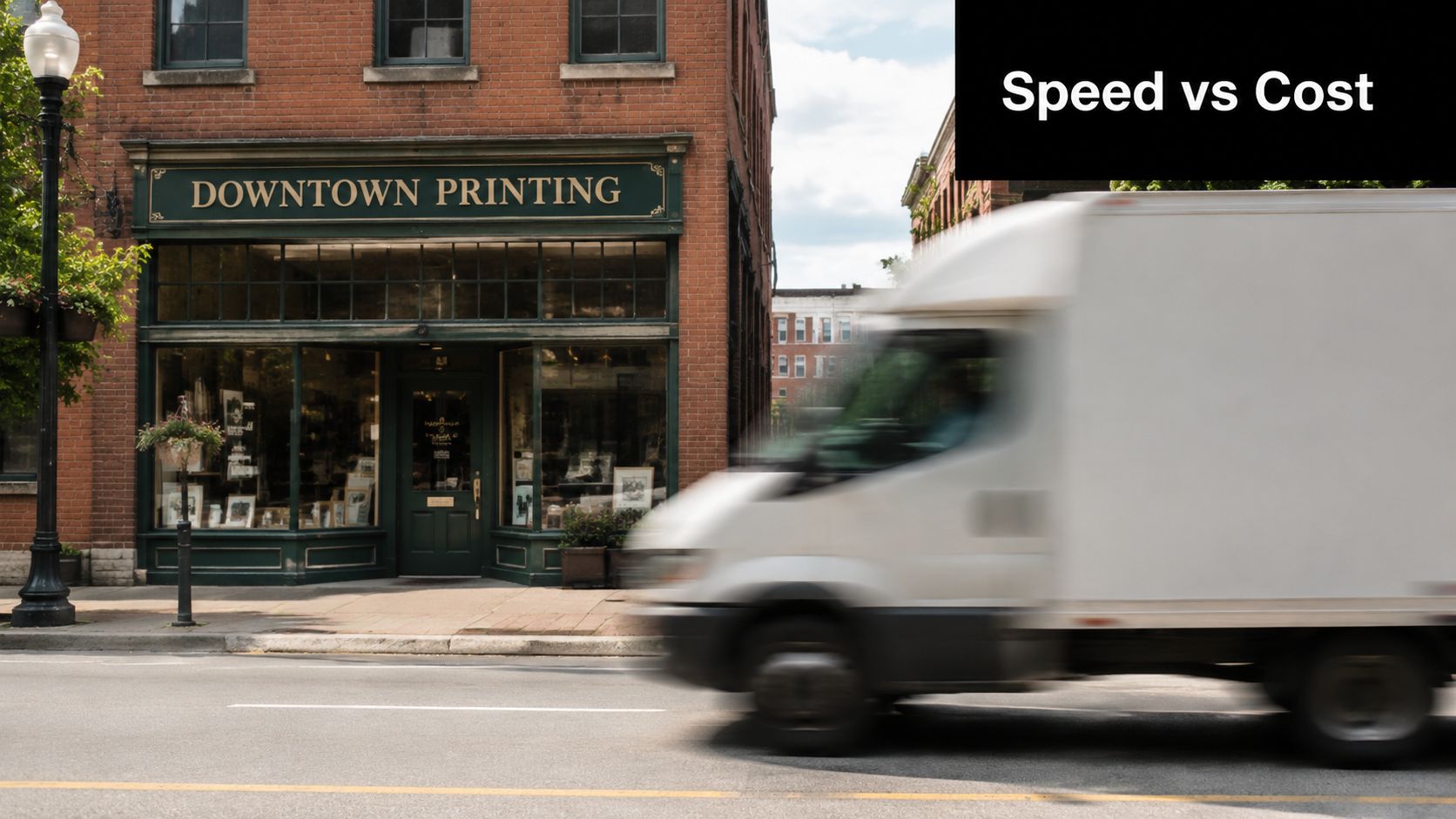
The Price of Speed Local Same-Day vs Online Economy
The biggest decision in cheap printing services isn’t always paper or color. It’s where you place the order.
When online printers make sense
Online printers are hard to beat for standardized products with flexible timing. If you need a common item, such as basic postcards, rack cards, brochures, or business cards, and you can wait through production plus shipping, online ordering can be very cost-effective.
They also work well when:
- The job is straightforward: Standard size, common stock, simple finish.
- The artwork is already correct: No need for design help or file rescue.
- The deadline is comfortable: You can absorb a delay without damage.
- The quantity is larger: Especially when the product is common and repeatable.
This model fits the broader shift toward on-demand digital production. The global digital print market reached $167.5 billion in 2025 and is forecast to reach $251.1 billion by 2035, according to digital print market projections from Data Bridge Market Research.
When a local print shop wins
Local shops earn their keep when the order isn’t neat and predictable.
If you need same-day flyers for a weekend event, a corrected business card after a typo, a banner for tomorrow morning, or help choosing a paper stock in person, local service often beats a lower online unit price. You can ask questions, see samples, approve proofs faster, and solve problems before they become delays.
A local shop is often the better choice when:
- You’re on a tight deadline
- You need a custom size or finish
- You want to compare stocks by hand
- You’re ordering multiple related items
- You need a real person to catch issues
There’s also less friction when something changes. If the quantity shifts, the file needs a quick edit, or you need to add a mounted sign to the original order, direct communication matters.
Online printing is great when nothing goes wrong. Local printing is great when real life happens.
A simple way to decide:
Choose online economy for repeatable, non-urgent, standard products.
Choose local same-day for rush jobs, event materials, brand-sensitive pieces, or anything that needs guidance.
If timing is your biggest pressure point, this resource on finding rush printing near you for same-day success lays out what to prepare before you place an urgent order.
Advanced Strategies for Businesses and Bulk Orders
One-off print buying is expensive because it creates repeat decision-making, repeat setup, repeat proofing, and repeat chances to make mistakes. Businesses that print regularly save more when they treat print as a system instead of a task.
Think beyond one order
Start with a simple print calendar. List the materials you reorder most often: business cards, flyers, brochures, envelopes, presentation folders, event signage, training handouts, direct mail pieces, labels, and seasonal promotions. Then group those needs by month or quarter.
That one habit improves almost everything. Your team catches branding inconsistencies earlier. You order before the panic window. The printer has more flexibility. You spend less time chasing quotes for every small request.
For recurring needs, consolidating work with one reliable partner usually lowers the total cost better than shopping every job from scratch. According to RK Black’s review of managed print services, organizations that implement managed print services typically achieve a 20 to 30% reduction in total print costs by reducing waste, labor, and overhead. Small businesses aren’t building a formal enterprise MPS contract in most cases, but the principle still applies. Fewer vendors, fewer handoffs, fewer surprises.
How to buy print like a pro
The strongest buyers don’t just ask, “What’s your price?” They ask better questions.
Ask how the job can be produced more efficiently. A good printer may suggest a standard size instead of a custom trim, a different stock that performs better for mailing, or a digital run instead of offset for a short quantity. Those changes can lower total cost without lowering the usefulness of the piece.
Use this information when you request quotes:
- Describe the piece clearly: Say what it is, how it will be used, and whether durability matters.
- Provide exact specs: Quantity, size, pages or sides, paper preference, folds, coating, and delivery date.
- Mention future demand: If this first order may repeat, say so early.
- Share the actual deadline: Not just the event date. Include when the material must be in hand.
- Ask for options: Good, better, best pricing is often more useful than one rigid quote.
Relationships matter in print because repeat business creates context. A printer who knows your brand colors, preferred stocks, common formats, and approval process can move faster and make fewer mistakes than a vendor seeing your files for the first time.
That doesn’t mean blind loyalty. It means building a working rhythm with someone who understands your needs.
There’s also an operational savings that buyers often ignore. Print coordination takes staff time. Someone requests the quote, checks the proof, follows up on shipping, fixes a file, receives the boxes, and fields complaints if something is off. When one partner handles those jobs consistently, your team gets time back.
A few long-term habits usually pay off:
- Standardize templates: Keep approved layouts for cards, flyers, forms, and signs.
- Limit unnecessary variation: Too many sizes and stock types create friction.
- Order with enough lead time: Last-minute buying forces expensive choices.
- Review what got wasted: Old brochures, outdated cards, and overprinted forms are preventable.
- Keep a live reorder list: Don’t wait until stock is gone to start the process.
The cheapest printing service for a business isn’t always the one with the lowest website price. It’s the one that gives you the lowest total cost across production, admin time, speed, consistency, and rework.
Business Mail Boutique LLC helps Sugar Land businesses and local residents handle printing, shipping, mailbox services, and office support in one place. If you need same-day business cards, flyers, banners, signs, or a dependable local partner for recurring print work, visit Business Mail Boutique LLC to see available services and get help from a team that understands fast turnaround and practical print decisions.

Related posts

Custom Memorial Glasses Engraved in Three Hours in Sugar Land
When a customer needed eight personalized glasses for a memorial, Business Mail Boutique completed the engraving or...

Custom Martini Glass Engraving in Sugar Land, TX
Custom Logo Engraving on Martini Glasses in Sugar Land, Texas.
Business Mail Boutique recently completed a beautiful custom engravin...

Custom Engraved Wine Glasses for a Golf Club Event in Sugar Land, TX
Custom Engraved Wine Glasses for a Golf Club Event in Sugar Land.
Custom wine glass engraving in Sugar Land, TX at Business Mail Bouti...