
- Print Business Cards in Sugar Land – Same Day Service
- Copying Services
- Document Printing, Finishing & Lamination in Sugar Land
- Flyers
- Print Banner in Sugar Land | Same-Day Banner Printing Near Me
- Graphic Design
- Photo Printing
- Postcard Printing
- Document Printing
- EDDM Full Service Postcards
- FotoZoomer Large Format Printing


Construction Plan Printing.
Construction plan printing explained step by step. Learn file setup, sheet sizes, scaling, color choices, finishing, and turnaround tips.
Businessmailboutique
11645 S. Hwy 6
Sugar land, Texas 77498 United States (US)
Email: info@businessmailboutique.com
Route
You’re staring at a plan set that has to leave the shop tonight, and the printer is the last thing between you and a very awkward morning. The scale has to hold, the sheet size has to match, and the crew on site can’t spend half the day squinting at a blurred note or a distorted dimension. Construction plan printing looks simple until one wrong export setting turns a full batch into scrap.
Table of Contents
Getting Your Construction Plans Print-Ready
Print-readiness starts before the file ever reaches a wide-format device or a service counter. A set can look fine on screen and still fail in the shop if the sheet size, scale, revision state, or export settings are wrong. That is the point where construction plan printing stops being a routine handoff and becomes a field-execution decision.
Start with the job, not the printer
Treat the file like it will be checked by someone who has never seen the project before. A clean plan set needs the correct sheet size, the correct scale, the current revision, and the right finish, because the crew uses it differently depending on whether it is headed for a desk, a trailer wall, or the slab. If the drawings are still being updated, compare them against browse as built documentation tips so the latest field conditions do not disappear into a stale set.
If a sheet would make you stop and question it in the field, it is not ready for print.
A strong pre-flight routine saves more time than any rush order. Check the source file, confirm the intended sheet size, verify that fonts are embedded, and make sure the output is going to the right audience. A permit reviewer, a superintendent, and a survey crew do not need the same finish or the same copy count.
Know what you’re trying to deliver
Before any export, decide whether the set is for documentation, field use, or both. Documentation sets can handle a little more handling, but field sets need immediate readability, clean folding, and no scale drift. If the set is for tomorrow’s meeting, the goal is not pretty output, it is a drawing that reads correctly the first time it opens.
That choice also affects where the job should go. For fast turnaround and jobsite-ready sets, some contractors use Business Mail Boutique blueprint printing services instead of waiting on a traditional outside printer, while others keep a wide-format device in-house for same-day markups and last-minute revisions. The right setup depends on how often the plans change, how many copies the field needs, and whether the team is paying for convenience or control.
Exporting CAD and BIM Files the Right Way
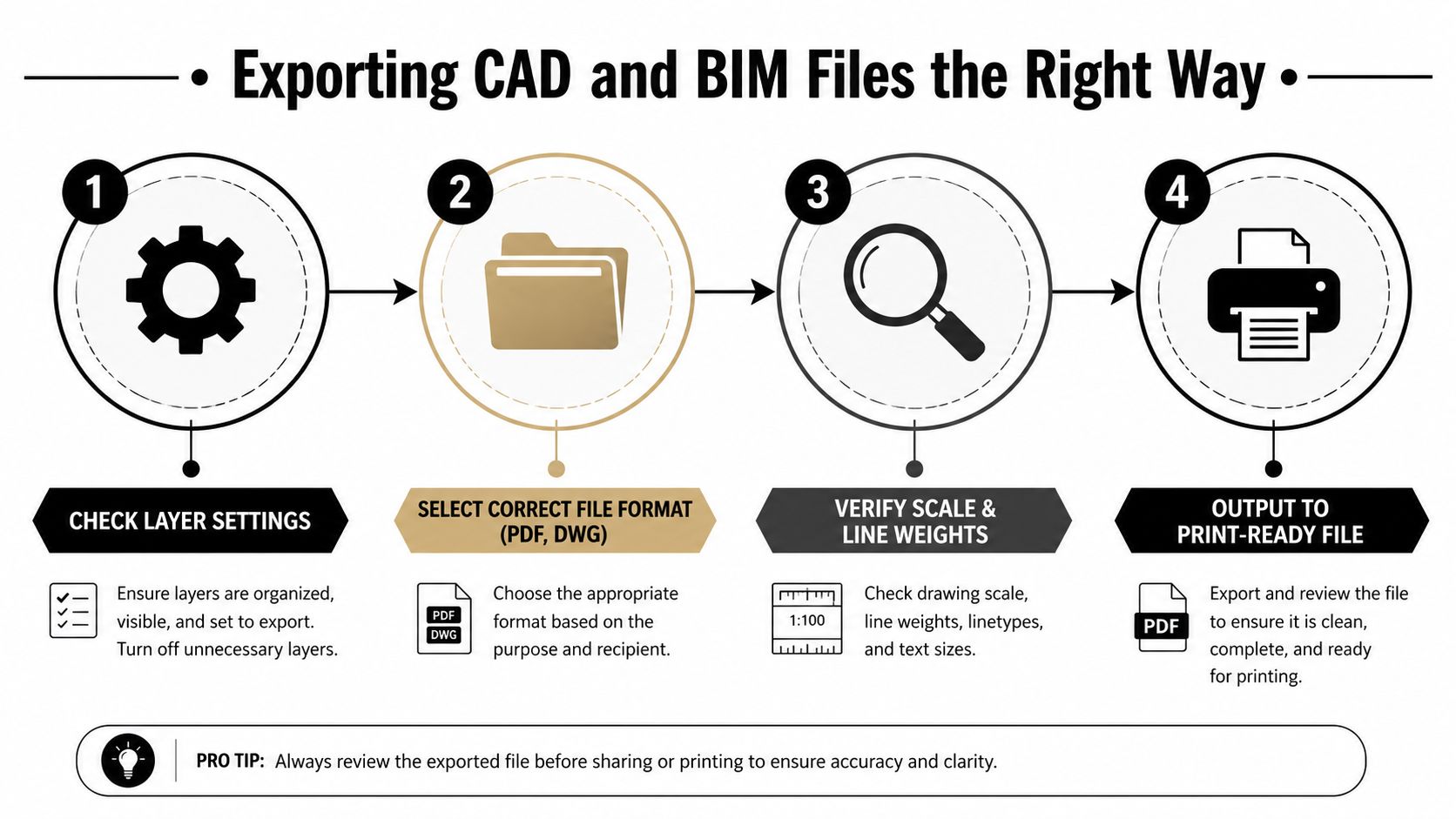
The safest handoff from design software to a print shop is a high-resolution PDF exported directly from CAD or BIM. That keeps linework vector-based where possible, which matters when a plan is being enlarged, folded, and handled all day. The most reliable workflow is to embed all fonts, set the page size to the target sheet size, and leave scaling at 100% actual size so the drawing doesn’t lose its geometry during output, as noted in the AO printing guide for architectural plans.
Keep the file print-safe before it leaves your machine
Use vector output whenever the software allows it. Rasterizing a plan too early can soften linework, especially around dense notes, hatch patterns, and symbols that need to stay crisp on a large sheet. Flatten transparency if the PDF engine is acting up, and lock the layer state before export so the print operator isn’t guessing which reference line was supposed to be visible.
File naming matters more than people admit. A clean queue needs a file name that tells the operator what sheet it is, which revision it belongs to, and whether it’s a record copy or a field copy. If the set arrives as a pile of vaguely named files, the shop has to stop and sort your project before it can print it.
Don’t let the scale setting sabotage the set
The single most common mistake is using fit to page. That looks harmless on screen, but it can distort dimensions and invalidate the scale the whole sheet is built around. If the printer driver or preview window offers a scaling choice, choose actual size and verify the plotted dimensions before you release the job.
For layout-heavy projects, a print-ready PDF also makes later coordination easier. If you’re managing site capture or closeout records, the same disciplined file prep helps you line up the drawings with field documentation and reduce back-and-forth during revisions.
PDF is the safest default because it protects scale, text, and layout across devices. The minute a file gets treated like a generic document instead of a measured drawing, the risk goes up fast.
For a visual overview of the export sequence, the process flow above is the one I’d hand to anyone who keeps getting reprints because of avoidable setup errors. The YouTube walkthrough below can also help if your team wants a screen-level example of the same workflow.
Choosing the Right Sheet Size for Your Plans
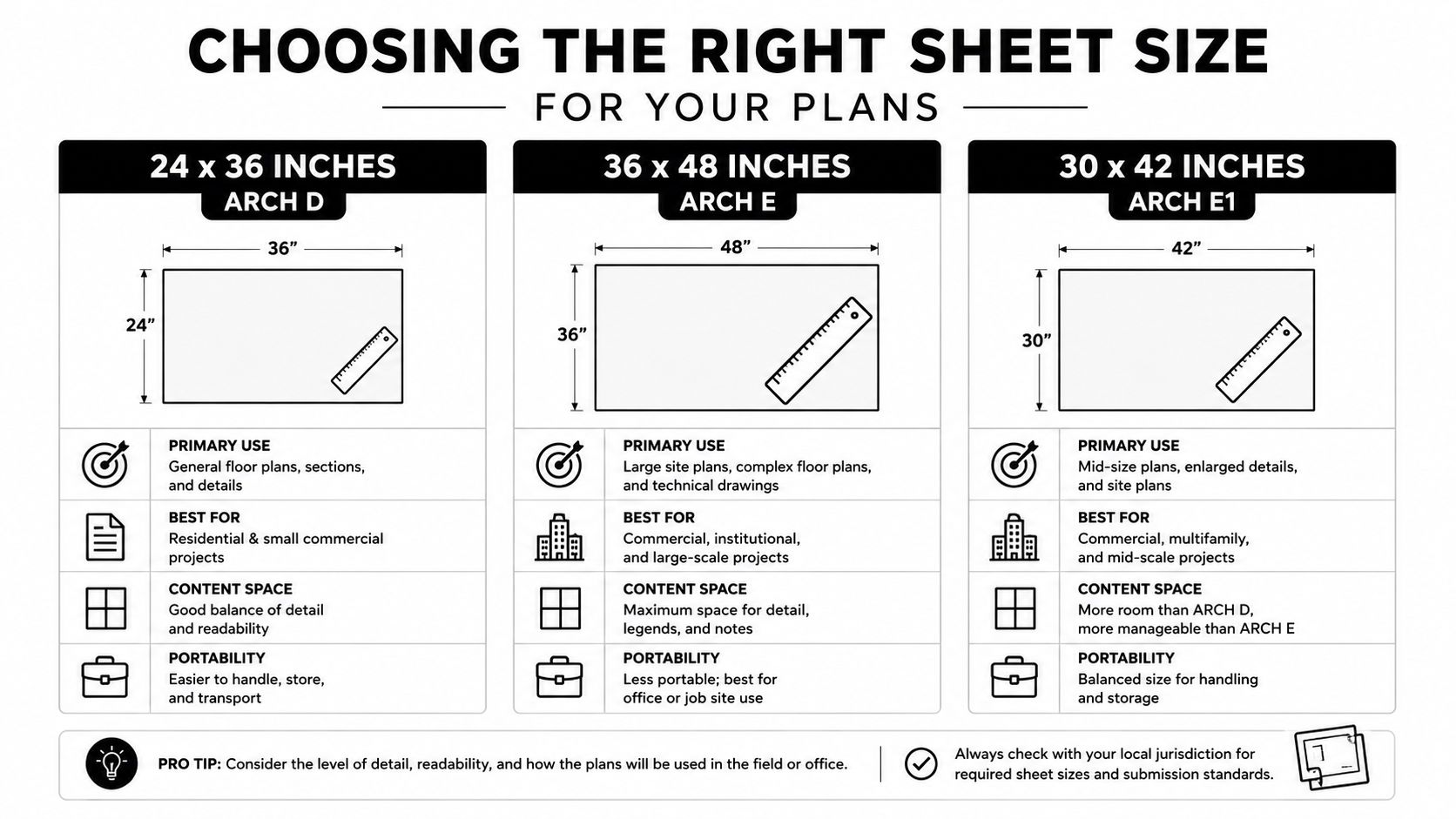
Standard construction drawings are usually produced at 24×36 inches (ARCH D) or 36×48 inches (ARCH E), with 11×17 inches used for smaller or half-size sets. Those larger sheets are a better fit for site plans, elevations, cross-sections, MEP diagrams, and grading layouts, because compressing them too far can blur linework and crowd the text. Duncan-Parnell’s guide to construction plan printing makes the same point from a production standpoint, sheet size has to support both readability and field use.
Match the sheet to the job, not the habit
ARCH D is the everyday field size on a lot of jobs. It gives crews enough room to read notes without turning the set into a stack of oversized pages, and it still handles well at a trailer table or on a clipboard. ARCH E fits better when the drawings carry dense coordination, larger site graphics, or enough callouts that shrinking the sheet would force the page to work too hard.
A half-size set on 11×17 works well as a companion set for office review, redlines, or distribution, and it is often the practical choice when the print run is meant for quick reference rather than active field installation. It should not be the only set if the crew needs to read fine text on site. If the detail matters, shrinking the plan just to save paper is a poor trade.
Metric drawings often land on A0, 841 mm × 1189 mm, which keeps the page sizing aligned with the drawing system instead of forcing a clumsy conversion. That matters when consultants, disciplines, and print vendors are all handling the same package, because the title block and scale bar need to stay consistent from export to release.
A busy shop can also keep a standardized sheet library on hand for repeat work. That is where wide-format printing services for Sugar Land businesses can make day-to-day coordination easier, especially when the team needs the same sheet size turned quickly for different sets.
Use the sheet size as part of the communication plan
Bigger sheets are not automatically better. If a foreman is carrying the drawings across a job site, the sheet should buy clarity, not just extra white space. If the recipient is an owner reviewing progress or a consultant checking markups, a smaller companion set may be enough, as long as the live field set stays readable.
Rule of thumb: choose the smallest sheet that keeps the linework, text, and scale your team actually needs.
Resolution, Color, and Paper Choices
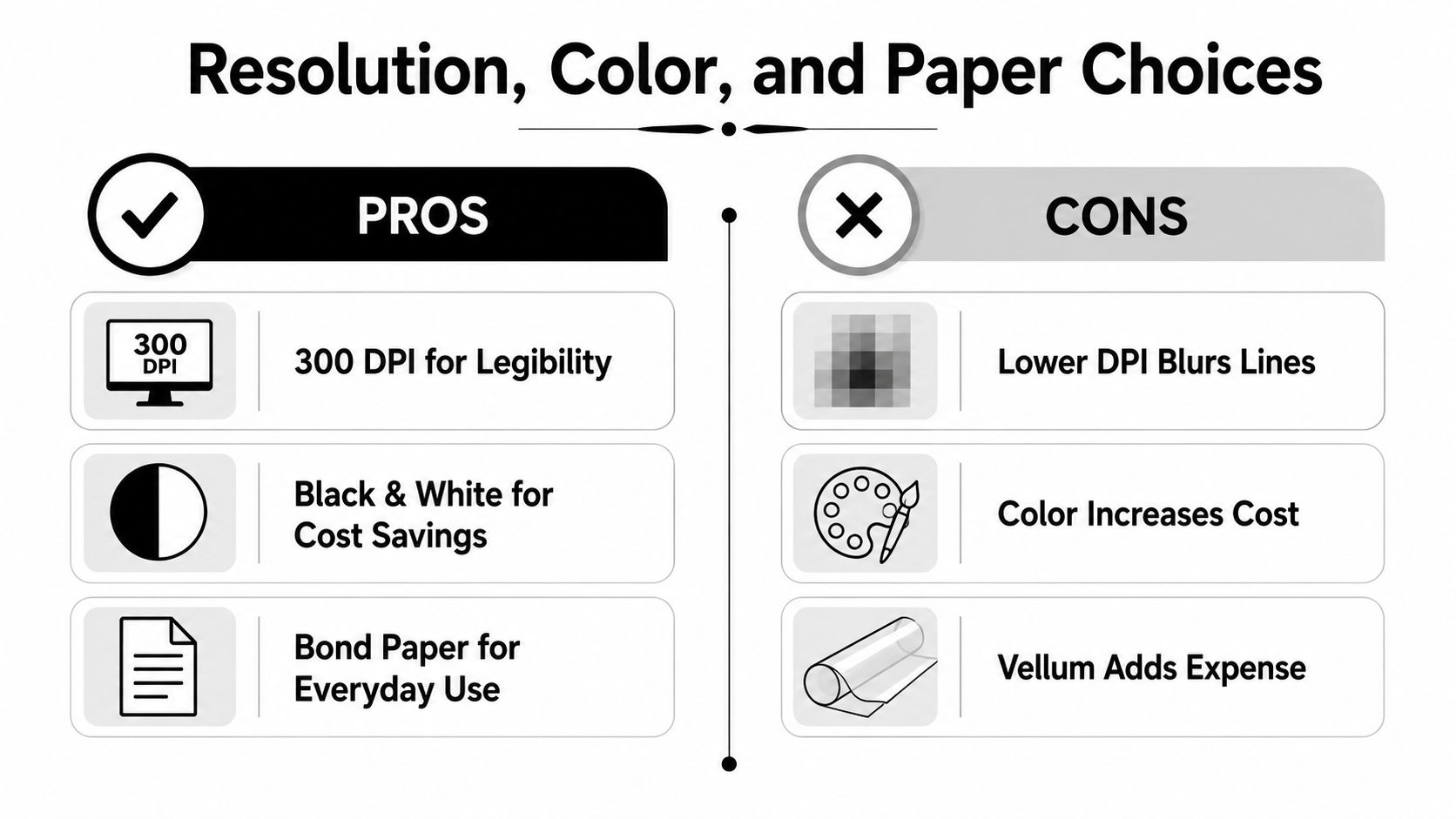
A practical baseline for technical drawings is around 300 DPI for building plans, and some blueprint workflows recommend 600 DPI minimum when fine linework and small text have to stay sharp, according to HP’s large-format guidance. That doesn’t mean every file needs to be treated like a photograph. It means the output needs enough detail to keep dimension strings, callouts, and light line weights intact after the sheet is enlarged and handled.
Color helps coordination, black and white controls cost
Black-and-white is still the default for most daily field sets because it keeps the read simple and the output economical. Color earns its place when the team needs to separate systems, highlight revisions, or make complicated markups easier to scan at a glance. If the plan will be used for quick coordination, a careful color set can reduce confusion. If it’s going into the hands of a crew that mainly needs dimensions and notes, black-and-white usually wins.
Paper choice should follow the use case
Bond paper is the sensible everyday choice for most plan sets. It handles routine handling, folds cleanly, and doesn’t add unnecessary cost when the sheets are going to be revised again anyway. Heavier stock or vellum makes more sense when the set is staying in circulation longer, needs a more durable presentation feel, or has to survive repeated review cycles.
The failures usually show up before anyone notices the paper weight. Missing or blurred lines can come from misaligned printheads, while distorted dimensions usually point back to scaling errors. File bloat and compatibility trouble often start when fonts aren’t embedded or transparency and layers haven’t been flattened before export, as HP notes in its printing guidance.
If a sheet looks great in the PDF viewer but loses detail on paper, the problem usually sits in resolution, scaling, or output handling, not in the design itself.
For field crews, I’d rather see a slightly plainer sheet printed cleanly than a glossy version with soft text and weak line contrast. Readability always beats presentation when the sheet is heading onto a muddy slab or into a trailer binder.
Finishing Options That Survive the Job Site
A plan set doesn’t become useful when it’s printed, it becomes useful when someone can carry it, open it, and keep using it after the first knock against a ladder or truck seat. Folding, binding, and packaging are not cosmetic choices. They decide whether the drawings stay organized or end up torn, scattered, and half-usable by lunchtime.
Fold for the crew that has to live with it
Field crews usually want folded sets that slip into a pouch or binder without fighting the whole stack. That’s the right move when the drawings need to travel between the trailer, the slab, and the foreman’s truck. Keep the folding consistent so title blocks land where people expect them, and specify the final pack-out clearly so the shop doesn’t guess.
Bind when the set is being reviewed, not carried
Spiral binding or stapled sets make more sense for submittals, permit packages, and review meetings than for rough job-site handling. Those formats keep multi-page documents in order and reduce the chance that a key sheet gets separated from the rest. They’re useful when the set is being read at a desk, not shoved into a tool bag.
Use lamination sparingly
Lamination or encapsulation is worth it when a sheet has to survive weather, heavy markup, or repeated handling in exposed conditions. It’s overkill for pages that will be superseded quickly or marked up once and archived. The smart move is to reserve protection for the sheets that are exposed to abuse, not the entire order.
If the shop offers protective packaging, ask for it by function instead of by habit. A field package needs enough durability to travel, while a client presentation set needs a cleaner finish and tighter presentation control. Those are different jobs, and they should not be treated like the same order with different paper.
Pricing, Turnaround, and Delivery Options
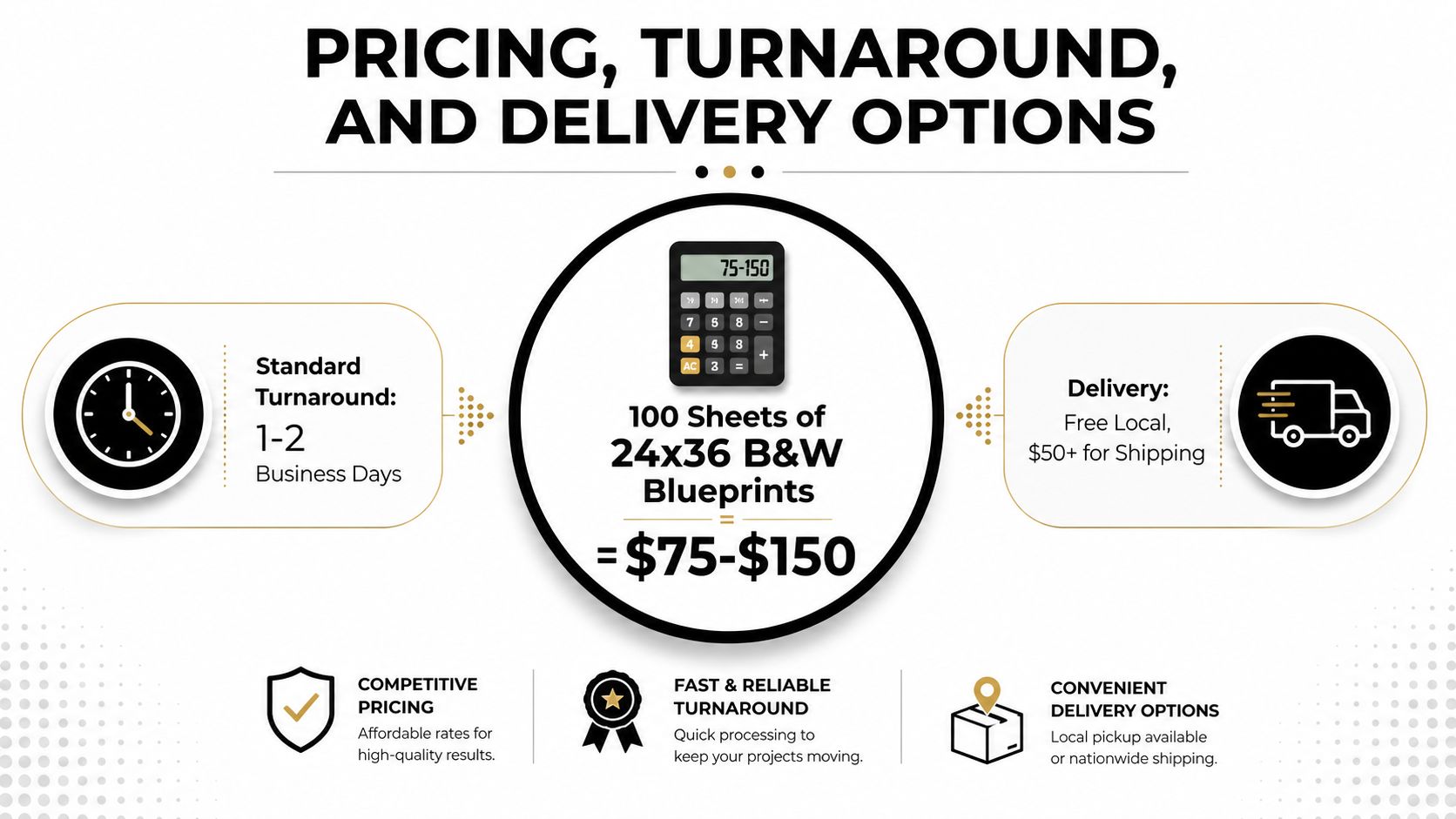
A 100-sheet order of 24×36 black-and-white blueprints can cost about $150 to $250 when outsourced, while in-house wide-format output can drop black-and-white sheet costs below $1.00, with color around $2 to $3 per sheet, according to Emerald Document’s cost breakdown. That spread is why some teams keep short-run field sets in-house and push larger or less urgent runs to a print vendor.
Outsource when volume and urgency collide
Outsourcing makes sense when the set is large, the timeline is tight, or the team doesn’t want to maintain wide-format equipment. A print shop can absorb the setup, handle finishing, and deliver the job ready to move. If you need a one-off set, a revision package, or a delivery straight to the job site, that service model can be simpler than maintaining your own machine.
In-house works when revisions are constant
Internal printing becomes attractive when the project is in a heavy revision phase and the team is printing often enough to justify the equipment and supplies. The economics improve when the crew is burning through copies and needs immediate control over reprints. The trade-off is that someone on your side owns upkeep, calibration, media, and the inevitable troubleshooting.
For a practical ordering workflow, blueprint architectural printing submit online and get it delivered is the kind of service model many teams look for when they want the set handled without a lot of back-and-forth.
Delivery should match the project phase
Same-day pickup can save a day when the meeting is already on the calendar and the set has to leave immediately. Scheduled delivery works better when the drawings need to land at a specific office, trailer, or site gate. Digital delivery still matters too, because some teams need the file set first and the paper set second.
The cheapest print is the one that doesn’t have to be redone, so turnaround should never be chosen without checking the file prep first.
Troubleshooting and Your Pre-Submit Checklist
Most print failures are loud enough to catch if you know what to look for. A missing font, a wrong sheet size, or a line that vanishes in output usually shows up before the order leaves the shop, but only if someone does a real pre-submit check instead of trusting the preview window.
Diagnose the failure, then fix the cause
- Missing or substituted text: the font wasn’t embedded, so the printer swapped it. Re-export the PDF with fonts embedded.
- Blurred or missing linework: the output path or printhead alignment is off. Recheck the device and the file resolution before rerunning the batch.
- Wrong dimensions on paper: scaling changed during print setup. Reset the job to 100% actual size and remove any fit-to-page setting.
- Bloated file or export errors: transparency, layers, or unsupported elements are stressing the PDF. Flatten what needs flattening and simplify the export.
- Wrong sheet size: page setup doesn’t match the intended output. Revisit the page size in CAD or BIM before releasing the file.
A quick pre-submit routine catches almost all of this. Confirm the file format, the fonts, the scale, the sheet size, the color choice, the paper choice, and the finishing requirement. If the set is for field use, verify that the title block reads cleanly at hand distance, because that’s where the sheet earns its keep.
A plan set should leave the shop in the same shape it had in the designer’s head, not as a guessed-at approximation.
That’s the standard I’d use on every order. If the sheet can survive export, print cleanly, fold properly, and land in the right hands, the job is ready for the field.
If you need a print partner that understands plan sets, finishing, and the realities of getting documents out the door fast, Business Mail Boutique LLC can help with wide-format engineering blueprints, document finishing, and other everyday print needs from one local counter. Visit Business Mail Boutique LLC to get help with your next construction set, whether you’re sending a last-minute revision or a full run of field drawings.

Related posts

Perfume Bottle Engraving Sugar Land | Same-Day Service
Same-Day Perfume Bottle Engraving in Sugar Land.
Custom Perfume Bottle Engraving in Sugar Land — Same-Day Personalized Gifts
Make a...

Leather Portfolio Engraving in Sugar Land | Custom Initials
Custom Leather Portfolio Engraving in Sugar Land: Personalized Initials for Corporate Gifts
A professional portfolio is something ...

Corporate Watch Engraving in Sugar Land | Business Mail Boutique
Custom Watch Engraving in Sugar Land: Meaningful Gifts for Employee Appreciation
A personalized watch can turn a company’s thank-you i...