
- Print Business Cards in Sugar Land – Same Day Service
- Copying Services
- Document Printing, Finishing & Lamination in Sugar Land
- Flyers
- Print Banner in Sugar Land | Same-Day Banner Printing Near Me
- Graphic Design
- Photo Printing
- Postcard Printing
- Document Printing
- EDDM Full Service Postcards
- FotoZoomer Large Format Printing


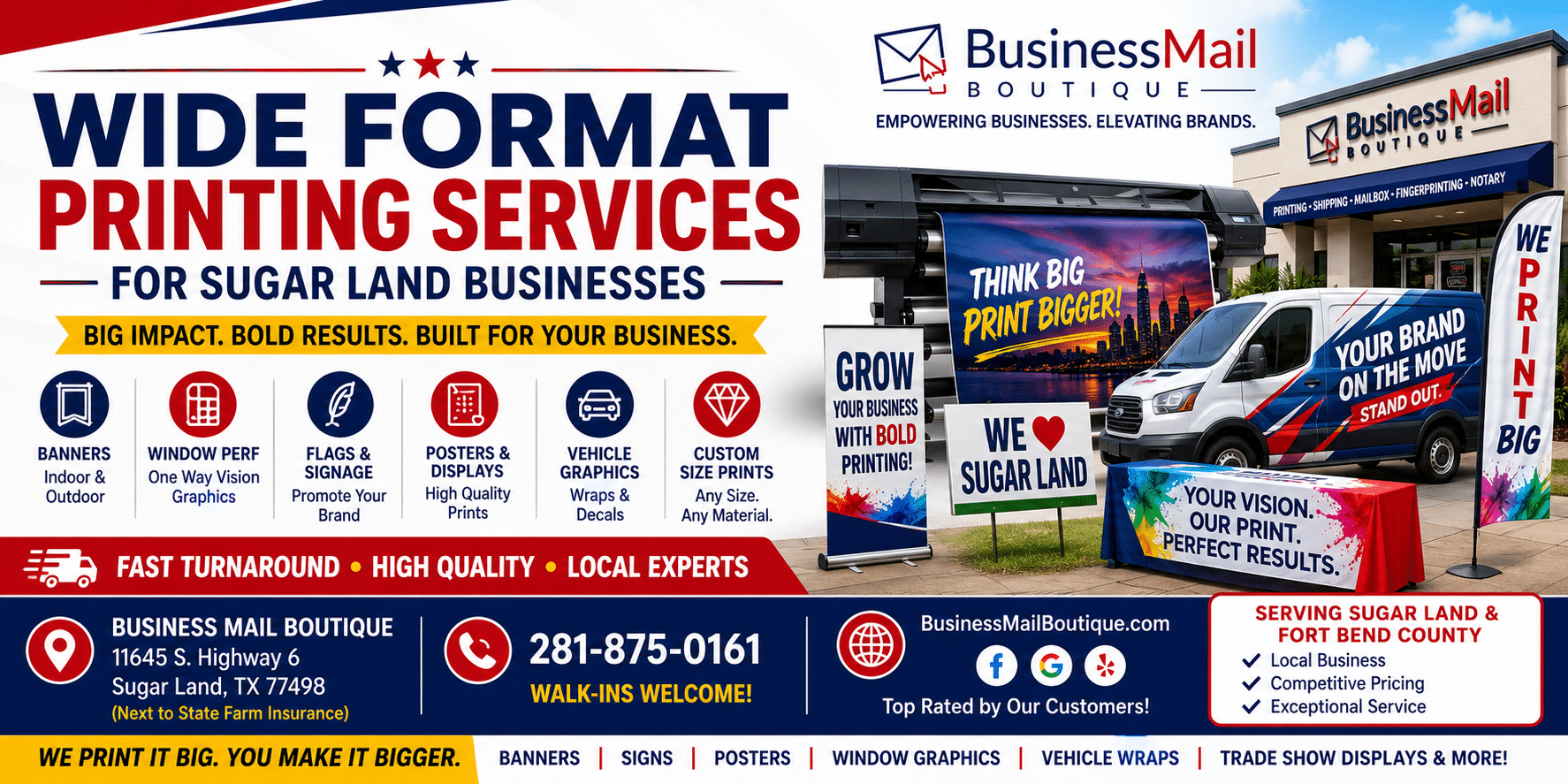
Wide Format Printing Services for Sugar Land Businesses
11645 S. Hwy 6
Sugar land, Texas 77498 United States (US)
Email: info@businessmailboutique.com
Route
When seeking wide format printing services in Sugar Land, you’re probably on a deadline. The grand opening banner is due tomorrow. The yard signs for a weekend event still aren’t printed. The blueprint set needs to be readable at full scale, not squeezed onto letter-size paper and guessed at in the field.
That’s usually when people learn that large prints aren’t just “regular printing, but bigger.” File setup, material choice, finishing, and pickup timing all affect whether the job comes out clean and on time. A sharp design can still fail if the image is low resolution, the wrong substrate is used outdoors, or the proof approval sits too long in someone’s inbox.
Wide format printing services cover a broad range of output, typically on media larger than a standard office printer can handle, with common widths ranging from 18 inches to 168 inches according to large format printing guidance from Color Reflections. For Sugar Land businesses, that means practical tools you can use right now: banners, posters, window graphics, yard signs, presentation boards, murals, and blueprint sets.
Table of Contents
- From Banners to Blueprints What You Can Create
- Choosing the Right Material for Your Project
- How to Prepare Your Files for Flawless Printing
- Understanding Pricing and Turnaround Times
- How to Choose a Wide Format Printer in Sugar Land
- Your Quick-Start Project Checklist
From Banners to Blueprints What You Can Create
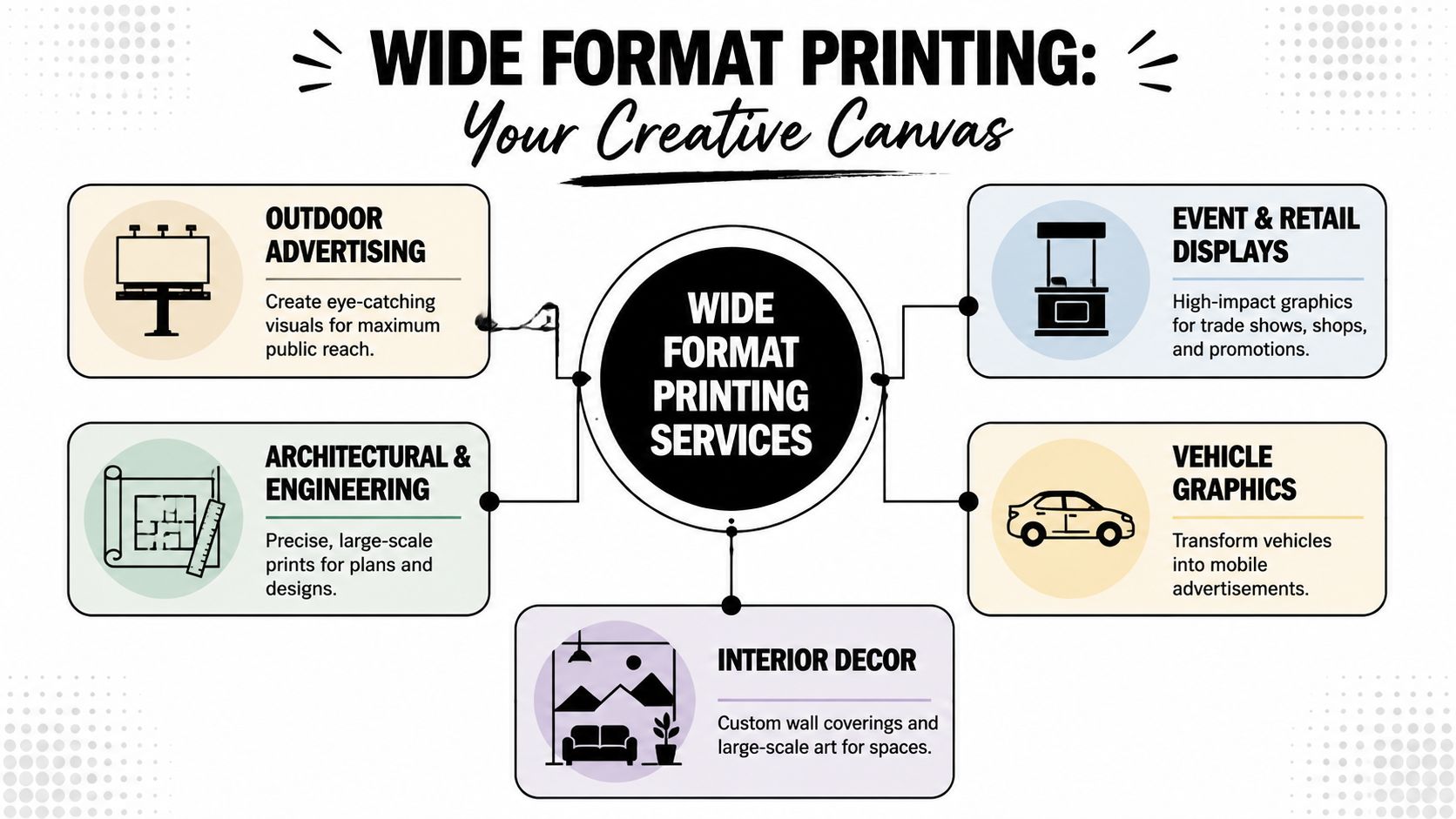
Wide format printing earns its keep when a business needs to be seen, understood, or found. A banner outside a storefront does one job. A foam board presentation does another. A plan set for a contractor has a completely different purpose. The value comes from matching the print to the outcome you need.
Marketing pieces that get noticed
For local marketing, the most common products are banners, posters, yard signs, storefront graphics, and retractable displays.
- Vinyl banners work well for promotions, school events, church gatherings, pop-up sales, and grand openings. They’re easy to transport and visible from a distance.
- Yard signs are useful when you need repeated visibility along a route, near an intersection, or around an event venue.
- Window graphics and decals help businesses turn empty glass into messaging space for hours, specials, services, or branding.
- Retractable displays make sense for indoor events, networking meetings, and presentations where setup time is short. If that’s the format you need, these professional roll-up banner options in Sugar Land are a good example of how portable display graphics are typically used.
If you’re planning outdoor visibility, it helps to think beyond the print itself and study placement. These out of home marketing insights are useful for understanding how location affects attention and message clarity.
Practical rule: If people will only see the sign for a few seconds, cut the message down. Business name, offer, date, and contact point. That’s usually enough.
There’s a reason this category keeps growing. The global large format printer market is projected to grow from USD 7.94 billion in 2025 to USD 10.36 billion by 2030, a 5.5% CAGR, according to MarketsandMarkets research on large format printers. For local businesses, that matters because demand for oversized print in retail, construction, events, and branding remains steady.
Operational prints that keep work moving
Not every wide format job is promotional. Some of the most important work is operational.
Blueprints and engineering drawings need to be readable at full scale. Teams on-site don’t want reduced drawings where dimensions, notes, or callouts become harder to review. Poster-size schedules, route boards, directional signage, and safety graphics also fall into this category.
A quick way to think about common applications:
| Product | Best use | What matters most |
|---|---|---|
| Banner | Event, sale, grand opening | Visibility, durability, grommets or finishing |
| Foam board poster | Presentation, meeting, indoor display | Clean mounting, crisp graphics |
| Yard sign | Temporary local promotion | Weather resistance, simple message |
| Window decal | Storefront branding, seasonal offer | Adhesion, cut accuracy |
| Blueprint set | Construction, engineering, planning | Legibility, scale, fast reprints |
When customers ask what they can make with wide format printing services, the answer is this: anything that needs to be seen clearly at a larger scale and used in the physical world, not just admired on a screen.
Choosing the Right Material for Your Project
A rush print order can still fail if the material is wrong. I see it in Sugar Land all the time. A banner for an outdoor school event gets ordered on an indoor stock, or a polished lobby display gets printed on the cheapest board available, then dents before setup is finished.
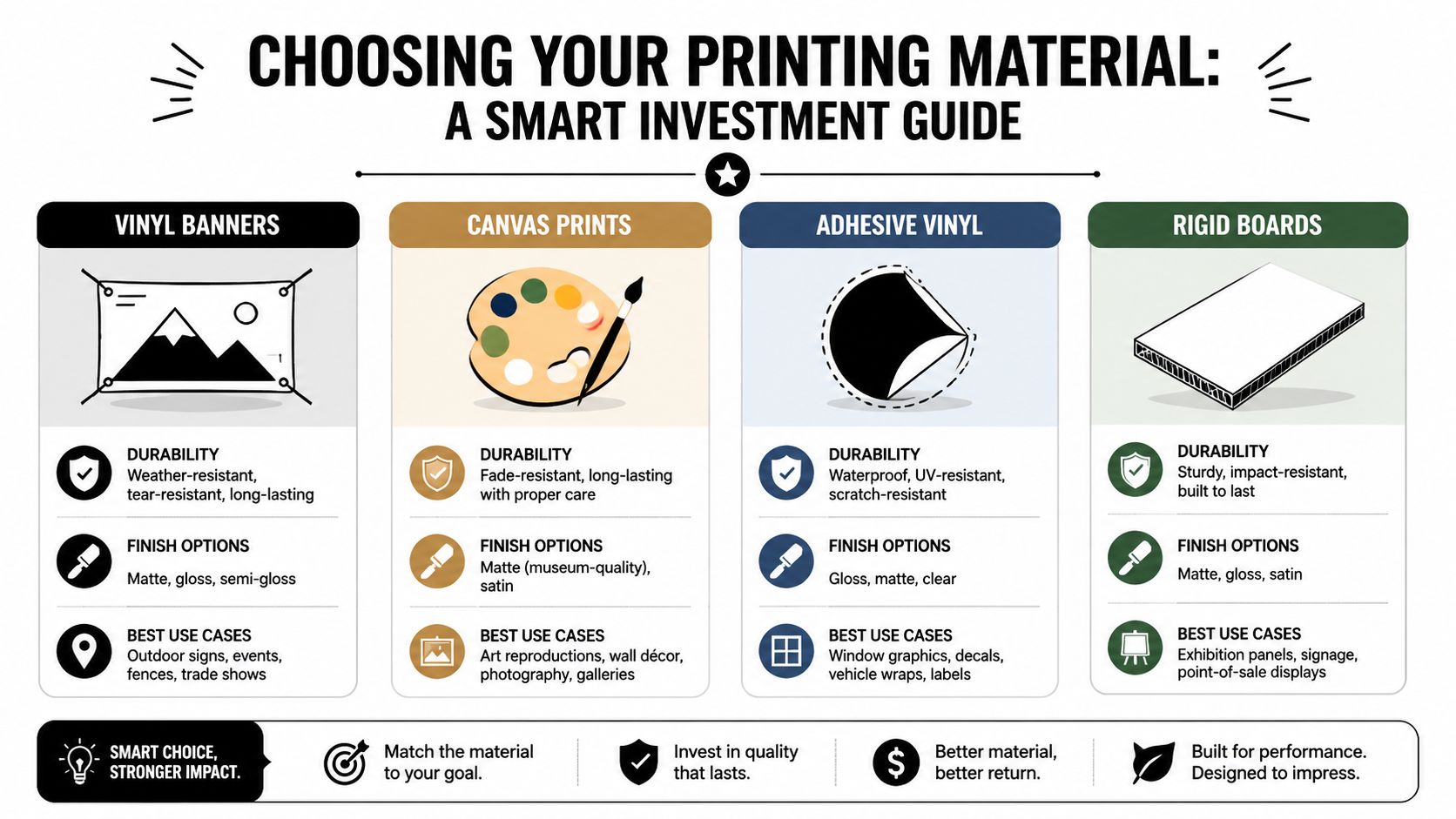
Material choice affects more than appearance. It changes how the piece installs, how long it lasts, whether it can be rolled for transport, and how it holds up under heat, rain, glare, or repeated handling. A poster, banner, decal, and mounted sign can all be the same size, but they perform very differently once they leave the shop.
What works indoors and outdoors
For outdoor use, vinyl is usually the safest starting point. It handles moisture, sun, and short-term wear better than paper, which is why it is the standard pick for event banners, fence signs, and temporary promotions. If the piece will be tied down, moved between locations, or exposed to wind, finishing details like hemming and grommet placement matter just as much as the print itself.
Jobs for vehicles, trailers, and food-service setups need a tougher decision process. The graphic has to fit the surface, hold during use, and still look clean after installation. This guide to custom vinyl banners for food trucks and cargo vehicles in Sugar Land shows the kind of project where choosing the right material early saves rework later.
Foam board works well for indoor presentations, check-in signs, menus, and one-day displays. It is lightweight, looks clean, and is easy to mount on an easel. It also dents fast, so it is a poor choice for sidewalks, busy entrances, or any event where volunteers will be moving signs around all day.
Paper posters are the budget option for short indoor runs. Canvas fits better when the print needs a softer, finished look for office décor or presentation walls. Corrugated plastic sits in the middle for yard signs and directional event signage, especially when cost and weather resistance matter more than a premium appearance.
To see substrate options in action, this short video gives a helpful visual overview of common print materials and applications:
A simple material comparison
The practical trade-off most buyers care about is durability versus finish, and whether the print has to survive transport, weather, or rough handling.
| Material | Good for | Trade-off |
|---|---|---|
| Vinyl banner | Outdoor promotions, temporary signage | Less refined than rigid display materials |
| Foam board | Indoor meetings, presentations, check-in signs | Can dent or warp if handled roughly |
| Adhesive vinyl | Windows, counters, branded surfaces | Installation quality matters |
| Corrugated plastic | Yard signs, directional event signage | Functional look, not premium presentation |
| Paper poster | Short-term indoor use | Lowest durability |
| Canvas | Art-style display, interior décor | Not the first choice for hard-use signage |
The cheapest print usually isn’t the cheapest project if you have to replace it early.
Finish matters too. Gloss makes color look stronger, but it can create glare under lobby lights, trade show lighting, or direct sun. Matte reads better in many indoor settings and usually photographs better, which matters for sponsor walls, event backdrops, and presentation signs.
A good print shop will ask a few practical questions before recommending a substrate. Where will it be used? How long does it need to last? Will it be taped, framed, mounted, or hung with grommets? Those answers prevent expensive mistakes and speed up production because the job is set up correctly the first time.
How to Prepare Your Files for Flawless Printing
Most rush jobs don’t get delayed at the printer. They get delayed at the file stage. The artwork is the wrong size. The photos were pulled from a website and look blurry when enlarged. The text uses a font that isn’t embedded. The background stops exactly at the trim line, which creates white edges after cutting.
A simple way to think about resolution is camera focus. If the image looks sharp only when it’s small, enlarging it won’t improve it. It just makes the softness easier to see.
The file issues that cause most delays
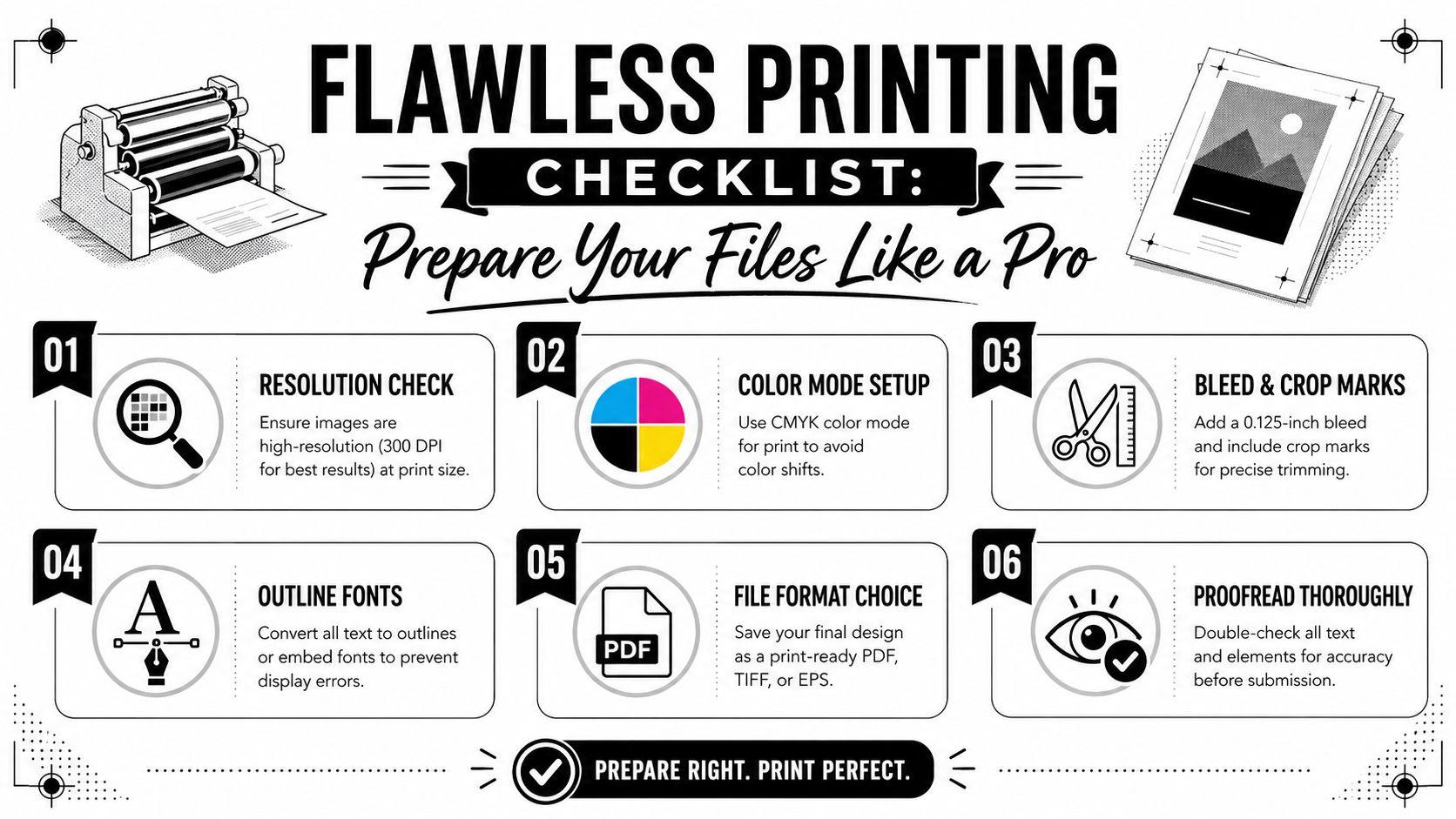
For sharp output, raster images should be 150 to 300 DPI at final size, based on large format file guidance from Boston Reprographics. Below that range, pixelation and banding become more likely. Files should also include 0.125 to 0.5 inches of bleed, and text should be converted to vector outlines in formats such as .AI or .EPS to avoid font rendering problems at print time.
Another useful production rule comes from print-shop guidance that recommends a safe zone of at least 0.5 inches for critical text and graphics away from the trim edge, with cutter variation that can be up to 0.125 inches depending on hardware and material tension, as explained in this large format digital printing guide from Poster Print Shop.
If you’re ordering photo enlargements or display pieces, this guide to large format prints through FotoZoomer is a practical reference for matching file quality to print size.
Send the file at the final size whenever possible. That removes guesswork and speeds up proofing.
A print-ready checklist
Use this before you submit artwork:
- Check final dimensions. Design the piece at the exact finished size, or at a properly scaled size your printer approves.
- Review image quality. Don’t grab a logo from a website and expect it to print clean on a banner.
- Outline fonts. If the printer doesn’t have your font, the text can reflow or substitute.
- Add bleed. Background color and photos should extend beyond the trim line.
- Keep important text inward. Dates, phone numbers, and calls to action shouldn’t ride the edge.
- Export a print-ready file. PDF, TIFF, AI, and EPS are common formats depending on the job.
File prep isn’t busywork. It’s what makes same-day and next-day production realistic. Clean files move quickly. Problem files turn a fast order into a back-and-forth approval process.
Understanding Pricing and Turnaround Times
Most customers ask two questions first. What’s this going to cost, and when can I get it? Both are fair questions, and both depend on details that aren’t obvious until the job is specified correctly.

What affects the final price
Wide format printing services are usually priced by a mix of material, print size, finishing, and labor. A simple indoor poster on paper is a different job from a weather-resistant banner with hems and grommets. A standard rectangle is easier to produce than a custom contour-cut decal. Mounting, laminating, and installation prep also change the final quote.
Here’s the practical breakdown:
- Material choice affects both print cost and durability.
- Size changes media use, ink use, and handling requirements.
- Quantity can lower setup friction on repeat pieces, but only if the files are consistent.
- Finishing adds time. Grommets, mounting, lamination, trimming, and packaging all count.
- Design repair can add cost if the supplied artwork isn’t production-ready.
A cheap quote can still become an expensive job if it doesn’t include finishing you need. That’s why good estimating starts with use case, not just dimensions.
What speeds a job up and what slows it down
Rush service often exists, but timing depends on workflow, proof approval, and whether the file is ready to print. One university print service specifically notes same-day and next-day rush options as schedule allows, with extra fees, in its large format service details from Catholic University. That reflects the issue in this market. Speed is usually a coordination problem before it’s a machine problem.
Common delays include:
- Missing or low-resolution files
- Unclear sizing instructions
- Late proof approval
- Requests for uncommon materials
- Complex finishing or custom cuts
- Pickup timing that doesn’t match production timing
If your event is Friday, don’t aim to approve the proof on Friday morning.
The fastest jobs tend to have three things in place. A print-ready file, a standard material that’s already in stock, and a customer who can approve the proof quickly. If even one of those is missing, the schedule tightens fast.
How to Choose a Wide Format Printer in Sugar Land
Not every print provider is set up for deadline-driven local work. Some handle straightforward online orders well but struggle when a customer needs help fixing a file, matching a material to an outdoor use case, or coordinating a fast reprint before an event.
What to ask before placing the order
Start with questions that affect the finished result, not just the ticket price.
Ask whether the shop can review your file before production. Ask what materials they recommend for the exact environment where the graphic will be used. Ask how proofing works and who signs off. If you need a rush order, ask what would delay it. Those answers tell you more than a simple square-foot rate.
For outdoor graphics, durability deserves special attention. Industry guidance notes that the cheapest print is rarely the lowest-cost option once replacement due to fading or damage is considered, and that substrate and coating decisions should match the installation environment, as discussed in this article on businesses that benefit from wide format printing.
A reliable local provider should be comfortable discussing:
| Question | Why it matters |
|---|---|
| Can you review my file before printing? | Prevents avoidable production issues |
| What material fits my use case? | Protects against early failure |
| Can I see a proof? | Helps catch content and layout errors |
| What are realistic turnaround options? | Reduces deadline risk |
| Do you offer related services on-site? | Saves time on multi-step projects |
Why local coordination matters
A local shop is useful when the job needs real-world coordination. You can bring in a sample, compare materials, confirm color direction, and solve file problems without a long online support thread. That’s especially helpful for event signage, blueprint sets, and storefront graphics where timing and accuracy matter as much as print quality.
If you also need outside design help before the file reaches the printer, this guide on finding the right design agency is worth a look. Good design support can prevent expensive production errors later.
One practical option in Sugar Land is Business Mail Boutique LLC, which offers wide format output for banners, posters, yard signs, decals, and engineering blueprint printing alongside shipping and office services. That kind of one-stop setup can simplify pickup and project coordination when you’re trying to get multiple tasks done in one trip.
Local matters most when something changes. The event time moves. The sign needs a correction. The contractor needs another plan set. The revised file arrives late. In those moments, responsiveness matters more than a polished website.
Your Quick-Start Project Checklist
The smoothest wide format jobs usually aren’t the fanciest ones. They’re the ones planned clearly. The goal is simple: match the print to the job, send a file that won’t break in production, and give the printer enough information to move fast.
Use this before you send the file
Run through this checklist in order:
- Define the job clearly. Is this for one event, a short promotion, ongoing storefront use, or field work?
- Measure the actual space. Don’t estimate a window, easel, wall, or sign frame.
- Choose the material based on use. Indoor presentation materials and outdoor signage materials are not interchangeable.
- Confirm the message. Keep headlines readable and calls to action short.
- Check the artwork. Images should be sharp at final size, and text should be easy to read from the intended viewing distance.
- Build in approval time. Even fast jobs need someone to review the proof.
A banner that arrives on time with a simple message will outperform a complicated design that misses the event.
A fast checklist for common local jobs
Different projects fail in different ways. Use the right lens for the order you’re placing.
For banners Think about viewing distance, mounting method, and wind exposure. Confirm whether you need hems, grommets, or other finishing before production starts.
For yard signs Keep the layout bold and short. Small text gets lost outdoors, especially near traffic.
For window graphics Measure the glass precisely and note whether the decal goes inside or outside. Installation details affect the final result.
For blueprint sets Check page scale, sheet size, and whether any details will become hard to read when printed. Revised construction documents should be labeled clearly so the field team isn’t comparing mixed versions.
For presentation boards Choose a rigid material that’s easy to transport and display. Matte surfaces often read better indoors under lights.
Wide format printing services work best when buyers treat them as production, not just design. Good planning prevents reprints. Good files reduce delays. Good material choices keep the print useful after it leaves the shop.
If you need a local place to handle wide format printing services in Sugar Land, Business Mail Boutique LLC can help with banners, posters, yard signs, decals, blueprint printing, and other business print needs. Bring your file, your dimensions, and your deadline. A quick review up front usually saves time, money, and last-minute stress.

Related posts

Custom Memorial Glasses Engraved in Three Hours in Sugar Land
When a customer needed eight personalized glasses for a memorial, Business Mail Boutique completed the engraving or...

Custom Martini Glass Engraving in Sugar Land, TX
Custom Logo Engraving on Martini Glasses in Sugar Land, Texas.
Business Mail Boutique recently completed a beautiful custom engravin...

Custom Engraved Wine Glasses for a Golf Club Event in Sugar Land, TX
Custom Engraved Wine Glasses for a Golf Club Event in Sugar Land.
Custom wine glass engraving in Sugar Land, TX at Business Mail Bouti...