
- Print Business Cards in Sugar Land – Same Day Service
- Copying Services
- Document Printing, Finishing & Lamination in Sugar Land
- Flyers
- Print Banner in Sugar Land | Same-Day Banner Printing Near Me
- Graphic Design
- Photo Printing
- Postcard Printing
- Document Printing
- EDDM Full Service Postcards
- FotoZoomer Large Format Printing


Digital Printing
Discover how digital printing works, its benefits over offset, common use cases for small businesses, and how to prep files for fast, high-quality results.
Businessmailboutique
11645 S. Hwy 6
Sugar land, Texas 77498 United States (US)
Email: info@businessmailboutique.com
Route
You’re trying to get prints out the door, the design is close, and the clock is not being kind. Maybe it’s 4 p.m. and you still need business cards for tomorrow’s meeting, or the event banner you approved this morning just got pushed to the front desk because the vendor missed a cutoff. That’s where digital printing earns its keep, because it’s built for fast turnaround, short runs, and jobs that don’t justify a big press setup.
The old print world punished small orders. If you needed a modest stack of flyers or a few dozen custom pieces, the setup often felt bigger than the job itself. Digital printing changed that by making professional output practical for smaller quantities, personalized pieces, and reprints that need to move quickly, which is why it’s become central to commercial print, packaging, and fulfillment work. The broader market data backs that shift, with one industry source placing the global digital printing market at about USD 41.4 billion in 2020 and projecting a 9.9% CAGR from 2021 to 2028 (Wifitalents market overview).
For a small business owner, the value isn’t in the jargon. It’s that digital printing lets you order what you need, when you need it, without turning every job into a production campaign. If you’re comparing print approaches for a mailing, a launch event, or a local promotion, Skup’s POD business guide is a useful companion because it explains the business logic behind print-on-demand thinking in plain terms. And if you’re trying to choose a nearby shop instead of waiting on shipping, this local print shop guide for Sugar Land is a practical reference point for what a local provider can handle.
Table of Contents
- Why Digital Printing Changed Everything for Small Businesses
- How Digital Printing Actually Works
- Digital Printing Versus Offset Printing
- Common Digital Printing Applications for Small Businesses
- Preparing Your Files for Digital Printing
- Materials and Finishing Options That Affect Quality
- Understanding Turnaround Time and Pricing Factors
- Frequently Asked Questions About Digital Printing
Why Digital Printing Changed Everything for Small Businesses
A Sugar Land owner calls at noon and says the company’s booth materials are wrong. The event starts tomorrow. In the old model, that was a headache because every extra setup step added time, and every mistake pushed the job further back. With digital printing, the printer can move from file to output far more directly, which is why same-day flyers, business cards, posters, and custom signage became realistic for businesses that don’t order in huge volumes.
The part small businesses feel first
The biggest change is not technical, it’s commercial. Digital printing reduced the pressure to order thousands just to make the math work, so a small restaurant can print a limited seasonal menu, a contractor can replace a damaged yard sign, and a realtor can reorder open-house flyers without tying up cash in excess inventory. That shift lines up with the broader rise of the technology from niche to mainstream, and it also helps explain why digital output now supports commercial print, packaging, textiles, and fulfillment services at scale (Wifitalents market overview).
The same logic shows up in print-on-demand business models, where a design can sit ready until demand appears instead of forcing a batch to be printed and warehoused. That’s why a practical print partner matters as much as the machine itself.
Practical rule: if the job is urgent, customized, or low quantity, digital printing usually deserves a look before anything else.
Why local shops matter in a hurry
A local shop can review the file, flag a problem, and print without the delay of shipping and re-shipping. That’s useful when the work is time-sensitive and the client can’t afford a round trip through a distant warehouse. Business Mail Boutique LLC, for example, lists same-day business cards, flyers, banners, posters, yard signs, decals, and photo prints, plus wide-format engineering blueprints via FotoZoomer, so it fits the kind of “need it now” order that small businesses run into.
When people think printing is just about paper, they miss a fundamental shift. Digital printing made professional output more flexible, more responsive, and much easier to match to the actual size of the job instead of forcing the job to fit the press.
How Digital Printing Actually Works
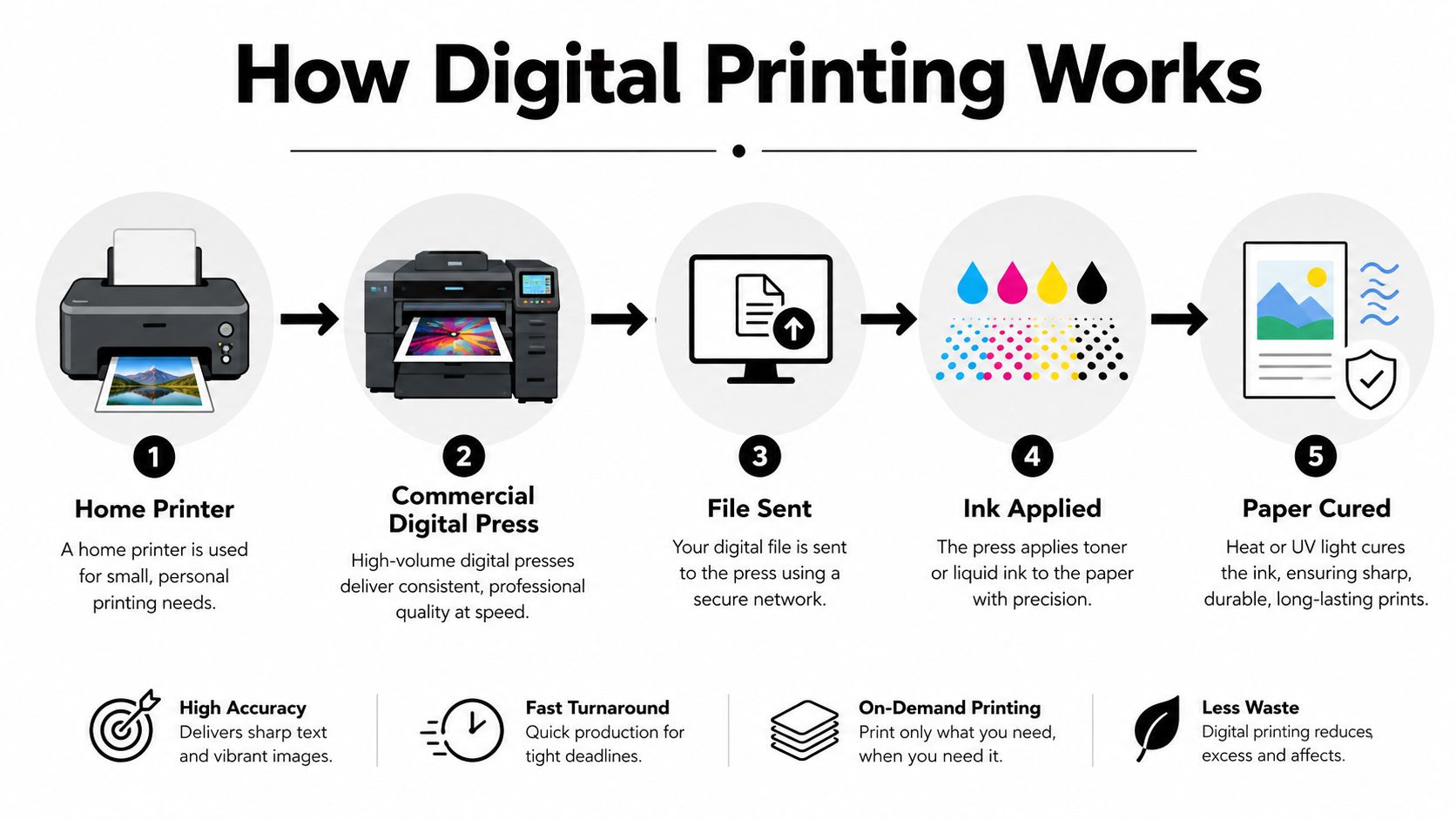
The idea is already familiar because they’ve used an office printer. You send a file, the device interprets it, and ink or toner lands where the image says it should. Commercial digital printing follows the same basic logic, just with tighter controls, heavier-duty hardware, and much more demanding quality requirements.
From file to finished piece
The first step is file interpretation. A RIP, or raster image processor, translates your design into instructions the press can use, which matters because print files and printer language aren’t the same thing. After that, the imaging engine places toner or ink directly onto the substrate, and the curing or fusing system locks the image in place so it can be handled, folded, or shipped.
That direct path is why digital presses can produce variable data jobs. One business card can have a different name, QR code, or offer from the next without making a new plate for each piece. The machine is reading digital instructions rather than relying on a static setup.
Why speed depends on the job setup
Commercial presses still have limits. The HP Indigo 6K+ is specified at up to 98 ft/min in 4-color mode, 130 ft/min in Enhanced Productivity Mode, and 196 ft/min in 1- or 2-color mode, while maintaining 812 dpi at 8-bit image quality and 2,438 x 2,438 dpi addressability (HP Indigo 6K+ specifications). That tells you something important, fewer separations can mean much faster output, but the file and the stock still have to fit the press.
The same press also handles substrates from 12 to 450 microns thick (HP Indigo 6K+ specifications). That range is useful, but it’s not a blank check. A thick board, a thin label, and a folded brochure are all different jobs, and each one asks the operator to confirm whether the press setup matches the material before committing to a deadline.
Bottom line: digital printing is direct, but not automatic. The file, the substrate, and the finishing plan all need to line up before the run starts.
Digital Printing Versus Offset Printing
A lot of business owners ask the wrong question first. They ask which method is “better,” when the real question is which method fits the job, the quantity, and the deadline. Digital and offset both have a place, but they solve different problems.
A side-by-side view
| Factor | Digital Printing | Offset Printing |
|---|---|---|
| Setup costs and time | Low setup, fast start | More setup, more prep before printing |
| Minimum order quantities | Friendly to short runs | Better suited to larger runs |
| Per-unit pricing at higher volume | Stays relatively steady | Can become cheaper as volume rises |
| Color consistency | Strong for many business jobs, proofing still matters | Strong for repeat long-run consistency |
| Turnaround speed | Usually faster for urgent work | Slower because of setup and plate work |
If you need 50 custom flyers for a launch, digital usually makes sense. If you need a large, identical brochure run and can wait for setup, offset may make more financial sense. The crossover point isn’t fixed, because complexity, finish, and material all matter.
Where the “digital is lower quality” myth falls apart
That myth sticks around because people remember cheap desktop output, not modern commercial presses. The better comparison is practical, not theoretical. For most small-business jobs, the question is whether the print looks clean, reads clearly, and lands on time. Modern digital printing handles that well when the file is prepared properly and the substrate choice matches the job.
For apparel workflows, it helps to compare process categories instead of assuming every textile or transfer method behaves the same. A useful related read is Cobra DTF’s guide to DTF printing for custom apparel shops, especially if your business is weighing decorated garments alongside paper or signage.
If the job changes often, needs names or codes to vary, or has a deadline that can’t move, digital usually wins on convenience. If the job is large, static, and not urgent, offset can still be the smarter production choice.
Common Digital Printing Applications for Small Businesses
A realtor doesn’t buy print the same way a contractor does, and a bakery doesn’t need the same stock as an architect. That’s where digital printing is especially useful, because the format can be matched to the actual use case instead of forcing every customer into one template.
The jobs you’ll see most often
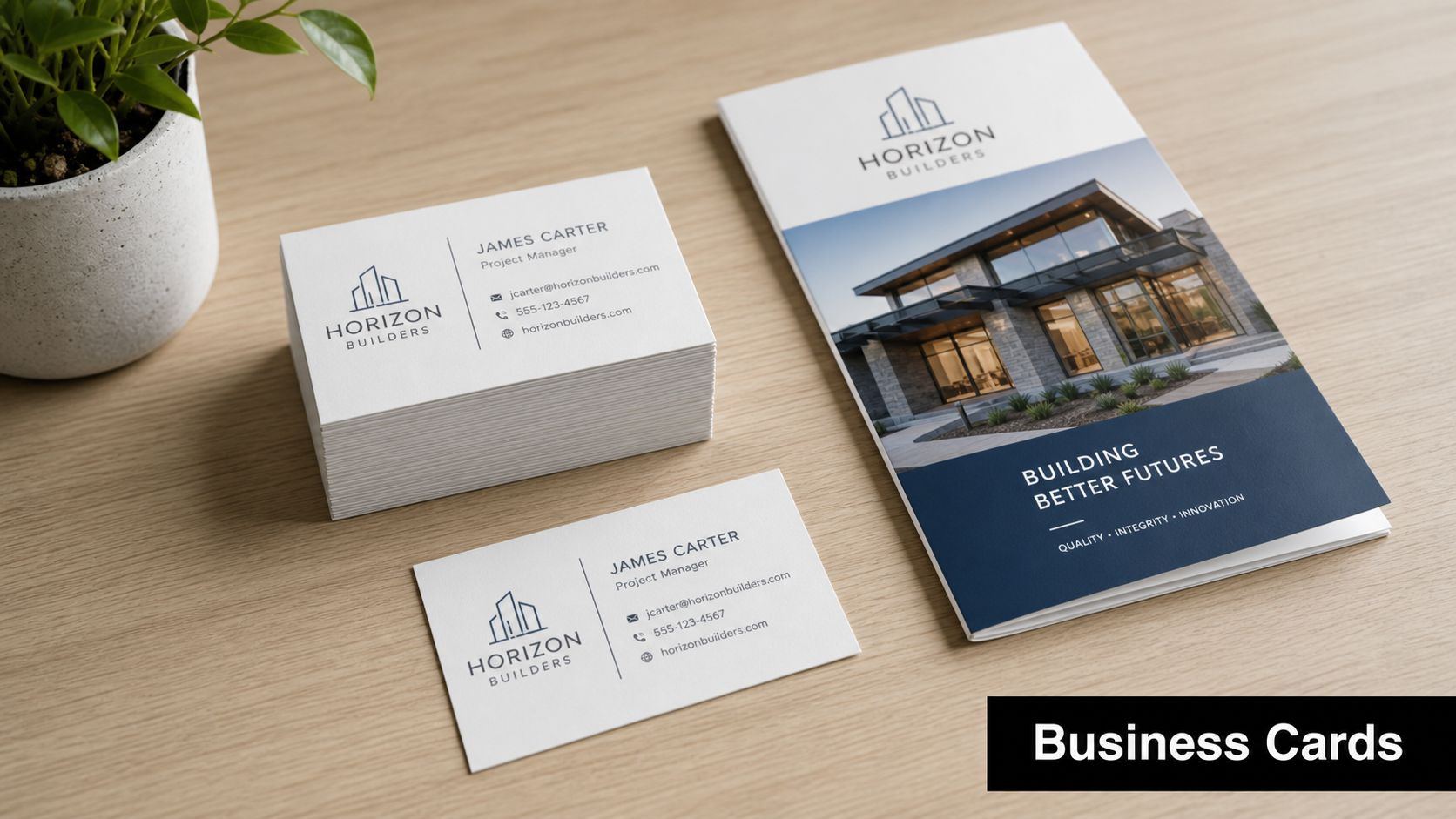
Business cards are the classic example. Small batches make sense because people update titles, phone numbers, and branding more often than they used to. Paper weight, coating, and corner style all affect the feel, and digital printing keeps the order practical even when you only need a modest quantity.
Flyers and brochures are where folds and paper brightness start to matter. A bright stock tends to make color look livelier, while folds and panels need clean alignment so the piece doesn’t feel sloppy in hand. A real estate agent’s open-house flyer and a local nonprofit’s event brochure may both be digital jobs, but they won’t use the same finish.
Banners and yard signs need more than good color. They need materials that hold up outdoors, and they often need grommets, lamination, or rigid mounting so they can survive weather and handling.
Stickers, labels, and technical output
For decals and stickers, the adhesive matters as much as the artwork. Indoor labels and outdoor graphics live very different lives, so one can’t be specified like the other. This local sticker and label printing guide is a helpful reference if your business is trying to sort out finish, adhesion, and placement.
Wide-format engineering blueprints are another common digital application. The value there is clarity, because line accuracy and readable detail matter more than decorative effect. An architect’s set of plans has different requirements than a sales poster, even though both come off digital equipment.
The Houston-area print counters I’ve seen handle all of these categories under one roof, which helps when a business needs more than one item for the same deadline. A contractor might leave with yard signs, a realtor might pick up postcards, and an office manager might add banners and color copies to the same order.
A quick ordering mindset
- Start with the use case: indoor handout, outdoor display, packaging, or technical drawing.
- Match the stock to the environment: glossy, uncoated, vinyl, adhesive film, or rigid board.
- Think about handling: will it be folded, hung, mailed, or touched repeatedly?
- Ask for a proof when color matters: especially on branded work and photo-heavy pieces.
Preparing Your Files for Digital Printing
A clean file saves more time than almost anything else in the print process. The actual press may be fast, but a wrong color mode, missing font, or weak image can stall the order before the first sheet ever moves.
The pre-submission basics
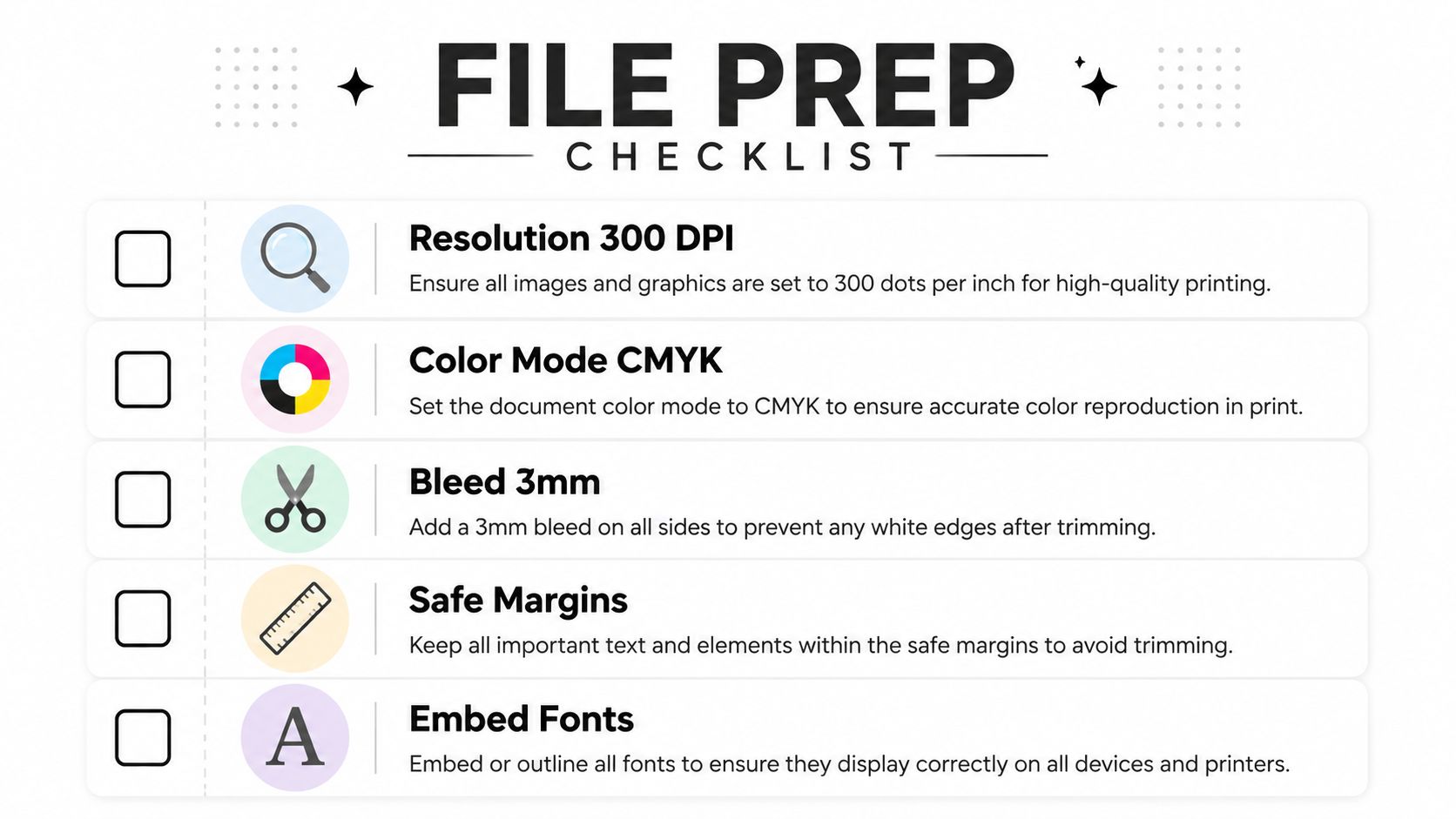
Start with resolution. For most print jobs, 300 DPI is the practical target, and detailed artwork may need more if the final output is being inspected closely. If you’re sizing a banner for distance viewing, the file can often be handled differently than a close-up brochure, because nobody studies a street banner from six inches away.
Color is the next trap. Screens show RGB light, while printers use CMYK inks on reflective stock, so the file needs to be prepared with that gap in mind. Fonts should be embedded or outlined so the printer doesn’t substitute a missing typeface, and backgrounds that run to the edge need bleed so the trim doesn’t leave a white sliver.
The useful shorthand is simple. If you wouldn’t want the press operator to guess, don’t leave it to chance.
Practical rule: every file should answer three questions before upload, is the image sharp enough, are the fonts safe, and does the artwork extend past the cut line?
A simple checklist before you send anything
- Resolution checked: make sure images are large enough for the intended output size.
- Color converted: verify the file is in CMYK if the shop requests print-ready color.
- Bleed added: extend artwork past the trim edge so cuts don’t expose white borders.
- Fonts handled: embed them or convert them to outlines.
- Export reviewed: open the final PDF and inspect it before sending.
Why resolution advice keeps people stuck
A lot of confusion comes from screen tools promising a file “looks fine” at zoom. That doesn’t mean it will print cleanly. For a clearer primer on image size, pixel density, and why print files behave differently from web graphics, MyImageUpscaler’s DPI guide is a straightforward companion piece.
The goal is not perfection for its own sake. It’s to prevent avoidable delays, reprints, and that awkward call where a shop has to ask for a corrected file after the deadline is already tight.
Materials and Finishing Options That Affect Quality
Two jobs can leave the same printer on the same day and still look completely different in hand. That usually comes down to substrate choice and finishing, not the image file alone.
Why stock changes the result
Paper is not just paper. Weight, brightness, and surface coating all influence how ink sits on the sheet and how color reads to the eye. Coated paper generally gives a cleaner, sharper result because the ink sits more predictably on the surface, while uncoated stock can feel warmer or softer but may not reproduce color as crisply.
The substrate testing guidance in the technical spec brief makes the point clearly. Coated paper with 44 to 48 mN/m surface energy can achieve Delta E of ≤1.5 and 5B adhesion, while recycled folding board at 36 to 42 mN/m needs more aggressive curing and still reaches only about 4B to 5B adhesion. Low-energy kraft at 30 to 36 mN/m is harder still, with typical adhesion of 3B to 4B and higher color error (digital printing technical specification overview).
That’s why the same art file can behave differently across stocks. The press isn’t being inconsistent, the surface is.
Finishing choices that change both look and durability
Lamination can add protection and alter the feel of the piece, with gloss, matte, and soft-touch each creating a different experience in the hand. UV coating adds shine and protection, while folding and scoring help brochures and mailers break cleanly instead of cracking. Die-cut shapes can make a sticker or card more memorable, but they also add a manufacturing step that changes cost and timing.
The same guide recommends UV cure energy ranges from 120 to 160 mJ/cm² on SBS board to 160 to 200 mJ/cm² on BOPP film, along with cross-hatch testing per ASTM D3359 and rub-resistance checks before finishing (digital printing technical specification overview). That matters because durable output is not only about appearance, it’s about whether the piece survives handling, shipping, or outdoor exposure.
When customers ask why one quote is higher than another, the answer is often hiding in the material stack. A banner on vinyl, a decal on adhesive film, and a folded brochure on coated stock are different production paths, even if the artwork looks similar on screen.
Understanding Turnaround Time and Pricing Factors
Print pricing feels mysterious until you look at what the shop is doing. The press time is only one part of the order, and sometimes it’s not even the biggest one.
What changes the quote
Quantity matters, but not in the same way it does with offset. Digital printing tends to keep per-unit pricing relatively steady, which helps on short runs and reorders. Material choice also matters because premium papers and specialty substrates cost more, and finishing steps like lamination, folding, and binding add both time and labor.
Rush service is where deadlines become visible in the quote. If a job has to be squeezed ahead of other work, the shop may have to interrupt a normal production sequence to make it happen.
Practical rule: the cheaper the file is to run, the faster it usually moves. A clean, print-ready order beats a half-finished design every time.
Turnaround reality, not wishful thinking
Simple jobs can often move same day when the file is ready and the stock is in house. Banners and signs usually need more coordination because of size, finishing, and pickup logistics. Complex finishing or larger quantities take longer because each extra step adds a chance for delay.
File readiness makes a bigger difference than most clients expect. A print-ready PDF can move straight into production, while a file that needs design cleanup, font fixing, or image correction has to sit in a prepress queue first. That’s the hidden reason one customer gets a quick answer and another gets a follow-up call.
Local pickup helps too. A nearby shop cuts out shipping time, shipping damage risk, and the awkwardness of waiting for a package that was supposed to arrive “by end of day.” For small businesses in Sugar Land, that can be the difference between getting through an event and missing the opening hour.
Business Mail Boutique LLC’s print counter covers same-day cards, flyers, banners, posters, yard signs, decals, and more, so it fits the kind of order where convenience matters as much as price. For businesses that are comparing quick local service against online ordering, this cheap printing services guide can help frame the savings question more realistically.
Frequently Asked Questions About Digital Printing
People usually ask the same handful of questions once they’re ready to place an order. The good news is that most of the confusion comes from file preparation and material choices, not from the press itself.
Can digital printing match brand colors
Often, yes, with proper color management and proofing. The key is to treat the press and the substrate as part of the color system, not just the artwork file. Some spot colors are harder to reproduce exactly, so branded work sometimes needs extra attention before the full run is approved.
Why do prints look different from my screen
Because your screen is backlit RGB and your print is CMYK on a reflective surface. That difference changes how bright, saturated, and dark colors appear. A proof is the best way to reduce surprises, especially when the piece includes a logo, product photo, or skin tones.
What’s the largest size I can print
Wide-format digital printers can handle banners and signs that run several feet wide, and the length is usually limited more by the material roll than by the concept of digital printing itself. The question is not just size, it’s where the piece will be viewed and how it will be mounted or displayed.
Can I print on both sides
Yes, duplex printing is common for many digital jobs. Thickness, opacity, and finishing requirements can affect whether double-sided output is the best choice, so it’s worth checking how the piece will be handled before you approve the layout.
What should I do if I’m unsure about the file
Ask for a preflight review before the press run starts. A good print shop will look for font issues, image resolution problems, bleed, trim safety, and stock compatibility before anything is committed to production.
If your next job needs to look sharp, land on time, and fit your budget, Business Mail Boutique LLC can help with digital printing, same-day business cards, flyers, banners, posters, yard signs, decals, photo prints, and wide-format blueprints from its Sugar Land location. Visit Business Mail Boutique LLC to get your files moving and talk through the right stock, finish, and turnaround for your project.

Related posts

Perfume Bottle Engraving Sugar Land | Same-Day Service
Same-Day Perfume Bottle Engraving in Sugar Land.
Custom Perfume Bottle Engraving in Sugar Land — Same-Day Personalized Gifts
Make a...

Leather Portfolio Engraving in Sugar Land | Custom Initials
Custom Leather Portfolio Engraving in Sugar Land: Personalized Initials for Corporate Gifts
A professional portfolio is something ...

Corporate Watch Engraving in Sugar Land | Business Mail Boutique
Custom Watch Engraving in Sugar Land: Meaningful Gifts for Employee Appreciation
A personalized watch can turn a company’s thank-you i...