
- Print Business Cards in Sugar Land – Same Day Service
- Copying Services
- Document Printing, Finishing & Lamination in Sugar Land
- Flyers
- Print Banner in Sugar Land | Same-Day Banner Printing Near Me
- Graphic Design
- Photo Printing
- Postcard Printing
- Document Printing
- EDDM Full Service Postcards
- FotoZoomer Large Format Printing


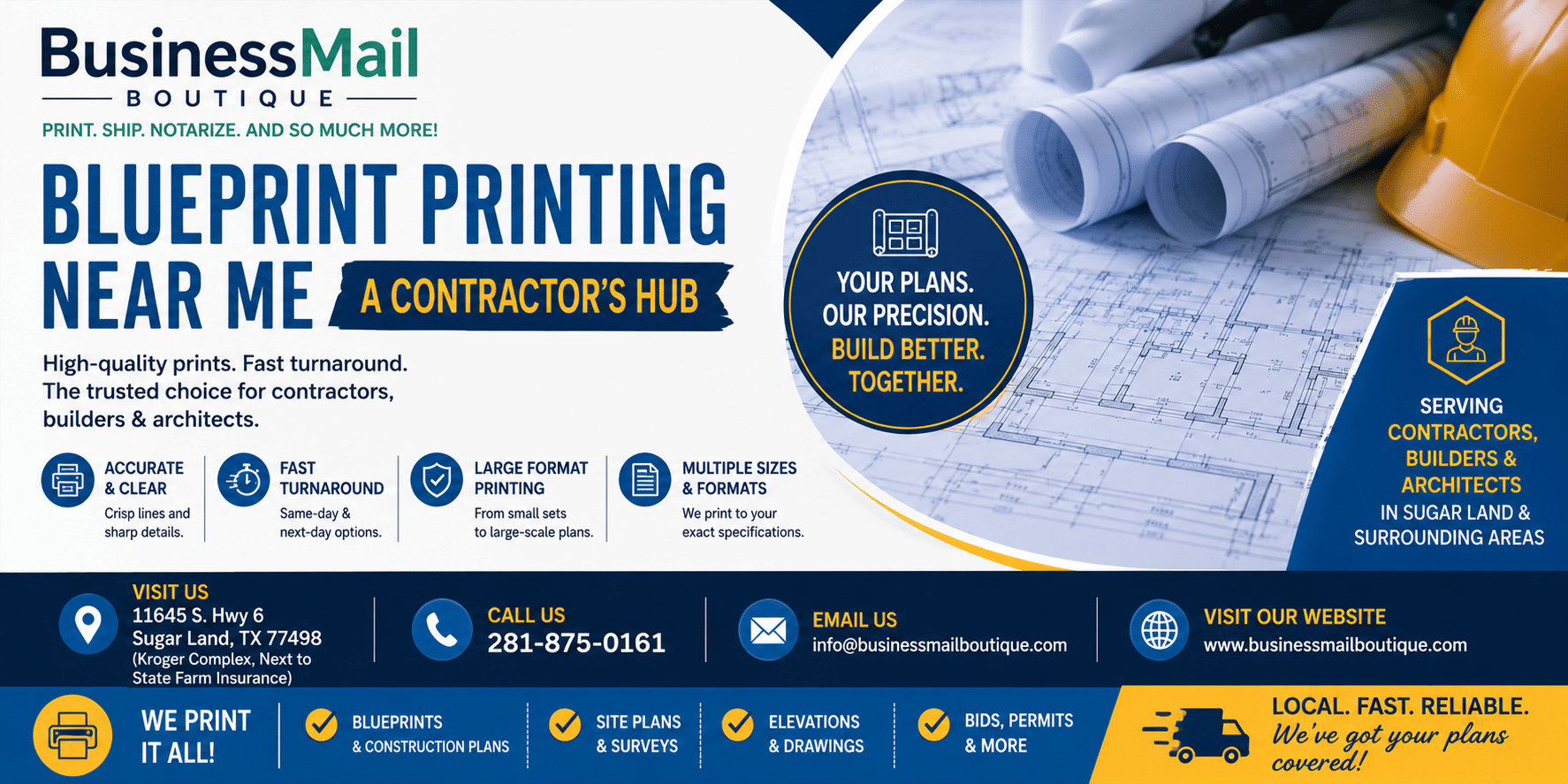
Blueprint Printing Near Me: A Contractor’s Hub
Discover expert “blueprint printing near me: a contractor’s guide. Learn file prep, scaling, paper choices, and get accurate, same-day plans for your projects.
You’re usually not searching for blueprint printing near me when everything is calm. You’re searching because a revised sheet just landed in your inbox, the superintendent needs a clean set, and the crew can’t afford to build from the wrong revision tomorrow morning. This is often the case on active jobs. Printing plans isn’t an office errand. It’s a field control issue.
Digital plans help, but tablets don’t eliminate the need for full-size paper. Crews still spread sheets across hoods, mark them up in the trailer, compare details side by side, and hand a physical set to inspectors, subs, and owners. The trick isn’t just finding a place that can print. It’s finding a workflow that gives you accurate, readable, current plans without wasting half a day.
One detail gets missed in most guides: the print itself has to be physically checked before it goes to the field. A file can look perfect on screen and still come out slightly off in scale, clipped at the edges, or muddy in the fine notes. That’s where jobs get expensive.
If you also work from takeoffs and estimation sets, this expert guide for construction estimators is useful for keeping drawing types and plan interpretation straight before you send anything to print.
Table of Contents
- Why Your Local Print Shop Still Matters for Blueprints
- Preparing Your Digital Files for Flawless Prints
- Choosing the Right Paper Size and Material
- Navigating Your Ordering Options Online vs In-Store
- Understanding Blueprint Pricing and Turnaround
- The Final Check A Contractor’s QA Checklist
- How a Local Business Center Streamlines Your Workflow
- Frequently Asked Questions about Blueprint Printing
Why Your Local Print Shop Still Matters for Blueprints
The broad print industry has been under pressure for years, but blueprint printing hasn’t disappeared with it. The reason is simple. Construction still runs on physical coordination. According to Grand View Research’s U.S. commercial printing outlook, the U.S. commercial printing market generated $127.5 million in 2025 and is projected to reach $165.4 million by 2033, and localized wide-format providers are tied to rapid turnaround that’s often within 24 to 48 hours.
That tracks with what contractors need. If the architect issues a revision late in the day, nobody wants to wait on a shipment that may or may not line up with the next morning’s coordination meeting. A local shop matters when timing gets tight, when revision control matters, and when you need someone to answer the phone instead of an order portal.
Local service solves different problems than online ordering
Online printing is useful. For planned volume, it often makes sense. But the search for blueprint printing near me usually starts when something has gone sideways or accelerated. You need revised sheets, permit copies, a clean bid set, or a replacement run because someone marked up the only field set beyond use.
A local shop also gives you something online portals can’t. You can bring up a problem sheet, point to a clipped keynote, ask for a reprint, and settle it face to face.
Practical rule: If the set is tied to tomorrow’s work, treat printing as part of production, not procurement.
When you’re evaluating options, local fit matters as much as equipment. This guide to choosing a local print shop in Sugar Land is a useful checklist for judging turnaround, communication, and whether the shop handles wide-format construction work on a regular basis.
Paper still controls the jobsite conversation
Crews don’t gather around a laptop to solve framing conflicts. They gather around a set. They circle dimensions, compare reflected ceiling plans to MEP runs, and hand sheets from one trade foreman to another. Full-size printed plans reduce friction because everyone is reading the same thing, at the same scale, in the same moment.
That’s why local blueprint providers still matter. They aren’t there to replace digital tools. They’re there to keep the project moving when paper needs to be right, now.
Preparing Your Digital Files for Flawless Prints
Most print problems start before the file ever reaches the counter. If the PDF is sloppy, the print will be sloppy. That means fuzzy details, missing symbols, substituted fonts, clipped borders, or sheets that look fine at a glance but fail when someone in the field tries to read a callout.
For professional blueprint printing, files need to be exported at a minimum of 300 DPI, and fonts need to be embedded or converted to outlines so annotation text doesn’t change during output, as explained in AlphaGraphics’ file preparation guide for blueprint printing.
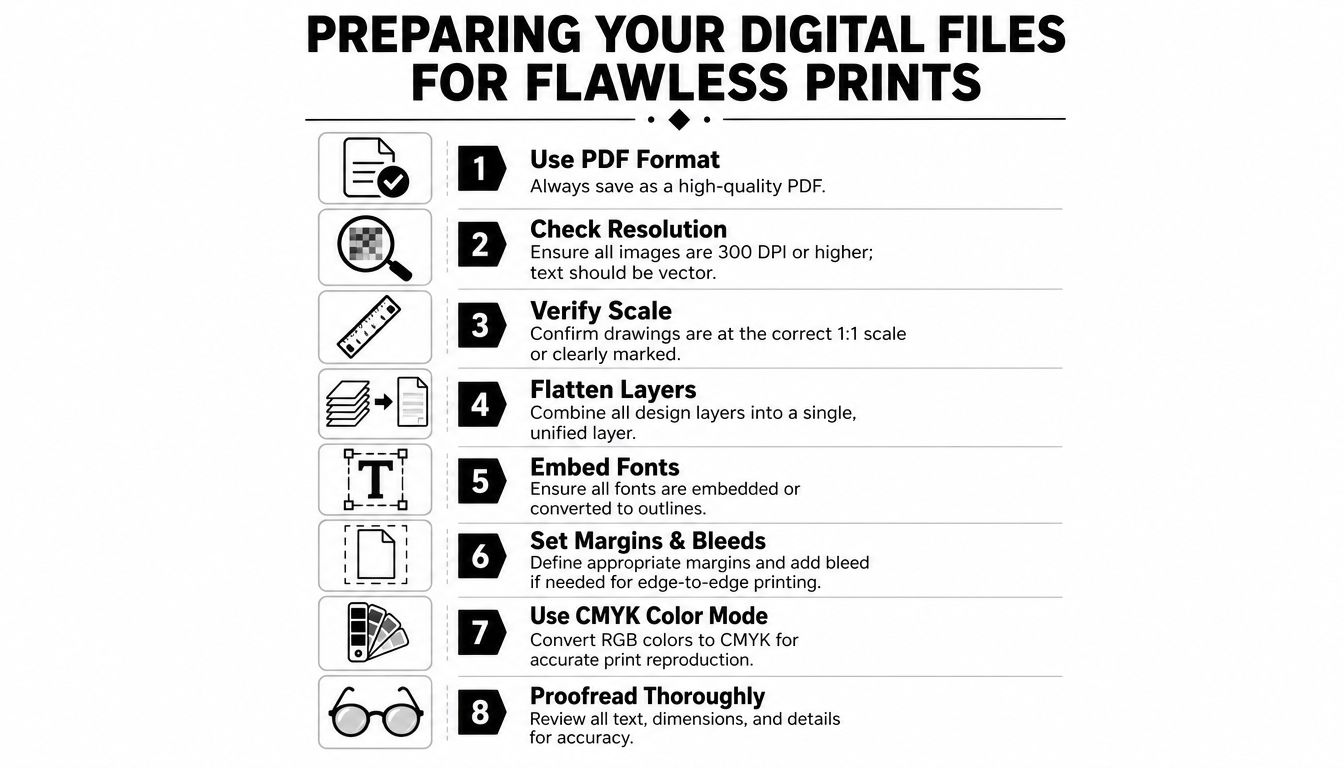
Start with a clean export
The safest handoff is a high-quality PDF exported directly from your CAD or plan management workflow. If a drawing includes raster images, scanned markups, or consultant inserts, check them before export. A sheet can carry clear vector linework and still have one embedded image that turns to mush on a large-format printer.
Use this short pre-send checklist:
- Lock the revision first: Make sure the title block revision, issue date, and sheet index all match what you intend to print.
- Export for print, not screen: A screen-friendly PDF may look acceptable on a monitor but won’t hold line clarity at sheet size.
- Embed fonts or outline them: This avoids the classic problem where notes shift, symbols change, or specialty lettering gets replaced.
- Check margins: Sheet numbers, revision clouds, and border notes can get trimmed if they ride too close to the edge.
- Look for overlap: Dense structural and mechanical areas can become unreadable if stacked lines or heavy screening aren’t cleaned up.
If your team reviews and marks up PDFs heavily, it helps to use tools that keep comments organized without creating a messy final export. For teams comparing options, Exayard as a Bluebeam Revu alternative is worth reviewing before you standardize your markup process.
Use a preflight check before upload
Don’t rely on the print shop to catch every file issue. Good shops will flag obvious problems, but the responsibility for sheet content is still yours. Before upload or handoff, open the final PDF and inspect it at full zoom.
A practical preflight usually includes:
- Open every sheet individually. Don’t just trust the set thumbnail view.
- Check scale notes and view titles. Confirm the intended plotted scale is shown clearly.
- Inspect the corners and borders. Clipping usually shows up first in these areas.
- Read one dense area. Pick the busiest sheet and make sure notes are still legible.
- Verify page order. Misordered sheets waste field time fast.
A print-ready file isn’t the same as a design-complete file. It has to survive export, transfer, and wide-format output without losing meaning.
If you handle file prep tightly, you’ll spend less time fixing reprints and less money chasing avoidable mistakes.
Choosing the Right Paper Size and Material
Contractors sometimes overfocus on the drawing and underfocus on the sheet it lands on. That’s a mistake. Size affects usability. Stock affects durability. Finishing affects how fast the set gets used in practice.
Match sheet size to field use
Full-size sheets make coordination easier when multiple trades are reading the same plan. Reduced sets are easier to carry, but they trade convenience for readability. The right choice depends on who’s using the plans and where they’re using them.
| Option | Best For | Cost Indicator |
|---|---|---|
| ARCH D or similar full-size sheets | Field coordination, superintendent sets, trade review | Mid |
| Larger full-size sheets | Dense details, presentation drawings, complex layouts | Higher |
| Reduced sets | Personal reference, quick office review, travel copies | Lower |
| Color presentation sheets | Client review, renderings, sales or design meetings | Higher |
A contractor’s rule of thumb is simple. If people need to scale visually, compare layered information, or mark up details on-site, go larger. If they just need a portable reference, a reduced set can work.
For teams ordering wide-format plans locally, these wide-format printing services for Sugar Land businesses show the kind of size and output options you should expect from a serious print provider.
Pick the stock for the way the set will be handled
Standard bond works for most everyday blueprint needs. It’s practical, familiar, and easy to roll, fold, or replace. For check sets, internal reviews, and routine field use, that’s usually enough.
Heavier or coated material makes more sense when presentation quality matters, when color needs to hold cleanly, or when the sheets will be handled repeatedly. Specialty materials can also earn their keep on certain jobs:
- Bond paper: Good for everyday sets, revisions, and markup copies.
- Heavier stock: Better when sheets need more stiffness or cleaner presentation.
- Vellum-type media: Useful for overlays or specialty drafting workflows.
- Durable synthetic stock: Worth considering when weather, mud, or repeated handling are a concern.
Finishing matters too. Rolled sets are fine for transport. Folded sets are easier to hand out. Stapled or otherwise bound sets help keep permit packages or discipline-specific runs together.
The best order isn’t the fanciest one. It’s the one that matches how the set will be used in the next few hours.
Navigating Your Ordering Options Online vs In-Store
Most contractors don’t need one printing method. They need two. Planned work and emergency work behave differently, so the ordering strategy should too.
According to Plans4Less on blueprint printing options for general contractors in 2025, general contractors should route 90 to 95% of routine blueprint orders through online printing platforms for cost efficiency, while keeping a local physical shop relationship for true last-minute, same-day needs.
Where online ordering wins
Online platforms are strong when the order is predictable. Large bid sets, scheduled reissues, multi-location distribution, and standard repeat work fit that model. You can upload from the office, keep account settings consistent, and avoid unnecessary trips.
Online ordering works well when:
- The schedule is stable: You know when the set is needed.
- Volume is the priority: Large routine orders benefit from standardized workflows.
- Shipping risk is acceptable: A delivery window won’t disrupt work if it slips.
- The job is geographically spread out: Multiple destinations are easier to manage through a centralized platform.
Where a local counter still wins
A local shop is for jobs that don’t tolerate lag. Revised permit sets. Urgent replacement sheets. Last-minute owner meetings. Field teams that need paper today, not “after transit.”
The biggest advantage isn’t only speed. It’s problem solving. If a title block looks clipped or a revision cloud isn’t showing properly, you can resolve it before the whole run is produced.
Here’s the side-by-side view contractors use:
| Ordering Method | Strongest Use Case | Main Trade-Off |
|---|---|---|
| Online printing platform | Planned, repeat, bulk work | Less flexible when timing changes |
| Local in-store provider | Same-day needs, issue resolution, physical review | Not always the first choice for routine volume |
Keep your routine work systemized online. Keep your emergency work local.
If you want a local option that accepts plan files digitally and handles delivery, this online blueprint and architectural printing submission service shows the kind of hybrid setup that can fit a contractor’s workflow.
The mistake is treating all print jobs the same. They aren’t. Some are procurement. Some are production support. Order accordingly.
Understanding Blueprint Pricing and Turnaround
Blueprint pricing gets easier to manage once you stop thinking in vague “print costs” and start looking at the variables that move the invoice. Size, color, quantity, and turnaround matter more than anything else.
Based on Emerald Document Imaging’s 2026 blueprint pricing guide, a 24″ x 36″ black-and-white blueprint typically ranges from $1.25 to $2.50 per page, a 36″ x 48″ sheet ranges from $2.00 to $3.50, and full-color renderings can run from $6.00 to $10.00+ per page.
What usually drives the invoice
Black-and-white line drawings are the baseline. Once you move into larger sheets, color output, specialty stock, or finishing, the cost rises. None of that is surprising. What catches contractors off guard is usually the combination.
A simple way to think about it:
- Sheet size: Bigger sheets cost more to produce.
- Color usage: Renderings, color-coded plans, and presentation sets cost more than monochrome technical drawings.
- Order size: Larger runs often improve per-sheet value.
- Material and finishing: Upgraded stock, folding, or binding can affect final pricing.
If you’re comparing local and remote providers, don’t compare sheet price alone. Compare total delivered cost, time to hands, and what happens if one sheet needs to be rerun.
How to talk about turnaround without surprises
Turnaround is usually a communication issue before it’s a print issue. A shop can only promise what it understands. If you say “I need these tomorrow,” but don’t mention that the set includes late revisions, color sheets, and folding, you’re setting yourself up for friction.
When placing the order, confirm:
- Need-by time, not just day
- Exact set count
- Any color sheets in the run
- Folding or binding requirements
- Whether only revised sheets are needed or full sets
Fast turnaround only helps if the sheets arrive usable. Speed without clarity creates rework.
For budgeting, routine jobs should be priced before they’re urgent. Ask for common-scenario pricing ahead of time so your PMs and supers know what to expect when the pressure is on.
The Final Check A Contractor’s QA Checklist
This is a commonly skipped step, and it’s the one that protects the job. Existing guides often miss a hard truth: local print shops can have uncalibrated wide-format printers that introduce fractional scaling errors, and construction error analysis ties scale misinterpretation and physical print errors to some of the costliest blueprint-reading mistakes, as noted in Plans4Less’ guide to online blueprint printing for construction professionals.
That means a file can be correct and the printed sheet can still be wrong for field use.
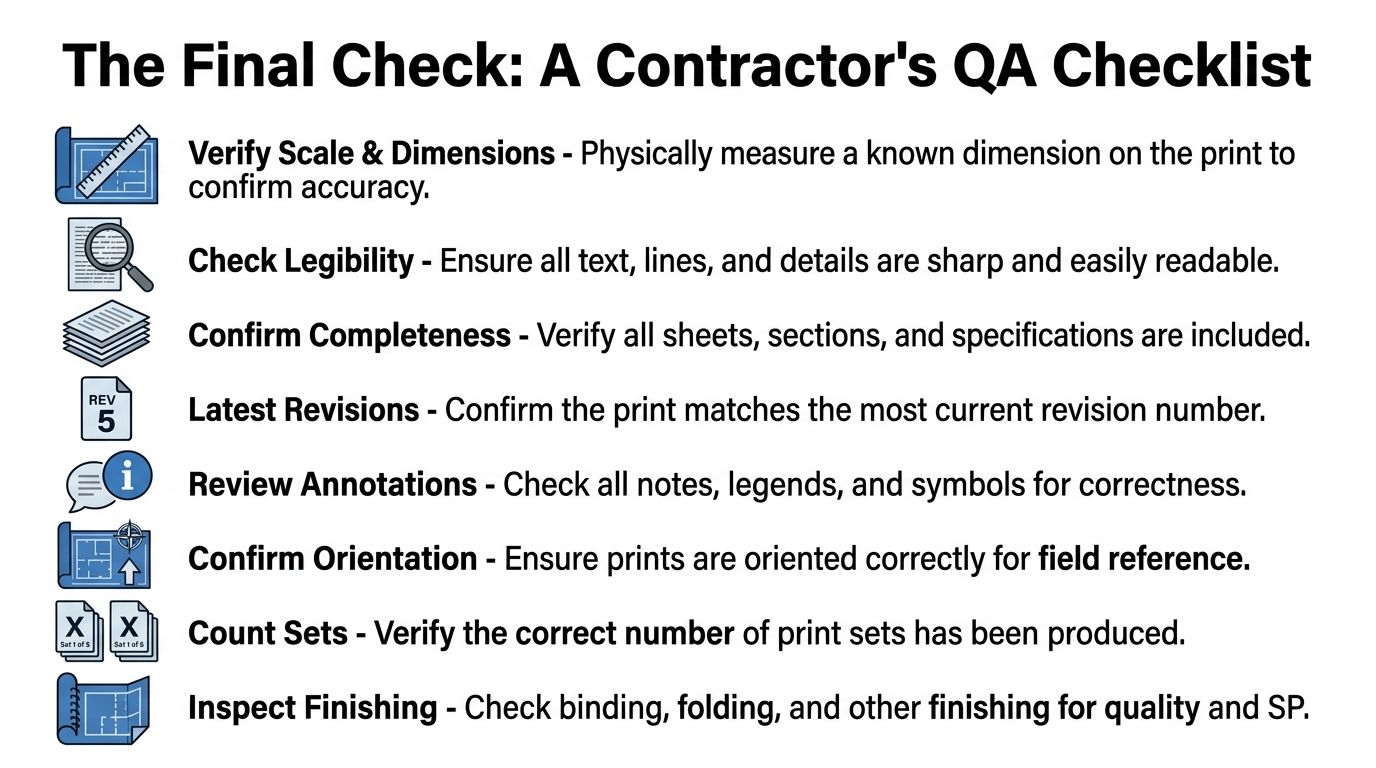
What to verify before the prints leave the shop
Bring a scale ruler when you pick up plans. Don’t assume “printed to scale” means the machine is perfect that day. Spot-check one known dimension on one representative sheet before the full run goes to the site.
Use this contractor QA routine:
- Measure a known dimension. Pick a detail or plan dimension you can verify quickly with an architect’s or engineer’s scale.
- Read the smallest notes. Fine text in legends, keynote blocks, and schedules tells you whether the output is usable.
- Inspect the borders. Check that sheet numbers, revision clouds, and edge notes aren’t clipped.
- Confirm the issue version. Match revision numbers and dates to the current release.
- Count the sets and sheets. Missing one page can stall a foreman as effectively as a bad print.
A simple field-safe habit
Don’t review every sheet equally. Review one sheet from each condition that could fail differently. One crowded MEP sheet. One architectural sheet with dense notes. One sheet with critical dimensions near the border. One revision sheet.
That approach catches most real-world output problems fast.
If the sheet says “Do not scale,” treat that as a warning about field measurement, not a reason to skip print verification.
A good local printer won’t object to this check. They’ll expect it. Contractors who make physical verification part of pickup avoid a lot of ugly conversations later, especially when multiple trades are already working from the set.
How a Local Business Center Streamlines Your Workflow
A contractor rarely needs only blueprints. The same errand often includes shipping documents, laminating notices, printing safety signage, or sending paperwork to a municipality. That’s why a full-service local business center can reduce a lot of wasted movement during the week.
A place like Business Mail Boutique LLC in Sugar Land handles wide-format engineering prints through FotoZoomer, but the practical value is broader than that. If you can print a revised set, laminate a site notice, ship a package to another job, and handle document finishing in one stop, you save time and reduce handoff errors.
That kind of setup works well for project managers, supers, and small contractors who don’t have a dedicated reprographics department. It turns a local service counter into part of the operating routine instead of another separate vendor to manage.
Frequently Asked Questions about Blueprint Printing
Do I need full-size sets for every trade
No. Full-size sets make the most sense where crews need to read dense detail, coordinate multiple systems, or mark up field changes directly on the drawings. Some team members can work from reduced reference sets, but the primary field copies should be sized for readability and quick use.
What file format should I send
A clean PDF is usually the safest option. It travels well, is easier for the print provider to process consistently, and reduces the chances of software compatibility problems. Before sending, confirm the revision, borders, fonts, and scale notes are correct.
Can a local shop print revised sheets only
Yes, if you clearly identify which sheets changed. That’s often the smartest way to handle addenda or issue updates. Label the revised pages carefully and tell the shop whether you need replacement sheets only or complete updated sets.
How do I avoid ordering the wrong version
Put the revision date and sheet issue in the file name, and match that to the title block before ordering. If you manage multiple drawing types across design and fabrication, this BIM Heroes guide to drawing types helps clarify the differences between plan categories so the wrong document doesn’t get sent to print.
Blueprint printing near me: a contractor’s guide comes down to one habit more than anything else. Don’t treat printing as an afterthought. Treat it like jobsite control. Get the file right, order with the end use in mind, and physically verify the print before it reaches the field.
If you need wide-format blueprint printing, shipping, and related business services in one place, Business Mail Boutique LLC offers a practical local option in Sugar Land for contractors who need current plans in hand without adding another stop to the day.

Related posts

Custom Memorial Glasses Engraved in Three Hours in Sugar Land
When a customer needed eight personalized glasses for a memorial, Business Mail Boutique completed the engraving or...

Custom Martini Glass Engraving in Sugar Land, TX
Custom Logo Engraving on Martini Glasses in Sugar Land, Texas.
Business Mail Boutique recently completed a beautiful custom engravin...

Custom Engraved Wine Glasses for a Golf Club Event in Sugar Land, TX
Custom Engraved Wine Glasses for a Golf Club Event in Sugar Land.
Custom wine glass engraving in Sugar Land, TX at Business Mail Bouti...