
- Print Business Cards in Sugar Land – Same Day Service
- Copying Services
- Document Printing, Finishing & Lamination in Sugar Land
- Flyers
- Print Banner in Sugar Land | Same-Day Banner Printing Near Me
- Graphic Design
- Photo Printing
- Postcard Printing
- Document Printing
- EDDM Full Service Postcards
- FotoZoomer Large Format Printing


Online Printing Documents Services: Order & Pickup Today
Businessmailboutique
11645 S. Hwy 6
Sugar land, Texas 77498 United States (US)
Email: info@businessmailboutique.com
You’ve got a meeting tomorrow, a proposal still needs to be printed, and the office printer has chosen today to streak toner across every page. That’s usually the moment people start searching for fast online printing documents services and hoping “pickup today” means what it sounds like.
It can, but only if you order the job the right way. The difference between a smooth order and a frustrating one usually comes down to three things: choosing the right provider, sending a file that won’t break in production, and knowing when a local print shop can handle something a national chain may limit. If your job includes binding, heavier paper, large pages, or a same-day deadline, those details matter more than price shopping by itself.
Table of Contents
- Getting Started with Online Document Printing
- Choosing Your Print Format Paper and Finishing
- Preparing and Uploading Your Digital Files Correctly
- The Critical Proofing and Approval Step
- Fast Fulfillment with Delivery or Local Pickup
- Pro Tips for Cost Savings and Fast Turnarounds
Getting Started with Online Document Printing
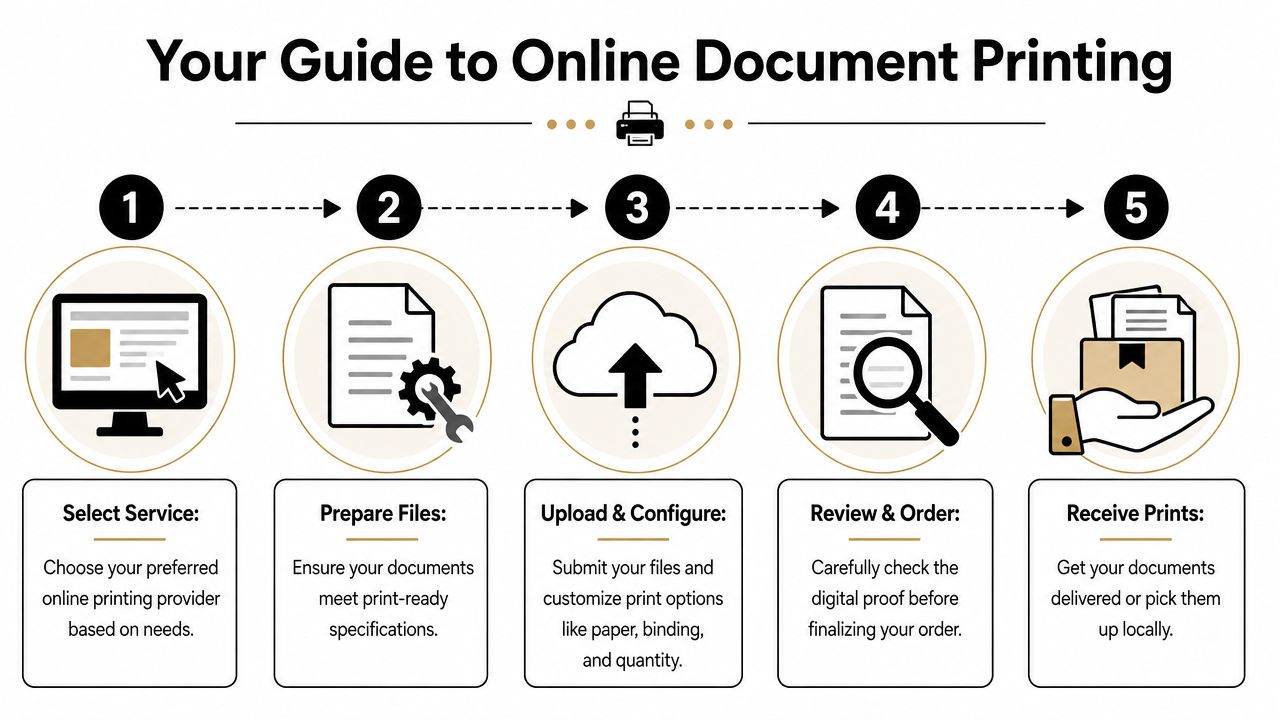
Start with the deadline, not the document. If you need a simple black-and-white packet next week, almost any online printer can probably handle it. If you need presentation sets, tabbed manuals, or branded handouts today, you need a provider that can tell you exactly what’s possible before you upload.
The reason these services are everywhere now is simple. Online printing has grown into a large service category, with one market report valuing the global online printing service market at USD 25.3 billion in 2023 and projecting USD 46.9 billion by 2032 at a 7.2% CAGR according to DataIntelo’s online printing service market report. That tells you this isn’t a niche workaround anymore. It’s a normal way businesses order proposals, flyers, reports, and sales materials.
Pick the provider based on the job
National platforms work well for standard items with comfortable lead times. Their ordering systems are usually polished, and they’re fine for straightforward runs with basic finishing.
Local providers are often better when the job has moving parts:
- Urgent turnarounds that need same-day pickup
- Special finishing like binding, folding, trimming, or mounting
- Mixed orders such as presentation packets plus signs plus shipping
- Real troubleshooting when your file needs a quick correction
If you want a local option that combines document printing with shipping and business services, Business Mail Boutique’s print shop is one example of the kind of storefront many small businesses use when they need a practical, in-person handoff.
Know what to prepare before ordering
Before you click “upload,” have these answers ready:
- What is this for. A client pitch, training packet, event handout, or internal draft?
- When do you need it. Today, tomorrow, or this week?
- How should it feel in hand. Lightweight and economical, or polished and presentation-ready?
- Do you need finishing. Stapled, spiral bound, three-hole punched, or loose sheets?
- Pickup or delivery. Fast local access or direct shipment?
Practical rule: If the document will be touched in a meeting, handed to a customer, or left behind after a presentation, order from a service that lets you confirm paper and finishing details clearly before production.
A useful habit is to think beyond the current document. Businesses that order print regularly often benefit from keeping visual assets organized across formats, whether that’s sales sheets, banners, or even high-quality vinyl stickers for packaging and promotions. The cleaner your brand files are, the easier every future print order becomes.
Choosing Your Print Format Paper and Finishing
The difference between a decent and a professional print job lies in the details. Most ordering pages make paper, size, and finishing look like a list of checkboxes. They aren’t. Each option changes how the document reads, feels, travels, and holds up after it leaves the printer.
Online print services give you a lot of flexibility, including typical production and delivery windows of 2 to 10 business days, no order minimums, and finishing choices like loose-leaf, ring binder, spiral, and saddle-stitched formats, as described in Mimeo’s guide to online printing services. That flexibility is useful, but only if you match the format to the job.
Match paper to purpose
Use the paper to support the document, not distract from it.
| Document type | What usually works | Why it works |
|---|---|---|
| Internal reports | Standard uncoated paper | Easy to read, easy to write on |
| Client proposals | Heavier matte stock | Feels more substantial without glare |
| Marketing flyers | Gloss or silk-coated stock | Helps photos and bright graphics stand out |
| Training manuals | Durable inside pages with a sturdier cover | Holds up to repeated handling |
Gloss looks sharp for image-heavy pieces, but it can feel slippery and reflect overhead lights. Matte tends to look calmer and more professional for text-heavy business documents. If people need to annotate the pages, uncoated stock is usually the safer choice.
Choose the right size and layout
Letter-size is the default for a reason. It’s easy to carry, file, and reprint. But there are times to go larger or more specialized.
A few common decisions:
- Letter-size sheets work for proposals, reports, agreements, and presentations.
- Tabloid or larger formats make sense for plans, charts, or visuals that need room.
- Half-fold or booklet layouts fit event programs and compact handouts.
- Wide-format pages are better for architectural drawings and engineering sets than forcing details onto small paper.
A document can be beautifully printed and still fail if the format makes it hard to read or awkward to use.
Pick finishing that fits real use
Finishing should support how the document will be handled.
- Loose-leaf works for short handouts, one-time leave-behinds, and simple inserts.
- Stapled sets suit reports that don’t need to lie flat.
- Spiral binding is practical for training packets, manuals, and reference guides because pages turn easily and stay open on a desk.
- Ring binder formatting makes sense when pages will be updated often.
- Saddle-stitched booklets are cleaner for brochures, programs, and slimmer multi-page pieces.
Here’s what often goes wrong. People pick finishing based on appearance only, then discover the packet won’t sit flat at a training table, or the glossy sheet they chose for a report is hard to mark up with a pen.
When local help matters most
If your order includes mixed paper stocks, special covers, or unusual finishing, a local printer often saves time by clarifying the choices before production starts. A quick phone call can prevent the classic mistakes: paper that feels too thin, binding on the wrong edge, or covers that don’t match the inside pages.
For urgent jobs, simpler specs usually move faster. If speed matters most, stay close to standard sizes, common stocks, and straightforward finishing unless the document really needs something else.
Preparing and Uploading Your Digital Files Correctly
Most print problems begin before the order is placed. The printer didn’t “mess up” the file. The file arrived with low-resolution images, shifted margins, missing fonts, or artwork set up for a screen instead of a press.
Online printing documents services work best when you send a file that’s already production-ready. The smoother your file is, the faster the job moves from upload to approval to print.
Use a PDF unless the printer asks for something else
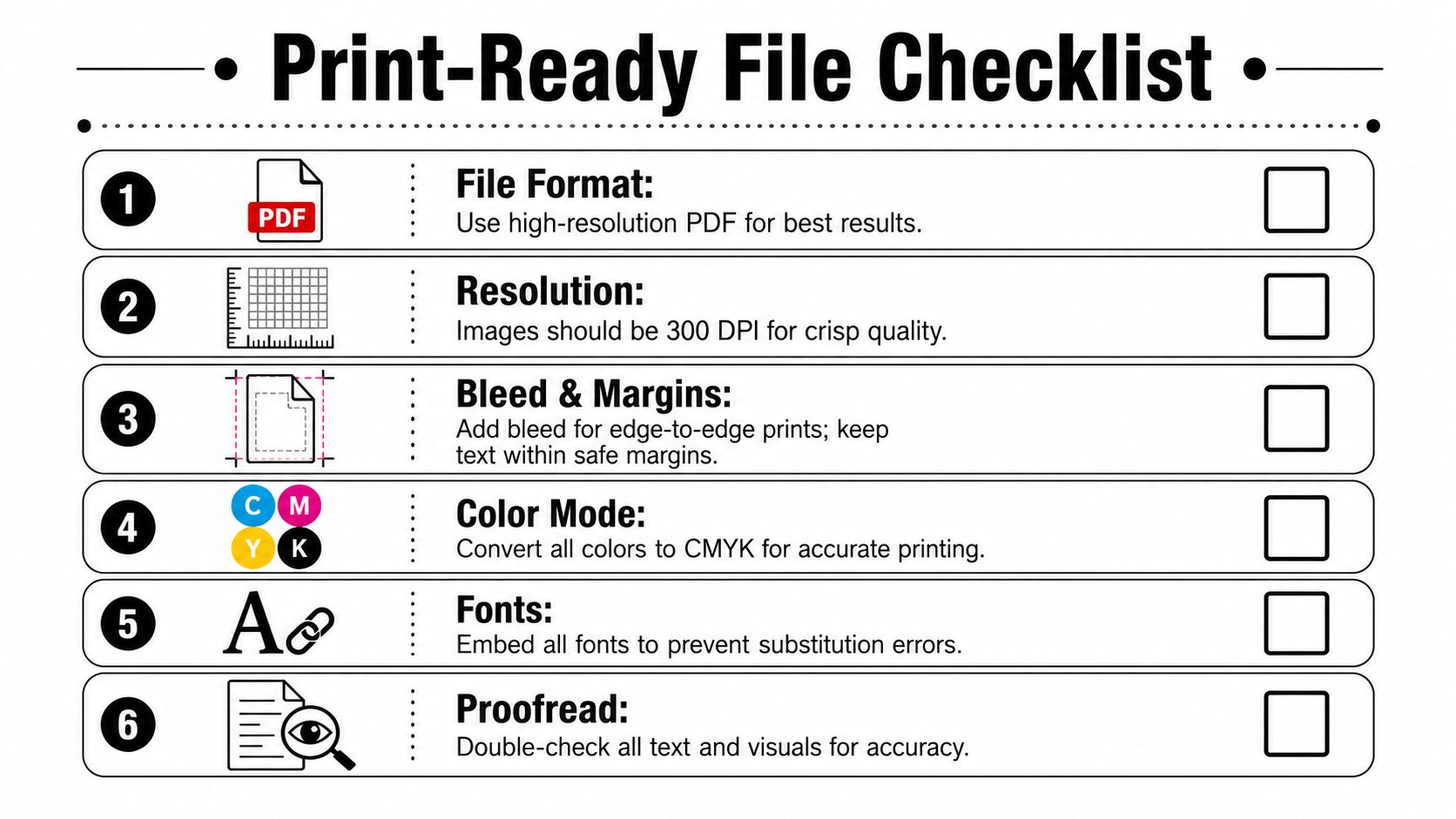
A PDF is usually the safest file type because it locks in layout more reliably than an editable Word, PowerPoint, or design file. What you see before upload is much more likely to match what the printer sees in production.
Before exporting, check these basics:
- Page size must match the final printed size
- Fonts should be embedded
- Images should look sharp at print size
- Margins need enough breathing room so text won’t be clipped
If you’re designing mailers or promo pieces alongside document sets, these postcard design tips for local businesses are a helpful reminder that print layout rules matter even on small formats.
Don’t skip the pre-flight issues
A solid online print workflow includes automated pre-flight validation, and skipping checks for layout, margins, and resolution is a known cause of reprints and delays, as explained in Taylor’s print-on-demand workflow guidance. Pre-flight isn’t there to slow you down. It’s there to stop preventable problems before paper is wasted.
Common file issues include:
- Low-resolution graphics that looked fine on a laptop but print soft
- Missing bleed on full-page color designs, leaving white edges after trimming
- Text too close to the edge, which feels cramped even if it isn’t cut off
- Layer or transparency glitches from design software exports
- Wrong orientation, especially with slides exported as handouts
If a file includes background color or imagery that runs to the edge, build it for trimming. Otherwise, thin white borders can show up where you didn’t expect them.
For oversized plans, construction sets, or technical pages, file setup matters even more. When you’re submitting larger documents, online blueprint and architectural printing submission is a good example of a workflow where page size, scale, and legibility all need attention before upload.
A quick visual walkthrough helps if you haven’t prepared print files in a while:
A simple file check before you upload
Open the final PDF and review it at full size, page by page.
- Zoom in on photos and logos. If they look soft on screen at close view, they’ll likely print soft.
- Flip through every page in order. Page breaks and rotated pages show up here.
- Check the final version name. Teams often upload the wrong draft, not the wrong design.
- Read the last page. The final page is where old disclaimers, notes, or template leftovers tend to hide.
That last check saves more jobs than people realize.
The Critical Proofing and Approval Step
The proof is your last clean chance to catch a problem while fixing it is still easy. Once you approve it, the file usually moves straight into production, and at that point the conversation changes from “Can we adjust this?” to “Do you want us to reprint it?”
A lot of customers look only for typos. That’s not enough. You also need to check whether the layout shifted, whether fonts rendered correctly, whether logos and images landed where they should, and whether trim or fold placement still makes sense after the system processed the file.
What to check on every proof
Read the proof like a buyer, then inspect it like a printer.
- Text fit. Look for lines wrapping differently than they did in your original.
- Image placement. Photos can move or crop oddly if the export wasn’t clean.
- Margins and safe areas. Contact details and page numbers should never feel crowded.
- Page sequence. Multi-page packets and booklets are especially easy to approve in the wrong order.
- Finishing direction. Binding on the top edge instead of the left edge is a painful mistake.
Five minutes spent proofing is cheaper than discovering the mistake after the box is opened.
Why approval deserves full attention
Complex jobs fail in small ways. A report prints beautifully, but the tabs are out of order. A sales packet looks sharp, but one chart was from an older revision. A booklet is trimmed well, but the back page contains a hidden template note no one noticed on screen.
That’s why approval should happen with the final user in mind. If a client will read it, proof the contact information and branding carefully. If a trainer will use it, confirm page flow and binding. If a contractor will rely on it, make sure nothing important is too small or cut tight.
Don’t proof while multitasking. Open the file, compare it to your original, and review it slowly once. That single pause prevents a surprising number of bad print days.
Fast Fulfillment with Delivery or Local Pickup
The final decision is how you want the job in hand. Delivery is convenient. Pickup is faster and gives you one more chance to confirm the finished piece before you walk out the door.
For many standard jobs, shipping works fine. If the order is going to another office, a job site, or a remote teammate, direct delivery is often the cleanest option. It also keeps your own schedule free if you don’t need to inspect the order in person.
Delivery versus pickup
| Option | Best for | Main trade-off |
|---|---|---|
| Delivery | Remote recipients, planned projects, multi-site distribution | You depend on transit timing |
| Local pickup | Same-day needs, reviewed jobs, urgent presentations | You need to travel to collect it |
Pickup becomes especially valuable when the deadline is tight and the project isn’t basic. Retail chains often advertise same-day printing, but many large retailers limit same-day service by quantity and exclude more complex finishing, as shown in Office Depot’s document printing details. That’s where local print hubs can be more flexible for urgent, nonstandard work.
When local online ordering wins
A local shop often gives you a better shot at getting the hard job done today:
- Bound presentations needed before an afternoon meeting
- Large-format plans that can’t wait for shipping
- Mixed orders that combine documents with signage or marketing pieces
- Last-minute corrections after a proof change
If the project is time-sensitive, ask practical questions early. Can they finish the binding today? Is the stock you chose on hand? Does “same day” apply to your quantity and format, or only to simple copies?
Same-day printing usually gets easier when you choose standard paper, standard sizing, and finishing the shop can run immediately.
For businesses in a hurry, rush printing guidance for same-day success is useful because it focuses on what actually speeds up a job instead of just promising fast service.
A simple way to decide
Choose delivery when the destination matters more than the clock.
Choose pickup when the clock matters more than convenience.
That sounds simple, but it’s the right filter. If you have a trade show packet, proposal deck, or permit set that must be physically ready today, local pickup is usually the safer move.
Pro Tips for Cost Savings and Fast Turnarounds
Good print ordering isn’t about chasing the lowest price on a checkout page. It’s about avoiding the expensive mistakes that force reprints, rush handling, or awkward substitutions when the right stock isn’t available.
A few habits make a big difference over time.
Spend money where people notice it
Not every document needs premium stock. Save the upgrade for pieces that will be presented, sold from, or handed directly to a customer. Internal drafts, review copies, and archive sets can usually stay on standard paper without hurting the outcome.
A practical pattern looks like this:
- Use standard stock for internal packets and review sets
- Upgrade covers or first pages for client-facing documents
- Keep sizes standard unless the content requires a custom format
- Bundle related jobs into one order when timing allows
That approach usually protects both budget and turnaround.
Cut time before the order even starts
Fast jobs start with organized files. Name your final PDF clearly, keep old drafts out of the upload folder, and decide on paper and finishing before you begin ordering. The back-and-forth over specs often takes longer than the printing itself.
The fastest print job is usually the one that arrives with a final file, a clear quantity, and no unanswered questions about paper or finishing.
If your team orders regularly, standardize a few templates. One approved proposal format, one training manual spec, one event flyer layout. Consistency reduces proofing time and prevents version confusion across departments.
Ask the privacy question most people skip
File security doesn’t get enough attention in online printing. That matters because many uploaded files include contracts, financial records, IDs, legal packets, or internal business information. A known gap in online printing content is the lack of clarity around file retention, encryption, access, and post-fulfillment handling, as noted by Doxdirect’s online printing service content.
Before uploading sensitive material, ask:
- How long is the file stored after the job is complete
- Who can access uploaded files
- Is there a way to request deletion after fulfillment
- How are reorders handled without exposing old versions
Those aren’t technical nitpicks. They’re practical purchasing questions.
Keep a short checklist for repeat orders
When customers print often, I recommend a simple saved checklist:
- Final file confirmed
- Correct quantity selected
- Paper choice matched to purpose
- Finishing direction verified
- Pickup or delivery chosen based on deadline
- Sensitive content reviewed for retention concerns
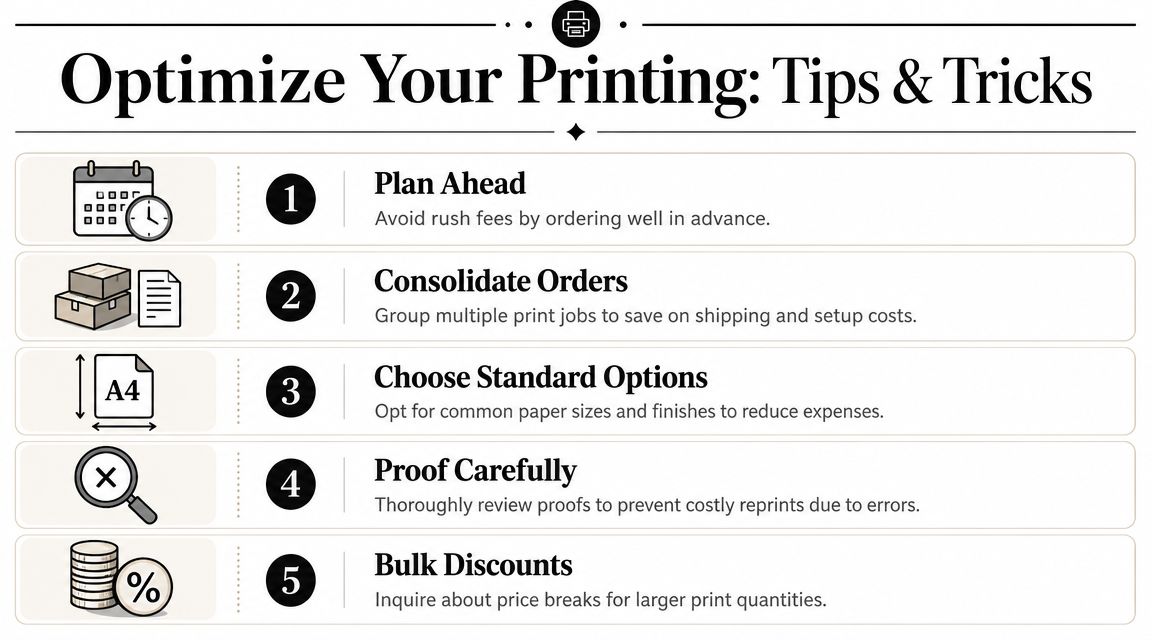
That checklist keeps online printing documents services from feeling unpredictable. Once you know how to prepare the file, approve the proof, and choose the right fulfillment method, the process becomes routine instead of stressful.
If you need document printing, same-day pickup options, shipping support, or help sorting out a more complex print order, Business Mail Boutique LLC is a practical local option in Sugar Land for business documents, wide-format work, finishing, and related office services.

Related posts
Marketing Material Printing
Marketing Material Printing: A Small Business Guide
You're probably here because a real deadline is staring at you. A gr...
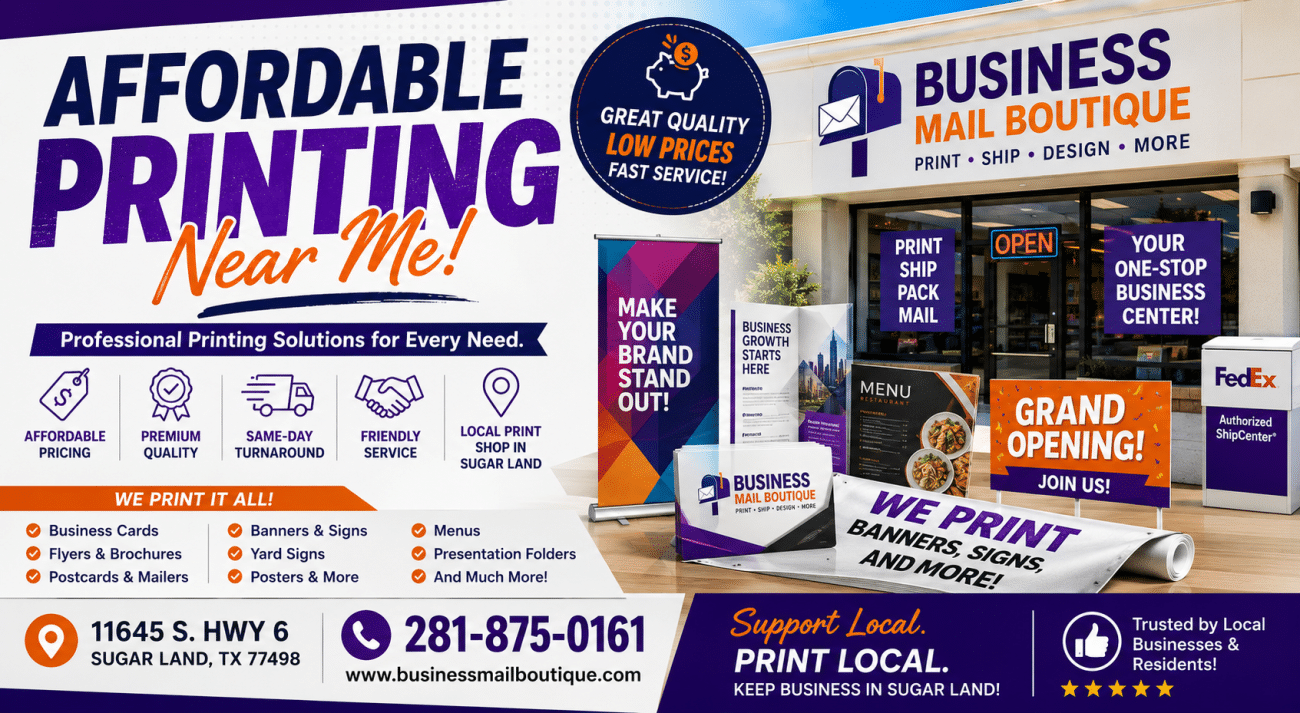
Affordable Printing Near Me – Professional Print Shop Services
Affordable Printing Near Me – Professional Print Shop Services at Business Mail Boutique in Sugar Land
When searching onli...
Best Printing Near Me: Find Local Shops for Fast Service
Best Printing Near Me: Find Local Shops for Fast Service
You've probably made this search in a rush. The event is tomorrow, the sa...