
- Print Business Cards in Sugar Land – Same Day Service
- Copying Services
- Document Printing, Finishing & Lamination in Sugar Land
- Flyers
- Print Banner in Sugar Land | Same-Day Banner Printing Near Me
- Graphic Design
- Photo Printing
- Postcard Printing
- Document Printing
- EDDM Full Service Postcards
- FotoZoomer Large Format Printing


Marketing Material Printing: A Small Business Guide
Businessmailboutique
11645 S. Hwy 6
Sugar land, Texas 77498 United States (US)
Email: info@businessmailboutique.com
You’re probably here because a real deadline is staring at you. A grand opening needs flyers by Friday. A trade show booth still needs a banner. Your staff is asking for business cards, and your online ad spend already feels crowded, expensive, and easy to ignore.
That’s exactly where marketing material printing still earns its keep. Good print gives people something they can hold, pin up, hand to a coworker, or bring back to your counter later. Bad print, though, wastes money fast. The difference usually comes down to choosing the right format, sending the right files, and working with a printer who can catch problems before they become reprints.
Table of Contents
- Why Great Print Marketing Still Matters
- Choosing the Right Print Format for Your Goal
- Preparing Your Design Files for Flawless Printing
- Selecting Materials and Finishes for a Professional Look
- Understanding Print Timelines Pricing and Delivery
- How to Measure Print Marketing ROI with Examples
- Your Pre-Order Checklist for Perfect Prints
Why Great Print Marketing Still Matters
When a small business needs attention quickly, print solves a problem digital ads often don’t. A flyer in a customer’s hand, a poster in a storefront window, or a countertop sign at checkout creates a physical interruption. It doesn’t disappear when someone swipes, closes a tab, or scrolls past.

Print also has staying power because it isn’t some outdated leftover from the pre-digital era. Printing became a major economic force after Gutenberg’s movable-type press commercialized around 1450, and it remains commercially significant today. The global printing market was projected to reach at least $980 billion, and customers find print ads 43% less annoying than online ads, according to these print marketing statistics.
That matters for a local business owner. If customers are more receptive to print, your brochure, postcard, or in-store handout starts with less resistance. You’re not forcing your message into a crowded feed. You’re placing it in a context where people can look at it.
Practical rule: Use print when you need visibility, local presence, and memory. Use digital to capture the response.
Print works best when the message is immediate
A restaurant promoting weekend specials, a salon announcing a new service, or a contractor sponsoring a neighborhood event all benefit from printed pieces because the message is tied to place and timing. A well-placed flyer near the register or a poster in the right window often does more than a generic social post.
Print also lets you extend the brand beyond paper. If your campaign includes handouts, event signage, and branded giveaways, a thoughtful mix can make the offer feel complete. If you need ideas beyond paper pieces, these promotional items to give away at events and local campaigns can support the same message without replacing print’s core role.
What doesn’t work
Print fails when owners treat it like decoration. A pretty flyer with no offer, no audience in mind, and no action step usually ends up in the trash. The same goes for ordering a generic batch of materials because “every business should have them.”
Good marketing material printing is purposeful. It should answer three questions before a file ever goes to press:
- Who is this for and where will they see it?
- What action should they take after they read it?
- Why is print the right format for this message?
If you can answer those clearly, print becomes a working sales tool instead of a sunk cost.
Choosing the Right Print Format for Your Goal
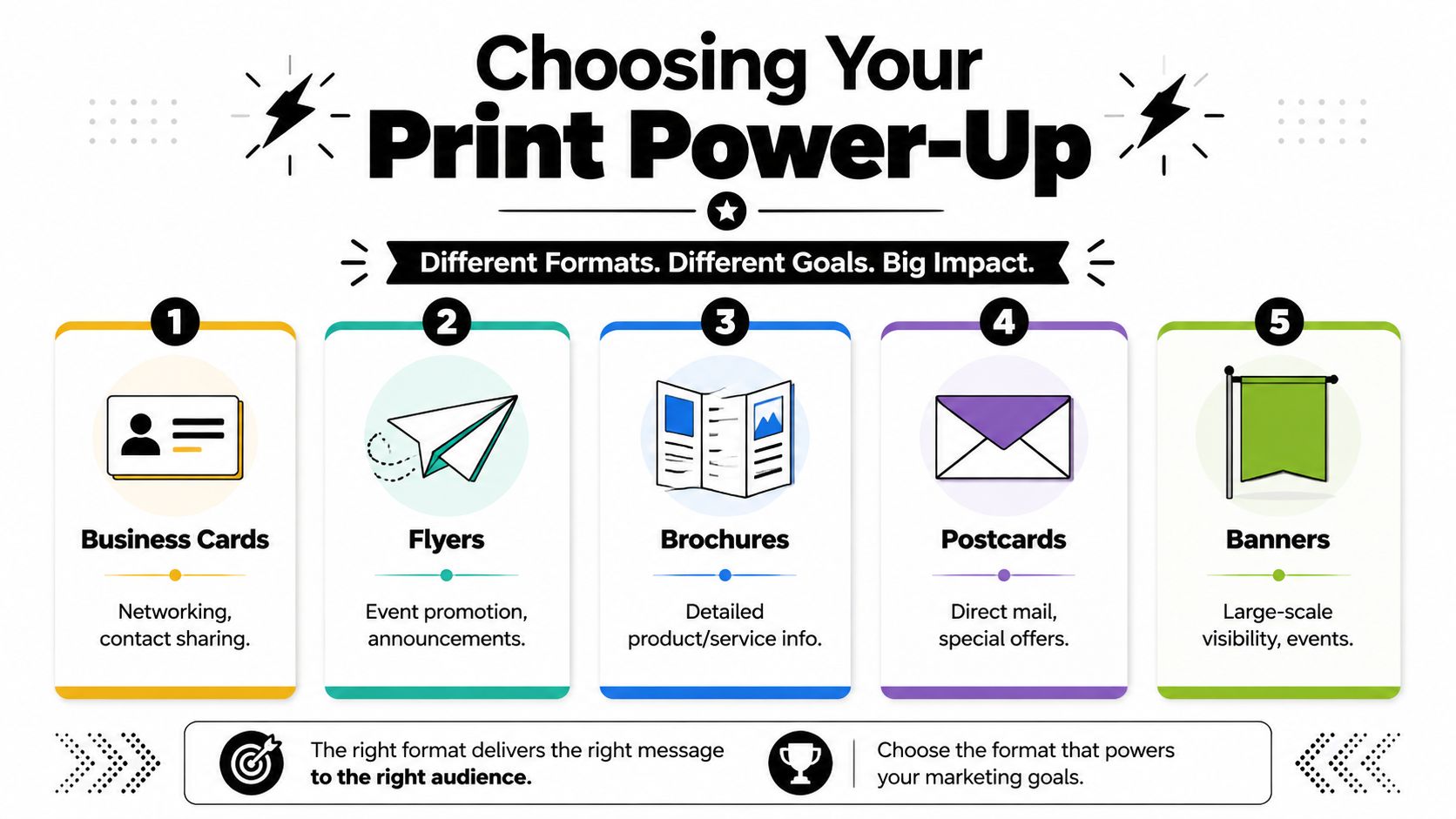
The biggest mistake I see is ordering the format first and thinking about the goal second. A business card won’t do the work of a brochure. A banner won’t replace a direct mail postcard. Each piece has a job.
Match the format to the job
Here’s the way to think about the most common print formats.
| Format | Best use | Where it works well | Common mistake |
|---|---|---|---|
| Business cards | Contact sharing and one-to-one follow-up | Networking, estimates, front desk, service calls | Cramming too much text |
| Flyers | Fast announcements | Grand openings, events, specials, local drops | Weak headline and no call to action |
| Brochures | Explaining services in more depth | Waiting rooms, sales meetings, leave-behinds | Treating them like mini websites |
| Postcards | Direct offers and reminders | Mail campaigns, seasonal promotions, customer reactivation | Designing the front without a strong offer |
| Posters | Fixed-location awareness | Storefronts, windows, counters, lobbies | Too much copy for a quick read |
| Banners | Large-scale visibility | Markets, trade shows, outdoor events | Tiny text nobody can read at distance |
| Yard signs | Hyperlocal exposure | Real estate, home services, campaign-style visibility | Missing contact info visible from the road |
A business card is personal. It’s best when someone has already met you or expects to hear from you. A flyer is broader. It’s good for getting one message in front of a lot of people quickly. A brochure sits in the middle. It works when the buyer needs a little more confidence before taking the next step.
For events and storefronts, wide-format pieces do the heavy lifting. Banners and posters create presence before anyone reads a word. If your campaign includes larger signage, this overview of wide-format printing options for signs, posters, and displays helps clarify where each format fits.
A short visual walkthrough can also help if you’re comparing common print uses in real business settings.
Where small businesses usually misfire
Some formats are easy to underestimate. Postcards, for example, are stronger than many owners think because they combine the directness of mail with a simple, focused message. Stickers can also do more than decorate packaging. They’re useful for product labeling, thank-you inserts, event handouts, and repeat brand exposure. If you want a practical look at how smaller branded pieces can fit a campaign, this guide on how to order custom stickers for your brand is worth a read.
A banner attracts attention. A flyer explains the offer. A business card supports the conversation after the first two do their job.
The right choice usually comes down to whether you need one of these outcomes:
- Broad visibility: banners, posters, yard signs
- Hand-to-hand promotion: flyers, postcards
- Detailed explanation: brochures
- Personal follow-up: business cards
- Brand reinforcement: stickers and other small add-ons
If you’re trying to make one piece do all five jobs, the campaign usually feels muddy. A smaller set of pieces with clear roles nearly always prints better and performs better.
Preparing Your Design Files for Flawless Printing
Most expensive print mistakes start before ink touches paper. They start in the file. A design can look sharp on a laptop and still print soft, cropped, or off-color if the setup is wrong.
Treat your file like a blueprint
Think of your print file the way a contractor thinks about a blueprint. If the dimensions are off, the structure won’t come out right. The same logic applies to marketing material printing.
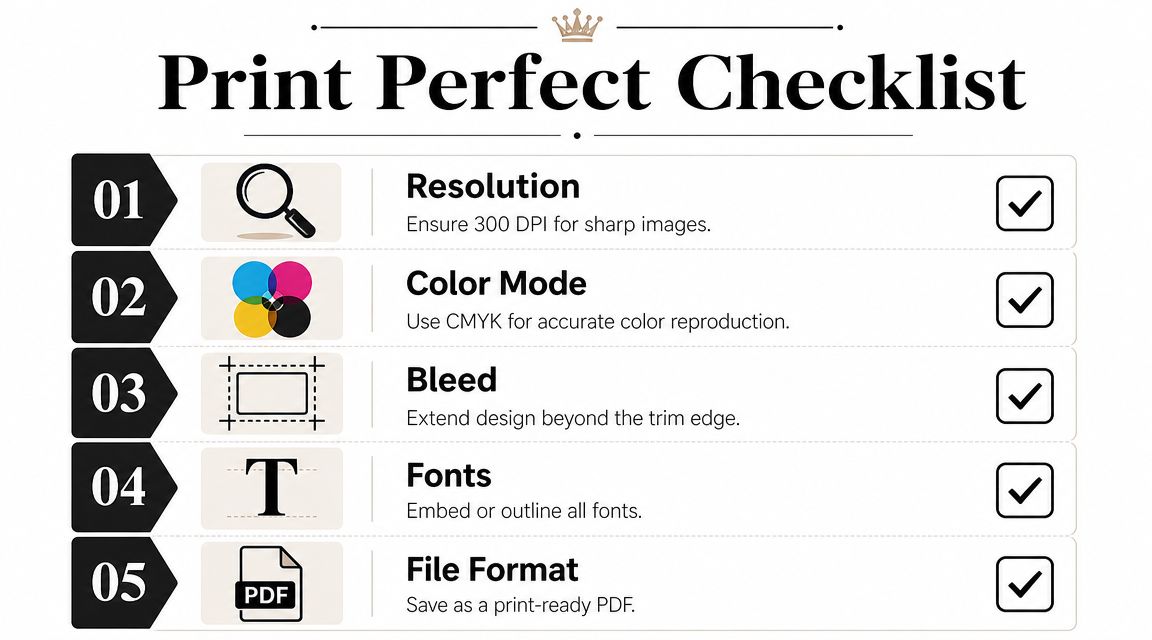
For image quality, the practical benchmark is 300 PPI at final print size, and many commercial printers accept 150 to 300 DPI depending on the piece and viewing distance. At 4×6 inches, 300 PPI equals 1200×1800 pixels. That’s why a photo pulled from social media often looks fine on a screen but falls apart in a flyer or card. The technical guidance on high-quality print marketing files explains this benchmark and why low-resolution artwork causes visible softness and pixelation.
Color matters just as much. Screens use RGB. Printers use CMYK. If you design in RGB and send the file as-is, the printed piece can shift in ways you didn’t expect. Bright screen colors often print flatter, especially in photos, gradients, and branded backgrounds.
The preflight checks that prevent reprints
Before sending anything to a printer, check these items:
- Resolution: Photos and raster graphics should be sized for print, not just stretched to fit.
- Bleed: Background colors and images should extend beyond the trim line so cutting doesn’t leave white edges.
- Safe area: Keep logos and text inside the cut line so trimming variation doesn’t clip important content.
- Color mode: Convert files to CMYK for print output.
- Logos: Use vector artwork when possible so logos stay clean at any size.
- File format: Printers commonly ask for PDF, TIFF, or EPS, depending on the job.
If text sits too close to the edge on screen, it’s too close to the edge in print.
Professional print specs also call for bleed, safe area, correct final size, and print-ready file formats because small setup errors lead directly to reprints, proofing delays, and waste. The breakdown in this professional printing specifications guide is a solid reference if you want to understand the production side more clearly.
If you’re designing a mail piece, postcards are where these details show up fast. Tight layouts, edge-to-edge color, and small address areas leave little room for sloppiness. For teams working on that format, HelloMail’s advice for postcard marketing is useful for thinking through layout and message discipline before you export the final file.
One more practical note. Always ask for a proof when the job is customer-facing, deadline-sensitive, or expensive to rerun. A proof won’t fix a weak offer, but it will catch plenty of preventable production mistakes.
Selecting Materials and Finishes for a Professional Look
The physical stock changes the message before anyone reads the first line. People notice weight, texture, stiffness, glare, and how the sheet handles in the hand. That response is immediate.
Paper changes how people read your brand
A glossy flyer can make photos and bright colors pop. That’s useful for food, retail, beauty, and event promotion where visual energy matters. An uncoated piece feels more subdued and often more practical. It works well for appointment cards, forms, inserts, and any item people may need to write on.
Cardstock sends another signal entirely. A thicker business card feels more deliberate than a flimsy one. For service businesses, consultants, realtors, and anyone building trust one conversation at a time, that tactile difference matters. Customers may not name the paper stock, but they absolutely notice whether the piece feels substantial.
Here’s the trade-off in simple terms:
- Gloss or coated stocks: stronger color punch, smoother finish, more reflective surface
- Matte stocks: softer look, easier reading under bright light, more restrained presentation
- Uncoated stocks: natural feel, easier to write on, less slick
- Heavier cardstock: better rigidity and durability for cards, covers, and premium handouts
Finishes should support the message
Finishes are useful when they reinforce the purpose of the piece. They’re a problem when they become the purpose.
A glossy coating on a restaurant menu insert or promotional flyer can help product photos stand out. A matte finish on a law office brochure or luxury service card often feels more grounded and easier to read. If a piece will be mailed, handed out outdoors, pinned up, or passed between many people, durability should matter as much as appearance.
Choose stock for the way the piece will be used, not just the way it looks under shop lights.
Small businesses often overbuy finish and underthink function. A flashy card that scuffs easily or a dark coated postcard that’s hard to write on creates friction. The best material choice is the one that supports the audience, the setting, and the length of time the piece needs to stay useful.
Understanding Print Timelines Pricing and Delivery
A common small-business mistake is approving a print order on Tuesday for a Thursday event, then finding out the clock did not start when the order was placed. It started when the files were approved, the stock was confirmed, and the finishing details were locked. That gap is where rush fees, shipping problems, and missed deadlines usually begin.
Print pricing follows the same pattern. Quantity matters, but speed, paper availability, finishing, file cleanup, proofing, packing, and delivery method all shape the final number. A cheap quote can stop looking cheap once a job needs reprints, hand trimming, split shipments, or overnight delivery.
Online bulk ordering versus local production
Online-only printers fit stable, repeatable jobs. If you already know the exact size, stock, finish, and quantity, and your files are press-ready, that route can work well for planned orders with room for production and shipping time.
Local production helps when the job is still moving. Files may need correction. Quantities may change. A team member may want to compare two stocks before approving the run. A banner may be needed this afternoon, not next week. In those cases, direct access to the shop shortens approval time and catches mistakes before they become expensive.
For tight deadlines, local turnaround can change the whole decision. This guide to rush printing near you and same-day success explains why businesses often choose nearby production when shipping time is the risk.
Delivery and pickup decisions affect cost and timing
Delivery plans have a greater impact on logistics than owners often anticipate.
Ask these questions before you approve the order:
- Do you need local pickup? Pickup is often the fastest option for urgent jobs and gives you a chance to inspect the pieces before they go out.
- Are the materials going to an office, trade show, or event venue? Then carton labeling, packing method, and arrival window matter as much as print quality.
- Will more than one person need access to the order? Decide in advance who is receiving it and where it should go.
- Are the files still changing? Once a job enters production, last-minute edits can trigger delays, added setup time, or waste charges.
I tell customers to work backward from the handoff date, not the order date. If brochures must be on a table by 9 a.m. Friday, the actual schedule includes proof approval, production time, cutting or folding, packing, and either transit time or pickup coordination. That is also where a local one-stop print partner earns its keep. You can correct a file, confirm a proof, print the job, and sort out delivery in one place instead of juggling an online portal, a carrier, and a support queue.
The trade-off is straightforward. Online ordering works for predictable jobs with lead time. Local support is usually the safer call when deadlines are tight, details are still changing, or the printed piece needs to connect cleanly with a timed campaign, event, or trackable digital follow-up.
How to Measure Print Marketing ROI with Examples
The old complaint about print is familiar. “I can’t tell whether it worked.” That’s only true if the piece gives people nowhere trackable to go next.

Print becomes measurable when you connect it to a digital action. Businesses should tie print materials to trackable steps like exclusive landing pages, unique URLs, and QR codes so offline attention turns into measurable online behavior, as explained in this print-to-digital ROI guidance.
Three simple tracking setups that work
A restaurant flyer is a good example. Instead of listing only a homepage, the flyer can send people to a landing page built for one offer, such as reservations for a weekend special. If scans or visits show up on that page, the flyer is generating movement you can see.
A realtor’s yard sign can do the same thing with a property-specific URL or QR code tied to a virtual tour page. The sign still does its street-level job, but now it also feeds a measurable digital path.
A consultant’s business card can point to a booking page instead of a generic website. That doesn’t make the card less personal. It makes follow-up easier to attribute.
Print should direct people to one next step, not five.
What to watch after the pieces go out
Once the campaign is live, track response in a simple way:
- Unique destination: Use one landing page or URL for one print campaign.
- Offer codes: Add a code customers can enter online or mention in-store.
- QR scans: Use a code that leads to a campaign-specific page.
- Staff feedback: Ask front-desk staff or salespeople what customers are bringing in or mentioning.
- Lead quality: Look at whether the responses fit the audience you intended.
You can also ask customers how they heard about you, especially for local service businesses. That won’t capture every response, but it adds useful context when paired with landing page activity and redemption patterns.
The important shift is mental. Don’t treat print as a vague awareness expense. Treat it like an acquisition channel with a defined endpoint, and it becomes much easier to justify, improve, and repeat.
Your Pre-Order Checklist for Perfect Prints
A strong print order is usually boring in the best possible way. The goal is no surprises, no rushed fixes, and no boxes of materials that looked better on screen than they do in hand.
Run through this checklist before approving the job:
- Define the goal. Know whether the piece is meant for awareness, explanation, promotion, or follow-up.
- Choose the format based on that goal. Don’t ask one printed piece to do every job.
- Check the message. The headline should be clear, the offer should be specific, and the call to action should be obvious.
- Review the file setup. Confirm image quality, CMYK color mode, bleed, safe area, and final size.
- Use the right assets. Logos should be clean, and text should be easy to read at the actual printed size.
- Pick the stock and finish intentionally. Match the material to the audience and how the piece will be used.
- Confirm quantity and timing. Order enough to support the campaign, but don’t overprint outdated messaging.
- Plan the handoff. Decide whether you need pickup, shipping, or distribution to multiple locations.
- Make it measurable. Add a QR code, unique URL, landing page, or offer code if the piece is part of a campaign.
- Approve a proof carefully. Read every line, check every phone number, and look at trim-sensitive areas one last time.
A little discipline upfront saves money, protects your brand, and makes marketing material printing feel a lot less risky.
If you need printed pieces fast and want help catching file issues before they become expensive mistakes, Business Mail Boutique LLC is a practical local resource for Sugar Land businesses. They handle print, packing, shipping, and mailbox services in one place, which is useful when your project includes more than just the printed piece itself.

Related posts
Online Printing Documents Services: Order & Pickup Today
Online Printing Documents Services: Order & Pickup Today
You've got a meeting tomorrow, a proposal still needs to be print...
Affordable Printing Near Me – Professional Print Shop Services
Affordable Printing Near Me – Professional Print Shop Services at Business Mail Boutique in Sugar Land
When searching onli...
Best Printing Near Me: Find Local Shops for Fast Service
Best Printing Near Me: Find Local Shops for Fast Service
You've probably made this search in a rush. The event is tomorrow, the sa...