
- Print Business Cards in Sugar Land – Same Day Service
- Copying Services
- Document Printing, Finishing & Lamination in Sugar Land
- Flyers
- Print Banner in Sugar Land | Same-Day Banner Printing Near Me
- Graphic Design
- Photo Printing
- Postcard Printing
- Document Printing
- EDDM Full Service Postcards
- FotoZoomer Large Format Printing


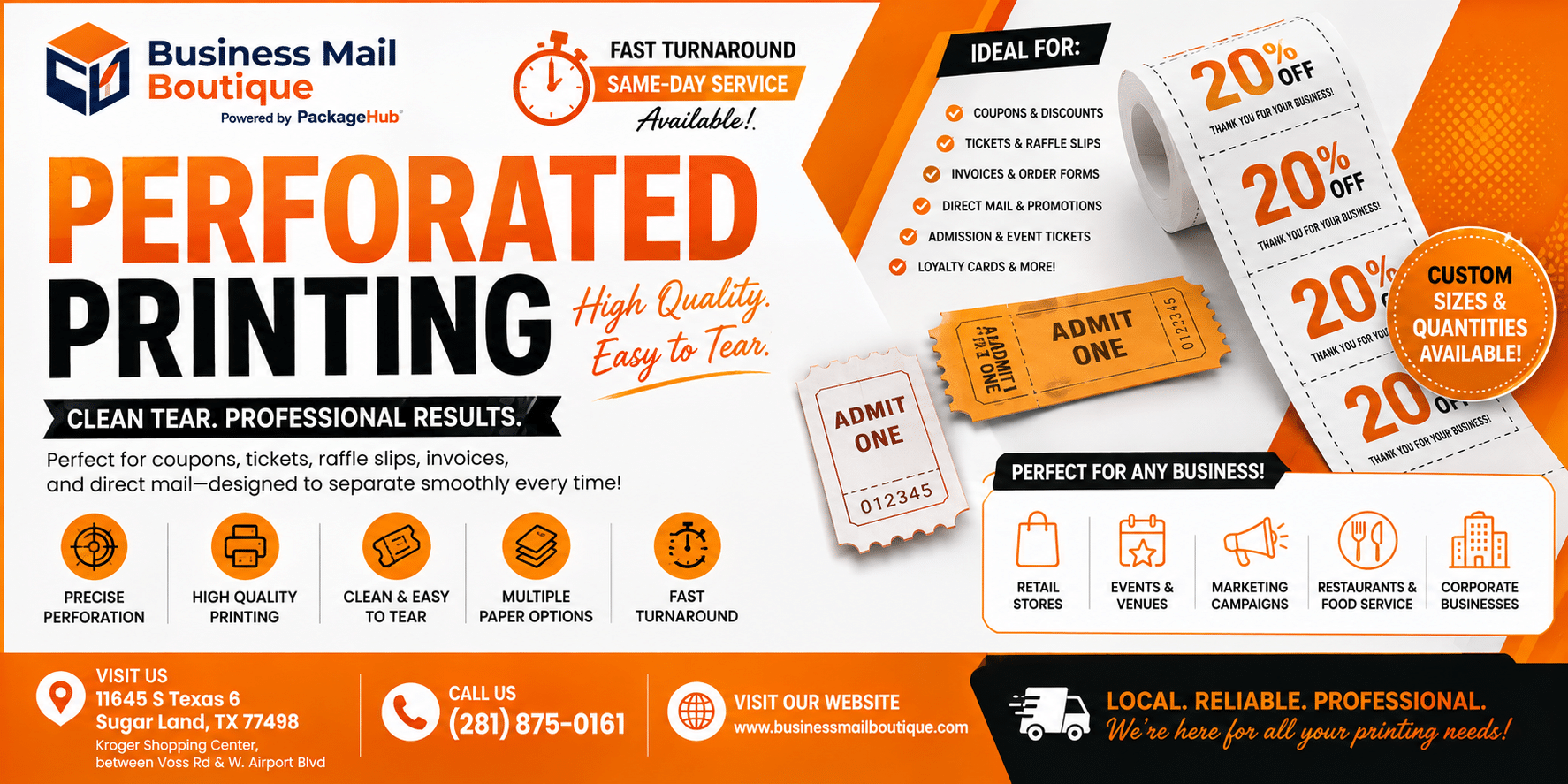
Perforated Printing.
Learn how perforated printing works for coupons, tickets, and tear-off forms. Get specs, material tips, and more.
Businessmailboutique
11645 S. Hwy 6
Sugar land, Texas 77498 United States (US)
Email: info@businessmailboutique.com
Route
You’re probably staring at a coupon layout, a stack of raffle tickets, or a tear-off reply card and wondering why the proof suddenly looks harder than the job sounded. That’s normal. Perforated printing looks simple on the surface, but the part that saves you money is the part many overlook, the engineering detail that decides whether the ticket tears cleanly, the stub stays readable, and the job ships on time.
Table of Contents
- When a Business Needs Perforated Printing
- How Perforation Works on a Press
- Matching the Product Type to Your Use Case
- Preparing Print-Ready Artwork That Will Not Get Rejected
- Choosing Paper, Cardstock, and Synthetic Stocks
- Common Perforated Printing Mistakes and How to Fix Them
- Pricing, Turnaround, and Local Fulfillment for Small Businesses
When a Business Needs Perforated Printing
A Sugar Land café does not ask for perforation because it wants a fancy finish. It asks because it needs 500 coupon cards that let customers keep one piece and hand the other back without scissors, a ruler, or a line of chaos at the register. A school PTO needs the same setup for raffle tickets, where the tear-off stub has to stay attached until the last second, then separate cleanly when the seller rips along the line.
That is the job perforation handles. It solves a workflow problem at the counter, at a check-in table, at a church event, or on a service form that changes hands all day. The sheet stays intact until someone needs one part of it, then it separates where you planned.
The jobs that usually belong on perforated stock
A lot of first-time buyers already have the right use case, they just do not call it the right thing. If the piece needs to be detached by the customer, staff member, or attendee, perforation is usually the cleanest answer.
Practical rule: if the user has to tear something off at the counter, at a gate, or at a front desk, a straight cut usually creates more friction than a perf line.
The common candidates are easy to spot:
- Coupons and offer cards, when the customer keeps one half and redeems the other.
- Event and raffle tickets, when the stub needs numbering and fast tear-off.
- Two-part and three-part forms, when one section stays with the business and another goes home with the customer.
- Reply or RSVP cards, when response tracking matters more than decorative layout.
Historically, perforation became a standard print-production answer because it made separation quick and tool-free. The same workflow logic is why perforated printed sheets became a staple in business and postal handling, not just craft projects. A good overview of that shift is captured in the history of the first perforated U.S. postage stamp and how perforation changed printed sheets into a mass-handled product in this historical account.

If your job needs a cleaner handoff, faster counting, or a stub that proves the original piece existed, perforation is the right finishing choice. If the piece only needs to be trimmed to size, do not add the extra step.
How Perforation Works on a Press
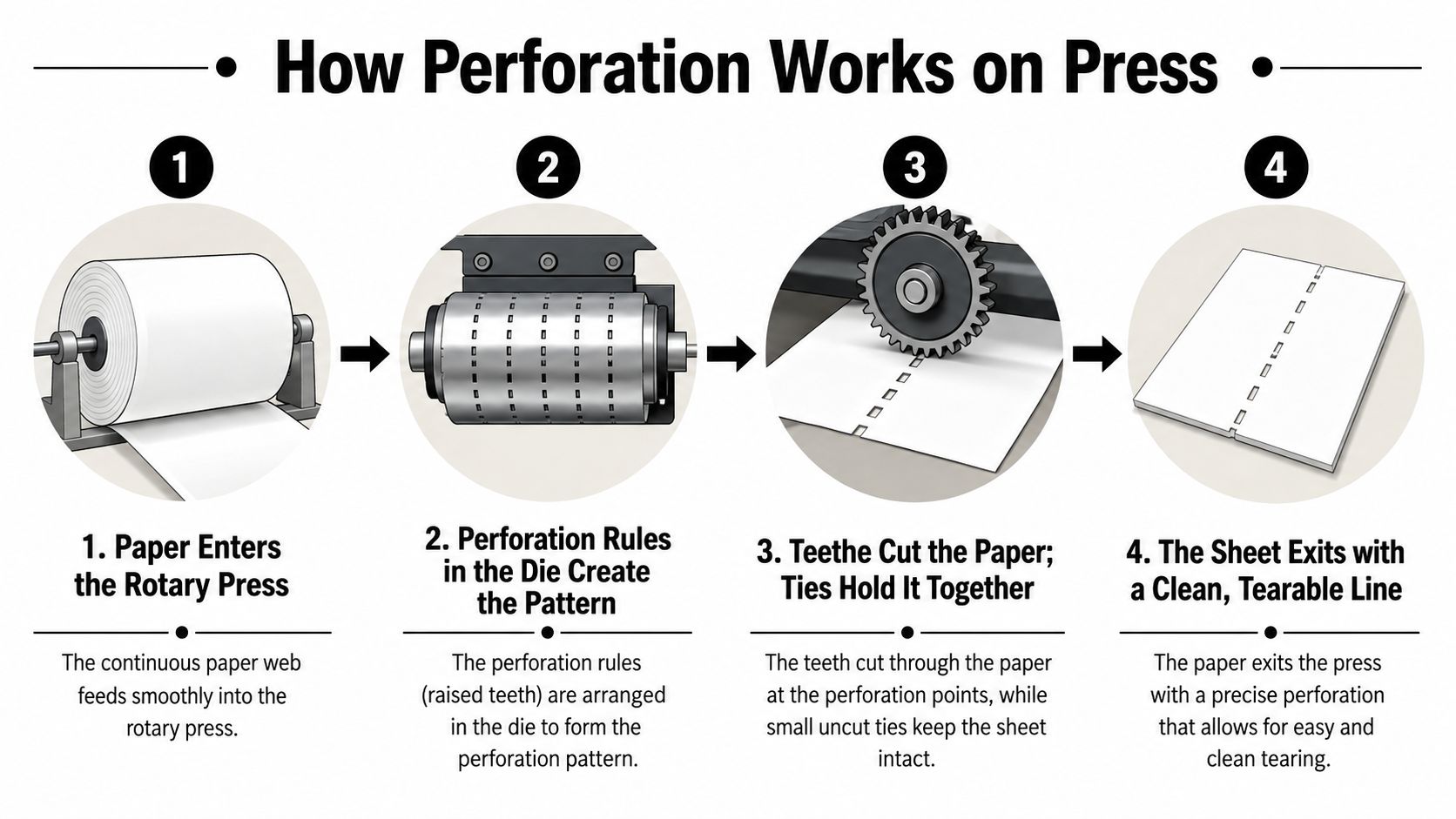
Perforation is a precise die-cutting process that creates controlled slits and ties, also called the uncut bridges, so the sheet stays together until someone tears it. The press is not roughing up the paper. It is cutting a measured line that has to hold during handling and release cleanly at the tear.
The language your printer is using
A slit is the cut segment. A tie is the tiny uncut segment that holds the sheet intact. The teethe ratio is the balance between cut and reserve, and that balance changes how easily the piece tears. Perforation direction tells the shop whether the line runs with or against the travel of the paper through the press.
That direction matters more than most customers expect. Technical production guidance treats perforation as a controlled die-cutting process, where the perforation rule is built into the die and the sheet passes through the press to create the pattern as described in this press setup guide. If the perf direction does not match the press method, the job can tear unevenly or register poorly on forms and tickets.
Rotary and rule-based setups
For long runs where the perf line runs parallel to paper travel, shops often use rotary or segmented-wheel systems. For jobs where the line must run perpendicular to travel, steel perforation rules are the better fit. That is a production choice, and it changes both tear behavior and how consistently the line lands on the sheet.
If the tear line feels “grabby” in the proof, the issue is usually geometry or alignment, not the customer’s design.
That is why a printer will ask whether the perf is horizontal or vertical, whether it runs across the stub or down the ticket, and where the tear needs to begin. A clean tear on press starts with the right orientation on paper, not with a stronger pull from the end user.
For older industrial context, perforated paper has been doing this kind of work for a long time, from punched tape in telegraphy to machine input and automation systems that used perforated media well into the 20th century as documented in this history summary. The medium changed, but the logic stayed the same. Control the cut, leave enough bridge to hold the sheet, and match the mechanism to the direction of travel.
Matching the Product Type to Your Use Case
The fastest way to order the wrong perforated job is to describe the outcome instead of the format. “I need coupons” can mean a single tear line, a double stub, or a numbered ticket set. “I need forms” can mean two-part reply cards or three-part carbonless sheets with one perf and one fold. The product type has to match the behavior you want at the counter.
Coupons, tickets, forms, and reply cards
Coupons usually work best when the tear-off section is obvious and the offer section stays large enough to read after separation. Event and raffle tickets need the stub to stay intact until the sale or entry point, then separate cleanly with numbering that stays legible. Two-part forms fit customer receipts, approvals, and sign-off sheets, while three-part forms are more useful when one copy stays with the site, one goes to the customer, and one stays for internal records.
Reply cards and RSVP pieces are a little different. They don’t just need a perf line, they need the tear area to avoid swallowing names, codes, or response boxes. That’s where layout discipline matters more than decoration. If the tear line lands too close to the text, the content goes with the stub.
The printed format also affects whether you need one perf or two. A simple coupon card might need one clean line. A raffle ticket often needs a stub and a body. A three-part form can require more planning around folds and tears than people expect, especially when the customer wants the detachable section to hold address information or a tracking code.
Here’s a quick reference I’d hand a buyer before they approve artwork.
| Product | Typical Size | Perf Lines | Common Numbers |
|---|---|---|---|
| Coupon card | Varies by campaign | One | Optional |
| Event ticket | Ticket size or card size | One | Often yes |
| Raffle ticket | Ticket size with stub | One or two | Usually yes |
| Tear-off form | Letter or half-letter | One or two | Sometimes |
If you’re comparing tear-off forms with more custom-shaped options, a separate die-cut layout may be the better fit, and this custom-shape die-cut guide is a useful companion reference when the shape matters as much as the tear line.
The point is simple. Don’t ask for “a perf” unless you already know where the tear belongs, how many pieces the sheet should become, and whether numbering has to stay on both sides.
Preparing Print-Ready Artwork That Will Not Get Rejected
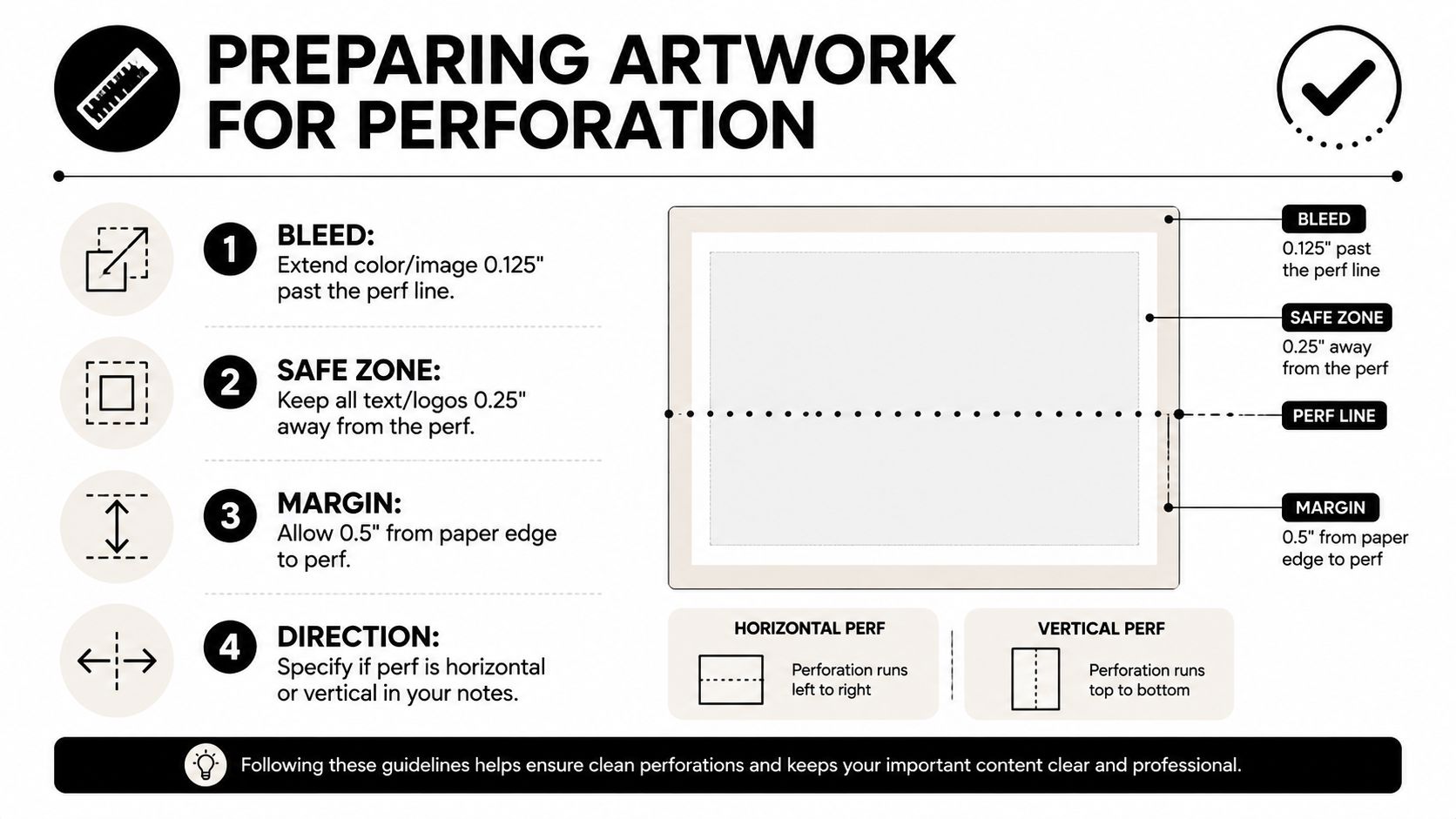
A perforated job fails fastest when the art is placed like it’s going to be trimmed, not torn. Anything too close to the line can disappear with the stub, and anything outside the safe zone can look careless even if the press runs perfectly. The file has to respect the tear, not just the page edge.
What belongs in the file
Use CMYK, not RGB, if you want the proof to match the press run more closely. Keep images at 300 dpi minimum so small text, QR codes, and fine logos don’t break down in output. Outline fonts if the shop asks for it, and don’t leave anything critical sitting on the perf line unless you want it to tear off with the detachable part.
Bleed still matters. If color or artwork is supposed to run to the edge of a tear-off area, extend it beyond the cut area so you don’t get a white sliver after finishing. The perf line itself needs breathing room, because the tear is part of the final appearance, not a hidden production detail.
A setup checklist you can paste into your brief
Prepress note: send one file with both panels clearly labeled if the stub and main body share artwork, and label the tear direction in the file name or notes.
- Use CMYK art: avoid RGB surprises at print time.
- Keep live text away from the perf: don’t place names, prices, or codes too close to the tear line.
- Add bleed where color meets the tear: that prevents a white edge from showing.
- Export at print resolution: low-res files make fine perf jobs look sloppy.
- Specify the tear direction: horizontal or vertical, no guessing.
- Separate stub and body only if the shop requests it: many prepress teams prefer one combined layout.
For digital printing workflows, file prep gets even stricter because shops often need quick proofing and clean output on short notice. If your artwork is going to a local shop for same-day handling, a clean file saves you more time than any rush fee can buy. A good starting point for broader digital-output prep is the digital printing reference from Business Mail Boutique.
The safest habit is simple. Design the page around the perf, not around the idea of a full sheet that happens to tear later.
Choosing Paper, Cardstock, and Synthetic Stocks
Stock choice decides how the tear behaves in the hand. I’ve seen good artwork fail on paper that was too light, and I’ve seen simple layouts work cleanly because the stock had enough body for the perf to do its job. In perforated printing, weight is part of the setup, not just a finishing preference.
Why gsm matters more than most buyers expect
Industry guidance says paper at 80 gsm or below can make perforation ineffective because the sheet is too thin to tear cleanly. 80 gsm and above is functional, and 135 gsm and above is ideal for reliable separation. Another technical guide notes that perforation lines in folds may need at least 115 gsm.
That is the practical line I give customers. Light stock can split away from the perf line, especially if the cut pattern is aggressive or the tear starts near a tight corner. Heavier stock holds the perforation better, feels better in the hand, and keeps numbered tickets or reply cards from curling like office paper.
Matching the stock to the job
Uncoated stock is easier to write on, which makes it a better fit for reply cards, sign-up cards, and anything that needs a pen on site. Gloss and matte coated stocks are useful when the artwork matters more than handwriting. Kraft stock gives a rougher, more natural look, but it needs the perf spec to be tested carefully because texture changes the tear feel.
Synthetic stocks need their own rule set. DuPont recommends a 10:1 cut-to-reserve ratio for clean tearing perforations on Tyvek, with 8:1 as the minimum, and says starting the cut at the sheet edge improves tear initiation. That is not a small detail. A cut pattern that is too aggressive on a synthetic can send the tear off the perf line instead of letting it separate cleanly.
A few stock choices tend to work well in real shops:
- 80 gsm office-style paper, only for light-duty internal use, because it can feel flimsy on a tear line.
- 115 gsm to 135 gsm text stock, when you need a cleaner tear and a more durable hand feel.
- Cardstock at 135 gsm or above, when the piece needs to survive handling, numbering, and repeated touch.
- Tyvek or other synthetics, when moisture resistance or durability matters, but only after the perforation pattern is tested.
If you need a writable reply card, choose an uncoated sheet. If you need a coupon that feels substantial at the counter, step up the weight. If you are unsure, ask the printer to show the stock by gsm, not by a vague description like “nice paper.”
Common Perforated Printing Mistakes and How to Fix Them
Most bad perforated jobs fail for predictable reasons. The frustrating part is that the fix is usually simple, but only if someone catches the issue before the file is approved. I’d rather slow the order down for one proof than reprint a run because the stub tore off with the logo.
The six mistakes that cost the most time
Hard truth: if the proof looks rushed, the finished perf usually feels rushed too.
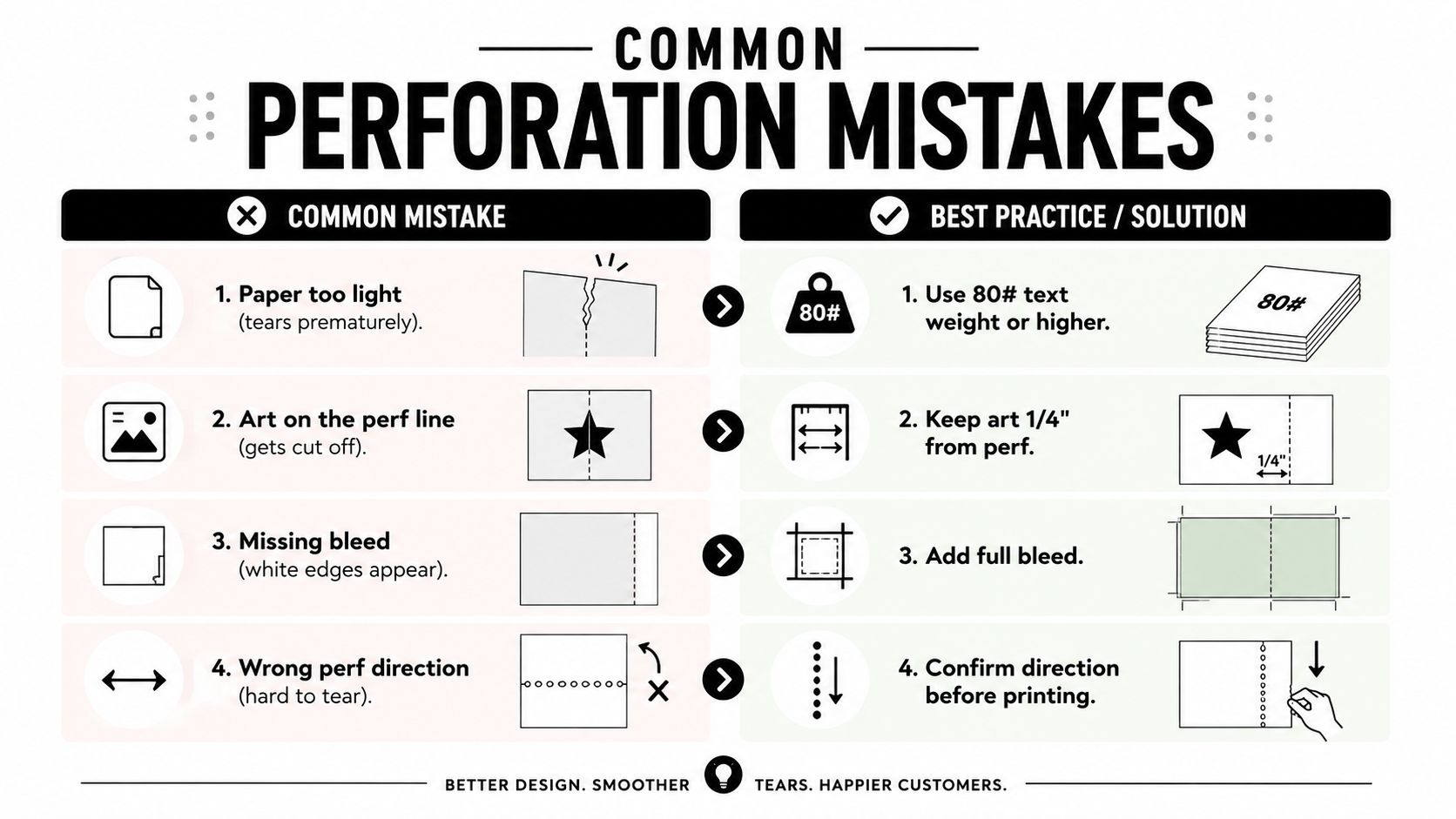
- Paper too light.
The symptom is a tear that splits the sheet instead of following the line. The cause is stock that’s too thin for the cut pattern. Fix: use 80# text weight or higher, or ask for a heavier stock if the job has a strong tear-off point.
- Art on the perf line.
The symptom is missing text, sliced logos, or a price that disappears with the stub. The cause is placing live artwork too close to the tear line. Fix: keep critical content 1/4″ from the perf.
- Missing bleed.
The symptom is a white edge or a thin unprinted line after finishing. The cause is artwork that stops at the line instead of extending past it. Fix: add full bleed wherever color reaches the tear.
- Wrong perf direction.
The symptom is awkward tearing or inconsistent separation. The cause is perf orientation that doesn’t suit the press direction or the way the user will tear the piece. Fix: confirm direction before printing.
- No test print.
The symptom is a proof that looks fine on screen but behaves badly in hand. The cause is assuming visual approval equals mechanical approval. Fix: request a sample or hard proof before the full run if the layout is new.
- Skipping sequential numbering.
The symptom is confusion at redemption or check-in. The cause is leaving tickets unnumbered when tracking matters. Fix: add numbering early, not as an afterthought.
Perforated jobs get expensive when the proof stage is treated like a formality. A printer can adjust many things before the run starts, but the late-stage changes usually cost time, and time is what small businesses don’t have when a promotion starts tomorrow.
Pricing, Turnaround, and Local Fulfillment for Small Businesses
Perforated jobs are priced by the parts that make them harder to finish, not by the idea of a perf line. Stock, number of perforations, quantity, finishing complexity, and numbering all push the quote up or down. A one-perf coupon on standard stock is a different job from a numbered raffle ticket with a second tear and custom setup.
What actually moves the cost and turnaround
The biggest pricing driver is usually the setup, because a good perf has to be placed correctly and checked before production. More perf lines mean more layout work and more opportunities for the sheet to misbehave in finishing. Numbering adds another layer because the printer has to keep sequence and position aligned across the run.
For small businesses in Sugar Land and Houston, the primary question is often speed, not just price. If you need a same-day handoff, a local shop can review the file, catch a perf-direction issue, and talk through the stock choice before the job goes out. That matters more than shaving a little off a quote when the event is tonight or the promotion starts in the morning.
A local print center also helps when the artwork is still being revised. You can bring in a proof, compare paper options, and fix the margin issue before anyone commits to the run. If you’re working from a kiosk, storefront, or office near the Southwest Houston area, that face-to-face check can save an entire reprint cycle.
A good local printer doesn’t just output the file, it helps you spec the tear, the stock, and the finishing order before production starts.
Business Mail Boutique LLC is one example of a local Sugar Land option that handles printing and document finishing, including perforating, alongside other same-day business services. For time-sensitive projects, their quick turnaround printing page is the right place to compare what can be handled on a short schedule.
If you’re calling a shop, ask three things before you place the order. Can they confirm the perf direction, can they recommend stock by gsm, and can they review the bleed and safe zone before printing? Those answers tell you more than a generic price ever will.
Business Mail Boutique LLC handles printing and document finishing, including perforating, for local businesses that need forms, coupons, tickets, and other tear-off pieces done right the first time. If you need a clean, practical spec for a perforated job in Sugar Land or Houston, visit Business Mail Boutique LLC and ask for help with the stock, bleed, and tear direction before you approve the file.

Related posts

Custom Memorial Glasses Engraved in Three Hours in Sugar Land
When a customer needed eight personalized glasses for a memorial, Business Mail Boutique completed the engraving or...

Custom Martini Glass Engraving in Sugar Land, TX
Custom Logo Engraving on Martini Glasses in Sugar Land, Texas.
Business Mail Boutique recently completed a beautiful custom engravin...

Custom Engraved Wine Glasses for a Golf Club Event in Sugar Land, TX
Custom Engraved Wine Glasses for a Golf Club Event in Sugar Land.
Custom wine glass engraving in Sugar Land, TX at Business Mail Bouti...