
- Print Business Cards in Sugar Land – Same Day Service
- Copying Services
- Document Printing, Finishing & Lamination in Sugar Land
- Flyers
- Print Banner in Sugar Land | Same-Day Banner Printing Near Me
- Graphic Design
- Photo Printing
- Postcard Printing
- Document Printing
- EDDM Full Service Postcards
- FotoZoomer Large Format Printing


LiveScan Fingerprinting in Sugar Land
Businessmailboutique
11645 S. Hwy 6
Sugar land, Texas 77498 United States (US)
Email: info@businessmailboutique.com
Route
You’re usually looking for livescan fingerprinting in sugar land because something is already in motion. A job offer is waiting on clearance. A license application is stalled until prints are submitted. A volunteer role, contract, or agency request suddenly adds one more task to your week.
The confusing part isn’t the scan itself. It’s figuring out where to go, whether you need the state vendor, whether a walk-in shop will work, and what paperwork has to match the request exactly. In Sugar Land, that distinction matters. Some fingerprint requests must go through the state-mandated path. Others can be handled faster and with less friction through a local provider that offers walk-ins and other business services in the same stop.
Table of Contents
- Why You Need Live Scan Fingerprinting
- The Live Scan Process From Start to Finish
- Gathering Your Documents and Forms
- Choosing Your Live Scan Provider in Sugar Land
- Preparing for Your Scan and Avoiding Rejections
- Your Live Scan Fingerprinting Questions Answered
Why You Need Live Scan Fingerprinting
Live Scan is electronic fingerprint capture. Instead of rolling fingers in ink and mailing paper cards, a technician captures your prints digitally and sends them to the right agency. This process results in less mess, fewer errors, and a much smoother path to a completed background check.
That’s why livescan fingerprinting in sugar land has become the default for many licensing and employment situations. Teachers, healthcare workers, childcare staff, real estate applicants, contractors, and volunteers often run into this requirement because the agency requesting the check wants prints submitted in a specific format and routed to a specific destination.
The practical reason people prefer Live Scan is speed and accuracy. The FBI processes over 100,000 live scan fingerprints daily, and that system has reduced processing times from weeks to 24 to 72 hours while cutting error rates by 98% compared with traditional ink cards, according to Business Mail Boutique’s fingerprinting overview.
Practical rule: If the requesting agency allows digital submission, Live Scan is usually the cleaner option. Ink cards still have a place, but they’re often the slower path.
In Texas, the bigger issue isn’t whether Live Scan is useful. It’s whether your request is tied to a state workflow or a non-state workflow. Some agencies require a specific provider and a specific submission path. Others just need compliant fingerprints for an FBI card, an employment review, or another non-DPS purpose.
If your requirement is tied to a professional or clinical pathway, it helps to review a real-world example of background check requirements for students and nurses. The same pattern shows up across many fields. The agency sets the rules, and your job is to match the fingerprint method to that rule the first time.
The Live Scan Process From Start to Finish
It starts with the requesting agency
Most delays happen before anyone scans a finger. They happen when someone shows up without the right form, the wrong routing information, or a misunderstanding about which provider they’re allowed to use.
Your first step is to read the fingerprint request from the employer, licensing board, school, or government agency. That document usually tells you whether you need a state-contracted provider, a Live Scan submission, an FBI card, or another format. If the request includes an ORI number, that matters. The ORI tells the system where your results need to go.
Once you know the destination, choose a provider that matches that requirement. If the agency says you must use the Texas DPS path, follow that instruction exactly. If the request is for a non-DPS purpose, a local provider may be the simpler option.
A clear visual helps readers understand the flow:
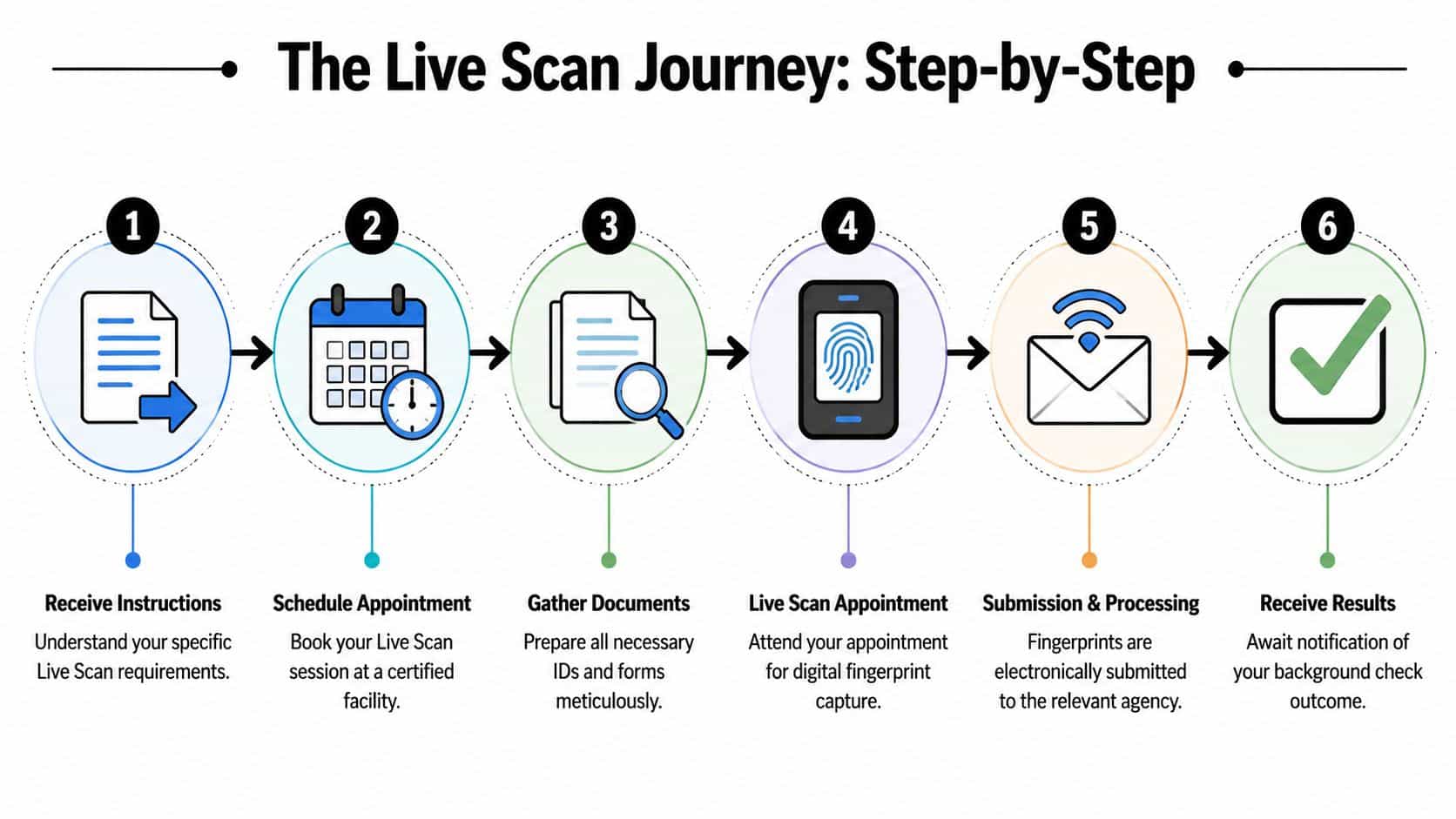
For applicants who need card-based output or digital alternatives to traditional cards, it’s worth reviewing digital ink roll fingerprinting in Sugar Land. That’s often where people realize they do not need the exact same process their coworker used.
What happens during the appointment
At the appointment, the technician checks your identification and your paperwork first. If the form is incomplete or doesn’t match the request, the process usually stops there. That’s why the paperwork matters as much as the scan.
Then the technician captures your prints on a glass platen. The system uses optical or capacitive sensors to digitally image fingerprints at 500 dpi resolution and applies image enhancement to improve clarity, based on the technical workflow described by Biometrics4ALL’s Live Scan overview. During capture, the software performs quality checks and prompts a retake if a print doesn’t meet the required standard.
A typical visit feels more routine than people expect. You place fingers as directed, the operator checks the image, and the system flags weak captures before submission. That immediate feedback is one of the biggest advantages over paper cards, where a bad print may not be caught until much later.
A good technician won’t rush your hands through the scanner. They’ll adjust finger pressure, hand position, and sequence until the images pass quality review.
What happens after submission
After capture, the file is compressed and sent electronically through the proper channel to the state or federal repository tied to your request. That routing is why the ORI and form details have to be right. Even a clean fingerprint file can become useless if it goes to the wrong place.
From there, the next step depends on the agency. Some employers or boards receive the result directly. Some notify you only if something else is needed. Others give you a receipt or transaction reference and handle the rest without much follow-up.
The main point is simple:
- Get the right instructions
- Match the provider to the request
- Bring the exact paperwork
- Let the technician confirm quality before submission
When those four parts line up, the process is usually straightforward.
Gathering Your Documents and Forms
The fastest fingerprint appointment in the world won’t help if you arrive missing the one form the agency requires. Most second trips happen because the applicant assumed any fingerprint form would work. It won’t.

Bring the form that matches your request
For many applicants, the most important item is the request form supplied by the employer, board, school, or agency. That’s the document that usually contains the routing details, service code, ORI, or other instructions that tell the provider where the prints belong.
Bring the original instructions if possible. A screenshot with half the information cut off creates problems. An email chain forwarded three times can do the same.
Use this quick checklist before you leave:
- Agency form first: Bring the exact request document, not a similar version from an old application.
- Read the destination details: If the request names a specific provider or says the submission must go through a state channel, follow that language exactly.
- Check names carefully: Your ID name and your application name should match closely enough that the provider can verify you without confusion.
If the form includes codes you don’t understand, don’t guess. Call the requesting agency before you get fingerprinted.
Use ID that is current and readable
You also need valid government-issued photo identification. In practice, applicants usually bring a current Texas driver’s license, a U.S. passport, or a military ID. The key issue is that it must be current, legible, and accepted by the provider handling your scan.
Expired ID causes preventable delays. So does damaged ID that can’t be read clearly. If the barcode, photo, or printed details are worn out, bring another acceptable document if you have one.
A simple prep routine works best:
| Item | Why it matters |
|---|---|
| Correct agency form | Routes prints to the right destination |
| Current photo ID | Confirms identity at check-in |
| Payment method | Avoids a stalled appointment |
| Any confirmation email | Helps resolve provider-specific questions |
People often focus on the scanner and forget the paperwork. In real appointments, the paperwork is usually the part that decides whether you get in and out smoothly.
Choosing Your Live Scan Provider in Sugar Land
Most local confusion starts at this point. Not every fingerprint request goes to the same place, and not every provider serves the same purpose. In Sugar Land, the practical choice usually comes down to two lanes. One lane is the official state-mandated provider for certain Texas DPS-related submissions. The other is a local walk-in option for many non-DPS fingerprinting needs.
When IdentoGO is the right choice
If your request is tied to a Texas agency that requires the DPS workflow, don’t improvise. Use the provider named in the instructions. This applies to applicants whose board, license path, or agency specifically directs them into that state system.
That route is formal for a reason. The submission has to connect to the correct government channel. If the form says to use the state vendor, that’s the answer.
This is usually the wrong time to prioritize convenience over compliance. The easiest appointment is not helpful if the agency rejects the submission because it came through the wrong path.
When a local walk-in provider makes more sense
For non-DPS needs, the decision can be different. Local providers often handle FBI cards, private employment checks, out-of-state licensing support, or other fingerprint requests that don’t require the Texas state-contracted pipeline.
That’s where the trade-off shifts in favor of flexibility. According to Business Mail Boutique’s Sugar Land fingerprinting page, local providers for non-DPS needs often have lower costs of $20 to $50 compared with $40 to $60, and they avoid the 4 to 8 week mail-in delays tied to ink cards by providing results in 24 to 72 hours. The same source notes a 30% rise in searches for walk-in alternatives, which matches what many busy applicants want: less scheduling friction and fewer extra stops.
That matters if you run a small business, manage hiring, or need fingerprints while handling other errands. A walk-in provider inside a business center can save time because you can handle fingerprinting and other tasks in one place, instead of making separate trips.
For readers comparing local service types, fingerprint scanning services in Sugar Land gives a useful picture of what non-state options can include.
The best provider isn’t the one with the biggest name. It’s the one your requesting agency will accept, with the least friction for your specific use case.
Sugar Land Live Scan Provider Comparison 2026
| Provider | Best For | Appointments | Walk-Ins | Additional Services |
|---|---|---|---|---|
| IdentoGO | Texas DPS-specific and agency-directed submissions | Typically required | Limited by workflow | Focused on fingerprint processing |
| Local walk-in business center | Non-DPS fingerprinting, FBI cards, many employment and personal needs | Often optional | Commonly available | May include notary, passport photos, shipping, printing |
A simple way to choose is to ask one question first: Who asked for the fingerprints? If the answer is a Texas agency with a fixed process, follow that process. If the answer is an employer, an out-of-state board, a federal requirement, or another non-DPS request, a local walk-in provider may be the faster and easier choice.
Preparing for Your Scan and Avoiding Rejections
A common Sugar Land scenario goes like this. Someone leaves work, stops in for fingerprinting, and expects to be done in ten minutes. Then the scanner struggles to capture a clear image because their hands are too dry, too sweaty, or worn down from daily work.
That kind of delay is usually preventable.

What affects scan quality
Clear prints depend on ridge detail, hand condition, and technician handling. The scanner can only capture what your fingertips present. If the skin is overly dry, overly damp, cut, irritated, or flattened by too much pressure, the image quality drops.
I see the same trouble spots over and over. Fresh lotion leaves residue. Recently washed hands that are still damp create smearing. Very dry fingertips can look faint on the glass. People who work with tools, boxes, cleaning products, or patients often have worn ridge detail, which means the operator needs to slow down and adjust technique instead of rushing through the capture.
Provider choice matters here too. If you are using a walk-in local business center for an employment check, FBI card, or other non-DPS need, ask whether the staff regularly handles difficult prints and retakes. Convenience helps, but operator experience still matters.
What to do before you arrive
A few simple steps usually give you a better first scan:
- Wash your hands earlier, not at the last second: Clean skin helps, but fingertips should be fully dry before scanning.
- Skip heavy lotion right before the visit: A small amount of moisturizer hours earlier is different from oily residue on the scanner.
- Tell the technician about any hand issues: Cuts, cracked skin, peeling fingertips, or irritation affect how the scan should be taken.
- Mention your job if your hands take a beating: Construction workers, mechanics, nurses, warehouse staff, and yard maintenance crews often need a slower, more careful capture.
- Give yourself a little extra time: Rushing leads to tense hands and poor placement.
One practical tip. If your instructions do not require the state appointment-only route, a local walk-in shop can be easier for this part of the process because you can ask questions on the spot and handle related tasks in one stop. That does not change the submission rules. It does make the visit easier for many non-DPS cases.
Good fingerprinting is part preparation and part technique. Show up with clean, dry hands, mention anything unusual about your skin, and give the technician a fair chance to capture each print correctly the first time.
Your Live Scan Fingerprinting Questions Answered
What if my prints are rejected
Start by contacting the provider that took the prints and the agency that requested them. A rejection usually means the image quality or submission path needs to be corrected. In many cases, the next step is a retake. Don’t assume the problem is permanent. Most rejections are procedural, not personal.
Can I reuse prints from an older job
Usually, no. Fingerprint results are often tied to the specific employer, board, or agency that requested them. Even if you were fingerprinted recently, the new requester may need a new submission routed directly to their system. Always ask the requesting agency before assuming a previous background check can transfer.
Can I get my own results
Sometimes the agency receives the results directly and doesn’t send a copy to you. In other cases, there may be a separate process for requesting a personal record review or obtaining documentation for your own files. The answer depends on who ordered the check and how that workflow is set up.
How do I know whether I need IdentoGO or a local provider
Look at the instructions, not online guesses. If the request names the state vendor or references a Texas DPS submission path, use that path. If it’s for a non-DPS purpose such as an FBI card, private employment need, or another accepted use case, a local walk-in provider may be appropriate.
How can I make the appointment go faster
Bring the correct form, current ID, and any confirmation details the provider asks for. Check the instructions before you leave home. Most delays come from missing documents or using the wrong provider, not from the scan itself.
If you need a convenient place for fingerprinting and other business services in one stop, Business Mail Boutique LLC in Sugar Land offers a practical option. It’s especially useful when you need help with non-DPS fingerprinting, plus related tasks like passport photos, notary, printing, packing, or shipping without making multiple trips across town.

Related posts

How Does a Virtual Address Work? A Clear Guide
How Does a Virtual Address Work
You're probably dealing with one of these problems right now. Your business is new, so your home add...

Custom Engraved Coffee Mugs and Etched Mugs: A Guide
Custom Engraved Coffee Mugs and Etched Mugs: A Guide
You need a mug fast. Maybe it's a retirement gift for someone who's been drinki...
PrintScan Authorized Fingerprinting Service Center Guide
You've probably got a form in one hand and a deadline in the other. A new job wants a background check. A licensing board needs prints....