
- Print Business Cards in Sugar Land – Same Day Service
- Copying Services
- Document Printing, Finishing & Lamination in Sugar Land
- Flyers
- Print Banner in Sugar Land | Same-Day Banner Printing Near Me
- Graphic Design
- Photo Printing
- Postcard Printing
- Document Printing
- EDDM Full Service Postcards
- FotoZoomer Large Format Printing


Businessmailboutique
11645 S. Hwy 6
Sugar land, Texas 77498 United States (US)
Email: info@businessmailboutique.com
Print Services in Sugar Land: Cards, Banners & More
You’ve got a deadline, a logo file on your laptop, and a dozen open tabs trying to explain paper stocks, bleed, and turnaround times. Maybe you need business cards before a networking event in Sugar Land. Maybe your storefront needs a banner by tomorrow morning. Maybe you just want someone local to tell you, in plain English, what to send and what to order.
That’s where print gets easier when you treat it like a conversation instead of a puzzle. If you’re a small business owner, a freelancer, or a first-time buyer, the main job is simple: match the right product, file, and finish to the moment. Once you know those three pieces, the rest moves fast.
Table of Contents
- Your Local Partner for Professional Printing
- Understanding Your Print Service Options
- Essential Print Products for Your Business
- Preparing Your Artwork for Perfect Prints
- Choosing the Right Materials and Finishes
- Same-Day Service and Wide-Format Capabilities
- How to Order Your Print Project in Sugar Land
Your Local Partner for Professional Printing
A local business owner usually doesn’t need a lecture on print. They need menus, flyers, signs, cards, or copies done correctly and on time. That’s why having one place for print, finishing, and shipping saves so much back-and-forth.
Industry data shows that 90% of customers expect a print provider to be a one-stop shop rather than a single-service vendor, according to IBISWorld’s U.S. printing industry overview. That expectation makes sense in real life. If you’re juggling a launch, an event, or a weekly promotion, you don’t want one business for cards, another for banners, and a third for packing or delivery.
Why local matters when timing is tight
A nearby print partner helps in ways online checkout pages can’t.
- You can ask questions before ordering. If your file looks fuzzy, your colors seem off, or you’re unsure about size, it’s easier to fix a problem before it goes to print.
- You can match the product to the use. A countertop sign, a yard sign, and a trade show banner may all look similar on screen, but they don’t behave the same once they’re installed.
- You can work around real deadlines. Local pickup is different from hoping a package arrives on time.
Practical rule: If your print piece supports an in-person event, order it from a place you can reach quickly if you need changes.
What a one-stop print relationship looks like
For a Sugar Land business, convenience usually means fewer handoffs. You might print postcards for a promotion, laminate a price sheet, ship a sample kit, and pick up a banner for the weekend, all from the same storefront. That setup reduces mistakes because the person helping you can see the full job, not just one line item.
Business Mail Boutique fits that kind of workflow because it handles print along with shipping and office services in one location. For a first project, that’s useful. You’re not forced to become a print technician overnight. You can bring the idea, ask a few practical questions, and move the project forward without guessing.
Understanding Your Print Service Options
Most first-time buyers use the word print to mean everything. In a shop, it helps to break it into categories. Once you know the lane your project belongs in, ordering gets much simpler.
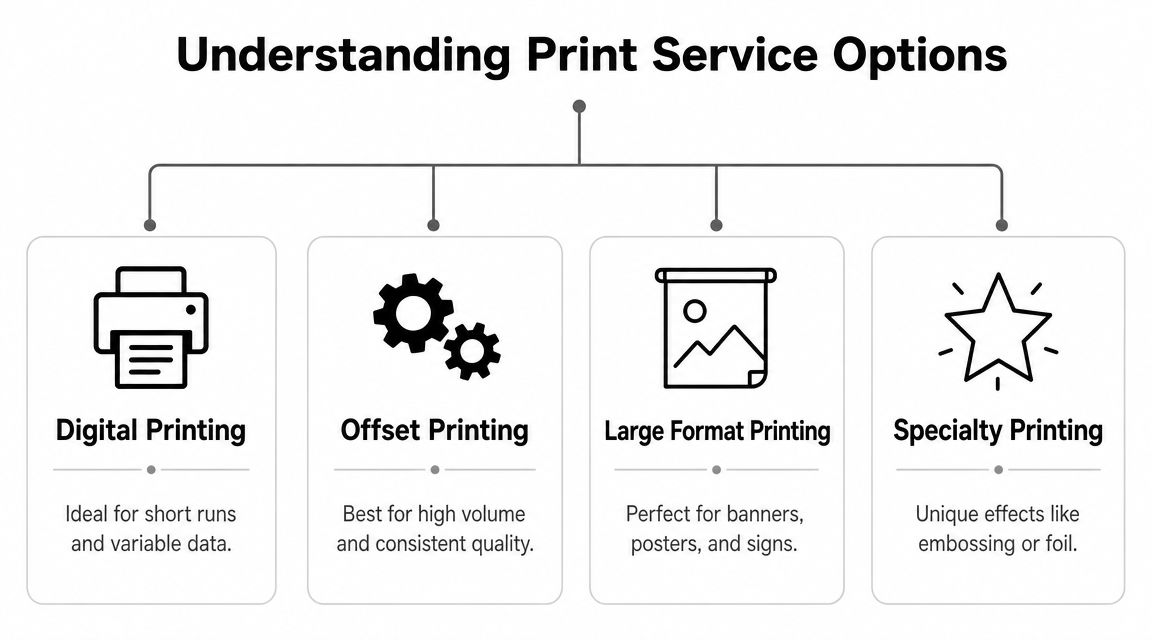
Digital printing for everyday business jobs
Digital printing is the category most small businesses use most often. Think business cards, flyers, brochures, postcards, menus, simple booklets, and quick promotional pieces. It’s a lot like using a home or office printer in spirit, but with sharper output, better paper options, cleaner color, and more reliable finishing.
Digital works well when you need short runs, quick edits, or fast turnaround. If you’re testing two flyer versions or updating prices on a menu, digital is usually the practical choice.
Offset printing for longer, repeatable runs
Offset printing is a more traditional production method. It’s often chosen when a job needs strong consistency across a larger quantity and the design won’t change from piece to piece. Many first-time buyers won’t need to start here, but it helps to know the term so you don’t feel lost when a shop mentions it.
A simple way to think about it is this:
| Print method | Best fit | What it feels like |
|---|---|---|
| Digital printing | Short runs, quick jobs, changing content | Fast and flexible |
| Offset printing | Larger runs, repeated designs | Built for consistency |
Large format for signs, banners, and visibility
Large format printing is the part of print that people notice from across a room, parking lot, or street. It includes banners, posters, yard signs, decals, and presentation graphics.
Wide-format products remain important because businesses still need durable, visible pieces such as banners, decals, and signs, and the market is moving toward customized short-run graphics with fast turnarounds, as noted by Keypoint Intelligence coverage in WhatTheyThink.
Large format isn’t just “regular print, but bigger.” Material, viewing distance, installation, and durability all matter more.
Specialty printing when the piece needs extra character
Some projects need more than ink on paper. That’s where specialty printing comes in. This can include lamination, decals, custom shapes, textured stocks, foil accents, mounted prints, engraved gifts, and other finishing options.
If digital printing is your everyday work shirt, specialty printing is what you wear when presentation matters. A thank-you card for a premium client, a branded gift item, or a polished presentation folder often belongs here.
When you’re not sure which category fits, describe the actual use first. Say where the piece will be seen, how long it needs to last, and whether people will hold it, mail it, post it, or hang it. That usually reveals the right print path faster than talking about technical specs.
Essential Print Products for Your Business
Print still has a daily role in business. The U.S. printing industry was valued at $77.7 billion in 2021, which shows how much commerce still depends on physical materials like cards, flyers, packaging, and signage, according to TonerBuzz’s printing industry summary.
For a Sugar Land business, the useful question isn’t whether print matters. It’s which printed piece solves the problem in front of you.
The products most businesses order first
A new consultant usually starts with business cards. They’re small, but they do a lot of work. They help with introductions, referrals, vendor meetings, and local networking events where handing over your contact details is still faster than asking someone to spell your Instagram handle.
A restaurant or café often starts with menus, flyers, or table inserts. These are practical tools, not just marketing pieces. They answer questions, guide ordering, and keep promotions visible while customers are deciding.
A realtor, contractor, or event organizer often reaches for yard signs and posters. These work when location matters. If the message needs to be seen where the action is happening, a sign does the job better than a social post.
What each product is good at
| Print Product | Common Use Case | Typical Turnaround |
|---|---|---|
| Business cards | Networking, customer handouts, referral meetings | Often fast, sometimes same-day depending on file readiness |
| Flyers | Promotions, grand openings, seasonal specials | Often quick for short runs |
| Brochures | Service overviews, take-home information, presentations | Usually depends on folding and paper choice |
| Postcards | Direct mail, appointment reminders, promos | Varies based on print and mailing needs |
| Posters | In-store displays, event promotion, announcements | Often quick for standard sizes |
| Yard signs | Open houses, roadside promotions, directional signage | Depends on quantity and mounting needs |
| Banners | Storefronts, pop-up events, trade shows | Varies by size and finishing |
A good print product doesn’t just look nice. It fits the way your customer will actually encounter it.
Quick examples from everyday local business life
A home services company might use flyers for a neighborhood promotion because they’re easy to hand out, leave behind, or stack at a counter. A boutique fitness studio might use posters for a class launch and postcards for a referral offer. A bakery may need branded menus one week and a vinyl banner the next for a holiday sale.
If you’re deciding where to start, choose the item closest to the moment of contact.
- Meeting people face to face: business cards
- Explaining services in more detail: brochures
- Promoting a short-term offer: flyers or posters
- Getting seen outdoors: yard signs or banners
- Putting an offer in someone’s hand or mailbox: postcards
For businesses comparing options, marketing material printing is a helpful place to review common product types before placing an order.
How to choose without overordering
Start with one main product and one support piece. For example, pair business cards with a flyer, or pair a banner with postcards. That gives you both reach and follow-up without turning a simple print run into a giant project.
A lot of first-time buyers order too many different pieces at once. It’s better to print the item you know you’ll use this week, then build the rest once you see how customers respond.
Preparing Your Artwork for Perfect Prints
File setup is where many print problems begin. Blurry logos, strange color shifts, and thin white edges usually don’t happen at the printer. They start in the artwork.
Start with the right file
If you only remember one thing, remember this: send your final file as a PDF whenever possible. PDFs keep fonts, alignment, and layout more stable than editable design files or screenshots.
If you’re building cards from scratch, a ready-made template can help you avoid common setup mistakes. This free business card printing template gives you a cleaner starting point than trying to guess margins by eye.
The three file settings that matter most
Resolution affects sharpness. If an image looks fine on your phone but turns fuzzy when printed, resolution is often the culprit. For beginners trying to understand image quality before they submit artwork, this guide to Image resolution for printing gives a useful plain-language overview.
Color mode also trips people up. Screens display color differently than print does, so bright digital colors sometimes look more muted on paper. That doesn’t mean the printer failed. It means screen color and print color speak slightly different languages.
Bleed is the extra image area that extends past the trim edge. If your background color or photo is supposed to run all the way to the edge, the file needs bleed. Without it, tiny cutting shifts can leave a white line where you didn’t want one.
Shop advice: If your design touches the edge, build in bleed from the start. Trying to add it at the last minute often creates stretched graphics or awkward cropping.
A quick pre-flight checklist
Before you upload or email your file, check these basics:
- Confirm size: Make sure the document matches the final trim size you want.
- Embed or outline fonts: This prevents text from changing if the printer doesn’t have your font installed.
- Use high-quality images: Don’t pull tiny images from social media and expect them to scale cleanly.
- Check margins: Keep important text away from the cut edge.
- Export a final PDF: Don’t send the working draft with hidden layers and notes.
A lot of people learn this faster by watching it. This short video walks through print file basics in a way that’s easier to follow than a long software manual.
A simple rule for first-time buyers
If you’re unsure whether the file is ready, don’t keep tweaking it blindly for hours. Send the file, describe the finished piece you want, and ask for a quick review. That’s often faster than fixing the wrong problem.
The best print files aren’t fancy. They’re clean, correctly sized, and built for the actual output. That’s what gets you from laptop to pickup counter without surprises.
Choosing the Right Materials and Finishes
Two brochures can use the same design and still feel completely different in a customer’s hands. That difference usually comes from the material and finish, not the artwork.
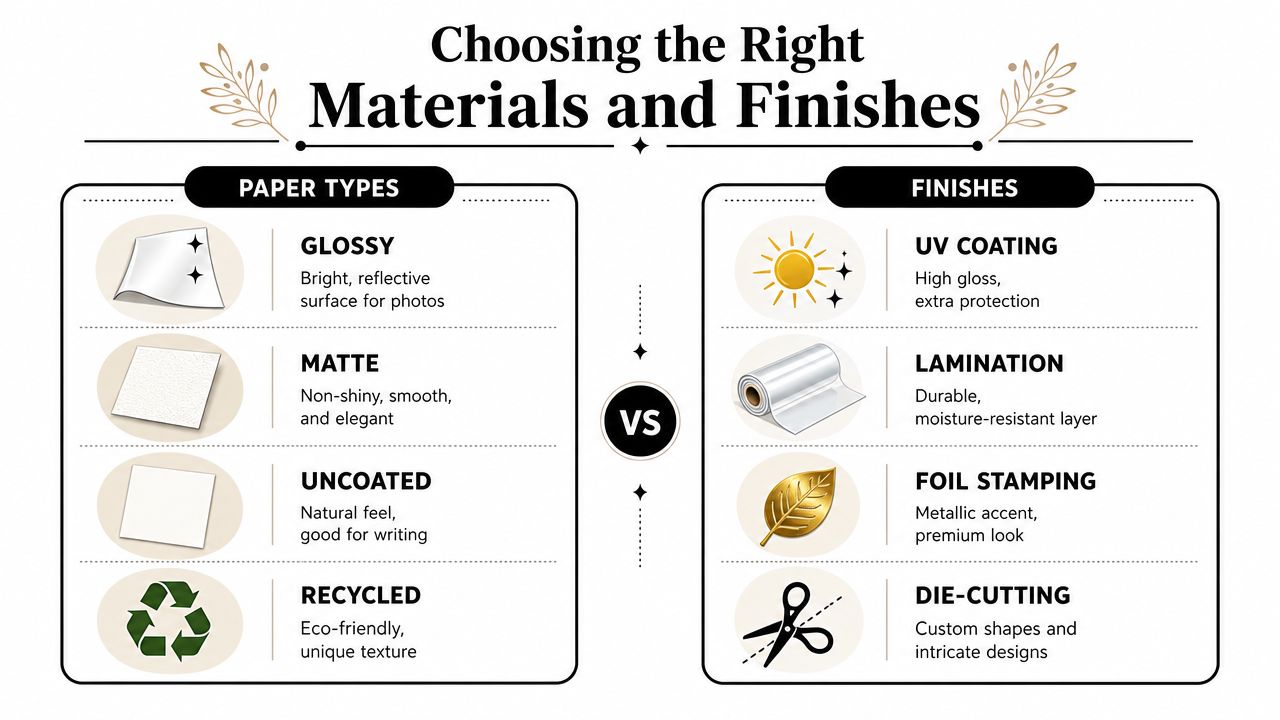
Paper types and when to use them
Glossy paper has a brighter, more reflective surface. Photos, colorful food menus, and promotional postcards often look lively on gloss because colors appear punchier.
Matte paper is smoother and less shiny. It tends to feel more understated. If you want a modern, polished look for a brochure, presentation sheet, or premium handout, matte is often a safer choice.
Uncoated paper has a more natural texture and is easier to write on. That makes it useful for appointment cards, forms, note cards, and pieces where someone might add a signature or a quick note.
Here’s a simple way to compare them:
| Material | Best for | Watch out for |
|---|---|---|
| Glossy | Photo-heavy, colorful marketing pieces | Can reflect light |
| Matte | Clean, refined branding pieces | Colors may feel softer |
| Uncoated | Writable, natural-feel materials | Less slick and less vibrant |
Finishes that change durability and feel
Lamination adds a protective layer. It’s useful when a print piece will be handled often, exposed to moisture, or displayed for more than a quick event. Menus, signs, ID cards, and reusable instruction sheets are common examples.
Other finishes change the personality of the piece. A smooth coating can make a postcard feel more polished. A thicker stock can make a business card feel more substantial. A custom cut can make a tag or promo card stand out even before someone reads it.
Paper choice sends a message before a single word is read.
If you’re torn between options, think about the setting. A takeout menu has different needs than a law office brochure. A kids’ event flyer doesn’t need the same feel as a luxury service packet. Material should support the job, not compete with it.
Same-Day Service and Wide-Format Capabilities
Urgent print jobs happen for ordinary reasons. You run out of business cards. A speaker gets added to an event. A sign is damaged. A pop-up sale needs a banner today, not next week.
What same-day usually means
Same-day printing usually works best for straightforward jobs with ready-to-print files. Business cards, flyers, simple posters, and basic signs are often the most realistic candidates. The cleaner the file, the faster the job moves.
That’s why file prep matters so much. If a logo is low-resolution, fonts are missing, or the size is unclear, “same-day” can quickly turn into “after revisions.”
For planning large displays before you print them, Bulk Image Generation’s AI mockups can help you visualize how a sign or banner might look in context. That’s especially useful when you’re choosing between several layout ideas and need to decide quickly.
When large prints make the difference
Wide-format printing covers the pieces that have to be seen from a distance. Banners, decals, signs, posters, and presentation graphics all fall into this group. These products matter because they do a job digital ads can’t do. They mark a physical location, guide foot traffic, and turn empty space into visible branding.
If your project needs visibility at a storefront, trade show, school event, open house, or roadside promotion, wide-format printing services are the category to ask for first.
The best use of wide-format print is often simple. One clear message, readable from a distance, on a material suited to where it will be displayed.
How to Order Your Print Project in Sugar Land
Ordering print is much easier when you approach it like a checklist instead of a guessing game. You don’t need to know every print term before you reach out. You just need the key details ready.
A simple order checklist
- Decide what the piece needs to do
Say whether it’s for handouts, mailing, in-store display, outdoor promotion, or an event booth. - Choose the product and size
If you don’t know the exact size, describe where it will be used. Counter card, storefront banner, yard sign, flyer rack, and menu insert all point to different formats. - Send your file in final form
PDF is usually the safest option. If you have brand assets like logos or photos, include those too. - Mention your deadline early
If you need it today or tomorrow, say that at the start. That helps avoid wasted time on options that won’t fit the schedule. - Ask about paper, finish, and pickup
If the piece will be handled a lot, exposed to weather, or written on, say so before production begins.
What to include in your first message
A short order note is enough. Include the product, quantity, size if known, deadline, and whether you need pickup. If you’re unsure about the stock or finish, ask for the most practical option for your use case.
“I need 250 flyers for a weekend event” is a good start. “I need something for marketing” is too broad.
Local ordering works best when the conversation is specific. The more clearly you describe the job, the easier it is to recommend the right print setup without delays.
If you need business cards, flyers, banners, posters, yard signs, blueprints, or other everyday print services in Sugar Land, Business Mail Boutique LLC is a practical place to start. Send your file, bring your idea into the store, or call ahead with your deadline and use case. A clear description of the job usually gets you to the right product faster than trying to decode print jargon on your own.

Related posts

Custom Memorial Glasses Engraved in Three Hours in Sugar Land
When a customer needed eight personalized glasses for a memorial, Business Mail Boutique completed the engraving or...

Custom Martini Glass Engraving in Sugar Land, TX
Custom Logo Engraving on Martini Glasses in Sugar Land, Texas.
Business Mail Boutique recently completed a beautiful custom engravin...

Custom Engraved Wine Glasses for a Golf Club Event in Sugar Land, TX
Custom Engraved Wine Glasses for a Golf Club Event in Sugar Land.
Custom wine glass engraving in Sugar Land, TX at Business Mail Bouti...