
- Print Business Cards in Sugar Land – Same Day Service
- Copying Services
- Document Printing, Finishing & Lamination in Sugar Land
- Flyers
- Print Banner in Sugar Land | Same-Day Banner Printing Near Me
- Graphic Design
- Photo Printing
- Postcard Printing
- Document Printing
- EDDM Full Service Postcards
- FotoZoomer Large Format Printing



T-Shirt Printing: A Complete 2026 Guide for Your Business
Businessmailboutique
11645 S. Hwy 6
Sugar land, Texas 77498 United States (US)
Email: info@businessmailboutique.com
You’ve got an idea for a shirt. Maybe it’s for a company event, a staff uniform, a fundraiser, a school club, or a product launch. The design might already be finished, or it may still live as a rough sketch, a logo file, and a few screenshots on your phone. What usually slows people down isn’t the idea. It’s everything that comes after. Which printing method fits the garment? Will the file print cleanly? How do you avoid ordering shirts that look good on screen but disappointing in person?
That hesitation is normal. T-shirt printing sits at the intersection of design, garment selection, production, and deadline management. The upside is that custom apparel is far from a niche purchase. The modern custom t-shirt printing market was valued at USD 5.16 billion in 2024 and is projected to reach USD 9.82 billion by 2030, according to Grand View Research’s custom t-shirt printing market analysis. That kind of demand tells you something important. Businesses, creators, teams, and event organizers keep using printed shirts because they work.
The shirt itself also carries a surprisingly rich history. Graphic tees became widely recognizable through U.S. military use during World War II, and over time they moved into mainstream retail and everyday brand expression. If you’re still shaping the visual direction, it helps to organize references before you ever send a file to print. A quick review of digital mood board best practices can help you narrow colors, typography, and style so your final shirt feels intentional instead of stitched together at the last minute.
If your project is part of a larger brand rollout, it also helps to think beyond the shirt itself and coordinate it with promotional giveaway items for events and branding. That keeps the apparel, handouts, and visual identity aligned from the start.
Table of Contents
- Your T-Shirt Idea Deserves a Great Print
- Choosing Your T-Shirt Printing Method
- Preparing Your Artwork for Perfect Prints
- Understanding Costs and Turnaround Times
- Your T-Shirt Ordering Checklist for Local Shops
- Why Choose a Partner like Business Mail Boutique
- Conclusion From Idea to Impact
Your T-Shirt Idea Deserves a Great Print
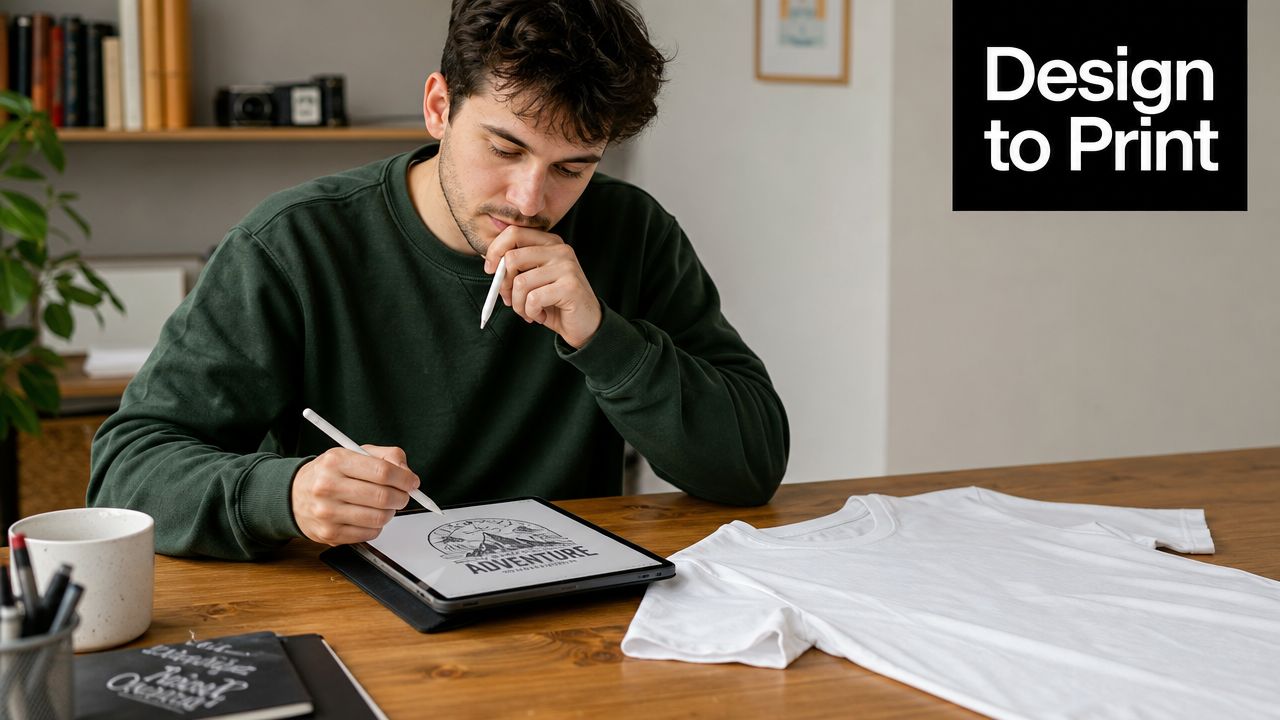
A good shirt starts long before ink touches fabric. It starts when the design matches the purpose. Staff uniforms need clarity from a distance. Event shirts need fast recognition. Retail-style shirts need artwork people want to wear again. When customers miss this step, they usually don’t have a printing problem. They have a planning problem.
Start with the job the shirt needs to do
The first question isn’t “What’s the cheapest method?” It’s “What is this shirt for?” A family reunion shirt, a restaurant staff shirt, and a brand merch drop can all use the same blank garment, but they rarely need the same print approach, placement, or design complexity.
Use these filters first:
- Who will wear it: Staff members need legibility and comfort. Customers may care more about style and softness.
- Where it will be used: Outdoor events, active use, and trade shows often push you toward different fabrics.
- How the design should feel: Some prints sit on top of the shirt. Others become part of the fabric or feel much softer.
A strong design idea can still fail if the garment, placement, and print method don’t match the use case.
The gap between idea and finished shirt
Most frustration in t-shirt printing comes from assumptions. People assume a website logo file is print-ready. They assume every printer handles every fabric the same way. They assume a hoodie front prints just like a flat tee. None of that is reliably true.
That’s why a practical order process matters. You want to know which method matches the fabric, how to prepare art correctly, and where garment construction can interfere with the print area. Once those parts are clear, the order gets much easier.
Choosing Your T-Shirt Printing Method
Most first-time buyers either save money or waste it when selecting printing methods. Printing methods don’t compete in a simple “best versus worst” way. Each one solves a different production problem. If you match the method to the fabric, artwork, and quantity, you usually get a much better result.
If you want a broader overview of online and print-on-demand options, this guide to explore POD printing with Skup gives useful context. For a local order, the same decision logic still applies. Fabric first, artwork second, quantity third.
How the fabric decides the method
Material matters more than most customers expect. According to Printful’s overview of t-shirt printing methods, DTG uses water-based inkjet inks sprayed directly onto the garment and typically works best on cotton, while sublimation uses heat so dye turns into gas and fuses into polyester fibers. DTF prints onto PET film and then transfers to the shirt with heat, which makes it more flexible across cotton blends and synthetics.
Here’s the practical version of that:
- DTG is like a fabric inkjet printer. It’s strong for detailed, full-color artwork on cotton shirts.
- Screen printing works like a stencil process. It shines when the art is bold and the job calls for repeatability.
- DTF is useful when fabric flexibility matters and you need to transfer a design onto a wider range of garments.
- HTV is often used for names, numbers, and simpler graphics where cut vinyl makes sense.
- Sublimation is the method for polyester-focused projects where you want the print to become part of the fabric instead of sitting on top.
One practical local option for polyester-based custom items and related projects is sublimation printing services in Sugar Land, especially when the garment or product is built for dye-based transfer rather than direct ink application.
A practical side-by-side comparison
Different methods create different hand feel, production flow, and cost logic.
| Method | Best For | Feel on Shirt | Cost-Effective At |
|---|---|---|---|
| Screen printing | Bold graphics, logos, repeat orders | Usually more noticeable on the surface | Larger runs |
| DTG | Detailed artwork, photos, short runs on cotton | Often softer, especially on suitable cotton garments | Small batches and one-offs |
| DTF | Flexible garment compatibility, colorful designs | Thin transferred layer on top of fabric | Mixed jobs and versatile fabric needs |
| HTV | Names, numbers, simple text, athletic personalization | Vinyl layer on garment surface | Small custom jobs |
| Sublimation | Polyester garments and performance wear | Print becomes part of the fabric | Jobs built around polyester items |
Practical rule: Don’t choose a method because it sounds modern. Choose it because it fits your shirt and your art.
A common mistake is forcing a method onto the wrong blank. Cotton shirts and polyester performance shirts don’t behave the same way under print. If you already know your garment type, a shop can usually narrow your method choices very quickly. If you haven’t picked the blank yet, that decision should happen before final pricing.
Preparing Your Artwork for Perfect Prints
Bad files create bad shirts. That sounds blunt, but it’s true. A printer can correct some issues, but no shop can turn a tiny low-quality web graphic into a crisp chest print without compromise.
Why sharp on screen can still print badly
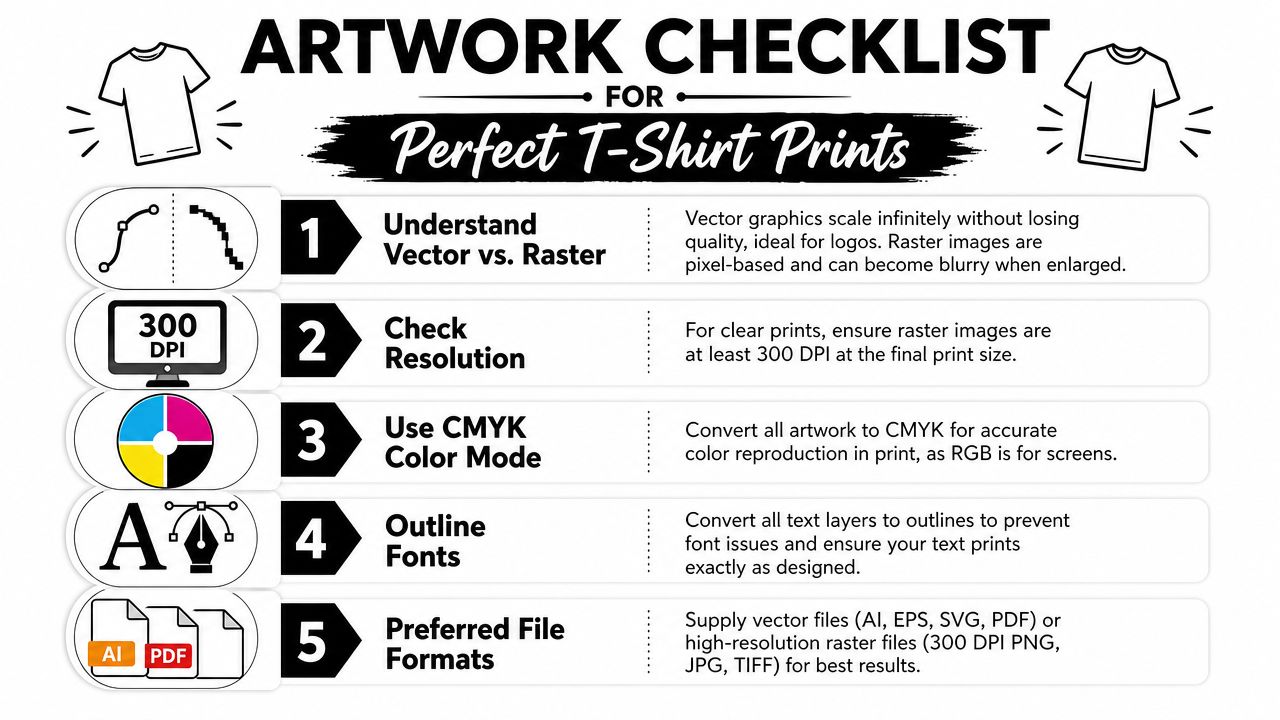
A lot of customers send artwork that looks fine on a laptop but falls apart in production. The most common reason is resolution. According to VistaPrint’s t-shirt artwork guidance, 300 DPI at the final print size is the standard target for high-detail shirt artwork. The same guidance recommends vector formats such as AI, EPS, SVG, or PDF because they keep edges clean and scale without losing quality.
That matters because screen display and print output are not the same thing. A social media graphic can look crisp on a phone and still print soft when enlarged across a shirt front.
A file checklist that prevents rework
When you send artwork to a print shop, these checks save time:
- Use vector when possible: Logos, wordmarks, and simple illustrations should ideally be in AI, EPS, SVG, or PDF.
- Check final-size resolution: If the design is raster-based, make sure it is built at 300 DPI at the size you want printed.
- Remove unwanted backgrounds: A transparent background is usually cleaner than a white box around the art.
- Convert text safely: Outline fonts if your designer provides editable files. That avoids font substitution issues.
- Mention print size clearly: “Use the logo on front” isn’t enough. Say whether you want left chest, full front, or oversized placement.
Here’s the simplest way to think about files:
- A vector logo is usually the safest file for clean branding work.
- A high-resolution PNG can work well for digital print methods when the art is already built correctly.
- A screenshot is almost never a production file.
If you’re unsure whether the file is usable, send it before choosing the garment. File limitations often change the smartest print method.
Color also needs a reality check. Screen colors don’t always translate exactly to fabric and ink. If brand matching matters, say that early. It’s much easier to address before production than after the shirts are finished.
Understanding Costs and Turnaround Times
Price in t-shirt printing comes from setup, garment choice, print complexity, and production flow. Customers often focus on the shirt count alone, but count is only one part of the job. A simple one-color design on a standard tee behaves very differently from a multi-location print on premium garments.
What actually changes the price
Several choices move the quote up or down:
- Printing method: Screen printing, DTG, DTF, HTV, and sublimation all have different labor and setup patterns.
- Garment quality: Basic tees, soft retail-style blanks, and performance fabrics don’t cost the same.
- Design complexity: More colors, larger print areas, and multiple locations increase production work.
- Order structure: Mixed garments, unusual sizing, and multiple artwork versions add handling time.
- Placement requests: Front only is simpler than front, back, sleeve, and tag-area decoration.
The cheapest path isn’t always the smartest one. If the shirt feels rough, the artwork looks muddy, or the garment doesn’t fit the use case, the order can become expensive in a different way. Reorders, complaints, and leftover inventory cost more than getting the decision right up front.
How to avoid slowdowns
Turnaround depends heavily on what the shop has to solve before printing starts. Clean files and clear instructions move fast. Missing information stalls jobs.
These steps help keep timing realistic:
- Approve the artwork carefully: Small errors become large once they’re printed across an entire order.
- Lock sizes early: Late size changes create confusion, especially on grouped orders.
- Confirm garment availability first: The perfect shirt doesn’t help if it can’t be sourced in the needed colors or sizes.
- Ask about deadline priorities: Some jobs can move quickly if the art and garment are straightforward.
Rush production usually isn’t blocked by the printer. It’s blocked by unclear files, missing approvals, and last-minute changes.
For local orders, direct communication is particularly helpful. A quick conversation often resolves production questions much faster than a long email thread with an online-only vendor.
Your T-Shirt Ordering Checklist for Local Shops
Walking into a local shop prepared makes the whole process smoother. It also reduces the chance of misprints, delays, or a final product that doesn’t match what you imagined.
Bring these decisions with you
Have these basics ready before you place the order:
- Your artwork file: Send the highest-quality version you have, ideally vector art or a properly built high-resolution file.
- Garment choice: Know whether you want cotton, a blend, or a polyester performance shirt.
- Garment color: Print colors interact with the shirt color. That matters for visibility and method choice.
- Size breakdown: Don’t just say “a mixed run.” List each size and quantity.
- Print locations: Left chest, full front, back, sleeve, and pocket area all need separate consideration.
- Wear context: Tell the printer whether the shirts are for staff use, resale, giveaways, sports, or an event.
If speed matters, local same-day options like same-day t-shirt logo printing in Sugar Land can be useful, but same-day jobs still move faster when all of the above is settled before production starts.
Call out tricky garments early
Not every shirt prints like a flat basic tee. According to Transfer Express guidance on common t-shirt printing mistakes, nonstandard garments like hoodies, polos, baby onesies, pocket tees, and shirts with seams or buttons can interfere with platen contact and require adjustments.
That affects real orders in ways customers don’t always expect:
- Polos: Collars and plackets can interfere with placement and pressure.
- Pocket tees: The pocket changes the printable area and can force a smaller graphic.
- Hoodies: Seams, thick fabric, and hoods can disrupt a clean print surface.
- Buttoned garments: Buttons create uneven contact and can complicate alignment.
On nonstandard garments, the printable area is defined by construction details, not by what looks visually empty.
Ask the shop to confirm safe print zones before final approval. That one step prevents a lot of disappointment. A good local printer will usually tell you when your chosen placement needs to shrink, shift, or move entirely.
Why Choose a Partner like Business Mail Boutique
You approve a shirt design on Tuesday, then realize on Wednesday that the red ink disappears on the maroon shirt you picked online. That problem is much easier to catch when you can stand at a counter, look at real garments, and ask a printer what will work before production starts.
Why local help changes the result
A good local shop helps you make fewer expensive decisions in the dark. You can feel the difference between a lightweight promo tee and a heavier retail-style shirt. You can compare print size against the actual garment. You can also get a straight answer on whether your file is ready, whether your deadline is realistic, and whether your order needs a different shirt or print method to look right.
That matters most on first orders, rush jobs, and mixed projects. Online systems are efficient for simple reorders. They are less helpful when you need someone to catch a placement issue, suggest a better garment, or explain why a design that looks fine on a screen may print poorly on fabric.
Business Mail Boutique LLC is a Sugar Land business center that offers apparel printing along with shipping, packaging, mailbox, and office services. That combination is useful for customers who need more than decorated shirts. A business might need staff apparel packed for an event. A school group might need shirts, flyers, and outgoing shipments handled in one place. Keeping those pieces together can reduce delays and cut down on handoff mistakes.
One place can solve more than printing
This short video gives a sense of that broader service model:
From a shop perspective, integrated service matters because apparel orders rarely exist by themselves. A customer ordering team shirts often also needs signs, inserts, packing, or delivery support. Handling those pieces with one local provider usually means fewer emails, fewer mismatched deadlines, and less back-and-forth if plans change.
That is the practical advantage. You are not only buying ink on fabric. You are working with a nearby team that can check the details, respond quickly, and help keep the whole order on track.
Conclusion From Idea to Impact
The difference between a shirt that gets worn and a shirt that gets ignored usually comes down to decisions made before production. The right method has to match the garment. The artwork has to be built for print, not just for screens. The order has to be clear about sizes, placement, and timing.
That’s why first-time t-shirt printing gets easier once you stop treating it like a single choice. It’s really a chain of choices. Fabric, file, print method, garment construction, and deadline all affect the result. When those pieces line up, the shirt does its job. It represents a business well, gives a team a unified look, supports an event, or turns a design idea into something tangible people want to keep.
A local shop can make that process much less stressful because you’re not guessing alone. You can ask better questions, catch problems before they become expensive, and make decisions based on the actual garment in front of you. That’s especially useful when the order is time-sensitive or includes more than just apparel.
If you’re in the Sugar Land area and you’ve got a t-shirt idea sitting in a folder, a text thread, or a half-finished design file, it’s close to becoming real. You don’t need perfect terminology to start. You just need a clear goal, the best file you have, and a shop that can translate the idea into a wearable final product.
If you’re ready to turn a logo, event concept, or rough design into finished shirts, contact Business Mail Boutique LLC and start the conversation with your artwork, garment idea, deadline, and quantity list. A local discussion can quickly reveal the right print method, likely turnaround, and any file or placement issues before production begins.
