
- Print Business Cards in Sugar Land – Same Day Service
- Copying Services
- Document Printing, Finishing & Lamination in Sugar Land
- Flyers
- Print Banner in Sugar Land | Same-Day Banner Printing Near Me
- Graphic Design
- Photo Printing
- Postcard Printing
- Document Printing
- EDDM Full Service Postcards
- FotoZoomer Large Format Printing


Florida Fingerprinting & Background Checks
Florida fingerprinting & background checks. Learn the step-by-step process, costs, required IDs, and how to avoid common delays.
Businessmailboutique
11645 S. Hwy 6
Sugar land, Texas 77498 United States (US)
Email: info@businessmailboutique.com
Route
You’ve got the offer letter, the license packet, or the volunteer onboarding email. Then one line stops everything: Level 2 background check required. For first-timers, Florida fingerprinting & background checks can feel more complicated than they need to be, mostly because one small mistake can send your results to the wrong place or stall your application.
The good news is that Florida’s system is established, busy, and routine. This isn’t an unusual process. It’s one the state has handled at scale for decades. As far back as 1997, the Florida Department of Law Enforcement processed nearly 1.5 million criminal history record requests in a single year, including over 396,000 Level 2 screenings for specific professions, according to a Florida Senate report citing FDLE data. That history matters because it explains why Florida relies so heavily on standardized workflows, electronic submission, and exact agency identifiers.
Most delays don’t happen because the system is broken. They happen because applicants book too early, bring the wrong information, or assume every background check works the same way. It doesn’t. The difference between a smooth appointment and a frustrating redo usually comes down to preparation.
Table of Contents
Your Guide to Navigating Florida Background Checks
Florida fingerprinting & background checks run on precision. If you treat the process like a generic errand, you’re more likely to hit delays. If you treat it like a compliance step with exact inputs, it usually moves cleanly.
The first thing to understand is that Florida didn’t build this system overnight. The state has processed these requests at a massive scale for a long time. That old FDLE volume matters because it shows why agencies depend on standard routing, fingerprint submission rules, and agency-specific screening instructions rather than one-size-fits-all checks.
A lot of applicants assume the fingerprinting location decides what check they need. It doesn’t. The requesting agency decides. Your employer, licensing board, volunteer organization, or regulator tells the system where the results have to go and what legal standard applies.
Practical rule: Fingerprinting is the easy part. Getting the right screening tied to the right agency is what keeps your application moving.
That’s also why legal and compliance guidance sometimes matters before the appointment itself. If you’re dealing with regulated hiring, employment compliance, or data handling concerns around screening programs, Coto & Waddington, Attorneys at Law offers a useful overview of Florida business compliance issues that employers often overlook when building screening practices.
Why applicants get tripped up
The most common misunderstanding is simple. People hear “background check” and assume all checks search the same records in the same way. In Florida, that assumption creates problems fast.
Some checks are name-based. Some are fingerprint-based. Some are tied to a specific board or clearinghouse. Some require a particular ORI number, and if that number is wrong, your prints may be captured perfectly and still become useless for your application.
What works in practice
Applicants who move through the process cleanly usually do four things:
- Confirm the exact requirement with the requesting agency before booking.
- Get the ORI number in writing instead of relying on memory or a phone call.
- Match their ID and application name before the appointment.
- Keep the Transaction Control Number after submission.
That sounds basic, but those four habits prevent most avoidable delays.
First Steps Identifying Your Required Check
Before you schedule anything, pin down the requirement exactly. Doing so determines whether one saves time or loses it.
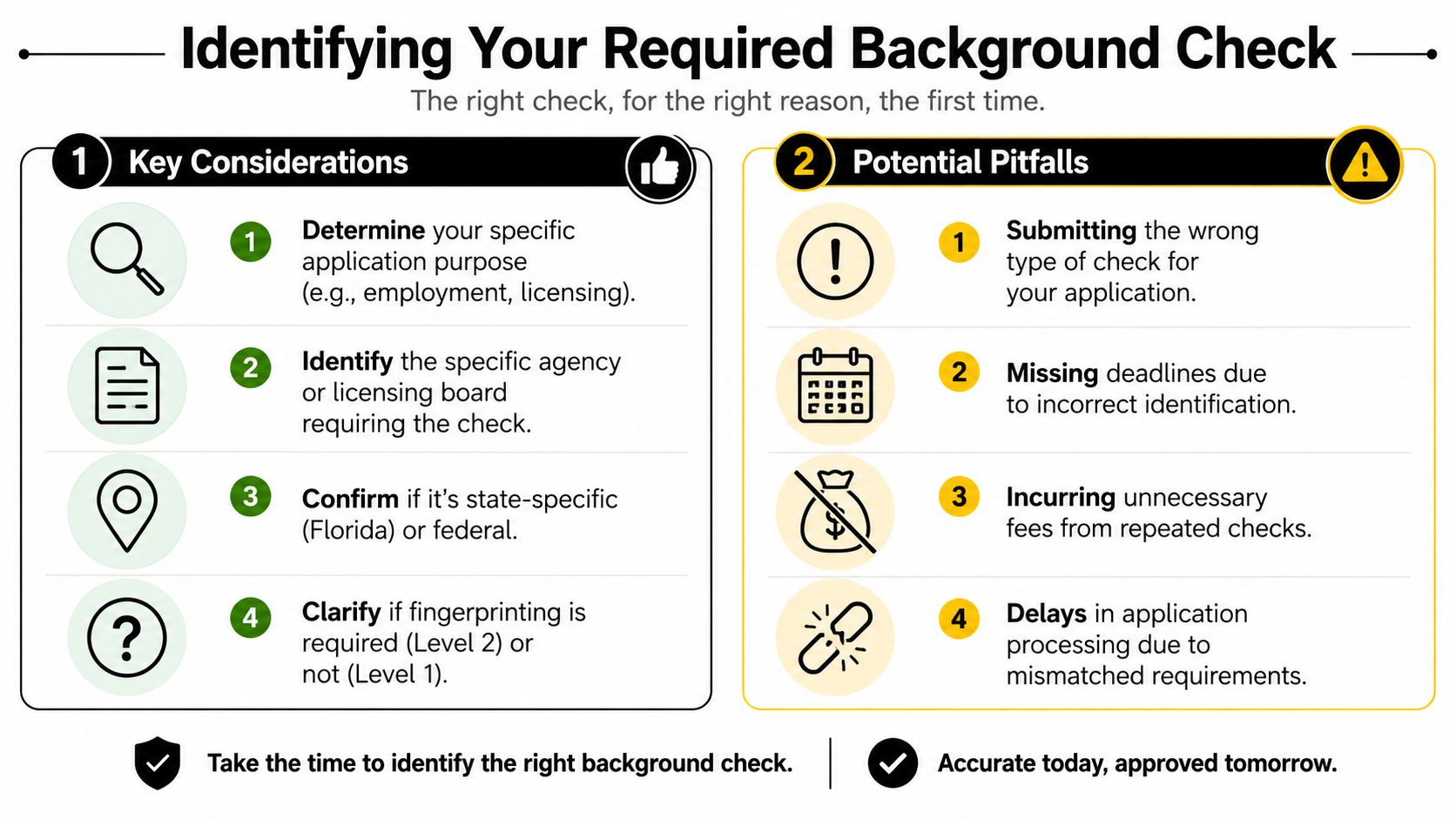
Start with the agency not the fingerprinting shop
The fingerprinting provider captures and submits prints. The provider doesn’t decide whether you need Level 1, Level 2, a profession-specific submission, or a board-specific route.
Start by asking the requesting party these questions:
- What type of check is required? Ask whether it’s Level 1 or Level 2.
- What is the ORI number? Get it exactly as issued.
- Which agency should receive the results? Don’t guess from a similar job title.
- Are there any supporting forms or registration steps? Some agencies want more than the fingerprint submission.
If you’re managing hiring or screening logistics for a business, this guide on FBI criminal history checks for businesses can help frame when federal-level criminal history information becomes part of the workflow.
Use the employer’s email, board notice, or application portal as your source of truth. Verbal instructions are where ORI mistakes start.
Know the difference between Level 1 and Level 2
Florida applicants mix these up all the time. The distinction matters.
According to the Florida Department of Children and Families background screening guidance, Level 1 is a name-based check, while Level 2 is a fingerprint-based screening used for roles involving vulnerable populations and includes both statewide FDLE and national FBI criminal history reviews.
That means Level 2 isn’t just a “stronger” version of Level 1. It’s a different process with different legal consequences and routing requirements.
Here’s the practical version:
| Check type | How it runs | Typical use |
|---|---|---|
| Level 1 | Name-based search | General employment where fingerprinting isn’t legally required |
| Level 2 | Fingerprint-based review through FDLE and FBI | Roles involving children, vulnerable adults, or regulated professions |
The ORI number is the key
If there’s one detail you should double-check, it’s the ORI number. This identifier tells the system where your results belong. A wrong ORI doesn’t usually create a “close enough” result. It sends your prints into the wrong workflow.
That’s why applicants sometimes say, “I already got fingerprinted,” but the agency still shows nothing received. In many cases, the prints were taken correctly. The submission was just routed incorrectly.
Common bad assumptions include:
- Using an old ORI from a prior job or license
- Borrowing a coworker’s ORI because the roles seem similar
- Assuming one nursing or healthcare ORI fits every board
- Booking first and asking questions later
When in doubt, stop and verify. Reprinting costs more time than waiting one extra day to confirm the right code.
The Fingerprinting Process From Start to Finish
A lot of Florida fingerprinting problems start before the scan. Someone books the appointment, brings an ID, sits down, and then finds out the ORI is wrong, the application name does not match, or a required form is missing. The actual capture is usually quick. The delays usually come from preventable check-in mistakes.
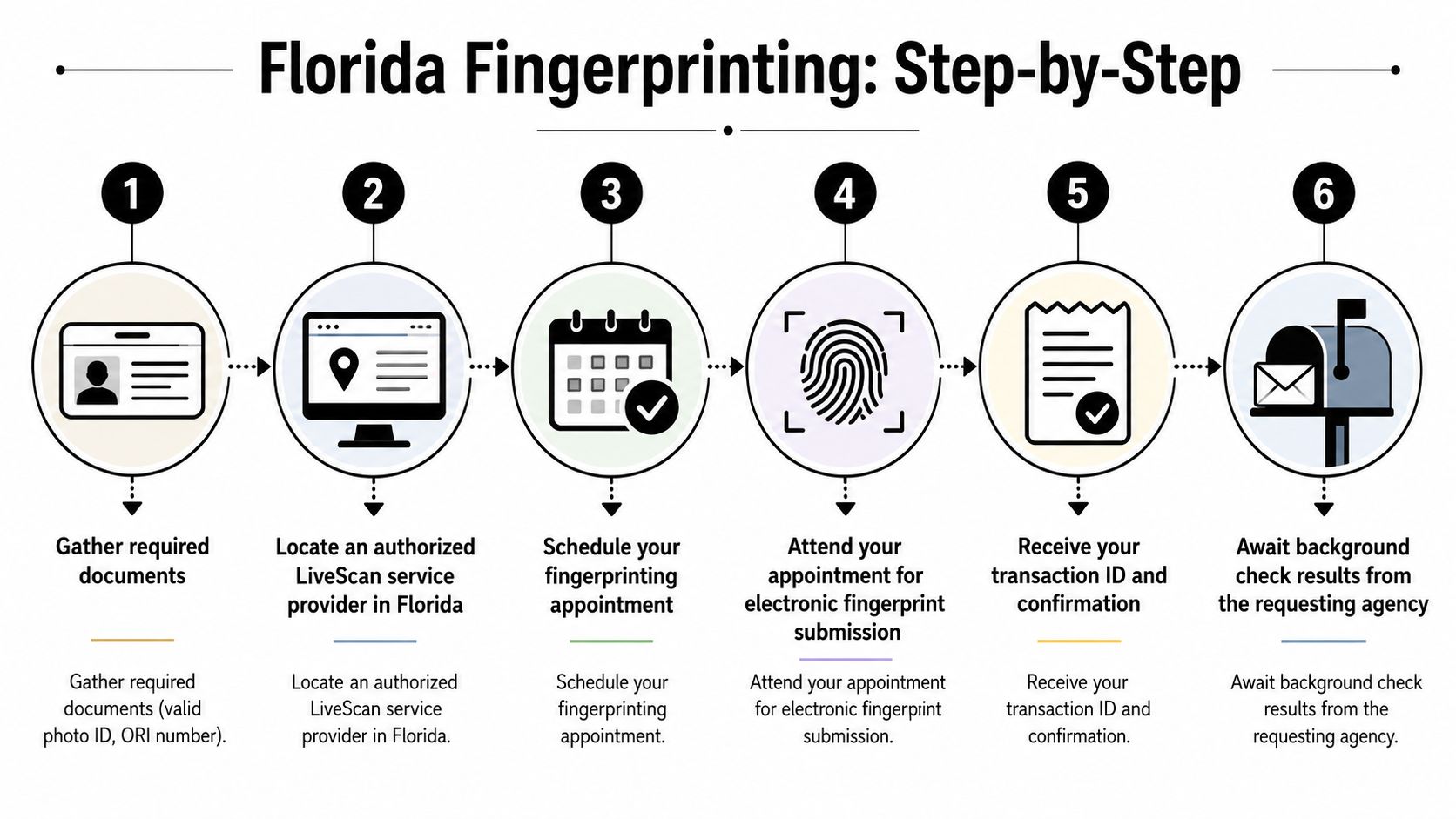
What to bring before you leave home
Bring everything in one folder or on one screen you can access fast. If the technician has to wait while you search old emails for your ORI or application details, check-in slows down, and mistakes become more likely.
You should have:
- A valid government-issued photo ID used to confirm your identity
- Your ORI number in writing so it can be entered exactly as issued
- Any agency instructions, registration page, or request form tied to your job, license, or volunteer role
- Your Social Security number information, if your agency requires it
- The exact name used on your application, matching your ID as closely as possible
If you are not sure whether your case uses electronic submission or a card-based process, this guide to fingerprinting with ink and Livescan capture gives a useful side-by-side explanation.
One practical tip from the field. If your ID shows a suffix, hyphenated last name, or a recent name change, bring the supporting document your agency told you to use. Name mismatches do not always stop the appointment, but they often create follow-up questions later.
What happens at the appointment
Most appointments follow the same workflow.
First, the technician verifies your identity and reviews the submission details. That is the point where wrong ORIs, transposed birth dates, and misspelled names should be caught. Next, your fingerprints are captured electronically through Livescan. The scan itself is usually the shortest part of the visit.
At a well-run location, the technician will also check image quality before final submission. That matters more than applicants realize. Dry fingertips, worn ridge detail, lotion residue, and recent cuts can all affect the images. If your hands are very dry or your fingerprints are hard to read, say so before scanning. A technician can often improve the capture with basic hand prep and a second pass.
Here’s a quick visual walkthrough if you want to see the process before you go:
Florida applicants often ask whether ink cards are still used. They are, but mainly for special cases, out-of-state requirements, or agencies that still call for card submission. For many Florida licensing and employment screenings, Livescan is the standard because it cuts out mailing time and reduces manual handling errors.
What to do with your TCN after submission
Before you leave, get your Transaction Control Number, or TCN. If there is a problem later, this is the number you will be asked for first.
Keep it with your receipt and a copy of the agency instructions you used at booking. That gives you a clean paper trail if your employer, licensing board, or volunteer coordinator says results have not posted yet.
Use this post-appointment checklist:
- Save the TCN immediately in your phone, email, or notes app
- Keep the payment receipt
- Watch your email and spam folder for follow-up requests
- Reply quickly if an agency asks about a mismatch or missing detail
Applicants who treat the TCN like an afterthought often waste time later. Applicants who keep it handy can usually confirm whether the submission was completed and start fixing a routing or identity issue faster.
Costs Timelines and Finding a Provider
A common Florida delay starts before the appointment even happens. Someone books the cheapest slot they can find, shows up with the wrong ORI number or the wrong ID, then has to pay again to redo the submission.
Cost matters. Correct submission matters more.
What the appointment usually costs
For a standard Florida Livescan appointment, applicants usually see pricing in the $50 to $100 range, as noted earlier. The total depends on how the provider bills the service.
Some offices quote one flat price. Others split out the fingerprinting fee, state processing fee, rolling fee, or mobile convenience fee. Ask for the full amount before you book, and ask whether a rejected submission due to applicant error means a second fee.
That question saves people money.
If your agency still requires a card-based submission instead of electronic Livescan, review the workflow before you schedule. This guide to the FINRA fingerprint card process is a good example of how card-based requirements differ from standard Florida electronic submissions.
What kind of turnaround to expect
The appointment itself is usually quick. The full result timeline depends on more than the scan.
Livescan prints are transmitted fast once they are captured correctly. After that, the waiting period usually comes from agency review, application matching, and whether the submission was routed to the right place in the first place. If the ORI number is wrong, speed at the scanner does not help.
Use this as a practical timeline guide:
| Stage | What usually affects it |
|---|---|
| Booking the appointment | How busy providers are in your area, and whether they handle your agency’s workflow |
| Check-in and fingerprint capture | Your photo ID, exact personal details, and the ORI number you bring |
| Electronic submission | Usually completed shortly after capture if the prints are readable |
| Agency review and posting | Internal processing time, matching your file, and any correction requests |
If you are on a deadline for a license, job start, or volunteer clearance, do not assume “same day fingerprinting” means same day approval. Those are different steps.
Finding a provider that will get it right the first time
Pick a provider based on accuracy and experience with your type of screening, not just distance or the first appointment available.
Law enforcement locations work for some applicants. Authorized private Livescan vendors often offer more appointment times and faster front-desk handling. The better option depends on your agency, your schedule, and whether the staff regularly process the exact submission you need.
Before you confirm the appointment, ask these questions:
- Do you handle submissions for my agency or licensing board on a regular basis?
- What do I need to bring besides photo ID?
- Will you verify the ORI number I provide, or am I responsible for bringing the exact one?
- Do you give me a receipt and TCN before I leave?
- If my prints need to be retaken, what is your policy?
The best provider is usually the one that catches mistakes before transmission.
A polished website does not tell you much. A staff member who immediately asks for your agency name, ORI number, and document checklist usually does.
Solving Common Pitfalls and Specific Scenarios
Some applications go through cleanly. Others hit a snag that could have been prevented with one extra check before the appointment.

Healthcare applicants now face a stricter rule
Healthcare is the clearest example of why applicants need to read current instructions, not rely on old advice from coworkers.
Beginning July 1, 2025, nearly all Florida healthcare practitioners licensed by the Division of Medical Quality Assurance must complete a fingerprint-based background screening for both initial licensure and renewal using an approved Livescan provider, and the Department of Health will deny renewal applications submitted after that date without a completed screening, as explained in this update on Florida healthcare background screening changes.
That means a healthcare applicant can’t treat fingerprinting as an optional last-minute task near renewal. It becomes part of keeping the license active.
The mistakes that cause the most rework
The most common delay I see in practice is the wrong ORI number. Everything can look successful at the appointment, but the receiving agency never gets what it needs.
Another frequent issue is a name mismatch. The ID says one version of the name. The licensing registration uses another. According to the same Florida process guidance commonly used by providers, problems like this may require the applicant to submit the TCN, a copy of the SSN, and photo ID to AHCA to resolve the mismatch. Don’t assume a minor variation will be ignored.
A few real-world scenarios come up often:
- You changed your name recently. Bring documents and make sure your application records are consistent before fingerprinting.
- You used an old ORI from a previous employer. Stop and get the current one from the actual requesting agency.
- Your prints are hard to capture clearly. Tell the technician if you work with chemicals, have very dry skin, or have worn ridge detail.
- You were told to submit on a card instead of Livescan. Confirm that instruction carefully. Some specialized processes still require cards. If you need cards for a nonstandard submission, this overview of the FINRA fingerprint card process shows how card-based workflows differ from electronic submission.
If something looks off at check-in, fix it before your fingers touch the scanner. After submission, correcting a routing or identity issue is harder.
When a problem appears, respond quickly and keep all records together. Your TCN, ID copy, email instructions, and payment receipt are the first things you’ll be asked for.
Frequently Asked Questions About Florida Background Checks
A few questions come up after the appointment or when an employer starts comparing options.

Do out of state records show up
For Level 2 checks, they can. Florida’s guidance distinguishes Level 2 as a fingerprint-based process that includes both statewide and national criminal history review. That’s why applicants shouldn’t assume an out-of-state issue stays invisible just because it didn’t happen in Florida.
Can you reuse a background check
Usually, you shouldn’t assume you can. In practice, many screenings are tied to a specific agency, employer, or licensing workflow through the ORI and related submission path. If a new employer asks for screening, get their instructions instead of trying to recycle a prior transaction.
What about traffic issues and smaller offenses
Applicants ask this constantly because “background check” is a broad phrase and different screens return different information. If you’re sorting out whether moving violations or related records might appear, this explanation of how traffic tickets affect your background is a helpful companion read.
When is fingerprinting legally mandatory for a business hire
It depends on the role. For general employment, a name-based check may be enough. For positions involving children or vulnerable populations, fingerprint-based Level 2 screening is often the legal requirement. Small business owners shouldn’t guess on this point. The safer move is to confirm the statute or agency rule tied to the role before hiring.
What should you keep after the appointment
Keep the TCN, your receipt, your ID details used for the submission, and any agency instructions. If anything stalls, that paperwork becomes your troubleshooting file.
If you need a convenient place to handle fingerprinting along with other practical business and personal service needs, Business Mail Boutique LLC offers fingerprinting, notary, passport photos, printing, shipping, and mailbox services in one location. For busy professionals, entrepreneurs, and local residents, that kind of one-stop setup can make compliance tasks much easier to manage.

Related posts

Corporate Watch Engraving in Sugar Land | Business Mail Boutique
Custom Watch Engraving in Sugar Land: Meaningful Gifts for Employee Appreciation
A personalized watch can turn a company’s thank-you i...

Standing Banner Printing with X Stand in Sugar Land | Business Mail Boutique
Custom Standing Banner Printing with an X Stand in Sugar Land
A well-designed standing banner gives a business a clear, visible presen...

Knife & Leather Case Engraving in Sugar Land | Business Mail Boutique
Custom Knife and Leather Case Engraving in Sugar Land — Same-Day Service at Business Mail Boutique
A name can turn an everyday item in...