
- Print Business Cards in Sugar Land – Same Day Service
- Copying Services
- Document Printing, Finishing & Lamination in Sugar Land
- Flyers
- Print Banner in Sugar Land | Same-Day Banner Printing Near Me
- Graphic Design
- Photo Printing
- Postcard Printing
- Document Printing
- EDDM Full Service Postcards
- FotoZoomer Large Format Printing


SF-87 Fingerprinting.
Complete SF-87 fingerprinting guide with step-by-step instructions, required ID, accepted methods, common mistakes, and Sugar Land walk-in service details.
Businessmailboutique
11645 S. Hwy 6
Sugar land, Texas 77498 United States (US)
Email: info@businessmailboutique.com
Route
You’re at the counter with a federal fingerprint packet in one hand and a question the website didn’t answer clearly. You need the prints done right, the first time, and you probably don’t want a second trip because one box was left blank or the rolled thumb came out muddy.
SF-87 fingerprinting is still part of federal vetting, but in 2026 it’s no longer the default path. It’s the fallback when an agency wants a hard card or when electronic capture isn’t available, and that shift matters because most rejection problems come from treating the form like a routine admin sheet instead of a controlled fingerprint submission. The right approach is simple, use the version your agency asked for, fill every required block, and focus on classifiable prints rather than just “getting ink on paper.”
If you’re comparing federal fingerprint options for a security role, the DocsBot security guard solution is a useful reference point for how background-check-heavy jobs are typically organized. For agencies that still route applicants through hard-card handling, the mechanics often overlap with broader federal mailing workflows, including the kind of intake process described in this federal agency fingerprinting guide.
Table of Contents
- What the SF-87 Fingerprint Chart Is and Who Still Uses It
- Who Needs SF-87 Fingerprinting and When It Is Still Required
- Documents and ID You Need Before You Go
- Booking an Appointment or Walking In for SF-87 Fingerprinting
- Ink Card vs Electronic Capture for SF-87
- Common Mistakes That Get SF-87 Cards Rejected
- Cost, Turnaround, and Sugar Land Walk-In Service Details
What the SF-87 Fingerprint Chart Is and Who Still Uses It
The SF-87 is the U.S. Standard Form 87 fingerprint chart used for federal personnel vetting, and the hard-copy form became the required version in a 2014 OPM notice that set the revised March 2013 form as mandatory effective October 1, 2014. That same notice said the SF-87A was obsolete, older versions stopped being accepted after the grace period, and agencies had to get the charts through GSA instead of OPM stock. That’s the kind of form-history detail applicants rarely hear about, but it explains why some offices still behave like paper controls matter more than convenience. OPM notice on the revised SF-87 process
Hard card is the backup, not the default
Today, DCSA guidance says the January 2025 version is the only accepted hard-card version as of January 1, 2026, and it’s used when electronic submission isn’t feasible. DCSA also says the form supports federal employee, applicant, military, volunteer, and contractor screening, and it’s automatically scheduled as a SAC, case type 92 because the SOI, SON, and IPAC fields are required. In plain terms, that means the card still matters, but only in the situations where the agency can’t or won’t use a live electronic channel. DCSA fingerprint guidance for SF-87 hard cards
For readers who need a quick primer on how federal screening requests are handled across mail and intake workflows, this business mailing and fingerprinting resource gives a practical sense of what request packets usually look like once they leave the agency.
Practical rule: if the agency handed you a paper SF-87, use that exact paper path. If they sent a live-scan authorization, you don’t need to improvise a hard card.
Most requests still fall into the same few buckets, military vetting, federal personnel onboarding, contractor screening, and a smaller set of legacy or state-adjacent requests. When the process is paper-based, the result is a physical card that gets mailed or scanned into the recipient’s process. That’s why the rest of this guide focuses on what gets accepted, not on what looks complete at a glance.
Who Needs SF-87 Fingerprinting and When It Is Still Required
You usually see an SF-87 request when the agency has chosen paper as the fallback path. A federal applicant may get it in an onboarding packet. A military candidate may get it when vetting or enrollment still requires a hard card. A contractor may get it when the facility has not fully shifted to electronic capture. A volunteer or clearance-driven applicant may get it when the requesting office still wants a paper card instead of a live scan.
| SF-87 Applicant Types and Current Requirements | |||
|---|---|---|---|
| Applicant Type | Typical Requesting Agency | Current Format | Trigger |
| Federal job applicant | Federal office or HR security team | SF-87 hard card or electronic capture | Onboarding packet names the form |
| Military candidate | DoD or service vetting office | Hard card when electronic capture isn’t used | Enrollment or clearance screening |
| Federal contractor | Contracting agency or facility security office | Often electronic, sometimes SF-87 | Facility onboarding or reinvestigation |
| Volunteer or clearance role | Requesting agency or program office | Hard card only when explicitly issued | Suitability or clearance-driven review |
The key point is simple. Most agencies now prefer electronic fingerprints, and DCSA says agencies should submit them that way whenever they can. The hard card comes into play only when electronic capture is not feasible. DCSA fingerprint submission guidance
If you want a plain-English comparison of why some requests still route to paper and others do not, this background-check requirements guide is useful. It helps explain the difference between federal paper workflows and the state or licensing workflows many applicants already know.
Confirm the trigger before you book anything
Read the packet, not the rumor mill. If your instructions name SF-87 directly, you need a hard card. If they authorize livescan, do not show up expecting paper to be acceptable.
That matters for contractors too. Some are already inside an electronic system and only fall back to a paper card when the requestor says so. In practice, the form choice follows the agency’s intake path, not what feels easier at the counter.
For students, nurses, and other regulated applicants, the federal process can feel backwards at first because the trigger is the request packet, not the applicant’s preference. Once you know which form the agency issued, the next step gets a lot easier. Federal fingerprint submission instructions and form handling
Simple filter: agency-issued SF-87 packet, yes. Livescan invitation, no.
Documents and ID You Need Before You Go
Bring more than one piece of ID, even if the fingerprint office only asks for the minimum at the counter. For hard-card work, start with a current government photo ID, such as a driver’s license, state ID, U.S. passport, or permanent resident card. If the requestor wants fuller identity support, bring a second document too, such as a Social Security card, birth certificate, or W-2.
Fill the form before you arrive
The blanks that slow people down are usually the same ones. Complete height, weight, eye color, hair color, place of birth, and citizenship status before you sit down, and use black ink if the agency instructions call for it. Some official instructions also call for the employee signature, residence address, date of fingerprinting, and the official’s title and address to be completed in black ink.
Bring the paperwork the requestor gave you as well. That includes the SF-87 itself, a cover letter, a fingerprint instruction memo, any case number or OPM reference, and any previous card if you are being reprinted. On a hard card, those details help the operator match the submission to the agency’s exact path the first time.
Operator habit that saves time: fill the demographic blocks before you arrive, then let the technician confirm them instead of writing them under pressure at the counter.
Electronic capture sites work a little differently. They verify ID on the spot and often already have the case data tied to the appointment or authorization code, so the secondary document may be waived when the requestor’s workflow allows it. For applicants who already have a clean agency invitation, live scan usually cuts out a lot of paper handling. The identity check still stays strict.
Booking an Appointment or Walking In for SF-87 Fingerprinting
If your packet is for electronic submission, book the appointment. That’s the cleanest route for applicants who have an invitation code, a case number, or a request letter that ties the capture directly to the agency’s system. If your packet is a paper chart request, walking in is often the more practical move because the office can lay out the card, roll the prints, inspect the image, and send you out with a completed hard card.
At the counter, the sequence should feel orderly, not rushed. The operator checks ID, confirms the demographic fields, then gets the cards and ink ready. If the office is doing the job correctly, you’ll see two clean fingerprint attempts, not a single sloppy pass that gets taped up and hoped for. FormBackend booking form guide
What the technician should do in order
- Verify identity first. The name on the ID, the form, and the request packet needs to match.
- Confirm the demographic blocks. Missing citizenship, birth place, or date fields are common reasons a card gets flagged later.
- Prepare the ink properly. Use printer’s ink, spread it evenly, and don’t overload the fingers.
- Roll each finger nail to nail. The order matters, and the print should be preserved exactly as captured.
- Take the plain impressions together. Those flat impressions are done simultaneously, not finger by finger.
- Inspect the finished card. Clear ridge detail, correct order, and no smears should be visible before the card is signed.
The part applicants notice most is the rolling. The technician should move from right thumb through left little finger in order, while keeping the finger from slipping across the card. If the card is built properly, the quality check happens before you leave, not after the agency rejects it.
Ink Card vs Electronic Capture for SF-87
The SF-87 itself doesn’t care how the fingerprint image gets created, but the submission path matters a lot. Ink hard cards are slower and more fragile, while electronic capture gives the technician a live view of the print quality and formats the images to the required specifications before transmission. For agencies that accept it, live scan is the cleaner default. For requestors that want a card return or still rely on paper handling, ink remains necessary. Fingerprinting ink and live scan capture comparison
| SF-87 Ink Card vs Electronic Live Scan | | | |
|---|---|---|
| Factor | Ink Hard Card | Electronic Live Scan |
| Rejection risk | Higher if the card smudges, over-inks, or misses the full roll | Lower because quality is checked on the spot |
| Resubmission | Usually means a new card and another visit | Often corrected during the same session |
| Audit trail | Physical card stays in paper workflow | Digital capture supports electronic tracking |
| Best use | Card-return requests and legacy submission paths | Agencies that accept digital fingerprint transmission |
Why ink cards fail more often
The usual failures are operator-side, not policy-side. Too much ink blurs the ridge detail. Dry fingers drag and skip. A rolled print that stops short of the nail-to-nail arc won’t classify well. Once that card goes out, the agency may ask for a retab or corrected submission, and that’s a delay you could’ve avoided at the counter.
Best practical choice: use live scan whenever the requestor accepts it. Reserve ink hard cards for the agencies that still require a physical chart or specifically want the card returned.
Ink cards still have a place, especially where a hard-copy record is the actual deliverable. But if the agency gives you a live-scan option, take it. The technician can see whether the ridges are readable before you leave, which is a big advantage over discovering the problem after mailing a paper card.
Common Mistakes That Get SF-87 Cards Rejected
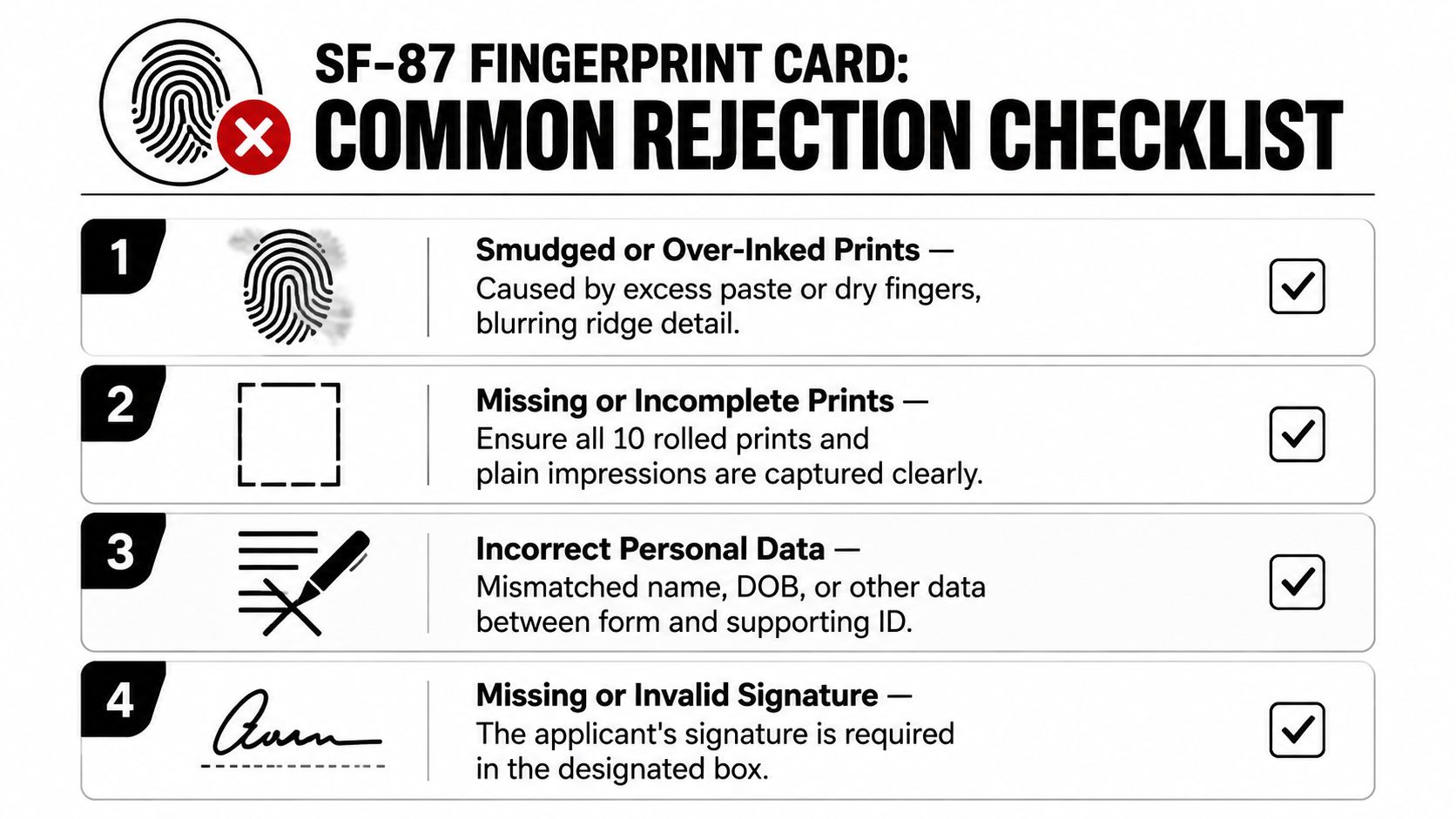
A rejected SF-87 usually fails for one of a few predictable reasons, and different agencies flag them in different ways. DoD requests often reject cards for unreadable ridge detail or mismatched identity data, while federal civilian intake offices may be stricter about whether the card matches the exact request packet and form version. The card may look fine to the applicant and still get pulled once it reaches intake.
The errors that show up again and again
- Smudged or over-inked prints. These cards often lose ridge detail in the first scan, so the rejection is about readability, not effort.
- Missing or incomplete prints. A card can be returned if one or more required impressions are absent, too light, or not fully rolled.
- Wrong personal data. Name, birth information, and citizenship details have to line up with the request packet and ID.
- Missing signature. Some requests are returned because the applicant or official did not sign in the right place.
- Wrong version of the form. Old hard-card stock still circulates, but agencies that changed intake rules may refuse it.
- Undeclared amputations or deformities. If a finger will not produce a normal impression, the card needs a clear notation and, when needed, an explanation.
In practice, the easiest failures to avoid are the ones tied to agency handling rules. A card for a federal civilian office may be accepted on paper but still sent back if the office wants a cleaner identifier block, while a defense-related request can be less forgiving about unusable prints. I see that split often enough to tell applicants to verify the requestor’s exact instructions before they leave the counter.
A technician can catch most obvious defects before release, but not every agency reviews cards the same way once they arrive. If the applicant has a real physical limitation, the safer path is to submit the most legible card possible with a clear note instead of hoping intake will infer the issue later.
Cost, Turnaround, and Sugar Land Walk-In Service Details
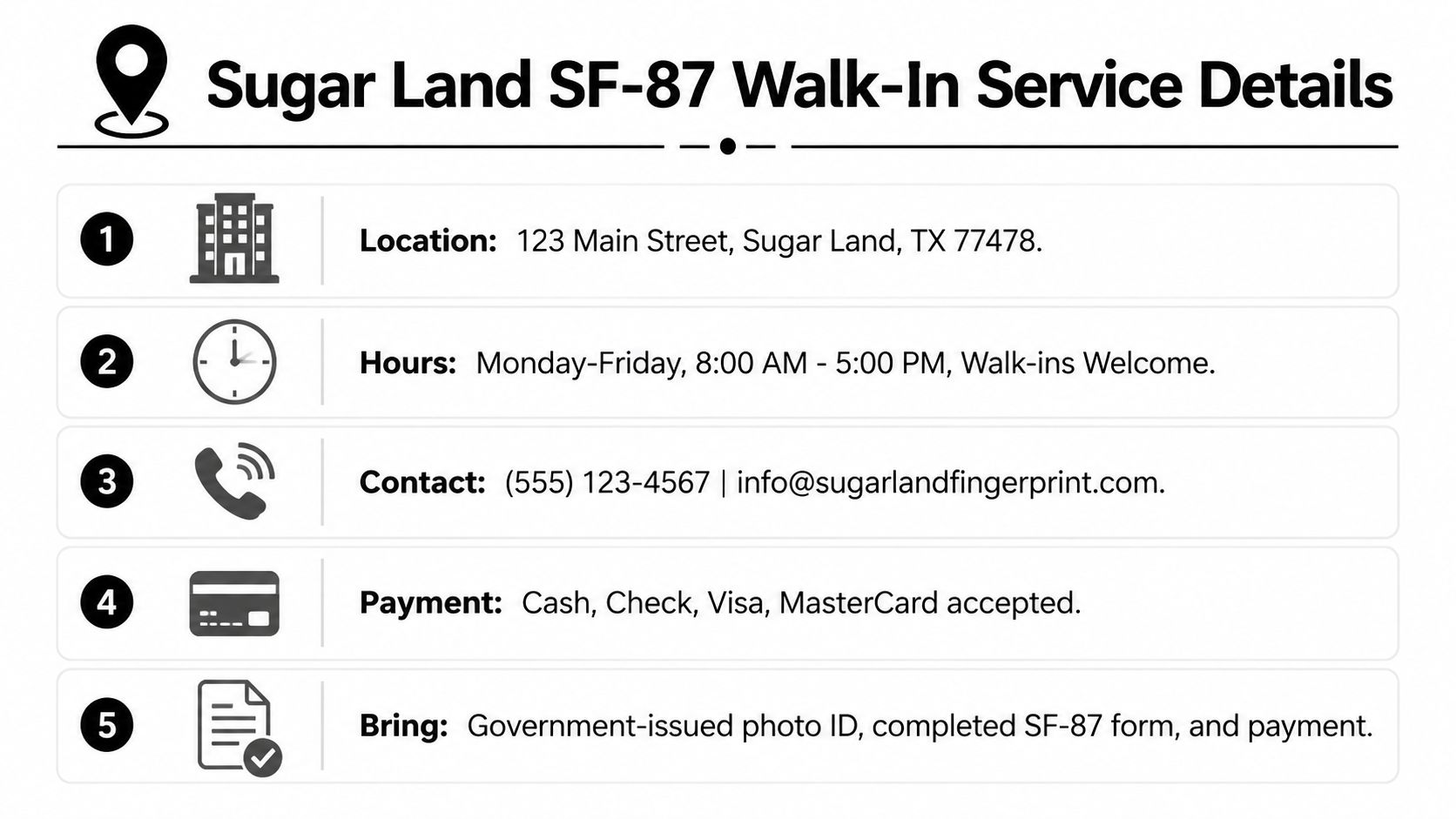
If you’re in Sugar Land and need a hard-card submission handled locally, Business Mail Boutique LLC provides fingerprinting services on site, including hard-card and live-scan options when the requesting agency allows them. A call ahead helps reduce waiting, but it isn’t required during posted hours, and the front desk can confirm whether your agency’s current form version is still accepted before you sit down.
Local walk-in details
- Location: 123 Main Street, Sugar Land, TX 77478.
- Hours: Monday through Friday, 8:00 AM to 5:00 PM, walk-ins welcome.
- Contact: (555) 123-4567, info@sugarlandfingerprint.com.
- Payment: Cash, check, Visa, and MasterCard accepted.
- Bring: Government-issued photo ID, completed SF-87 form, and payment.
For applicants who need a real storefront instead of shipping cards back and forth, that setup matters. You can walk in, get the card completed on site, and switch to electronic capture if your agency is set up for it. That flexibility fits the way federal fingerprint requests show up, especially when a requestor changes the form path at the last minute.
The practical checklist is straightforward. Bring the right ID, bring the exact form version your agency asked for, and confirm whether they want a paper chart or digital submission. If you’re unsure, ask the front desk to verify the request before the first finger goes down, because the cheapest fingerprinting appointment is still the one you don’t have to repeat.
Business Mail Boutique LLC handles fingerprinting, passport photos, shipping, printing, and mailbox services in one Sugar Land storefront, so you can tie the SF-87 job to the rest of your errands without extra stops. If your agency needs a hard card or can accept electronic capture instead, visit Business Mail Boutique LLC to see the available service options and plan your visit around the form your requestor wants.

Related posts

Custom Memorial Glasses Engraved in Three Hours in Sugar Land
When a customer needed eight personalized glasses for a memorial, Business Mail Boutique completed the engraving or...

Custom Martini Glass Engraving in Sugar Land, TX
Custom Logo Engraving on Martini Glasses in Sugar Land, Texas.
Business Mail Boutique recently completed a beautiful custom engravin...

Custom Engraved Wine Glasses for a Golf Club Event in Sugar Land, TX
Custom Engraved Wine Glasses for a Golf Club Event in Sugar Land.
Custom wine glass engraving in Sugar Land, TX at Business Mail Bouti...