
- Print Business Cards in Sugar Land – Same Day Service
- Copying Services
- Document Printing, Finishing & Lamination in Sugar Land
- Flyers
- Print Banner in Sugar Land | Same-Day Banner Printing Near Me
- Graphic Design
- Photo Printing
- Postcard Printing
- Document Printing
- EDDM Full Service Postcards
- FotoZoomer Large Format Printing


Businessmailboutique
11645 S. Hwy 6
Sugar land, Texas 77498 United States (US)
Email: info@businessmailboutique.com
Route
The call usually comes at the worst time. A booth goes live tomorrow morning, the grand opening banner never got ordered, or someone on the team realizes the presentation boards still exist only as PowerPoint slides. You need printed pieces today, not a polite promise that someone will “try.”
That’s exactly why same day posters and banners printing in sugar land matters. In local printing, speed only helps if the process is clear. If the file is wrong, the material is mismatched, or the order details are incomplete, “same day” disappears fast. The good news is that rush jobs are very doable when you know what to send, what to choose, and what can realistically be finished on time.
Table of Contents
- Your Last-Minute Lifeline for Local Printing
- Preparing Your Files for Flawless Printing
- Choosing the Right Poster and Banner Materials
- How to Place Your Same-Day Order
- Guaranteed Same-Day Success and Deadlines
- Pickup, Shipping, and Final Touches
Your Last-Minute Lifeline for Local Printing
A rush print job usually starts with one of three problems. The artwork is done but never ordered. The design is almost done but nobody knows what size to pick. Or the deadline moved up and now the signs need to be ready by the end of the day.
That situation is common enough that same-day banner and poster printing has become a critical service, and providers in major markets like Sugar Land now offer turnaround times of under 12 hours for standard work, a major shift from the old large-format timeline of 3 to 5 business days according to FedEx Office banner and poster printing details in Sugar Land. That change has made local print shops part of the emergency plan for launches, events, pop-ups, school displays, and sales promotions.
The biggest mistake people make is assuming speed means less planning. It’s the opposite. Fast printing works when the order is simple, the file is usable, and the customer answers questions quickly. A banner with the wrong dimensions, a poster built from a blurry screenshot, or missing mounting instructions can eat up the whole afternoon.
Practical rule: Rush printing is less about luck and more about reducing decisions before production starts.
If you need same day posters and banners printing in sugar land, treat the job like a checklist. Get the file right first. Pick the material based on where it will be used. Send complete instructions in one shot. That’s how you turn a stressful scramble into a clean pickup later the same day.
Preparing Your Files for Flawless Printing
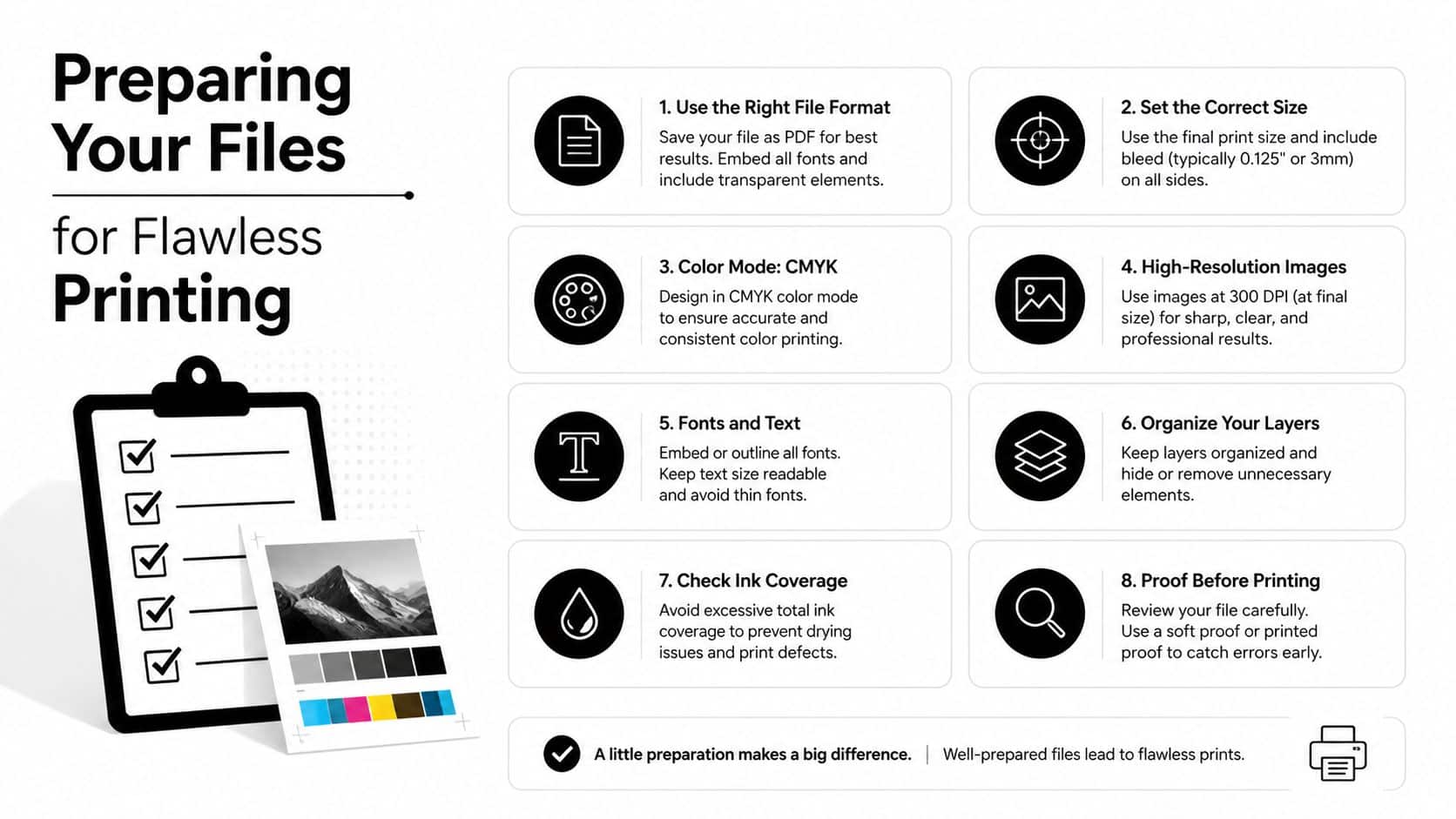
The file decides whether your order moves straight into production or stalls in review. Most same-day delays happen before printing starts. A customer sends a low-resolution image, artwork with text too close to the edge, or a file type that opens differently on another computer.
Start with a print-ready PDF
If you have a choice, send a PDF. It holds fonts, spacing, and layout more reliably than editable design files. That’s why print shops usually prefer it for posters and banners. If you’re still comparing options for poster printing in Sugar Land, this is one of the first things to confirm.
Use image quality that stays sharp at full size. If your poster will be viewed up close, blurry source images show immediately. Phone photos can work for some designs, but screenshots, copied web graphics, and images pulled from social media often fall apart when enlarged.
Use a quick preflight checklist
Before you upload anything, check these points:
- Set the final size correctly. Build the file at the actual print size whenever possible. Don’t design a small flyer and expect it to scale into a clean poster.
- Use high-resolution images. If a logo or photo already looks soft on screen at large size, it won’t improve in print.
- Choose CMYK if you can. Screens display color differently than printers. A file prepared for print color is less likely to surprise you.
- Add bleed for edge-to-edge designs. If color or artwork should extend to the trim edge, extra image area helps prevent thin white slivers.
- Keep important text in a safe zone. Phone numbers, QR codes, dates, and names should sit comfortably inside the edges.
- Outline or embed fonts when exporting. Missing fonts can reflow text and wreck spacing.
- Name the file clearly. Include the job name, size, and version so there’s no confusion.
- Send one approved version. Multiple attachments with “final,” “final2,” and “use-this-one” create avoidable mistakes.
A good rush file is boring in the best way. It opens correctly, prints at size, and doesn’t require anyone to guess.
If you’re not a designer, don’t overcomplicate this. Clean layout, strong contrast, readable type, and a proper PDF beat fancy effects every time on a same-day deadline.
Choosing the Right Poster and Banner Materials
Material choice affects everything. The look, durability, portability, and setup all change depending on whether you print on poster stock, mounted board, vinyl, fabric, or a retractable display. Pick based on how the piece will be used, not just how it looks in a sample image.
The market has largely standardized around banner formats like vinyl, fabric, mesh, and retractable, and integrated business centers often pair printing with shipping and related services for the 33.2 million small businesses in the U.S. that need convenient support, as noted by QuBash on poster and banner printing services. That matters because the right material often depends on what happens after printing. Will it be carried to a trade show, hung outside, mounted on foam board, or shipped to another location?
Posters for presentations promotions and displays
For posters, the core decision is usually finish and rigidity.
Glossy stock works well when you want color pop, bold photos, and a bright promotional feel. Matte stock is easier under overhead lighting because it cuts glare. If people will stand close and read charts, captions, or pricing, matte is often easier on the eyes.
Mounted posters solve a different problem. They’re for presentation boards, easel displays, lobby signage, and anywhere the print needs structure. Foam board is common for short-term use. Gator board is the sturdier option when the display needs to hold up better during transport and repeated handling.
Banners for walls sidewalks and booths
Banners are less about finish and more about environment.
- Vinyl banner works for storefront promotions, event signage, and outdoor messaging where durability matters.
- Fabric banner makes sense indoors when you want a softer, more upscale look for a booth backdrop or interior display.
- Mesh banner helps in breezy outdoor conditions where solid material may catch too much wind.
- Retractable banner is built for portability. It’s ideal when one person needs to carry, set up, and pack away the display quickly.
Here’s a simple way to compare typical same-day choices.
| Material | Best For | Common Same-Day Sizes |
|---|---|---|
| Glossy poster paper | Photo-heavy promotions, colorful displays | 18×24, 24×36 |
| Matte poster paper | Presentations, readable text, low-glare displays | 18×24, 24×36 |
| Foam board mounted poster | Easel presentations, lobby displays | 18×24, 24×36 |
| Gator board mounted poster | More durable presentations and repeated use | 18×24, 24×36 |
| Vinyl banner | Outdoor sales, grand openings, wall displays | 2×4, 3×6, 4×8 |
| Fabric banner | Indoor booths and backdrops | 3×6, 4×8 |
| Retractable banner | Portable event displays | standard retractable display sizes |
If you need a broader view of banner printing options, compare setup needs first. A beautiful material that’s hard to transport or install is the wrong choice for a rush job.
How to Place Your Same-Day Order
Ordering speed comes from complete information. The faster the print team gets the full picture, the faster the job can be checked, priced, and queued. Missing size, unclear quantity, or no material preference usually triggers follow-up questions, and that’s where time slips away.
Online upload for clean ready-to-print files
Use the upload route when your artwork is final and you already know the specs. This works best for straightforward orders like one poster size, one banner size, standard finishing, and no design revisions.
Include these details in the order notes:
- Finished size
- Quantity
- Material choice
- Any mounting or finishing needed
- Your pickup deadline
- A phone number that will be answered
For wide-format and oversized graphics, FotoZoomer large format printing is one example of a service path customers use when they need larger visual pieces produced from a single location.
Email when instructions matter
Email is better when the order has nuances. Maybe one file should print as a poster, another as a foam board mount, and a third as a banner with grommets. Maybe you need to explain where each piece is being used.
Write the email like a production brief, not a casual request. Put the deadline in the subject line. Attach the final file version only. Then list the job details in plain language.
A useful format looks like this:
- Job name
- Product type
- Size
- Quantity
- Material
- Finishing
- Needed by time
- Contact name and phone number
Walk in when you need help deciding
Walk-in orders make sense when you’re unsure about materials, file quality, or finishing. If your logo only exists in an old file, if you need to compare matte versus glossy, or if you’re deciding between a mounted poster and a retractable banner, in-person review can save the job.
Bring the file on a drive, in email, or accessible by cloud login, and bring any reference dimensions or photos of the space where the print will be used.
The more concrete your information, the smoother the order. “I need something big for tomorrow” is hard to process. “One 24×36 matte poster on foam board for a lobby easel by late afternoon” is actionable.
Guaranteed Same-Day Success and Deadlines
At 10:30 in the morning, a same-day poster order is usually very workable. At 2:45, the answer depends on the file, the size, the quantity, and whether any finishing is involved. That is the part many print shops leave vague. At Business Mail Boutique, the goal is to give you a straight answer early, so you know whether today is realistic before production starts.
A useful rule is simple. Earlier orders have more room for review, printing, trimming, drying, mounting, and pickup. Before noon is often the safest window for standard same-day work. After noon, some jobs still make it out the door, but the margin for file problems or last-minute changes gets tight fast.
What same day actually depends on
Same-day success comes down to production reality, not marketing language.
- Final artwork. Files need to be ready to print with no expected edits.
- Standard specs. Common poster sizes and straightforward banner setups move faster than custom configurations.
- Reasonable quantity. A short run is easier to complete today than a larger batch that needs more print time and finishing.
- Clear finishing instructions. Grommets, mounting, hems, or trimming need to be decided before the job enters production.
- Fast approval. If we have a question and cannot reach you, the press does not keep waiting.
One detail customers often miss is drying and finishing time. Printing the image is only part of the schedule. A mounted poster, a banner with finishing, or multiple oversized pieces can take longer than the customer expects even when the file itself is perfect.
How to give your order the best chance today
Rush jobs go smoothly when the request is specific and complete. The fastest orders usually include the exact product, size, quantity, finish, and needed-by time in the first message.
These steps help:
- Send the order early in the day. That gives the shop time to review and produce it without cutting corners.
- State the hard deadline clearly. “Need by 3 PM for setup” is far more useful than “need today.”
- Stay reachable. Keep your phone on and watch your email in case a file question comes up.
- Avoid mid-job changes. A revised file or added finishing can reset the production schedule.
- Keep rush specs practical. Standard materials and common sizes are the safest path for same-day pickup.
I have seen plenty of jobs miss the cutoff for avoidable reasons. A missing font, a low-resolution logo, or a late request to mount the poster can turn a good same-day candidate into tomorrow’s pickup. Clear instructions at the start prevent that.
If the deadline is real, send one complete message with the file, the print specs, and the pickup time. That is the fastest way to get an honest yes or no and keep the order on schedule.
Pickup, Shipping, and Final Touches
Once the printing is done, the last step is making sure the job leaves the counter ready to use. That means checking the print itself, confirming any finishing, and deciding whether you’re carrying it out or sending it onward.
What to check before you leave with the job
At pickup, review the practical details first. Check the size, count, finish, and mounting. Make sure the event date, phone number, address, QR code, and brand name are correct. If the piece will hang, confirm grommets or other requested finishing are present. If it will stand on an easel or wall, verify the mounted board feels right for the use.
Bring whatever helps the handoff move quickly. Your order name, a matching phone number, and any pickup confirmation will usually do the job. If someone else is collecting the order for you, send them the exact order details so they don’t leave with the wrong package.
Shipping finished prints from the same counter
Some jobs don’t need local pickup at all. They need to be packed and sent to a venue, another office, or a client location. That’s where a combined print-and-ship location is useful. Instead of collecting the banner or mounted posters and then driving them somewhere else for shipment, you can have the finished pieces packed and tendered from the same storefront.
This matters most for event marketers, exhibitors, and multi-location businesses. A local print run can become a ready-to-ship package without an extra stop, which reduces handling and cuts down on last-minute confusion.
Final touches are worth deciding before production, not after. Mounting for posters, foam board or gator board support, and banner finishing all affect readiness at pickup. If the print has a job to do the moment it leaves the store, order it in its final usable form.
If you need a rush job and want a clear path instead of vague “order early” language, contact Business Mail Boutique LLC with your file, size, material choice, quantity, and required pickup time. Clear instructions make same-day printing much smoother, and if your project also needs packing or shipping, handling it from one location keeps the deadline manageable.

Related posts
How Does a Virtual Address Work? A Clear Guide
How Does a Virtual Address Work
You're probably dealing with one of these problems right now. Your business is new, so your home add...

Custom Engraved Coffee Mugs and Etched Mugs: A Guide
Custom Engraved Coffee Mugs and Etched Mugs: A Guide
You need a mug fast. Maybe it's a retirement gift for someone who's been drinki...
PrintScan Authorized Fingerprinting Service Center Guide
You've probably got a form in one hand and a deadline in the other. A new job wants a background check. A licensing board needs prints....